

this is what i get with my opteron, which one to go for?
280x9 with 100Mhz divider or 260x9 with 166Mhz divider?
AMD K8 Family Overclocking (754/939/940/AM2/1207), General discussions and newbies' guide
AMD K8 Family Overclocking (754/939/940/AM2/1207), General discussions and newbies' guide
|
|
 May 29 2006, 09:51 PM May 29 2006, 09:51 PM
Return to original view | Post
#1
|
 
Senior Member
825 posts Joined: Jan 2003 From: Ipoh 
|
this is what i get with my opteron, which one to go for?
280x9 with 100Mhz divider or 260x9 with 166Mhz divider? |
|
|
|
|
|
May 30 2006, 07:02 PM
Return to original view | Post
#2
|
|
Senior Member
825 posts Joined: Jan 2003 From: Ipoh
|
QUOTE(magiara @ May 30 2006, 04:10 PM) what ram are you using? if using ram with good chipset why dont try 300mhz with 1:1 divider Just cheap Kingston valueRAM, cant go above 240HTT with 200Mhz divider   |
|
|
Dec 15 2007, 12:14 AM
Return to original view | Post
#3
|
|
Senior Member
825 posts Joined: Jan 2003 From: Ipoh
|
Hi All
I have a question (strange one)  . I tried to OC the proc staring from 1.34v until 1.61V, most of the time the CPU temp just ideal at 47 degrees on smartguardian. Here is the tread . I tried to OC the proc staring from 1.34v until 1.61V, most of the time the CPU temp just ideal at 47 degrees on smartguardian. Here is the tread- 1.34V (temp at 44 degrees) - 1.37V (temp at 47 degrees) - 1.42V (temp at 47 degrees) - 1.47v (temp at 47 degrees) - 1.50V (temp at 47 degrees) - 1.56v (temp at 47 degrees) - 1.61v (temp at 47 degrees) Using Smartguardian - most of the time temp will be around 46~ 47 degrees ideal, using Speed fan 4.33 will be 40 ~ 43 degrees ideal.  I already confused which one is the correct temp for my proc? I scared I might burn my proc cause my Vcore already at 1.64V. Mobo: DFI Lanparty UT NF4 Ultra-D Proc: AMD X2 4200+ Headsink: Thermalright XP90 with 8.5mm fan on top spinning 3000rpm Any comment from the expert or sifu? 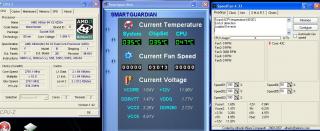
This post has been edited by hellwaker: Dec 15 2007, 12:21 AM |
|
|
Dec 15 2007, 12:37 AM
Return to original view | Post
#4
|
|
Senior Member
825 posts Joined: Jan 2003 From: Ipoh
|
QUOTE(lichyetan @ Dec 15 2007, 12:19 AM) use core temp for ur proc sake... Yeah.... but which one is correct? smartguardian or speed fan, cause both register different, my Vcore already reaching 1.64V which is very high for a Manchester. Can I still OC it with higher Vcore? |
|
|
Dec 15 2007, 01:03 AM
Return to original view | Post
#5
|
|
Senior Member
825 posts Joined: Jan 2003 From: Ipoh
|
QUOTE(ocz @ Dec 15 2007, 12:38 AM) Can,all depends on the cooling. What is the temp safe zone for X2? 55 or 50 degrees? |
|
|
Dec 15 2007, 09:07 AM
Return to original view | Post
#6
|
|
Senior Member
825 posts Joined: Jan 2003 From: Ipoh
|
Thanks OCZ & Cyberloner,
Does that mean I can just pump up the Vcore to any level as long as the temp remain below 55 ~ 60C? but the Vcore spec for AMD X2 (s939) is only 1.30 ~ 1.40V then how? no problem right as long as temp is 55 ~ 60C |
|
|
|
|
|
Dec 15 2007, 02:23 PM
Return to original view | Post
#7
|
|
Senior Member
825 posts Joined: Jan 2003 From: Ipoh
|
QUOTE(alive88 @ Dec 15 2007, 01:30 PM) bro,driver missing is normal when u OC falsely...that shows that u need to up ur vcore,when blue screen with blablabla means ur vdimm or ur ram timing and speed is wrong HT interface for my DFI LP UT NF4 Ultra-D is called LDT/FSB Frequency ratio. You no not need to increase this beyond MB spec cause it does not make any significant improvement. It's best to stay below spec (like S939 is 2000 HT)Added on December 15, 2007, 1:34 pm ok, i confuse about voltage... Voltage / Effect 1) CPU v = PROC 2) Memory v = RAM 3) HT v = normally dont have to increase the hyper transport 4) NB/SB v = dont have to touch its for your southbridge and northbridge can anyone answer my questions??? thanks  btw do you guys touch this panel wen OC? usually only touch the ht link frequency..u may need to lower the frequency@multiplier to OC..after found the rite spot of ur cpu, later u oc the HT link...1200 is ok..but some board like mine can achieve 1600 easily..to be on the safe side, keep it below 1000 while OCing next question is how do you calculate HT? easy ex 1... if your FSB is 270, your HT is x3 then the formula is 270x3x2. 1620 will be the actual HT interface. ex 2... if your FSB is 270, your HT is x4 then the formula is 270x4x2. 2160 will be the actual HT interface. Best to stay below 2000HT. So I will choose x3 HT. Added on December 15, 2007, 2:25 pm QUOTE(hellwaker @ Dec 15 2007, 09:07 AM) Thanks OCZ & Cyberloner, Sifu can help to clarify? Does that mean I can just pump up the Vcore to any level as long as the temp remain below 55 ~ 60C? but the Vcore spec for AMD X2 (s939) is only 1.30 ~ 1.40V then how? no problem right as long as temp is 55 ~ 60C  This post has been edited by hellwaker: Dec 15 2007, 02:25 PM |
|
|
Dec 15 2007, 04:03 PM
Return to original view | Post
#8
|
|
Senior Member
825 posts Joined: Jan 2003 From: Ipoh
|
QUOTE(alive88 @ Dec 15 2007, 03:06 PM) eventhough there arent any significant improvement, u may feel the diff whe n benchmarking and play games Meaning higher HT better?u can increase to 1.40 or 1.5,as long as ur temp is under control |
|
|
Dec 16 2007, 01:51 AM
Return to original view | Post
#9
|
|
Senior Member
825 posts Joined: Jan 2003 From: Ipoh
|
QUOTE(alive88 @ Dec 15 2007, 07:20 PM) ini xixo gila punya worang tau xixo I think you are running x5 HT right cause you are not on dual channel ram. ..my ht only 1550 only never try more..but he use 1650 ht link...haha  |
| Change to: |  0.0315sec 0.0315sec
 0.11 0.11
 7 queries 7 queries
 GZIP Disabled GZIP Disabled
Time is now: 7th December 2025 - 06:57 AM |
 Quote
Quote