

QUOTE(Vigilant @ Mar 21 2017, 08:46 PM)
Do tell me if you can find, wanting to try something new too.

Last weekend I give a try to VyprVPN. I find it better then wtfast. I havent try mudfish as mentioned by sinslayer91.MMO Taiwan Blade & Soul / 劍靈
|
|
 Mar 27 2017, 03:34 PM Mar 27 2017, 03:34 PM
Return to original view | Post
#21
|
 
Junior Member
19 posts Joined: Sep 2009 
|
QUOTE(Vigilant @ Mar 21 2017, 08:46 PM) Do tell me if you can find, wanting to try something new too. Last weekend I give a try to VyprVPN. I find it better then wtfast. I havent try mudfish as mentioned by sinslayer91. |
|
|
|
|
|
Mar 28 2017, 05:17 PM
Return to original view | Post
#22
|
|
Junior Member
19 posts Joined: Sep 2009
|
QUOTE(Vigilant @ Mar 27 2017, 08:55 PM) Supposedly there will be an instance of boss intro screen, not loading screen. But that can be disabled using Izanami? I don't know, never tried. I check ingame by enabled from the setting, using VyprVPN is around 160 to 230. Yesterday I tried Mudfish, it get better. Ping is around 110 to 150. And Mudfish is way cheaper.How much ping? |
|
|
Mar 29 2017, 01:11 PM
Return to original view | Post
#23
|
|
Junior Member
19 posts Joined: Sep 2009
|
QUOTE(Vigilant @ Mar 28 2017, 07:03 PM) pcwei How to use mudfish, err seems that it has browser GUI. Can you guide me step by step? I can do some guide for you, but u need to wait until I go home from work. My office laptop don't have mudfish. |
|
|
Mar 29 2017, 10:40 PM
Return to original view | Post
#24
|
|
Junior Member
19 posts Joined: Sep 2009
|
QUOTE(Vigilant @ Mar 29 2017, 09:55 PM) Alrighty thanks First please go to setup --> Program.In program page:- Connection protocol = TCP RTT Checking Method = TCP FastConnection mode = On. Save. *Please ignore "Full VPN" tab. Second please go to item --> Equip Items In Equip Items page Select Blade and Soul. Then will lead you to the setup page. Auto Refresh = On Server Location = Select "Asia (Taiwan)". Nodes = I choose advance mode with 2 TW Asia server. I choose the following TW Asia (Taiwan - Google 2) TW Asia (Taiwan - Google) Active = On. Save. To log your traffic. Please go to Setup --> Account --> Edit Profile --> Connection Log = Log. Click Modify. You can logout and login again, everytime when u login, you will be in the dashboard. Please make sure the blue colour bar is 100% before you launch your BnS TW. In the status, u will be able to see FastConnection Mode is enabled. My item section, you will see Blade & Soul and is enabled. Check your blade and soul whether to use mudfish or not. Please open your windows Resource Monitor. Go to Network tab. Expand TCP Connections. Look for client.exe in the image column, you will see the latency (ms) column is always 0. And mudfish.exe and mudrun.exe is always have numbers there. Yesterday I managed to get 110ms ingame. SO SMOOTH. |
|
|
Mar 30 2017, 05:07 PM
Return to original view | Post
#25
|
|
Junior Member
19 posts Joined: Sep 2009
|
QUOTE(Vigilant @ Mar 29 2017, 11:10 PM) Thanks That is a good ping to me. I also getting that ping. So far after so many vpn service I tried to play BnS TW, mudfish give the best connection. btw U guy have invest into the 2900?This is what I can see from resource monitor. In-game ping however shows 100~150ms |
|
|
Mar 30 2017, 06:53 PM
Return to original view | Post
#26
|
|
Junior Member
19 posts Joined: Sep 2009
|
QUOTE(karthyhu @ Mar 30 2017, 05:45 PM) hmm mudfish.... no trial acc cant try... I using the pay per use actually quite cheap. I paid around rm12 I can use very long. Weekday I hardly online for long, only weekend. |
|
|
|
|
|
Mar 30 2017, 07:12 PM
Return to original view | Post
#27
|
|
Junior Member
19 posts Joined: Sep 2009
|
QUOTE(Vigilant @ Mar 30 2017, 05:36 PM) Yes for Blade & Soul seems mudfish gives the best node to Taiwan. 2900 is the material to level up that item called 極魔魂. I don't what it called in english. I believe is something call soul.Nope, it only gives upgrade materials right? |
|
|
Mar 31 2017, 02:06 PM
Return to original view | Post
#28
|
|
Junior Member
19 posts Joined: Sep 2009
|
QUOTE(karthyhu @ Mar 31 2017, 12:22 PM) quite cheap but i dont have credit card U can use paypal by using topup credit. Paypal can link to rhb bank to topup fund. But u need rhb bank account. |
|
|
Apr 10 2017, 01:45 PM
Return to original view | Post
#29
|
|
Junior Member
19 posts Joined: Sep 2009
|
To me, I don't wish to start again, I will stick with Taiwan BnS.
|
|
|
Apr 10 2017, 02:23 PM
Return to original view | Post
#30
|
|
Junior Member
19 posts Joined: Sep 2009
|
QUOTE(karthyhu @ Apr 10 2017, 02:12 PM) Yeah me too... even the low ping is very tempting... but really dont wish to start all over again.. too much hardwork gone down the drain Furthermore, Thailand server is expected will have brunch of thai word flying around the chat room and I don't understand what they talk about. In taiwan server, at least I can understand chinese.  After use mudfish, my ping is have great improvement, I think stick with taiwan server is my choice for now. |
|
|
Apr 11 2017, 05:28 PM
Return to original view | Post
#31
|
|
Junior Member
19 posts Joined: Sep 2009
|
QUOTE(karthyhu @ Apr 10 2017, 03:04 PM) Yeah about the language.. but to me in TH or TW i also cant read chinese... but lucky i can understand spoken chinese.. Yup, at least you understand chinese language just that you cant read it. But for some of the chinese word, I believed you should already recognized it. But for thai language it is hard to recognize. At least to me. Anyhow, with mudfish thing go much more smoother, previously I am in the dilemma of whether or not I should stop it. Now i am actually enjoying it. haha.True about mudfish been using it since 1st april so far so good stable pings but only 1 problem for me on sunday during ebg farm the ping in there can be ustable but once get stable ping its nice.. |
|
|
Jul 15 2017, 02:17 PM
Return to original view | Post
#32
|
|
Junior Member
19 posts Joined: Sep 2009
|
I still using mudfish, recently the ping is not as good as last time. I am using google tw2 and google tw.
|
|
|
Jul 18 2017, 04:29 PM
Return to original view | Post
#33
|
|
Junior Member
19 posts Joined: Sep 2009
|
QUOTE(Vigilant @ Jul 16 2017, 04:21 AM) I see. What kind of weapon? Like 白靈 and 黑靈?Another thing is, there should be a free Legendary Weapon last time I heard? How do I obtain that? Though I already have one. |
|
|
|
|
|
Jul 24 2017, 11:51 AM
Return to original view | Post
#34
|
|
Junior Member
19 posts Joined: Sep 2009
|
QUOTE(aleluya @ Jul 21 2017, 01:15 AM) fill with bot until can't even complete the quest lol Human all at lv55 with hongmen star. U have to beat those machines before you can meet human. XD |
|
|
Sep 10 2017, 10:40 AM
Return to original view | Post
#35
|
|
Junior Member
19 posts Joined: Sep 2009
|
Hi guy, I am selling my 魂 item. I don't know what it called in English, please let me know if u interested.
Thanks. |
|
|
Sep 12 2017, 04:27 PM
Return to original view | Post
#36
|
|
Junior Member
19 posts Joined: Sep 2009
|
QUOTE(karthyhu @ Sep 10 2017, 03:01 PM) picture would be nice.. Sorry was busy with work.Here the picture. Thanks 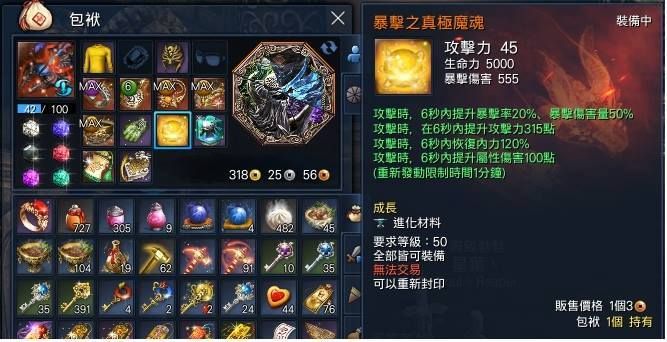 |
| Change to: |  0.0485sec 0.0485sec
 0.32 0.32
 7 queries 7 queries
 GZIP Disabled GZIP Disabled
Time is now: 6th December 2025 - 07:45 PM |
 Quote
Quote