Outline ·
[ Standard ] ·
Linear+
The Raidmax League, Pimp ur Raidmax here
|
lotus_man
|
 Sep 25 2009, 10:41 PM Sep 25 2009, 10:41 PM
|

|
hi everyone,
im using d raidmax ninja. ( for 2 years now)
anyway, do u guys noe d front of the pc? where the light will blink to red if its loading n so on?
yeah, if u understand, bt i notice tht my blue light seems a bit dimmer.
upon further check, i found out that d right's side bulb lik gone already.
anyway to fix it?
|
|
|
|
|
|
azilazwa
|
Sep 29 2009, 07:13 AM
|
|
|
QUOTE(lotus_man @ Sep 25 2009, 10:41 PM) hi everyone, im using d raidmax ninja. ( for 2 years now) anyway, do u guys noe d front of the pc? where the light will blink to red if its loading n so on? yeah, if u understand, bt i notice tht my blue light seems a bit dimmer. upon further check, i found out that d right's side bulb lik gone already. anyway to fix it? i have'nt use ninja before. but i think, the front light of ninja and my sagitta are same. the red light will blink when hdd are in use. and about the blue light, i think it is attached to the front fan. so, u have to replace the fan or change the led of the fan to fix the problem. but, i'm not that sure because ninja might not same with sagitta. maybe other ninja user can help.  |
|
|
|
|
|
Susaiput
|
Sep 29 2009, 11:18 AM
|
|
|
@lotus_man
u mean one of ur bulbs burnt?just replace the bulbs shud do it...
Added on September 29, 2009, 11:21 amany ninja users succeded in removing the hdd lock?pm me how-to pls...i still cant get it out...
This post has been edited by Susaiput: Sep 29 2009, 11:21 AM
|
|
|
|
|
|
M1X
|
Oct 6 2009, 08:39 AM
|
|
|
Uh, still unable to remove the lock? Woah man is it THAT hard? This is just a reference for Saggita user: 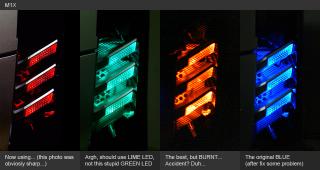
Added on October 6, 2009, 10:56 amOh btw, can anyone tell me how much voltage the BIG LED take? The really big one that the size is around the size of a 3V bulb... I saw it at a electronic shop but they also do not know about it... HAHAH WTH they sell thigs they don't even know... This post has been edited by M1X: Oct 6 2009, 10:56 AM |
|
|
|
|
|
azilazwa
|
Oct 7 2009, 04:06 PM
|
|
|
@M1X wah, the orange effect is so good. how do u do that?  |
|
|
|
|
|
Susaiput
|
Oct 7 2009, 07:53 PM
|
|
|
yup..still cant remove it...managed to chip it tho...
|
|
|
|
|
|
M1X
|
Oct 8 2009, 08:49 AM
|
|
|
QUOTE(azilazwa @ Oct 7 2009, 04:06 PM) @M1X wah, the orange effect is so good. how do u do that? It the best, just use ORANGE LED... But damn it i accidently burnt almost ALL LED in my casing once... Don't know where short circuit maybe...  |
|
|
|
|
|
azilazwa
|
Oct 8 2009, 12:26 PM
|
|
|
QUOTE(M1X @ Oct 8 2009, 08:49 AM) It the best, just use ORANGE LED... But damn it i accidently burnt almost ALL LED in my casing once... Don't know where short circuit maybe... aa.. what do u mean just use orange LED? sorry, noob here. i thought to change the colour, we have to change the fan (like CM 120mm that got different colour).  |
|
|
|
|
|
M1X
|
Oct 8 2009, 12:55 PM
|
|
|
AH... no lah, the LED are located in the individual "eye" blocks, not the fan... The fan located INSIDE the casing. The "eye" block is on the front panel. There are 6 of them
|
|
|
|
|
|
azilazwa
|
Oct 8 2009, 01:35 PM
|
|
|
Oo. so to change the colour, i just have to buy the led and replace the current led in their respective block. rite? thanx bro. will try it when have time.  btw, i also love the orange one.  |
|
|
|
|
|
M1X
|
Oct 8 2009, 01:39 PM
|
|
|
Yeah just get a standard sized one and just replace them. Note that the original BLUE LEDs are 5V...
Suggest you buy 5V LED if you lazy to think how to link those LEDs. Or you Can buy 6x 2V LEDs and link them all in parallel, so the total is 12V. But use 6 LEDs in parallel might result in not-very "even" lighting. Suggest you just get 5V LEDs.
Added on October 8, 2009, 1:41 pmIf you want cool effect, you can replace the FRONT-FAN with LED FAN!
For example my Front LEDs are RED, and then I put a 12cm GREEN LED FAN inside, so the green lights will sips out from the metal mesh and blend with the RED, looks real cool. But currently I didn't put any LED on my Front-Fan yet, lazy.
Kind of it become dual-layer lighting...
Added on October 8, 2009, 3:20 pmShit me sudah half year not clean up my casing... you can imagine how much dush in there.... Hahaha... Maybe later go back clean it up, it so heat inside due to the dust. Usually during night time I can get a temperature reading of 35, but now even it's raining I get a reading of 38... Duh...
This post has been edited by M1X: Oct 8 2009, 03:20 PM
|
|
|
|
|
|
QQHTJ
|
Oct 18 2009, 12:59 AM
|
Getting Started

|
May Ati 5850/4890 fit in Raidmax Smilodon ??
|
|
|
|
|
|
rosihan
|
Oct 19 2009, 11:49 AM
|
|
|
any1 hv tried replace Fan LED ? me got 3 dead edy left oni 1 btw wat size izzit 4 fan LED ? it seems abit smaller than normal LED |
|
|
|
|
|
M1X
|
Oct 19 2009, 01:09 PM
|
|
|
It just a normal 3V or 5V LED. Recently cleaned up my casing, damn dirty... 

|
|
|
|
|
|
Susaiput
|
Oct 19 2009, 06:41 PM
|
|
|
@M1X
waa...ur case damn dirty bro...
|
|
|
|
|
|
nas06
|
Oct 20 2009, 11:50 AM
|
|
|
damn...if i were you, even a single makes me worry..
haha...nice dust... LOL
|
|
|
|
|
|
M1X
|
Oct 28 2009, 11:09 AM
|
|
|
It's been damn half a year not clean up... That just the CPU cooler, you didn't see the GPU cooler... Really DUH !!! Now my CPU reading is on the "safe" spot of 37" degree... Phew... (before cleanup was 42+)
|
|
|
|
|
|
Susaiput
|
Oct 28 2009, 12:55 PM
|
|
|
hahahaha...my fren also like u...he always complain high temp on a stock 6750 (48idle 60load)...n i was puzzled as i reached 66load@3.8..how come stock get temp like that...then ask him to clean an change thermal paste...immediately drop to 36...hahahaha
|
|
|
|
|
|
M1X
|
Oct 28 2009, 02:39 PM
|
|
|
Some bad cooler can reach over 100..... CRAZY! There was a review about a Gigabyte silent GPU cooler (heatsink only), that they test out a temperature of 118!!!! INSANELY USELESS...
|
|
|
|
|
|
nkarul85
|
Nov 5 2009, 04:38 AM
|
|
|
sheat..
try upload photo my ninja but cannot pulak
|
|
|
|
|



 Quote
Quote




 0.0210sec
 0.41
0.41
 6 queries
 GZIP Disabled