Outline ·
[ Standard ] ·
Linear+
Maxis Draining data like mad, Help please!
|
ryudell
|
 Nov 13 2014, 07:21 PM Nov 13 2014, 07:21 PM
|

|
today marked my 1st day using the ip6+...
suddenly my quota for today gone for 950MB!
connected to office wifi for the entire time!!
scream at maxis just now to investigate..
anybody share the same fate here?
|
|
|
|
|
|
ryudell
|
Nov 13 2014, 07:36 PM
|
|
|
QUOTE(Susuwatari @ Nov 13 2014, 07:28 PM) Make sure in settings - iCloud - iCloud Drive - use cellular data is off, it's on by default. it is off |
|
|
|
|
|
ryudell
|
Nov 13 2014, 08:36 PM
|
|
|
QUOTE(kokfei33 @ Nov 13 2014, 08:16 PM) My exp after upgraded to 8.1 prob solved for 5s as well as the new ip6 + that I just bought. I've upgraded last night thru wifi..seems it is not the cause |
|
|
|
|
|
ryudell
|
Nov 14 2014, 06:42 PM
|
|
|
QUOTE(ctvtec @ Nov 14 2014, 04:48 PM) Check under Setting > Cellular > Use cellular data for:, see which app uses the most cellular data. Photos app can consume a lot of data too if you enable My Photo Stream or use iCloud Photo Sharing. QUOTE(idoblu @ Nov 14 2014, 05:59 PM) It doesn't show usage. It's for you to turn on or off which app uses data already done when i receive the phone..yesterday kaput..today ok |
|
|
|
|
|
ryudell
|
Nov 14 2014, 07:06 PM
|
|
|
QUOTE(ctvtec @ Nov 14 2014, 07:04 PM) Yes, it does 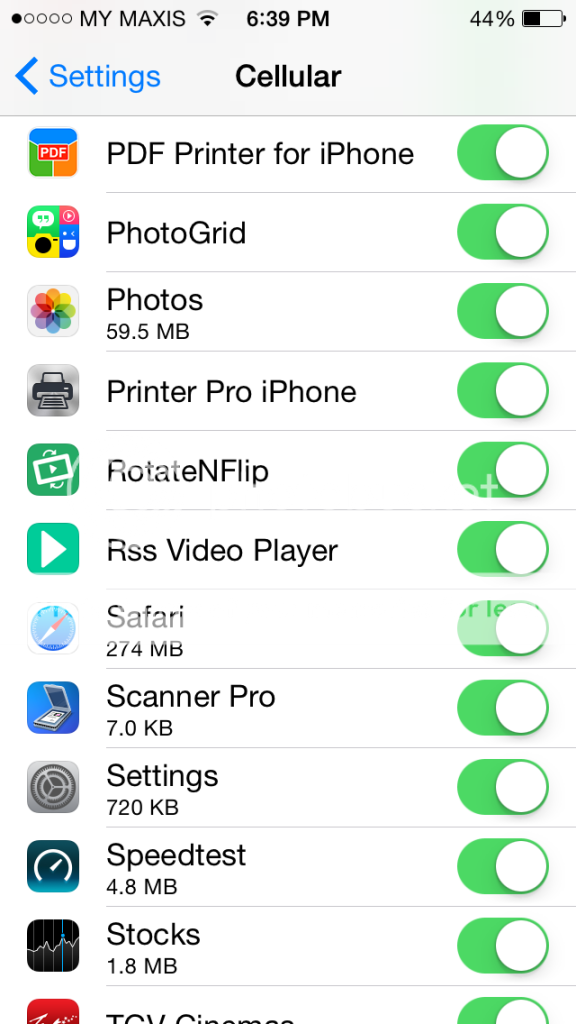 yup..it will show under "cellular".. btw, ur safari is like too much?  streaming videos? |
|
|
|
|



 Quote
Quote

 0.0180sec
 0.58
0.58
 6 queries
 GZIP Disabled