


Microsoft Windows 10
|
|
 Jul 30 2015, 11:12 AM Jul 30 2015, 11:12 AM
Return to original view | IPv6 | Post
#1
|
 
Senior Member
4,333 posts Joined: Jan 2003  
|
I am done.
|
|
|
|
|
|
Jul 30 2015, 04:21 PM
Return to original view | IPv6 | Post
#2
|
|
Senior Member
4,333 posts Joined: Jan 2003
|
QUOTE(ajay67 @ Jul 30 2015, 04:17 PM) jusst installed win 10 on my surface 3. it takes additional 10GB of space. can i take some space back? Yes, you can. You can even remove the old version of Windows before the upgrade (stored in folder Windows.old) Free up drive space in Windows 10 If your PC is running low on storage, here are a few ways to free up some drive space. Delete temporary files These files used to help your apps load and run faster, but they're not being used anymore. To delete them: Open the Start menu and select Settings > System > Storage. Under Storage, select This PC > Temporary files. Under Temporary files, select Delete temporary files > Yes, I'm sure. |
|
|
Aug 3 2015, 04:12 PM
Return to original view | Post
#3
|
|
Senior Member
4,333 posts Joined: Jan 2003
|
QUOTE(Vail @ Aug 3 2015, 03:58 PM) Not sure why you guys encountering many problems. Ive upgraded 7 machines without any issue. Same here. I have upgraded 4 machines without a single problem. |
|
|
Aug 5 2015, 06:07 PM
Return to original view | IPv6 | Post
#4
|
|
Senior Member
4,333 posts Joined: Jan 2003
|
QUOTE(horns @ Aug 5 2015, 05:38 PM) a clean install (i.e. wiping os drive clean, removing all partitions) is good if you wanna get rid of old recovery partition. i just noticed that there were 2 recovery partitions in os drive after upgrade. the old recovery partition was at the beginning of the drive, the new one at the end of drive. Yup.The C drive has shrunk 450MB at the end to make way for a new Windows 10 recovery partition.  |
|
|
Aug 5 2015, 06:19 PM
Return to original view | IPv6 | Post
#5
|
|
Senior Member
4,333 posts Joined: Jan 2003
|
Here is the Windows 10 450MB recovery partition.
 |
|
|
Aug 6 2015, 04:11 PM
Return to original view | IPv6 | Post
#6
|
|
Senior Member
4,333 posts Joined: Jan 2003
|
The missing Windows Start Up Sound is back after applying the first cumulative update today.
Thanks, Microsoft! 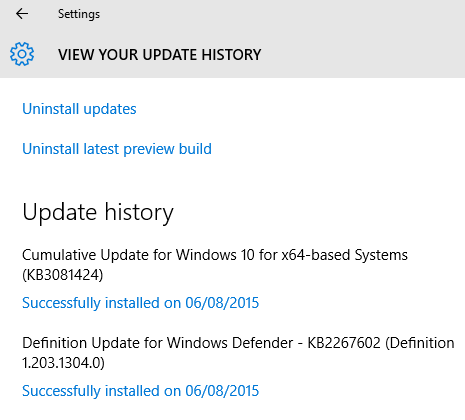 |
|
|
|
|
|
Aug 8 2015, 09:46 PM
Return to original view | IPv6 | Post
#7
|
|
Senior Member
4,333 posts Joined: Jan 2003
|
QUOTE(jiachunn @ Aug 8 2015, 09:41 PM) Sifus any advice to turn off any unnecessary features on windows 10? If you can elaborate on what these unnecessary features are, maybe we can help.Just updated and everything looks good and cool! |
|
|
Aug 8 2015, 09:56 PM
Return to original view | IPv6 | Post
#8
|
|
Senior Member
4,333 posts Joined: Jan 2003
|
QUOTE(jiachunn @ Aug 8 2015, 09:48 PM) Features that may caused my privacy to be exposed and avoiding stealing of bandwidth or any stuff. You can turn off "Choose how updates are delivered". The default is ON.  |
|
|
Aug 8 2015, 11:44 PM
Return to original view | IPv6 | Post
#9
|
|
Senior Member
4,333 posts Joined: Jan 2003
|
QUOTE(delsoo @ Aug 8 2015, 11:19 PM) what's ur intel graphics model ? mine is intel graphics 5500 . So i just searched intel graphics driver 5500 win10 64 bit using google. Google directed me to the intel download page Mine is the Intel HD Graphics 4400 and the driver was installed successfully during the upgrade to Windows 10. No issues at all. |
|
|
Aug 10 2015, 08:54 AM
Return to original view | IPv6 | Post
#10
|
|
Senior Member
4,333 posts Joined: Jan 2003
|
After performing a clean install of Windows 10, I get activated immediately once my PC is online.
But then, I entered the Windows 10 product key during the clean install, which I extracted earlier after upgrading from Windows 8.1 to Windows 10. |
|
|
Aug 10 2015, 10:39 AM
Return to original view | IPv6 | Post
#11
|
|
Senior Member
4,333 posts Joined: Jan 2003
|
QUOTE(spikey2506 @ Aug 10 2015, 08:48 AM) Upgraded to Win 10 from 8.1 and activated successfully. Used it for about a week and last night decided to clean install since I had some smoothness problems. But after booting back into windows it said not activated. Although MS said this should not happen if you successfully upgraded and activated from 8.1. Any solutions guys? Forums are saying to wait for a while. Maybe the activations servers are overloaded. You have skipped entering the Windows 10 product key during the clean install.It is quite normal because not everyone knows how to extract the Windows 10 product key AFTER the upgrade. Since yours is a legitimate clean install, you should wait for the activation. Eventually you will be activated since Microsoft already knew your hardware ID during the upgrade process. Don't worry. |
|
|
Aug 10 2015, 11:37 AM
Return to original view | IPv6 | Post
#12
|
|
Senior Member
4,333 posts Joined: Jan 2003
|
QUOTE(andy0212 @ Aug 10 2015, 11:27 AM) So the key extracted after upgrade is not the same as Win8.1 and not Win10 generic key? Nope.Dang, I should've check it out before refresh. I only check the key after refresh and the key is just a generic pro key. The extracted Windows 10 key after Windows 8.1 upgrade is a generic key. Only the hardware ID established during the upgrade ties that generic key to your PC hardware. |
|
|
Aug 16 2015, 02:00 PM
Return to original view | IPv6 | Post
#13
|
|
Senior Member
4,333 posts Joined: Jan 2003
|
You won't see it IMMEDIATELY. Wait a while, a day or two.
|
|
|
|
|
|
Aug 22 2015, 02:07 PM
Return to original view | IPv6 | Post
#14
|
|
Senior Member
4,333 posts Joined: Jan 2003
|
QUOTE(Moogle Stiltzkin @ Aug 22 2015, 02:03 PM) i don't have this issue It is only him. |
|
|
Aug 22 2015, 11:26 PM
Return to original view | IPv6 | Post
#15
|
|
Senior Member
4,333 posts Joined: Jan 2003
|
Like I said earlier, it is only you.
|
|
|
Aug 23 2015, 11:33 PM
Return to original view | IPv6 | Post
#16
|
|
Senior Member
4,333 posts Joined: Jan 2003
|
Anybody who tries to use a Windows 8.1 key for Windows 10 will face the same problem as you.
|
|
|
Aug 23 2015, 11:42 PM
Return to original view | IPv6 | Post
#17
|
|
Senior Member
4,333 posts Joined: Jan 2003
|
There is no problem at all with upgrading Windows 8.1 to Windows 10 if you do it the proper way.
|
|
|
Aug 23 2015, 11:51 PM
Return to original view | IPv6 | Post
#18
|
|
Senior Member
4,333 posts Joined: Jan 2003
|
In Windows 8.1, you click on the setup.exe in the downloaded Windows 10 folder to start the upgrade process.
|
|
|
Aug 23 2015, 11:52 PM
Return to original view | IPv6 | Post
#19
|
|
Senior Member
4,333 posts Joined: Jan 2003
|
You don't need to enter any keys during the upgrade process.
|
|
|
Aug 25 2015, 06:05 PM
Return to original view | IPv6 | Post
#20
|
|
Senior Member
4,333 posts Joined: Jan 2003
|
How dangerous is this piece of information?
Just the name "Danny". |
|
Topic ClosedOptions
|
| Change to: |  0.0475sec 0.0475sec
 0.13 0.13
 7 queries 7 queries
 GZIP Disabled GZIP Disabled
Time is now: 7th December 2025 - 05:01 AM |
 Quote
Quote