

 Sep 30 2014, 11:13 AM, updated 9y ago



Update : 28 Sep 2015.
Dear Valued Customers,
Price has been revised due to the recent incident of the weakening Ringgit againts the US Dollar.
Hero 4 Black Edition MYR 2099.00
Hero 4 Silver Edition MYR 1,700.00
Hero 4 Session MYR 1,750.00
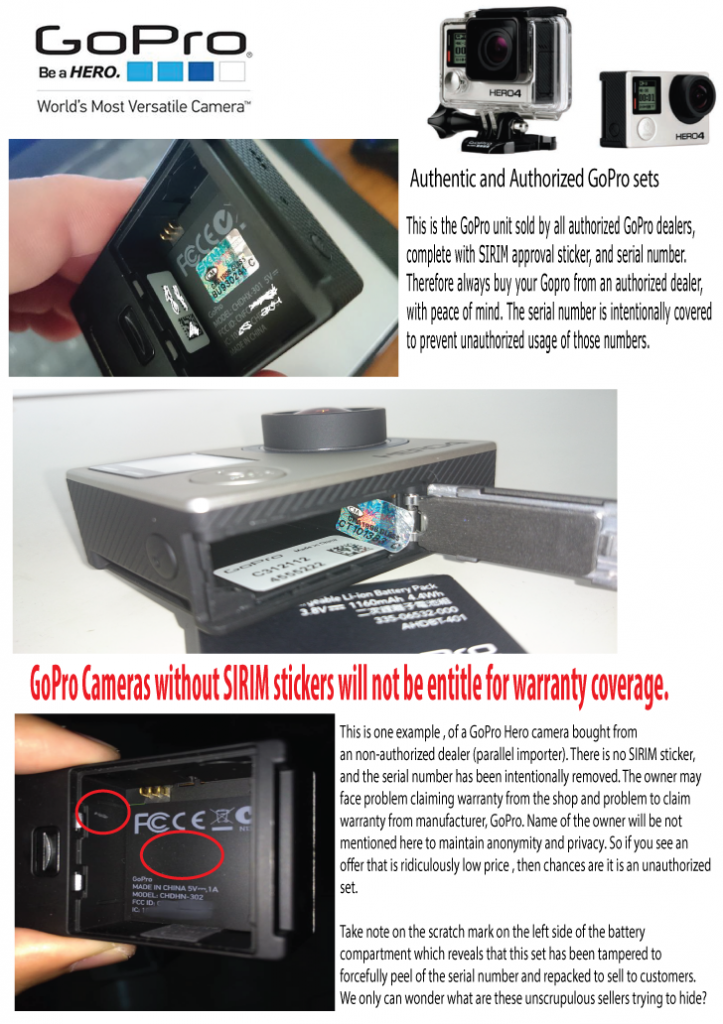
Please note that we wish to inform you to always your GoPro from an authorized dealer. All authorized GoPro cameras will have warranty coverage and product support from official distributor of Gopro in Malaysia, and of course each of them complies to international warranty conditions by GoPro US itself.
Please contact our Sales Executive Danny Lim, at 010 2066609, to instantly check stock availability.
Regards,
Admin Paradise HD Studio
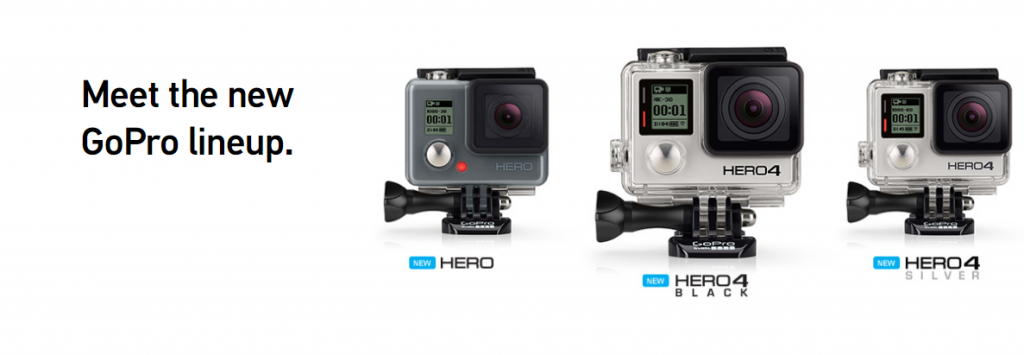
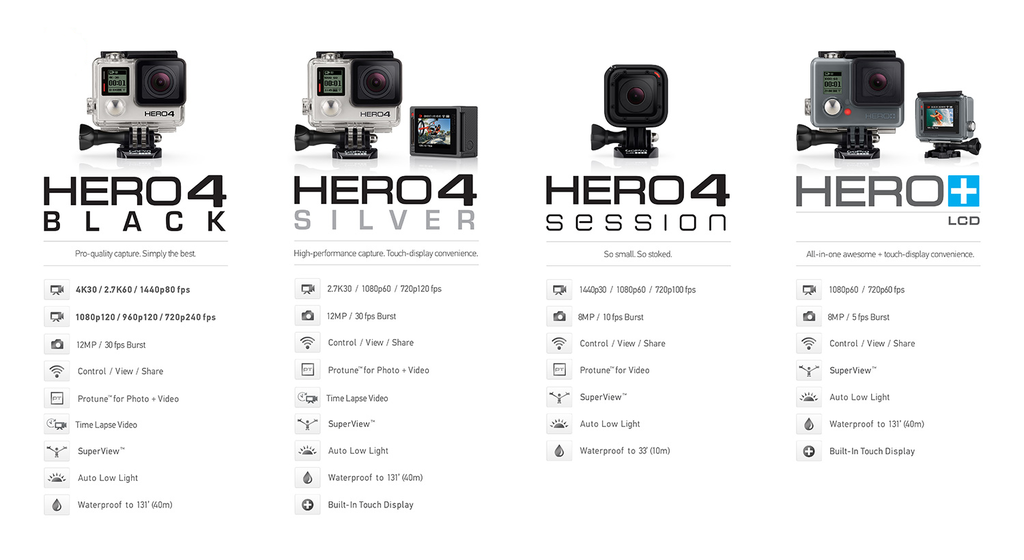
We the authorized dealer of GoPro camera, operating in Bandar Sunway. We are proud to introduce to you the all new GoPro Hero 4 product line up.
What you should know before you buy a GoPro.
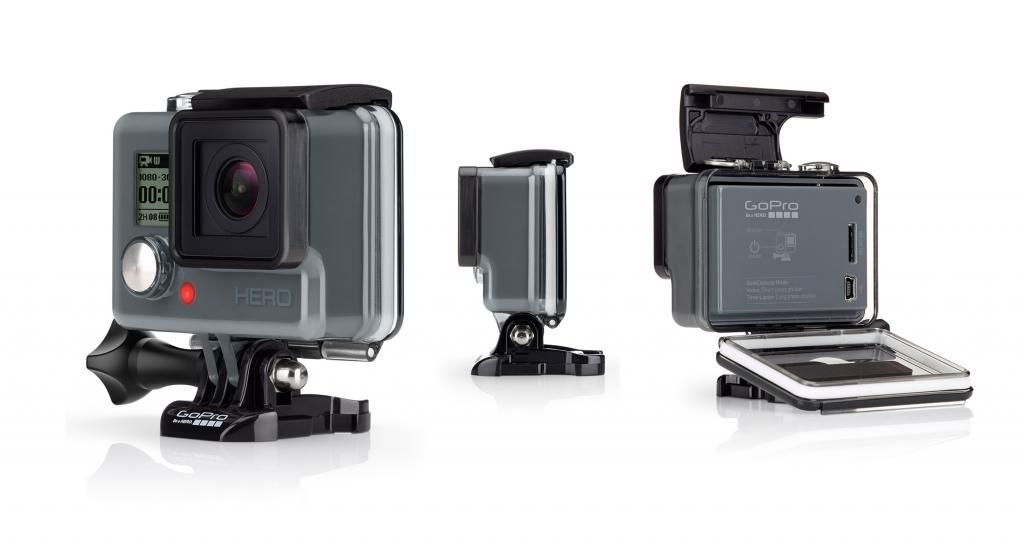
GoPro® HERO
» Click to show Spoiler - click again to hide... «
Weight
Camera with integrated housing: 111g (3.9oz)
Video Mode
Video Resolution Frames per Second (fps) NTSC/PAL Field of View (FOV) Screen Resolution
1080p 30, 25 Ultra Wide 1920 x 1080
720p SuperView 60, 50 Ultra Wide 1280 x 720
720p 60, 50 Ultra Wide 1280 x 720
Video Format
H.264 codec, .mp4 file
Advanced Video Capture Settings
Spot Meter
Spot Meter is ideal for filming within a dark space with the camera pointed towards a brighter setting (such as filming the outdoors from within a car).
SuperView™
SuperView video mode captures the world's most immersive wide-angle perspective. It allows you to capture more of yourself and your surroundings in the shot, and it provides full widescreen playback.
QuikCapture
With the press of a button, the camera automatically turns on and begins recording video or capturing Time Lapse photos.
Photo Mode
Photo Resolution
5MP, Wide FOV, 2592 x 1944 screen resolution
Burst Photo
Capture 10 photos in 2 seconds (5 fps).
10 photos/2 seconds (5 fps)
Time Lapse
Automatically capture a series of photos at 0.5-second intervals.
Advanced Photo Capture Settings
Spot Meter
Spot Meter is ideal for filming within a dark space with the camera pointed towards a brighter setting (such as filming the outdoors from within a car).
QuikCapture
With the press of a button, the camera automatically turns on and begins recording video or capturing Time Lapse photos.
Image Quality + Optics
Ultra sharp image quality with glass lens
Fixed f/2.8 aperture
Ultra wide-angle field of view
Battery + Charging
Rechargeable lithium-ion battery
Rated at 1180mAH, 3.8V, 4484mWh
Integrated with camera
Battery Life
The chart below indicates the approximate continuous recording time (hr:min) you can expect when shooting in various video modes using a fully charged battery.1
Video Mode Estimated Time
1080p 30fps 2:45
720p 60fps 2:30
720p SuperView 60fps 2:30
1 Based on GoPro engineering testing. Actual performance may vary based on settings, environmental conditions and other factors. Maximum battery capacity will normally decrease with time and use.
Audio
Internal Microphone:
Mono
Dynamic Range: 40-125 dB SPL
Format: AAC compression, AGC
Ports
Mini USB
Charging
Connecting to a computer for playback/file transfer/charging
microSD
Memory card
Storage
microSD memory card with a Class 10 or UHS-1 rating required.
Up to 32GB capacity supported
Record times vary with resolutions and frame rates
GoPro® HERO 4 Silver
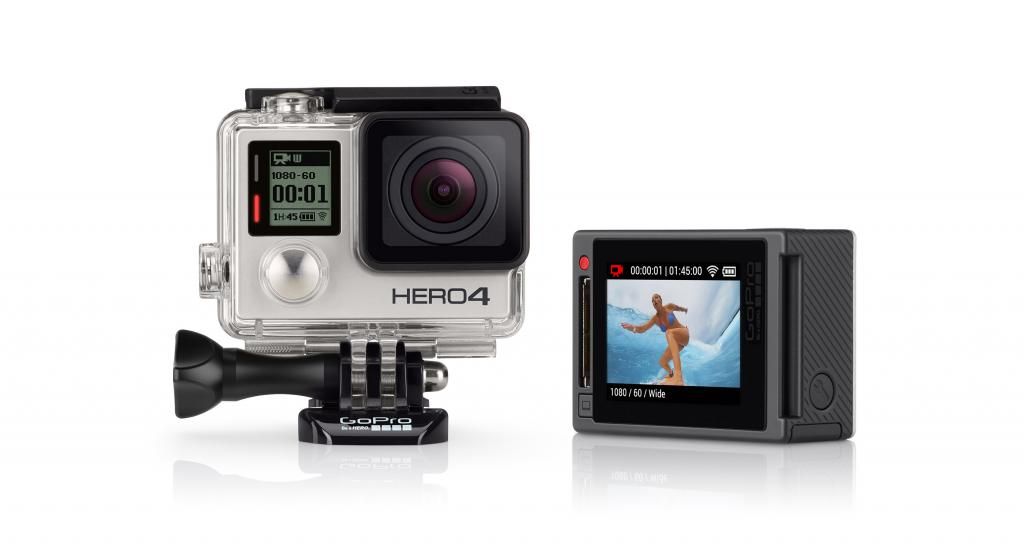
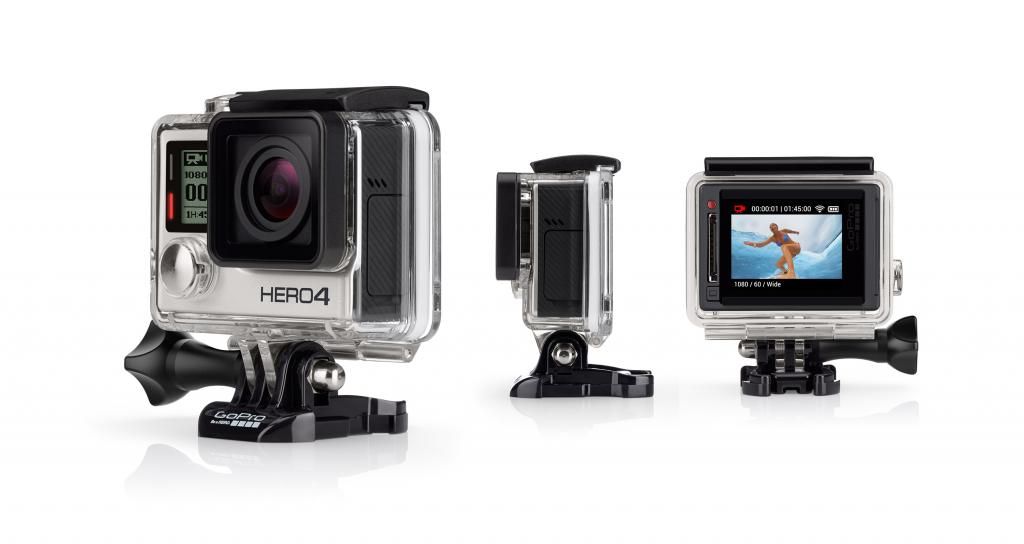
Specifications
» Click to show Spoiler - click again to hide... «
Weight
Camera: 83g (2.9oz)
Camera with housing: 147g (5.2oz)
Video Mode
Video Resolutions
Video Resolution Frames Per Second (fps) NTSC/PAL Field of View (FOV) Screen Resolution
4K 15, 12.5 Ultra Wide 3840x2160
2.7K 30, 25, 24 Ultra Wide, Medium 2704x1520
1440p 30, 25, 24 Ultra Wide, Medium 1920x1440
1080p 30, 25, 24 Ultra Wide, Medium, Narrow 1920x1080
1080p SuperView 60, 50, 48, 30, 25, 24 Ultra Wide 1920x1080
960p 100, 60, 50 Ultra Wide 1280x960
720p 60, 50, 30, 25 Ultra Wide, Medium, Narrow 1280x720
720p SuperView 100, 60, 50 Ultra Wide 1280x720
WVGA 240 Ultra Wide 848x480
Video Format
H.264 codec, .mp4 file format
Video + Photo
Record video and capture Time Lapse photos at the same time. Available intervals are 5, 10, 30 and 60 seconds.
Video Resolution Video Frames per Second (fps) Video FOV
1440p 24 Ultra Wide, Medium
1080p 30, 25, 24 Ultra Wide, Medium, Narrow
1080p SuperView 30, 25, 24 Ultra Wide, Medium, Narrow
720p 60, 50, 30, 25 Ultra Wide1, Medium, Narrow
720p SuperView 60, 50 Ultra Wide1, Medium, Narrow
1Ultra Wide is not available for 60 fps.
Looping
Record a continuous video loop that overwrites itself until you press the shutter button to stop it and save.
Advanced Video Capture Settings
SuperView™
SuperView video mode captures the world's most immersive wide-angle perspective. It allows you to capture more of yourself and your surroundings in the shot, and it provides full widescreen playback.
SuperView Settings
SuperView Mode Video Resolution
1080p SuperView 1920 x 1080
720p SuperView 1280 x 720
Auto Low Light
Auto Low Light mode automatically adjusts frame rates according to lighting conditions for enhanced low-light performance. Frame rates are adjusted in medium- and low-light conditions. Playback occurs at the selected resolution and frame rate.
Photo Mode
Photo Resolutions
Resolution Field of View (FOV) Screen Resolution
12MP (Default) Wide 4000 x 3000
7MP Wide, Medium 3000 x 2250
5MP Medium 2560 x 1920
Continuous Photo (up to 30 seconds)
Hold down the shutter button to continuously capture a series of photos until shutter button is released.
Continuous Interval
3 photos/1 second (Default)
5 photos/1 second
10 photos/1 second
Night
Capture a single photo with a customizable exposure time of up to 30 seconds.
Multi-Shot Mode
Photo Resolutions
Resolution Field of View (FOV) Screen Resolution
12MP (Default) Wide 4000 x 3000
7MP Wide, Medium 3000 x 2250
5MP Medium 2560 x 1920
Burst
Capture up to 30 photos per second
Burst Rate
30 photos/1 second (Default), 30 photos/2 seconds, 30 photos/3 seconds
10 photos/1 second, 10 photos/2 seconds, 10 photos/3 seconds
5 photos/1 second
3 photos/1 second
Time Lapse
Automatically capture a series of photos at timed intervals.
Time Lapse Photo Intervals
0.5, 1, 2, 5, 10, 30 and 60 seconds
Night Lapse
Capture a series of photos at specific intervals and exposure times.
Night Lapse Photo Intervals
15, 20, 30 and 60 seconds
2, 5, 30 and 60 minutes
Advanced Video and Photo Capture Settings
Protune™
Protune unlocks the camera's full potential, delivering minimally compressed, cinema-caliber video optimized for professional productions, and advanced manual controls for photos and video. Flex your creativity with customizable settings for Color, ISO Limit, White Balance, Sharpness and Exposure—and enjoy the greatest degree of manual control available in a GoPro camera.
Captures images with less compression, giving content creators higher quality for professional productions.
Protune enables manual control of White Balance, Color, ISO Limit, Sharpness, Shutter and Exposure Value Compensation for advanced control and customization of your videos and photos.
Protune is available for all video and photo resolutions.
Protune Settings
White Balance
White Balance
Adjusts the overall color tone of videos and photos.
White Balance Setting Recommended Lighting Conditions
Auto (Default) Automatically adjusts the color tone based on the environmental conditions
3000K Warm light (incandescent or sunrise/sunset lighting)
5500K Slightly cool light (cool fluorescent, average daylight)
6500K Cool light (overcast conditions)
Native Industry standardized optimized color
Color
Color
Allows you to adjust the color profile of your video footage or photos.
Color Setting Resulting Color Profile
GoPro Color (Default) GoPro color-corrected profile (same great color as when Protune is turned off)
Flat Flat, neutral color profile that can be color-corrected to better match footage captured with other equipment, offering more flexibility in post-production
ISO Limit
ISO Limit
Adjusts the camera's sensitivity in low-light environments, and creates a balance between brightness and resulting image noise. Image noise refers to the degree of graininess in the image.
Protune for Video ISO Limit
Setting Resulting Video Quality
6400 (Default) Brighter video in low light, increased image noise
1600 Moderately bright video in low light, moderate image noise
400 Darker video in low light, reduced image noise
Protune for Photo ISO Limit
Setting Resulting Photo Quality
800 (Default) Darker photo in very low light, increased image noise
400 Darker photo in low light, moderate image noise
200 Bright photo in indoor lighting, marginal image noise
100 Bright photo in outdoor daylight, minimal image noise
Sharpness
Sharpness
Controls the sharpness of your video footage or photos.
Sharpness Setting Resulting Quality
High (Default) Ultra sharp video or photo
Medium Moderately sharp video or photo
Low Softer video or photo that allows for more flexibility in post-production
Shutter
Shutter
Applies only to Night Photo and Night Lapse and determines the amount of time that the shutter is open. Auto applies only to Night Photo.
Shutter Setting Description
Auto (Default) Up to 2 seconds
Fixed 10, 15, 20 or 30 seconds
Exposure Value Compensation (EV COMP)
Exposure Value Compensation
Affects the brightness of your video. Adjusting this setting can improve image quality when shooting in environments with contrasting lighting conditions.
EV COMP Settings
-2.0
-1.5
-1.0
-0.5
0 (Default)
+0.5
+1.0
+1.5
+2.0
Spot Meter
Spot Meter is ideal for filming within a dark space with the camera pointed towards a brighter setting (such as filming the outdoors from within a car).
QuikCapture
With the press of a button, the camera automatically turns on and begins recording video or capturing Time Lapse photos.
Image Quality + Optics
Ultra sharp image quality with all-glass lens
Ultra wide-angle field of view with reduced distortion
Battery + Charging
Rechargeable lithium-ion battery
Rated at 1160mAH, 3.8V, 4.4Wh
Battery Life
The chart below indicates the approximate continuous recording time (hr:min) you can expect when shooting in various video modes using a fully charged battery.3
With Wi-Fi Off With Wi-Fi On + Using Wi-Fi Remote With Wi-Fi On + Using GoPro App With Wi-Fi Off + Using Battery BacPac™
Video Mode Estimated Time Estimated Time Estimated Time Estimated Time
4K 15fps 2:00 1:50 1:40 3:05
2.7K 30fps 1:50 1:40 1:30 3:00
1440p 48fps 1:50 1:40 1:30 3:05
1080p 60fps 1:40 1:30 1:20 3:00
1080p 30fps SuperView 1:50 1:40 1:30 3:05
720p 120fps 1:55 1:45 1:35 3:05
3 Based on GoPro engineering testing. Actual performance may vary based on settings, environmental conditions and other factors. Maximum battery capacity will normally decrease with time and use.
Audio
Internal Microphone:
Mono
Approximately 2x greater dynamic range (compared to the HERO3+ Black Edition)
Format: AAC compression, advanced AGC with multi-band compressor
Increased audio range by approximately 10dB (compared to the HERO3+ Black Edition)
Studio quality external microphone support. See list of supported microphones.
Ports
Mini USB
Charging
Connecting to a computer for playback/file transfer/charging
Supports 3.5mm stereo microphone via optional adapter (sold separately)
Supports playback to composite TV via optional cable (sold separately)
Micro HDMI
Supports playback to HDTV via optional cable (sold separately)
microSD
Memory card
Storage
microSD memory card with a Class 10 or UHS-1 rating required.
Up to 64GB capacity supported
Record times vary with resolutions and frame rates
Camera: 83g (2.9oz)
Camera with housing: 147g (5.2oz)
Video Mode
Video Resolutions
Video Resolution Frames Per Second (fps) NTSC/PAL Field of View (FOV) Screen Resolution
4K 15, 12.5 Ultra Wide 3840x2160
2.7K 30, 25, 24 Ultra Wide, Medium 2704x1520
1440p 30, 25, 24 Ultra Wide, Medium 1920x1440
1080p 30, 25, 24 Ultra Wide, Medium, Narrow 1920x1080
1080p SuperView 60, 50, 48, 30, 25, 24 Ultra Wide 1920x1080
960p 100, 60, 50 Ultra Wide 1280x960
720p 60, 50, 30, 25 Ultra Wide, Medium, Narrow 1280x720
720p SuperView 100, 60, 50 Ultra Wide 1280x720
WVGA 240 Ultra Wide 848x480
Video Format
H.264 codec, .mp4 file format
Video + Photo
Record video and capture Time Lapse photos at the same time. Available intervals are 5, 10, 30 and 60 seconds.
Video Resolution Video Frames per Second (fps) Video FOV
1440p 24 Ultra Wide, Medium
1080p 30, 25, 24 Ultra Wide, Medium, Narrow
1080p SuperView 30, 25, 24 Ultra Wide, Medium, Narrow
720p 60, 50, 30, 25 Ultra Wide1, Medium, Narrow
720p SuperView 60, 50 Ultra Wide1, Medium, Narrow
1Ultra Wide is not available for 60 fps.
Looping
Record a continuous video loop that overwrites itself until you press the shutter button to stop it and save.
Advanced Video Capture Settings
SuperView™
SuperView video mode captures the world's most immersive wide-angle perspective. It allows you to capture more of yourself and your surroundings in the shot, and it provides full widescreen playback.
SuperView Settings
SuperView Mode Video Resolution
1080p SuperView 1920 x 1080
720p SuperView 1280 x 720
Auto Low Light
Auto Low Light mode automatically adjusts frame rates according to lighting conditions for enhanced low-light performance. Frame rates are adjusted in medium- and low-light conditions. Playback occurs at the selected resolution and frame rate.
Photo Mode
Photo Resolutions
Resolution Field of View (FOV) Screen Resolution
12MP (Default) Wide 4000 x 3000
7MP Wide, Medium 3000 x 2250
5MP Medium 2560 x 1920
Continuous Photo (up to 30 seconds)
Hold down the shutter button to continuously capture a series of photos until shutter button is released.
Continuous Interval
3 photos/1 second (Default)
5 photos/1 second
10 photos/1 second
Night
Capture a single photo with a customizable exposure time of up to 30 seconds.
Multi-Shot Mode
Photo Resolutions
Resolution Field of View (FOV) Screen Resolution
12MP (Default) Wide 4000 x 3000
7MP Wide, Medium 3000 x 2250
5MP Medium 2560 x 1920
Burst
Capture up to 30 photos per second
Burst Rate
30 photos/1 second (Default), 30 photos/2 seconds, 30 photos/3 seconds
10 photos/1 second, 10 photos/2 seconds, 10 photos/3 seconds
5 photos/1 second
3 photos/1 second
Time Lapse
Automatically capture a series of photos at timed intervals.
Time Lapse Photo Intervals
0.5, 1, 2, 5, 10, 30 and 60 seconds
Night Lapse
Capture a series of photos at specific intervals and exposure times.
Night Lapse Photo Intervals
15, 20, 30 and 60 seconds
2, 5, 30 and 60 minutes
Advanced Video and Photo Capture Settings
Protune™
Protune unlocks the camera's full potential, delivering minimally compressed, cinema-caliber video optimized for professional productions, and advanced manual controls for photos and video. Flex your creativity with customizable settings for Color, ISO Limit, White Balance, Sharpness and Exposure—and enjoy the greatest degree of manual control available in a GoPro camera.
Captures images with less compression, giving content creators higher quality for professional productions.
Protune enables manual control of White Balance, Color, ISO Limit, Sharpness, Shutter and Exposure Value Compensation for advanced control and customization of your videos and photos.
Protune is available for all video and photo resolutions.
Protune Settings
White Balance
White Balance
Adjusts the overall color tone of videos and photos.
White Balance Setting Recommended Lighting Conditions
Auto (Default) Automatically adjusts the color tone based on the environmental conditions
3000K Warm light (incandescent or sunrise/sunset lighting)
5500K Slightly cool light (cool fluorescent, average daylight)
6500K Cool light (overcast conditions)
Native Industry standardized optimized color
Color
Color
Allows you to adjust the color profile of your video footage or photos.
Color Setting Resulting Color Profile
GoPro Color (Default) GoPro color-corrected profile (same great color as when Protune is turned off)
Flat Flat, neutral color profile that can be color-corrected to better match footage captured with other equipment, offering more flexibility in post-production
ISO Limit
ISO Limit
Adjusts the camera's sensitivity in low-light environments, and creates a balance between brightness and resulting image noise. Image noise refers to the degree of graininess in the image.
Protune for Video ISO Limit
Setting Resulting Video Quality
6400 (Default) Brighter video in low light, increased image noise
1600 Moderately bright video in low light, moderate image noise
400 Darker video in low light, reduced image noise
Protune for Photo ISO Limit
Setting Resulting Photo Quality
800 (Default) Darker photo in very low light, increased image noise
400 Darker photo in low light, moderate image noise
200 Bright photo in indoor lighting, marginal image noise
100 Bright photo in outdoor daylight, minimal image noise
Sharpness
Sharpness
Controls the sharpness of your video footage or photos.
Sharpness Setting Resulting Quality
High (Default) Ultra sharp video or photo
Medium Moderately sharp video or photo
Low Softer video or photo that allows for more flexibility in post-production
Shutter
Shutter
Applies only to Night Photo and Night Lapse and determines the amount of time that the shutter is open. Auto applies only to Night Photo.
Shutter Setting Description
Auto (Default) Up to 2 seconds
Fixed 10, 15, 20 or 30 seconds
Exposure Value Compensation (EV COMP)
Exposure Value Compensation
Affects the brightness of your video. Adjusting this setting can improve image quality when shooting in environments with contrasting lighting conditions.
EV COMP Settings
-2.0
-1.5
-1.0
-0.5
0 (Default)
+0.5
+1.0
+1.5
+2.0
Spot Meter
Spot Meter is ideal for filming within a dark space with the camera pointed towards a brighter setting (such as filming the outdoors from within a car).
QuikCapture
With the press of a button, the camera automatically turns on and begins recording video or capturing Time Lapse photos.
Image Quality + Optics
Ultra sharp image quality with all-glass lens
Ultra wide-angle field of view with reduced distortion
Battery + Charging
Rechargeable lithium-ion battery
Rated at 1160mAH, 3.8V, 4.4Wh
Battery Life
The chart below indicates the approximate continuous recording time (hr:min) you can expect when shooting in various video modes using a fully charged battery.3
With Wi-Fi Off With Wi-Fi On + Using Wi-Fi Remote With Wi-Fi On + Using GoPro App With Wi-Fi Off + Using Battery BacPac™
Video Mode Estimated Time Estimated Time Estimated Time Estimated Time
4K 15fps 2:00 1:50 1:40 3:05
2.7K 30fps 1:50 1:40 1:30 3:00
1440p 48fps 1:50 1:40 1:30 3:05
1080p 60fps 1:40 1:30 1:20 3:00
1080p 30fps SuperView 1:50 1:40 1:30 3:05
720p 120fps 1:55 1:45 1:35 3:05
3 Based on GoPro engineering testing. Actual performance may vary based on settings, environmental conditions and other factors. Maximum battery capacity will normally decrease with time and use.
Audio
Internal Microphone:
Mono
Approximately 2x greater dynamic range (compared to the HERO3+ Black Edition)
Format: AAC compression, advanced AGC with multi-band compressor
Increased audio range by approximately 10dB (compared to the HERO3+ Black Edition)
Studio quality external microphone support. See list of supported microphones.
Ports
Mini USB
Charging
Connecting to a computer for playback/file transfer/charging
Supports 3.5mm stereo microphone via optional adapter (sold separately)
Supports playback to composite TV via optional cable (sold separately)
Micro HDMI
Supports playback to HDTV via optional cable (sold separately)
microSD
Memory card
Storage
microSD memory card with a Class 10 or UHS-1 rating required.
Up to 64GB capacity supported
Record times vary with resolutions and frame rates
GoPro® HERO 4 Black
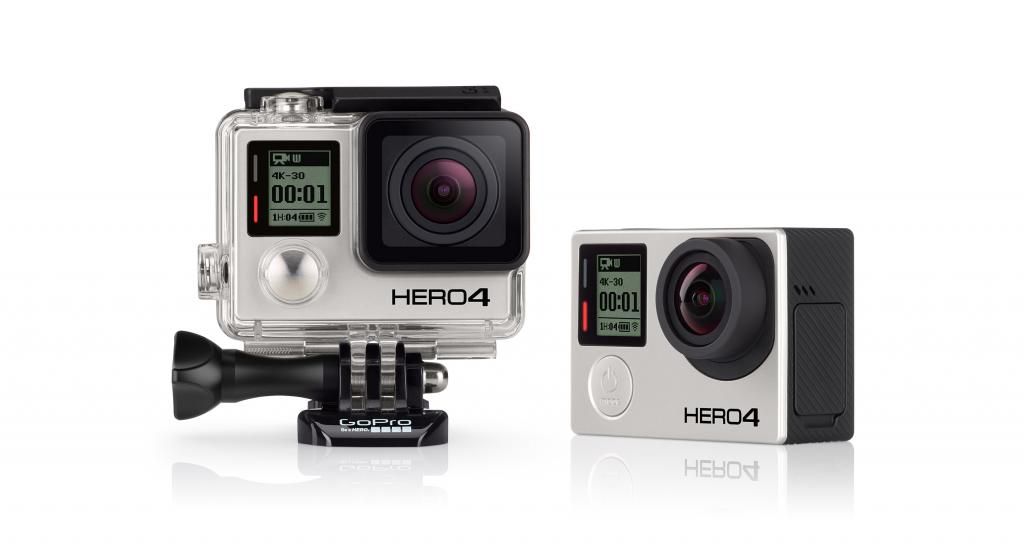
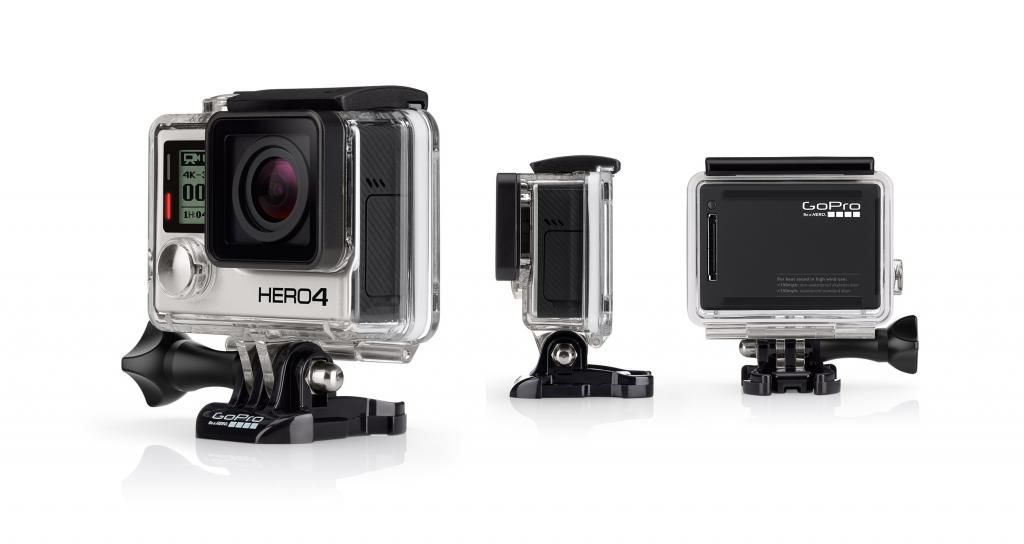
Specifications
» Click to show Spoiler - click again to hide... «
Weight
Camera: 88g (3.1oz)
Camera with housing: 152g (5.4oz)
Video Mode
Video Resolutions
Video Resolution Frames Per Second (fps) NTSC/PAL Field of View (FOV) Screen Resolution
4K 30, 25, 24 Ultra Wide 3840x2160
4K SuperView 24 Ultra Wide 3840x2160
2.7K 50, 48, 30, 25, 24 Ultra Wide, Medium 2704x1520
2.7K SuperView 30, 25 Ultra Wide 2704x1520
2.7K 4:3 30, 25 Ultra Wide 2704x2028
1440p 80, 60, 50, 48, 30, 25, 24 Ultra Wide 1920x1440
1080p 120, 90, 60, 50, 48, 30, 25, 24 Ultra Wide, Medium,1
Narrow 1920x1080
1080p SuperView 80, 60, 50, 48, 30, 25, 24 Ultra Wide 1920x1080
960p 120, 60, 50 Ultra Wide 1280x960
720p 120, 60, 50, 30 , 25 Ultra Wide, Medium, Narrow 1280x720
720p SuperView 120, 60, 50 Ultra Wide 1280x720
WVGA 240 Ultra Wide 848x480
1 Medium FOV is not available for 1080p120 and 1080p90.
Video Format
H.264 codec, .mp4 file format
Video + Photo
Record video and capture Time Lapse photos at the same time. Available intervals are 5, 10, 30 and 60 seconds.
Video Resolution Video Frames per Second (fps) Video FOV
1440p 30, 25, 24 Ultra Wide, Medium
1080p 30, 25, 24 Ultra Wide, Medium, Narrow
720p 60, 50, 30, 25 Ultra Wide2, Medium, Narrow
2Ultra Wide is not available for 60 fps.
Looping
Record a continuous video loop that overwrites itself until you press the shutter button to stop it and save.
Advanced Video Capture Settings
SuperView™
SuperView video mode captures the world's most immersive wide-angle perspective. It allows you to capture more of yourself and your surroundings in the shot, and it provides full widescreen playback.
SuperView Settings
SuperView Mode Video Resolution
4K SuperView 3840 x 2160
2.7K SuperView 2704 x 1520
1080p SuperView 1920 x 1080
720p SuperView 1280 x 720
Auto Low Light
Auto Low Light mode automatically adjusts frame rates according to lighting conditions for enhanced low-light performance. Frame rates are adjusted in medium- and low-light conditions. Playback occurs at the selected resolution and frame rate.
Photo Mode
Photo Resolutions
Resolution Field of View (FOV) Screen Resolution
12MP (Default) Wide 4000 x 3000
7MP Wide, Medium 3000 x 2250
5MP Medium 2560 x 1920
Continuous Photo (up to 30 seconds)
Hold down the shutter button to continuously capture a series of photos until shutter button is released.
Continuous Interval
3 photos/1 second (Default)
5 photos/1 second
10 photos/1 second
Night Photo
Capture a single photo with a customizable exposure time of up to 30 seconds.
Multi-Shot Mode
Photo Resolutions
Resolution Field of View (FOV) Screen Resolution
12MP (Default) Wide 4000 x 3000
7MP Wide, Medium 3000 x 2250
5MP Medium 2560 x 1920
Burst
Capture up to 30 photos per second.
Burst Rate
30 photos/1 second (Default), 30 photos/2 seconds, 30 photos/3 seconds
10 photos/1 second, 10 photos/2 seconds, 10 photos/3 seconds
5 photos/1 second
3 photos/1 second
Time Lapse
Automatically capture a series of photos at timed intervals.
Time Lapse Photo Intervals
0.5, 1, 2, 5, 10, 30 and 60 seconds
Night Lapse
Capture a series of photos at specific intervals and exposure times.
Night Lapse Photo Intervals
15, 20, 30 and 60 seconds
2, 5, 30 and 60 minutes
Advanced Video and Photo Capture Settings
Protune™
Protune unlocks the camera's full potential, delivering minimally compressed, cinema-caliber video optimized for professional productions, and advanced manual controls for photos and video. Flex your creativity with customizable settings for Color, ISO Limit, White Balance, Sharpness and Exposure—and enjoy the greatest degree of manual control available in a GoPro camera.
Captures images with less compression, giving content creators higher quality for professional productions.
Protune enables manual control of White Balance, Color, ISO Limit, Sharpness, Shutter and Exposure Value Compensation for advanced control and customization of your videos and photos.
Protune is available for all video and photo resolutions.
Protune Settings
White Balance
Adjusts the overall color tone of videos and photos.
White Balance Setting Recommended Lighting Conditions
Auto (Default) Automatically adjusts the color tone based on the environmental conditions
3000K Warm light (incandescent or sunrise/sunset lighting)
5500K Slightly cool light (cool fluorescent, average daylight)
6500K Cool light (overcast conditions)
Native Industry standardized optimized color
Color
Allows you to adjust the color profile of your video footage or photos.
Color Setting Resulting Color Profile
GoPro Color (Default) GoPro color-corrected profile (same great color as when Protune is turned off)
Flat Flat, neutral color profile that can be color-corrected to better match footage captured with other equipment, offering more flexibility in post-production
ISO Limit
Adjusts the camera's sensitivity in low-light environments, and creates a balance between brightness and resulting image noise. Image noise refers to the degree of graininess in the image.
Protune for Video ISO Limit
Setting Resulting Video Quality
6400 (Default) Brighter video in low light, increased image noise
1600 Moderately bright video in low light, moderate image noise
400 Darker video in low light, reduced image noise
Protune for Photo ISO Limit
Setting Resulting Photo Quality
800 (Default) Darker photo in very low light, increased image noise
400 Darker photo in low light, moderate image noise
200 Bright photo in indoor lighting, marginal image noise
100 Bright photo in outdoor daylight, minimal image noise
Sharpness
Controls the sharpness of your video footage or photos.
Sharpness Setting Resulting Quality
High (Default) Ultra sharp video or photo
Medium Moderately sharp video or photo
Low Softer video or photo that allows for more flexibility in post-production
Shutter
Applies only to Night Photo and Night Lapse and determines the amount of time that the shutter is open. Auto applies only to Night Photo.
Shutter Setting Description
Auto (Default) Up to 2 seconds
Fixed 10, 15, 20 or 30 seconds
Exposure Value Compensation (EV COMP)
Affects the brightness of your video. Adjusting this setting can improve image quality when shooting in environments with contrasting lighting conditions.
EV COMP Settings
-2.0
-1.5
-1.0
-0.5
0 (Default)
+0.5
+1.0
+1.5
+2.0
Spot Meter
Spot Meter is ideal for filming within a dark space with the camera pointed towards a brighter setting (such as filming the outdoors from within a car).
QuikCapture
With the press of a button, the camera automatically turns on and begins recording video or capturing Time Lapse photos.
Image Quality + Optics
Ultra sharp image quality with all-glass lens
Ultra wide-angle field of view with reduced distortion
Battery + Charging
Rechargeable lithium-ion battery
Rated at 1160mAH, 3.8V, 4.4Wh
Battery Life
The chart below indicates the approximate continuous recording time (hr:min) you can expect when shooting in various video modes using a fully charged battery.
With Wi-Fi Off With Wi-Fi On + Using Wi-Fi Remote With Wi-Fi On + Using GoPro App With Wi-Fi Off + Using Battery BacPac™ With Wi-Fi Off + Using LCD Touch BacPac™
Video Mode Estimated Time Estimated Time Estimated Time Estimated Time Estimated Time
4K 30fps 1:05 0:55 0:50 2:00 0:50
2.7K 48fps 1:05 1:00 0:55 2:10 0:55
2.7K 30fps (4:3) 1:10 1:05 0:55 2:15 0:55
1080p 120fps 1:10 1:05 1:00 2:20 0:55
1080p 60fps 1:20 1:15 1:10 2:30 1:10
1080p 30fps SuperView 1:30 1:20 1:15 2:45 1:15
720p 120 fps 1:50 1:40 1:30 3:00 1:20
3 Based on GoPro engineering testing.
Actual performance may vary based on settings, environmental conditions and other factors.
Maximum battery capacity will normally decrease with time and use.
Audio
Internal Microphone:
Mono
Approximately 2x greater dynamic range (compared to the HERO3+ Black Edition)
Format: AAC compression, advanced AGC with multi-band compressor
Increased audio range by approximately 10dB (compared to the HERO3+ Black Edition)
Studio quality external microphone support. See list of supported microphones.
Ports
Mini USB
Charging
Connecting to a computer for playback/file transfer/charging
Supports 3.5mm stereo microphone via optional adapter (sold separately)
Supports playback to composite TV via optional cable (sold separately)
Micro HDMI
Supports playback to HDTV via optional cable (sold separately)
HDMI playback is certified up to 1080p
microSD
Memory card
Storage
microSD memory card with a Class 10 or UHS-1 rating required.
Up to 64GB capacity supported
Record times vary with resolutions and frame rates
Price:
Hero 4 Black RM1849 (fixed price)
Hero 4 Silver RM1499 (fixed price)
Hero Rm?? [

to be confirm
[/b]
Warranty: 12 months
Dealing method:
Come visit our showroom or check out our page in Facebook. Click here.
Location of seller:
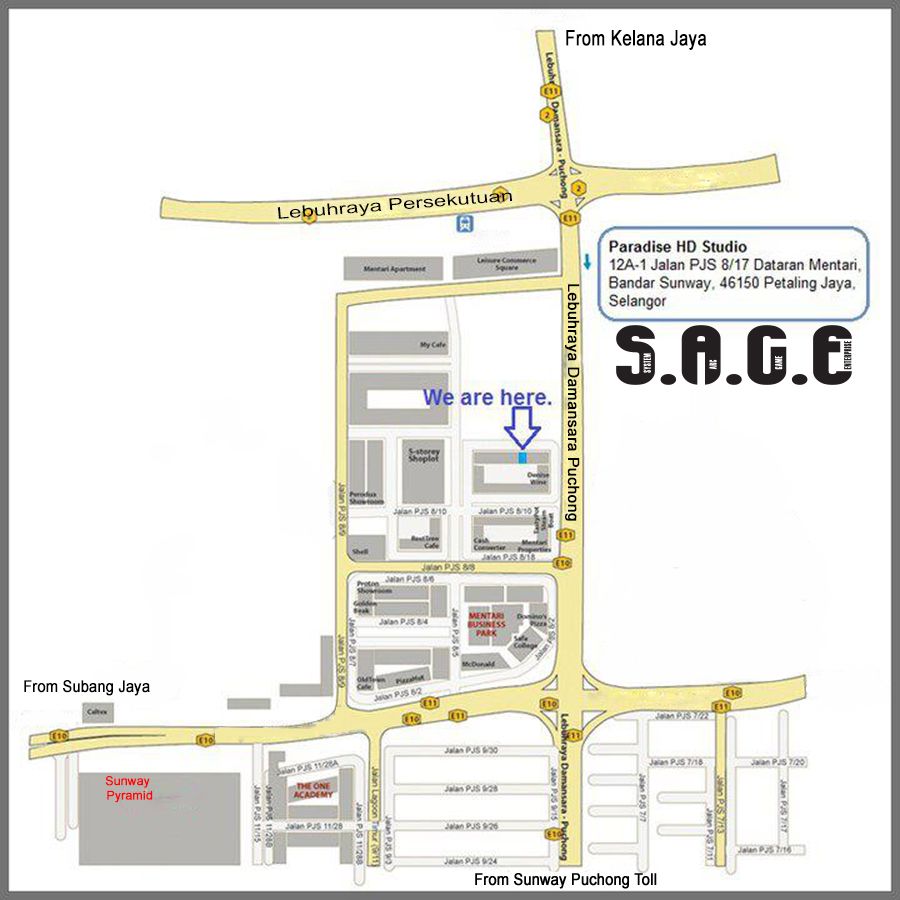
New Location
Paradise HD Studio @ Facebook, wholly owned by
Paradise HD Zone (001963405-W).
Paradise HD Studio, owned by Paradise HD Zone (001963405-W)
Location: 12A-1 Jalan PJS 8/17, 46150 Petaling Jaya, Selangor | Mobile : 010
2066609 (Danny) | email : hdstudio2u@gmail.com
Business Hours :
To cope with ongoing demand, most of the time we are required work outdoors.
If you wish to visit our showroom please call Danny at 010 2066609, for an appointment.
http://www.facebook.com/ParadiseHDstudio
Location Map
Contact method/details:
Phone: 60356114967
Mobile phone : 0102066609
Contact person : Danny Lim
The private messaging box get full easily.
Please direct your inquiries to my company email address : hdstudio2u@gmail.com
Thank You.
Age of item: New
Item(s) conditions: New
Reason for sale: Business
This post has been edited by blitzboy: Sep 28 2015, 10:13 AM
 Quote
Quote


 Alright noted , for all your price inquiries.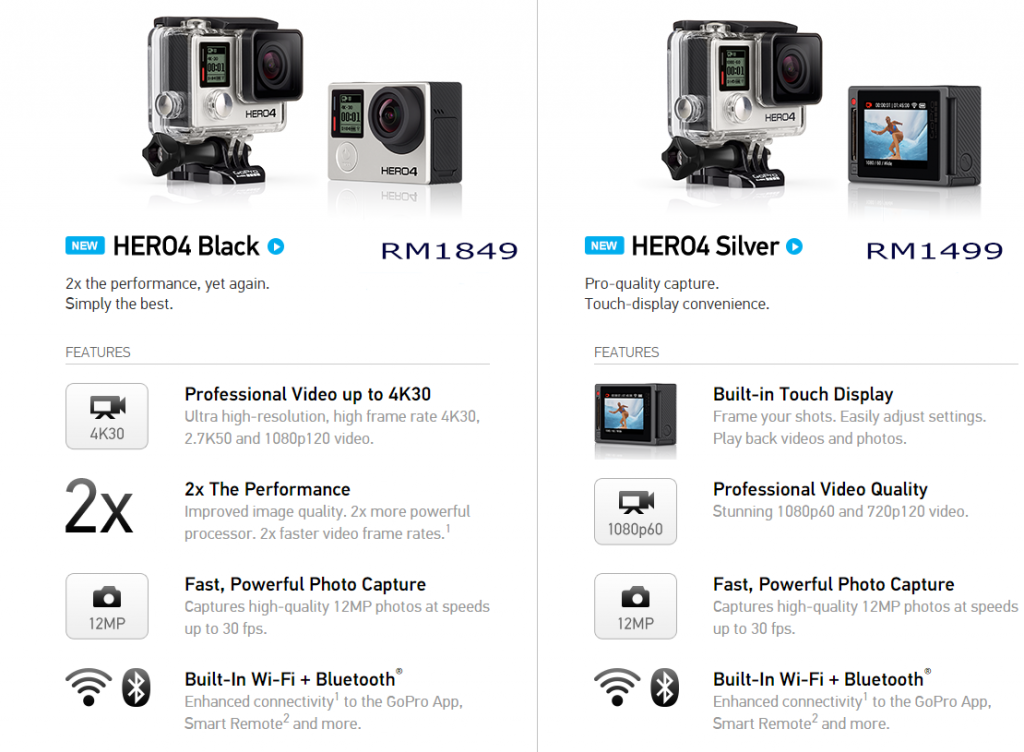

 0.0215sec
 0.73
0.73
 6 queries
 GZIP Disabled