


This post has been edited by fizzcola: Jan 8 2016, 07:22 PM
Attached thumbnail(s)

AMD (Malaysia) Official Thread
|
|
 Jan 8 2016, 07:15 PM Jan 8 2016, 07:15 PM
Return to original view | Post
#1
|
 
Junior Member
30 posts Joined: Jul 2011  
|
Need some help, anybody encounter this kind of artifacts before? any way to fix it?
This post has been edited by fizzcola: Jan 8 2016, 07:22 PM Attached thumbnail(s)
|
|
|
|
|
|
Jan 8 2016, 09:47 PM
Return to original view | Post
#2
|
|
Junior Member
30 posts Joined: Jul 2011
|
QUOTE(Acid_RuleZz @ Jan 8 2016, 09:30 PM) What am i looking at? On the top left of the screen, a minor artifact. it only appear when i walk a near building/rock. |
|
|
Jan 9 2016, 01:40 PM
Return to original view | Post
#3
|
|
Junior Member
30 posts Joined: Jul 2011
|
QUOTE(Acid_RuleZz @ Jan 8 2016, 10:40 PM) Try the latest driver 16.1 Hotfix. http://support.amd.com/en-us/download/desk...Windows+10+-+64 It fixed it! thanks alot.Many claimed it fixed some corruption in Fallout 4, GTA5 and few other games. |
|
|
Apr 13 2016, 01:32 AM
Return to original view | Post
#4
|
|
Junior Member
30 posts Joined: Jul 2011
|
Hi i got a question, everytime i updated the latest AMD driver Shadow of Mordor keep getting artifact? Now im using 15.12 and there is no artifaction. Can somebody explain why is this happening? I'm using R9 280
|
|
|
Apr 13 2016, 11:08 AM
Return to original view | Post
#5
|
|
Junior Member
30 posts Joined: Jul 2011
|
QUOTE(sHawTY @ Apr 13 2016, 10:42 AM) I highly doubt it's a driver issue Okay im gonna try the first method first.I've had 280X,380X,390 & 390X, never had artifacts when updating the driver Try these: 1. Check the temperature. Use HWMonitor. Paste a screenshot of HWMonitor in here so we can help you identify if your graphic card is overheating. State the brand and model of your R9 280 too 2. Try moving the graphic card to a different system using a higher wattage power supply then install the latest Crimson 16.4.1 right away, not Crimson 15.12. If the artifacts is still there, that means the issue is with your graphic card |
|
|
Apr 13 2016, 01:47 PM
Return to original view | Post
#6
|
|
Junior Member
30 posts Joined: Jul 2011
|
QUOTE(sHawTY @ Apr 13 2016, 10:42 AM) I highly doubt it's a driver issue Shadow of MordorI've had 280X,380X,390 & 390X, never had artifacts when updating the driver Try these: 1. Check the temperature. Use HWMonitor. Paste a screenshot of HWMonitor in here so we can help you identify if your graphic card is overheating. State the brand and model of your R9 280 too 2. Try moving the graphic card to a different system using a higher wattage power supply then install the latest Crimson 16.4.1 right away, not Crimson 15.12. If the artifacts is still there, that means the issue is with your graphic card 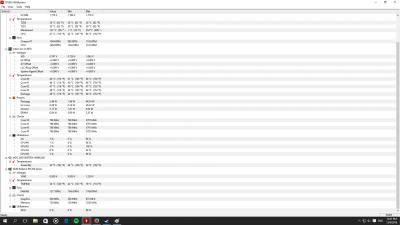
Firewatch 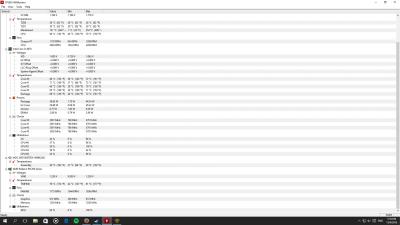
after the i updated with the latest driver their were no artifact in SoM but there were some in Firewatch. This post has been edited by fizzcola: Apr 13 2016, 01:48 PM |
|
|
|
|
|
Apr 13 2016, 02:24 PM
Return to original view | Post
#7
|
|
Junior Member
30 posts Joined: Jul 2011
|
QUOTE(sHawTY @ Apr 13 2016, 02:13 PM) Your temperatures is fine I'm using MSi R9 280 3GB, been using it a year and a half.So now you need to test your graphic card in a different system, preferably a desktop PC with a higher wattage power supply The reason why you need to test in a different system is because of these possibilities: 1. The graphic card itself may be faulty 2. The graphic card is not getting enough power from your PSU, depending on how old your PSU is 3. Your motherboard is semi-faulty Remember to always use DDU to uninstall the old driver before installing the new driver By the way, what's the brand & model of your graphic card? And how old is it? This is not my first GPU, the first one got RMA because it was making my screen turn yellow/purple. This post has been edited by fizzcola: Apr 13 2016, 02:25 PM |
|
|
Apr 13 2016, 02:27 PM
Return to original view | Post
#8
|
|
Junior Member
30 posts Joined: Jul 2011
|
QUOTE(sHawTY @ Apr 13 2016, 02:19 PM) fizzcola what cooler are you using on your i5 4670? It's kinda hot Im currently on stock cooler, it's 37C in Ipoh, my room gets really hot. My i7 4790s is a lot cooler. None of the cores ever exceed 50°C Though my CPU is cooled by Corsair H110i And no, my computer is not running in an air-conditioned room |
|
|
Apr 13 2016, 02:44 PM
Return to original view | Post
#9
|
|
Junior Member
30 posts Joined: Jul 2011
|
QUOTE(goldfries @ Apr 13 2016, 02:24 PM) So far I've never the need to use DDU, never had issues. Ya its a non constant thing but im just curious, worried my warranty will end and i don't have time to RMA it.Also artifacts and power supply wattage are not related. - Constant artifacts - card issue. - Non-constant artifacts, can be the software part, not necessarily the driver. It could be the game. Can be the card showing signs of wearing out too. |
|
|
May 20 2016, 12:17 PM
Return to original view | Post
#10
|
|
Junior Member
30 posts Joined: Jul 2011
|
Anybody with a R9 380 having a black screen issue? I can't even play a game.
|
|
|
May 21 2016, 09:13 PM
Return to original view | Post
#11
|
|
Junior Member
30 posts Joined: Jul 2011
|
QUOTE(goldfries @ May 21 2016, 09:00 PM) List the details? I have some models around, maybe I can simulate your condition. I got a MSI R9 380 Gaming 2G with 16.5.2.1 driver installed.I've encounted Black Screen before too and have solved them but using older drivers. 5 minute of gaming is fine more than that screen be black and sound with sound loop. |
|
|
May 22 2016, 01:07 PM
Return to original view | Post
#12
|
|
Junior Member
30 posts Joined: Jul 2011
|
QUOTE(goldfries @ May 21 2016, 09:34 PM) I see you posted https://community.amd.com/thread/198837 Both method failed Rather than using DDU, try using AMD's own Clean Uninstall Utility http://support.amd.com/en-us/kb-articles/P...ll-Utility.aspx After that install latest drivers, if doesn't work then uninstall again and use the driver from the CD.  how did you solved your black screen issue? This post has been edited by fizzcola: May 22 2016, 01:09 PM |
|
|
May 22 2016, 08:39 PM
Return to original view | Post
#13
|
|
Junior Member
30 posts Joined: Jul 2011
|
QUOTE(arifhasim85 @ May 22 2016, 05:28 PM) could be unstable voltage.. can try bump voltage a bit Bump the core voltage? Did that still crashes in 2 minute of ingame. |
|
|
May 22 2016, 11:27 PM
Return to original view | Post
#14
|
|
Junior Member
30 posts Joined: Jul 2011
|
QUOTE(goldfries @ May 22 2016, 11:23 PM) Don't think is voltage issue, if it's voltage issue you won't have to wait 5 minutes into the game. Aw man, so should i RMA it?I solved my black screen issue by going back to older drivers, I've also encountered black screen issues that were never solved.  |
|
|
May 24 2016, 11:33 PM
Return to original view | Post
#15
|
|
Junior Member
30 posts Joined: Jul 2011
|
QUOTE(AMDmy @ May 24 2016, 11:24 PM) Hello, it could be a problematic card. Never before, i have RMA the card.Were you having problems even before this? Yap the card was defact, i thought it was the driver causing the black screen. |
| Change to: |  0.0664sec 0.0664sec
 0.76 0.76
 7 queries 7 queries
 GZIP Disabled GZIP Disabled
Time is now: 1st December 2025 - 09:20 PM |
 Quote
Quote