QUOTE(am3rr @ Sep 11 2014, 01:01 PM)
» Click to show Spoiler - click again to hide... «


[V25] Lowyat.Net Mechanical Keyboard Club
|
|
 Sep 11 2014, 01:02 PM Sep 11 2014, 01:02 PM
Return to original view | Post
#121
|
 
Senior Member
2,882 posts Joined: Oct 2009 From: Land of Denial 
|
QUOTE(am3rr @ Sep 11 2014, 01:01 PM) » Click to show Spoiler - click again to hide... « |
|
|
|
|
|
Sep 11 2014, 01:06 PM
Return to original view | Post
#122
|
|
Senior Member
2,882 posts Joined: Oct 2009 From: Land of Denial
|
QUOTE(am3rr @ Sep 11 2014, 01:04 PM) aa 13700 yen? but the shipping cost is kinda steep How much is the shipping cost?13700yen is which case model? Normal black or carbon white?  |
|
|
Sep 11 2014, 01:15 PM
Return to original view | Post
#123
|
|
Senior Member
2,882 posts Joined: Oct 2009 From: Land of Denial
|
QUOTE(am3rr @ Sep 11 2014, 01:09 PM) im in dilemma either to take the wood grain or white. black one too common. So, how much the shipping cost for this KOBO in yen currency?so i settle for white as easier to purchase keycaps to suit on later |
|
|
Sep 11 2014, 02:01 PM
Return to original view | Post
#124
|
|
Senior Member
2,882 posts Joined: Oct 2009 From: Land of Denial
|
QUOTE(ikki9394 @ Sep 11 2014, 01:59 PM) In terms of:- Filco Majestouch 2 is the best of the best.durability stock key caps quality sturdiness users reviews value Im going for cherry mx black switches tho... Any other questions? |
|
|
Sep 11 2014, 02:11 PM
Return to original view | Post
#125
|
|
Senior Member
2,882 posts Joined: Oct 2009 From: Land of Denial
|
QUOTE(ikki9394 @ Sep 11 2014, 02:05 PM) Yeah... im refering to Filco Majestouch Ninja actually. Filco Majestouch 2 Ninja = side printed keycaps and no fonts beside the caps and scroll LED.Btw whats the diff between the 2 and Ninja apart from the aphabets being printed on the side of keycaps of the Ninja? Filco Majestouch 2 = front printed keycaps, and got "caps" and "scroll" font printed beside the LED (the LED located below print screen, scroll lock, pause keycap). Specs all same. So, you either choose between these 2 Filco or other Filco Majestouch 2 editions (Filco White, Filco Pink, Filco KOBO, Filco Camouflage). |
|
|
Sep 11 2014, 04:03 PM
Return to original view | Post
#126
|
|
Senior Member
2,882 posts Joined: Oct 2009 From: Land of Denial
|
QUOTE(belfong @ Sep 11 2014, 03:56 PM) I am trying to collect 15 of them - to fill up the first row of the HHKB. I *think* I am there. Tonight I will put all of them onto the board and snap photos   So, tonight special event photo by you. 15 CC on HHKB a.k.a HC event.  |
|
|
|
|
|
Sep 11 2014, 04:36 PM
Return to original view | Post
#127
|
|
Senior Member
2,882 posts Joined: Oct 2009 From: Land of Denial
|
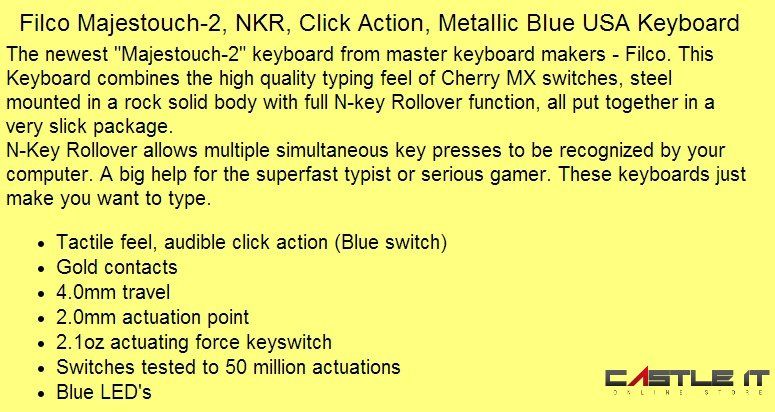
QUOTE(300thecat @ Sep 11 2014, 04:22 PM) » Click to show Spoiler - click again to hide... « What does the second point (gold contacts) mean? 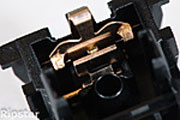 btw, mx cherry blue only 20million actuations for its life and 2.2mm actuation distance. |
|
|
Sep 11 2014, 05:39 PM
Return to original view | Post
#128
|
|
Senior Member
2,882 posts Joined: Oct 2009 From: Land of Denial
|
QUOTE(300thecat @ Sep 11 2014, 05:05 PM) » Click to show Spoiler - click again to hide... « Seems like forever lol. Btw, I'm still trying to figure out play my songs on WMP with AHK. Today I discovered that && is used to queue commands and that I probably need to add some delay time between commands because things won't start instantaneously. Sikit2 lama2 jadi bukit I guess lol. But if you don't mind helping, that's be cool too 20 million just the idea lab testing. U using windows 64-bit or 32-bit? Just want to know, so, easier for me to put the code here. |
|
|
Sep 11 2014, 11:46 PM
Return to original view | Post
#129
|
|
Senior Member
2,882 posts Joined: Oct 2009 From: Land of Denial
|
QUOTE(300thecat @ Sep 11 2014, 08:11 PM) I'm using Windows 8.1 Pro 64-bit Sorry for late reply, just back from somewhere. I will guide you for this simple script. By default, please always turn on the shuffle toggle. <-- coz for life easier (ctrl + h is shuffle toggle) You may turn on repeat toggle also if you want.  Let's get started: 1. Detect the whether Windows Media Player is running or not running 2. If not running then you run the Windows Media Player (I think more simple you run the playlist of your choice) 3. If the WMP already running, then no need to re-run the WMP again. Just script it press next track of song.  Note: it's better to include features of press next track of WPM in minimize. If you found any difficulty, please let me know.  This post has been edited by quovadis123: Sep 12 2014, 12:46 AM |
|
|
Sep 12 2014, 11:08 AM
Return to original view | Post
#130
|
|
Senior Member
2,882 posts Joined: Oct 2009 From: Land of Denial
|
QUOTE(300thecat @ Sep 12 2014, 10:56 AM) I admire you teaching method. Teach how to fish instead of giving the fish Ok. I always online today.  I'll spend the morning trying this out, will let you know the results. Now got any difficulty yet? |
|
|
Sep 12 2014, 11:57 AM
Return to original view | Post
#131
|
|
Senior Member
2,882 posts Joined: Oct 2009 From: Land of Denial
|
QUOTE(300thecat @ Sep 12 2014, 11:51 AM) To be honest, AHK is the first time ever I'm dealing with non-consumer level computer stuff so I don't understand the programming language. Like command lines and all that. Even the sample scripts I find online also I cannot brain...maybe I'll just read the guide that came when I installed it. If not running,Anyways, what I have now is My general idea is to run it, forward to the next song and play it, but it isn't working...Toggle shuffle is already on by default btw. try CODE Run, "C:\Program Files (x86)\Windows Media Player\wmplayer.exe", , min this will run the wmp with minimize. So, how you gonna play your playlist? |
|
|
Sep 12 2014, 12:10 PM
Return to original view | Post
#132
|
|
Senior Member
2,882 posts Joined: Oct 2009 From: Land of Denial
|
QUOTE(300thecat @ Sep 12 2014, 12:05 PM) Ah that I managed to figure out. You can just direct run the playlist.Actually CODE Run WMPlayer does the same thing. I actually opened the Run menu and spammed so many variations of Windows Media Player. WinMediaPlayer...WMP...till I got this one that worked. Haha, I didn't know you can execute programs like what you just did, so thanks for the tip Okay about the playlist, I know that Ctrl+P is to Play/Pause, but for some reason when I manually open up WMP I gotta click the start button (clicking Ctrl+P) doesn't work. But after I start playing music, all the default hotkeys work as per normal. Is this the same for you? It will autoplay the first song of the playlist instead of you using running wmp and press play. If want send command to play; CODE SendMessage 0x111,18811,0,,Windows Media Player Highly recommended use this. If direct run playlist; (my playlist name is wonderful.wpl) CODE Run, "C:\Program Files (x86)\Windows Media Player\wonderful.wpl" This post has been edited by quovadis123: Sep 12 2014, 12:13 PM |
|
|
Sep 12 2014, 12:16 PM
Return to original view | Post
#133
|
|
Senior Member
2,882 posts Joined: Oct 2009 From: Land of Denial
|
QUOTE(belfong @ Sep 12 2014, 12:13 PM) um, shouldn't this be in a different thread? Nope. Always in this thread. No worry. Next post will settle all. |
|
|
|
|
|
Sep 12 2014, 12:45 PM
Return to original view | Post
#134
|
|
Senior Member
2,882 posts Joined: Oct 2009 From: Land of Denial
|
QUOTE(300thecat @ Sep 12 2014, 12:36 PM) Heh, you're right Got 2 approaches actually:new and primitive This command doesn't work when I run WMP. But when I do start playing a track, it works as a next button. Ahhh...not what I expected, but does the job well enough. My playlist file is in the My Music folder though. Btw, important question. Where did you learn all of these things? I also wanna learn how to learn... The solution as below. From your original code, even you run the wmp and play and next song. Everytime you press #F5, will re-run the wmp, so I try to avoid that. You sendiri see, got comments in line of "; ". I actually no use autohotkey, so, yesterday read some basics commands from autohotkey.com and written it. New Method » Click to show Spoiler - click again to hide... « Primitive Method » Click to show Spoiler - click again to hide... « This post has been edited by quovadis123: Sep 12 2014, 12:53 PM |
|
|
Sep 12 2014, 12:56 PM
Return to original view | Post
#135
|
|
Senior Member
2,882 posts Joined: Oct 2009 From: Land of Denial
|
QUOTE(belfong @ Sep 12 2014, 12:51 PM) My head. It pains me! Why head pains? |
|
|
Sep 12 2014, 01:16 PM
Return to original view | Post
#136
|
|
Senior Member
2,882 posts Joined: Oct 2009 From: Land of Denial
|
QUOTE(belfong @ Sep 12 2014, 01:05 PM) head pains reading the codes you pasted above Ok. Put spoiler already. Some keyboards don't have pre-built media keys. ie. Filco Need to add media keys via remapping software like autohotkeys or Karabiner. Indeed is a mkb related questions. By answering such questions, more and more members can benefits and DIY for themselves in the future. Help the community to grow. Some in the future may participate in the custom keyboard firmware writing too. Note: queries regarding Firmware, Hardware, Software, DIY, reviews of keyboards and etc can be posted |
|
|
Sep 12 2014, 02:48 PM
Return to original view | Post
#137
|
|
Senior Member
2,882 posts Joined: Oct 2009 From: Land of Denial
|
QUOTE(ikki9394 @ Sep 12 2014, 02:45 PM) Which 1 better? Filco.Filco Majestouch Ninja vs Steelseries 6GV2 Cherry Mx Black for RM3xx? |
|
|
Sep 12 2014, 02:53 PM
Return to original view | Post
#138
|
|
Senior Member
2,882 posts Joined: Oct 2009 From: Land of Denial
|
QUOTE(ikki9394 @ Sep 12 2014, 02:51 PM) Filco> all? YA. |
|
|
Sep 12 2014, 03:57 PM
Return to original view | Post
#139
|
|
Senior Member
2,882 posts Joined: Oct 2009 From: Land of Denial
|
QUOTE(ikki9394 @ Sep 12 2014, 03:54 PM) Haha all the hard-one-to-get mkbs... came across the Code mkb. Look really nice. Ya. If you want to ask CODE vs Filco.I answer you 1st. Still is Filco wins. Just that, Filco do not have MX Clear and Green that CODE has. |
|
|
Sep 12 2014, 06:35 PM
Return to original view | Post
#140
|
|
Senior Member
2,882 posts Joined: Oct 2009 From: Land of Denial
|
QUOTE(belfong @ Sep 12 2014, 03:59 PM) I agree that Filco still wins. But Code Clears has other things: 1. backlight .. ok la.. I know the caps are crap but the white backlit is professional 2. I really really like the DIP switch to change to Mac mode 3. And I really really like that I can Fn-Page Up/Page Down to control volume. It does make a lot of sense. Why DIP switch to mac mode you like le? About point no. 3, any shortcut keys that pre-built from CODE keyboard or other keyboard you think you like? (Research purposes) |
|
Topic ClosedOptions
|
| Change to: |  0.0425sec 0.0425sec
 0.37 0.37
 7 queries 7 queries
 GZIP Disabled GZIP Disabled
Time is now: 4th December 2025 - 05:33 PM |
 Quote
Quote