Welcome Guest ( Log In | Register )

Outline · [ Standard ] · Linear+

 Safe Vcore for Overclocking, Just FYI if u wanna preserve CPU

views
     
TScharge-n-go
post Aug 25 2006, 01:29 PM, updated 20y ago

Look at all my stars!!
*******
Senior Member
4,060 posts

Joined: Jan 2003
From: Penang / PJ

I know many ppl want to know what's the safe Vcore range. In fact, you have to download the manufacturer's specification sheet and look at their electrical datasheet.

There are a few important parameters:

Absolute rating
the voltage that might cause CPU to DIE INSTANTANEOUSLY.

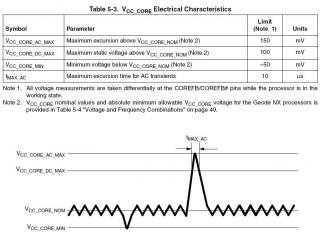
Vcore_max_AC
the maximum voltage spike the CPU can handle. It only can happen in a short time.

Vcore_max_DC
the maximum core voltage that user can set in BIOS. For example, boosting from 1.40V to 1.50V.

Vcore_nom
The default Vcore

The attached image is the voltage waveform found in AMD Geode's specification sheet.
You can clearly see the relation between Vcore_max_AC, Vcore_max_DC and Vcore_nom wink.gif

This post has been edited by charge-n-go: Aug 25 2006, 02:33 PM


Attached thumbnail(s)
Attached Image
TScharge-n-go
post Aug 25 2006, 01:34 PM

Look at all my stars!!
*******
Senior Member
4,060 posts

Joined: Jan 2003
From: Penang / PJ

Alrite, in case you dunno what is mV.
mV = milivolt

1000mV = 1V, so 100mV = 0.1V

From the Geode datasheet, the vcore_dc_max should not exceed 0.1V from default Vcore. That means, if the Vcore is 1.0V, u should only set it to 1.1V max to minimize the risk of sudden breakdown.


SUMMARY OF SAFE O/C

1. Read the specification sheet and obtain the max allowed Vcore. Do not set Vcore beyond the Vcore_max_DC

2. Use good motherboard and PSU to avoid excessive Vcore fluctuation (to avoid voltage spikes beyond Vcore_max_AC)

This post has been edited by charge-n-go: Aug 25 2006, 01:36 PM
TScharge-n-go
post Aug 25 2006, 02:05 PM

Look at all my stars!!
*******
Senior Member
4,060 posts

Joined: Jan 2003
From: Penang / PJ

Safe Voltage range


Intel Core2
Recommended : 0.85V --> 1.3625V
Vcore_max_AC : 0.05V above default Vcore
Absolute rating : 1.55V

Intel Pentium 4 / D (65nm)
Recommended : 1.2V --> 1.3375V
Vcore_max_AC : 0.05V above default Vcore
Absolute rating : 1.55V

Intel Pentium 4 / D (90nm)
Recommended : 1.2V --> 1.425V
Vcore_max_AC : 0.05V above default Vcore
Absolute rating : 1.55V

Intel Pentium 4 (130nm)
Recommended : 1.525V --> 1.60V
Vcore_max_AC : 0.05V above default Vcore
Absolute rating : 1.75V


K8 Family (90nm)
Recommended : 1.00V - 1.45V
Vcore_max_AC : 1.55V
Absolute rating : 1.80V

K8 Family (130nm)
Recommended : 1.20V - 1.55V
Vcore_max_AC : 1.65V
Absolute rating : 2.00V

AthlonXP (130nm)
Recommended : 1.60V - 1.70V
Vcore_max_AC : 1.80V
Absolute rating : 2.15V

AMD Athlon / AthlonXP (180nm)
Recommended : 1.70V - 1.80V
Vcore_max_AC : 1.85V
Absolute rating : 2.25V


* I could not find the voltage range for K8 from amd techdoc site. If somebody know, please update here. The information on K8 safe voltage range might not be true.

This post has been edited by charge-n-go: Aug 25 2006, 07:59 PM
TScharge-n-go
post Aug 25 2006, 02:32 PM

Look at all my stars!!
*******
Senior Member
4,060 posts

Joined: Jan 2003
From: Penang / PJ

QUOTE(shadow_dweller @ Aug 25 2006, 02:12 PM)
hey brother. how's life in Intel dude. nice guide anyway. take care and keep overclocking tongue.gif
*
Life is tough of course. Competition from AMD is too fierce tongue.gif

I am still overclocking, but playing on the safe side, no money to change processor and no PTPTN subsidize already laugh.gif
TScharge-n-go
post Aug 25 2006, 04:14 PM

Look at all my stars!!
*******
Senior Member
4,060 posts

Joined: Jan 2003
From: Penang / PJ

QUOTE(Shah81 @ Aug 25 2006, 02:59 PM)
Yo bro....
A question here.
Does these voltages only applies to stock heatsink ?
I see a lot of users with Core 2 Duo pumping more than 1.55V with high end heatsink and water cooling for 24/7 operation at Xtremesystem and their CPU does not "DIE INSTANTANEOUSLY".
*
Actually I m saying "might cause", because when a CPU is operating at the extreme, some longer duration voltage spikes can cause permanent damage to the CPU. Of course, running at that voltage will reduce the CPU lifespan SIGNIFICANTLY.

As I said before in many threads, voltage is the main killer for CPU instead of heat. Well, as process technology gets finer (eg from 90nm to 65nm and etc), the fine interconnecting wires have higher current density. When you pump in more voltage the electron acceleration from 1 point to another will be higher. When the voltage is too high, wear and tear in the wires will be much higher too. Eventually the wires might break and there is no way to fix it back.

Besides, even if the CPU is still working well after some time, the performance will be going down for sure, bcoz it might not be able to work at the frequency once you are running at.

Another fact about silicon is that, using at the predefined voltage and clock speed usually can last 10 years when the CPU is running at room temperature (27C). Every 1C increment will actually decrease the lifespan by some days (I forgot the exact formula to calculate). Since Intel/AMD is giving 3 years warranty, they must make sure that the CPU wont fail or degrade when operating at 50-60C for 3 years.

Hope this may clear your doubts.


QUOTE
Do the voltages have any relation with temperatures ?

Yes. P = IV.
P = Power consumption. In CPU case, the most of the consumed power converts to heat energy.

This post has been edited by charge-n-go: Aug 25 2006, 04:17 PM
TScharge-n-go
post Aug 25 2006, 08:00 PM

Look at all my stars!!
*******
Senior Member
4,060 posts

Joined: Jan 2003
From: Penang / PJ

Yes. Remember the SNDS, because many guys suddenly got dead Northwoods in a couple of months after pumping beyond 1.75V into the CPU.


Complete updating all the voltage range wink.gif
TScharge-n-go
post Aug 28 2006, 04:08 PM

Look at all my stars!!
*******
Senior Member
4,060 posts

Joined: Jan 2003
From: Penang / PJ

QUOTE(uzairi @ Aug 28 2006, 03:55 PM)
Okay, im using 1.58v for 2.7ghz and 1.66v for 2.8ghz. Both gives the same temp with my watercooling. So is it okay to run it 24/7 with the voltage above where the rated increased voltage which is 1.55v ?
*
As I mentioned, temperature is the secondary killer of proc. The biggest enemy is high Vcore wink.gif

Yes, u might get exactly the same temperature for the whole core, but when vcore increases, only a small portion of the working units in processor core heats up, where it won't affect the overall temperature that much (or no effect at all). However, the working unit becomes the "hotspot" in CPU, where it might go beyond 60C if your overall CPU temp is 40++C.

The 2nd reason is the electrostatic migration effect which I've mentioned in earlier post where high voltage can cause interconnection wires to wear out a lot faster. Well, using high voltage accelerates the electron faster and they hit the inner wall of the wires harder when there's a turning point at the interconnection. We won't know when the wires will wear out and break, so the risk of breakdown is higher when higher vcore is applied.
TScharge-n-go
post Sep 4 2006, 08:58 PM

Look at all my stars!!
*******
Senior Member
4,060 posts

Joined: Jan 2003
From: Penang / PJ

QUOTE(uzairi @ Sep 2 2006, 05:23 PM)
Let's say the core temp is 50c full load. The hottest spot in a proc is the die, so does that mean that's the highest temp the overall processor can go to ?
*
Inside the die, there is alot of stuff, such as ALU, AGU, FPU, Decoders and etc. The hotspot for Pentium 4 is the dual pump ALU as it works at 2x the clock speed. The die may be at 50C, but the hot spot may be at 55C or more. In Core2, the thermal sensor is placed near to the hottest spot inside the CPU, hence thermal throttling is more accurate. However, it still depends on how the binary value is read and intepreted into useful data for consumers --> that means every board might read differently.


QUOTE(remysix @ Sep 4 2006, 04:43 PM)
» Click to show Spoiler - click again to hide... «
Yes, you are right partly tongue.gif
The interconnect wires break down i mentioned is caused by high electron acceleration and then hit the inner wall of interconnect wires. Imagine that the wires are railways and electrons are trains. The faster the train goes, the faster the railway gets wear and tear especially at the turning point wink.gif
Of course, increasing the CPU clock frequency also increases the frequency of electrons passing in the interconnection wires. You can imagine that, frequency increase = more trains on the railway running to bring up performance. So the wear and tear would be higher too.

The hotspot mainly refers to those 'heat generators'. Those heat generators are actually the functional units for binary calculation, instruction scheduler and etc. They are working for us, consuming the electricity power and converts input data --> result + heat. The more power you supply into the CPU and the faster u want it to work, the more heat it will generate. [if we eat more and work harder, we sweat more right? tongue.gif]

note : power = voltage * current, and current increases when CPU frequency inreases

TScharge-n-go
post Sep 4 2006, 09:58 PM

Look at all my stars!!
*******
Senior Member
4,060 posts

Joined: Jan 2003
From: Penang / PJ

If you want CPU to last for 10 years, best is to stick at stock speed and stock Vcore. If u wanna last 3-5 years, don't pump too much vcore to kill it lo. CPU will die eventually, it depends on how long u want it to die.

If you are worried of short lifespan, lower down the vcore to 1.40V and decrease the clock speed. I think 3.0GHz is sufficient since that extra 0.24GHz isn't going to bring you great performance boost, and running 0.24GHz less might be able to detune the vcore from 1.48V to 1.45V or even less.


This post has been edited by charge-n-go: Sep 4 2006, 10:01 PM
TScharge-n-go
post Sep 5 2006, 04:11 PM

Look at all my stars!!
*******
Senior Member
4,060 posts

Joined: Jan 2003
From: Penang / PJ

QUOTE(ikanayam @ Sep 5 2006, 02:30 PM)
to elaborate, power consumed in a clocked chip is proportional to CV²f (simplistic approximation). C is the capacitance, which we will assume is constant for simplicity. V is the voltage and f is the frequency. This formula seems to break down after about the 2.5-3GHz range in current chips, where the power seems to increase exponentially with frequency increases and proportional to V³.
*
muahaha, u r back in action, and u are making things more complicated with that formula (although tat's the correct one tongue.gif)
Well, I read about V^3 too, but dunno the real reason. You know?
Here (u know where tongue.gif), the C memang assumed constant, so basically we are using F*V^2 for a given range of frequency.


QUOTE(dattebayo @ Sep 5 2006, 03:03 PM)
u mean the CPU must kept at 27 centigrade or leave the casing in 27 centgrade?
normally, Northwoord/Prescott P4 can be as high as 70C shocking.gif
*
CPU = 27C. wink.gif


Change to:
| Lo-Fi Version
0.0161sec    0.34    7 queries    GZIP Disabled
Time is now: 6th December 2025 - 05:58 AM