

QUOTE(solstice818 @ Aug 21 2014, 07:43 PM)
Any good suggestion on apps that +60 for phone contacts...tried 2 of play store but doesn't work well

tried this yet? Number FixerXiaomi Mi3 Official Thread V13, MIUI 6 official developer released :)
|
|
 Aug 21 2014, 07:51 PM Aug 21 2014, 07:51 PM
Return to original view | Post
#21
|
 
Senior Member
3,968 posts Joined: Sep 2012  
|
QUOTE(solstice818 @ Aug 21 2014, 07:43 PM) Any good suggestion on apps that +60 for phone contacts...tried 2 of play store but doesn't work well tried this yet? Number Fixer |
|
|
|
|
|
Aug 21 2014, 08:02 PM
Return to original view | Post
#22
|
|
Senior Member
3,968 posts Joined: Sep 2012
|
ps, I've added +6 in front of all my contact numbers since V14. Now on V23.
I just realize sumthing. Not sure if it is MIUI or the 'Message' app's fault. Take +60123456789 as an example. The contact from the sms thread in 'Message' sumtimes will have +60, sumtimes it won't have the +60. When i reboot my phone, contact numbers in 'Message' appear as 123456789. Then i go to settings > app > messaging > end. Then open back the 'Message' app. Now contact numbers in 'Message' app have +60 dy. When it have the +60 aka +60123456789, the recipient can get my sms. When it don't have +60 aka 123456789, recipient can't get my sms. Gonna test a few more days. See if the problem still persist. juz tried again. Reboot, contact numbers in 'Message' app don't have +6. But this time i try clearing task. Then relaunch 'Message' app, now contact numbers in 'Message' app have +6. Tested smsing my fren. They could not get my sms when the contact displaying 123456789. When my contact number in 'Message' app displaying +60123456789, then they can receive my sms. Not sure if it is Maxis or MIuI prob.  This post has been edited by briantwj: Aug 21 2014, 10:00 PM |
|
|
Aug 21 2014, 09:51 PM
Return to original view | Post
#23
|
|
Senior Member
3,968 posts Joined: Sep 2012
|
QUOTE(deadravel @ Aug 21 2014, 09:44 PM) MIUI prob. lel. I added +6 to all my numbers since V18 go playstore dl number fixer. i think previous post got mention and solution about this.  My 'Contact' app all number oso got +6. It's the 'Message' app that is troublesome. When i reboot my phone, the contact numbers after u click into the sms thread all is showing without the +60. So when u sms in the thread, ur fren wont get it. Solution is u nid to go to Settings > Apps > Messaging > End. Then relaunch ur 'Message' app. Then onli contact numbers in ur 'Message' app showing the full number with +60. Then when u sms, ur fren can receive them. I guess it's sumthin wrong with the 'Message' app. Several ppl dy made complain in MIUI forum. Hope they push an update to solve this. It's troublesome to force close app and relaunch. Or send sms from the 'Contact' app instead. |
|
|
Aug 21 2014, 10:11 PM
Return to original view | Post
#24
|
|
Senior Member
3,968 posts Joined: Sep 2012
|
Well, to summarize my prob, I've ady added +6 to all my contacts
country code +6 and 0 do not show up in sms. Which caused sms not able to send to recipient. this actually sums up my problem. Will update here if a solution is found. here is another case sums up my tldr version. lol This post has been edited by briantwj: Aug 21 2014, 10:12 PM |
|
|
Aug 23 2014, 08:26 PM
Return to original view | Post
#25
|
|
Senior Member
3,968 posts Joined: Sep 2012
|
QUOTE(jokeserv @ Aug 23 2014, 03:19 AM) Guys wanna ask is there a way to bypass the miui browser. Right now when I click Google maps link or YouTube link it loads into miui browser. Any help? I uninstalled it. I see in app manager can uninstall the browser. Is it safe to do so? Will I still be able to recover it if I do factory reset? Then use Chrome as default browser. But b4 diz when I haven't uninstall it. I tried both Chrome and stock browser. But I got used to Chrome dy due to my Nexus 7. Bookmarks and history can be sync between both device. Which is gud for me. When I have both browser, when i click on links, it will ask me which browser I wanna use. Did u tick don't ask me again or use this as default browser thingy? If u ticked it and choose stock browser. THen i think it'll use stock browser by default. To change it, go to Settings > Apps > Default app setting > choose Browser and change to Chrome. |
|
|
Aug 24 2014, 12:58 AM
Return to original view | Post
#26
|
|
Senior Member
3,968 posts Joined: Sep 2012
|
QUOTE(UntilUComeBack @ Aug 23 2014, 08:32 PM) err.. sorry if wrong tered. Ori set? If ori set, just send to Service Center here for their trained technician. jus wanna know any place for repair mi3? my friends drop her mi3 and crack. (side part) the worst part is screen cant be use at all. but she can see her phone got whatsapp / wechat bla bla. any idea? sorry for asking.   |
|
|
|
|
|
Aug 24 2014, 12:32 PM
Return to original view | Post
#27
|
|
Senior Member
3,968 posts Joined: Sep 2012
|
QUOTE(UntilUComeBack @ Aug 24 2014, 05:31 AM) yes ori. buy from mi.com/my sure cannot claim warranty. Coz u drop it urself. U'll nid to pay. But for a peace of mind, it is fix by official technician by Xiaomi. Quality shud b better than sending to 3rd party phone shop. sure can send? izzit claim waranty or not?  |
|
|
Aug 24 2014, 06:36 PM
Return to original view | Post
#28
|
|
Senior Member
3,968 posts Joined: Sep 2012
|
QUOTE(cutepet @ Aug 24 2014, 06:31 PM) Can Samsung earphone use on Xiaomi mi3 ? Because I know Mi3 does not include earphone in its box. What Mi3 package include if my Xiomi Malaysia ? (online). Does it include USB cable ? QUOTE(Echo^fish @ Aug 24 2014, 06:34 PM) really, its doesnt include the earphone? just phone and the charger itself? no wonder they sell the piston Any earphone can be used on Mi3. Yup, no earphone in box. Cut cost ma. des wai so cheap RM769...if add the Piston then bcum 800+ dy. Inside d box got usb cable, power plug, warranty card, sim ejector. |
|
|
Aug 24 2014, 07:07 PM
Return to original view | Post
#29
|
|
Senior Member
3,968 posts Joined: Sep 2012
|
QUOTE(kadajawi @ Aug 24 2014, 06:54 PM) USB cable, 1A charger (I think the phone can charge with 1.5 or 2A) and a bit of cardboard. The box is pretty though.  Looks posh. Looks posh.As long as the earphones have a standard 3.5mm plug that's fine. Box got sim ejector? Where? Oh and if you really want to protect your Mi3, search for Love Mei for the Mi3. That case seems rather solid. » Click to show Spoiler - click again to hide... « the middle picture. See the shiny silver thingy? This post has been edited by briantwj: Aug 24 2014, 07:07 PM |
|
|
Aug 24 2014, 10:02 PM
Return to original view | Post
#30
|
|
Senior Member
3,968 posts Joined: Sep 2012
|
QUOTE(cutepet @ Aug 24 2014, 09:46 PM) U guys use any screen protector for MI3 ? I use the screen protector sold by them on their website. Anti glare mia. Temper glass ? Is it necessary ? Because Mi3 already got corning gorilla glass 3 protect... Btw, any mi3 user pairing their mi3 with G Watch or Galaxy Gear? Or any other smartwatch.  |
|
|
Aug 26 2014, 01:35 AM
Return to original view | Post
#31
|
|
Senior Member
3,968 posts Joined: Sep 2012
|
QUOTE(andrekua2 @ Aug 25 2014, 09:19 PM) Today I dropped my Mi3 from car roof height and it survived. One really bad chip at the back top left, and some smaller chips here and there on the back cover. Really not bad... dropped mi3 at car roof height and it survived. On a sidenote, my bro's wife dropped hers and didnt fare well. Shattered screen...  what casing u using bro? care to share? I oso mau. I using aluminium bumper ni now, so the phone will look nice. But I'm also looking for a tough casing. |
|
|
Sep 2 2014, 01:47 AM
Return to original view | Post
#32
|
|
Senior Member
3,968 posts Joined: Sep 2012
|
credits to IwanAGP! Now I got a gud looking mi3 siggy, not like the previous ugly 1 dat was done by myself.
|
|
|
Sep 2 2014, 12:36 PM
Return to original view | Post
#33
|
|
Senior Member
3,968 posts Joined: Sep 2012
|
QUOTE(jack2 @ Sep 2 2014, 12:32 PM) I follow your setting but when I close my flip, wont off also la. I tried Gravity Screen before. U will have to close your flip case AND tilt ur phone downwards. Then only the screen will off. Tilt ur phone downwards as in 60%, the pocket sensor thingy's measurement. Just terbalik ur phone upside down + flip ur case. THen only it will screen off.This post has been edited by briantwj: Sep 2 2014, 12:37 PM |
|
|
|
|
|
Sep 2 2014, 12:48 PM
Return to original view | Post
#34
|
|
Senior Member
3,968 posts Joined: Sep 2012
|
QUOTE(jack2 @ Sep 2 2014, 12:42 PM) ya. this one I know... need to terbalik to face down the phone... then will hear the "cha.." off screen sound. I tried with changing the setting to 0 degree. But it does not work. So I think cannot. Which is why i uninstall it riao. so there is no chance to off the screen just to close the flip? Nid to wait other sifus who using the app to ans u. |
|
|
Sep 2 2014, 01:07 PM
Return to original view | Post
#35
|
|
Senior Member
3,968 posts Joined: Sep 2012
|
QUOTE(WaCKy-Angel @ Sep 2 2014, 12:49 PM) Hmm i dont want to auto off when put on table so i didnt on it. I've just install back and follow ur settings. Now it works flawlessly. I think before this I didn't tick 'any direction' in the Pocket Sensor section. After ticking that. My phone screen will auto lock after closing my flip case. Thanks for ur settings sharing! U should enable Lying Face Up. I tested working perfectly.. put on table after 1.5secs screen off already. And i dont use flip casing.. What i do is just put my thumb on the sensor and it will auto wakeup. U can try whether works or not. So if i put my phone on table and want it lock it, i just put my thumb on the proximity and it will lock (but still showing locked screen) then after 1.5sec then only it will totally off screen.  |
|
|
Sep 2 2014, 01:08 PM
Return to original view | Post
#36
|
|
Senior Member
3,968 posts Joined: Sep 2012
|
QUOTE(jack2 @ Sep 2 2014, 01:06 PM) I tried your method... the phone can't lock or off even I put thumb to close the proximity sensor... After putting ur thumbs on the proximity sensor, u nid to have slight motion, just move ur phone a little. THen it'll lock screen. Anyway to adjust it?  |
|
|
Sep 2 2014, 01:14 PM
Return to original view | Post
#37
|
|
Senior Member
3,968 posts Joined: Sep 2012
|
QUOTE(WaCKy-Angel @ Sep 2 2014, 01:10 PM) How long u put ur thumb? IINM need atleast 1.5seconds only it will activate. Yea. Just play with it again. I cover my thumb on the proximity sensor, wait for 1.5seconds without movement. Then it can lock/unlock dy. Seems like it's just me. Can u show ur Notification screen? If the app is running, it should have a Notification bar there.. Something like this. CODE Gravity Screen Click to PAUSE No need one.. QUOTE(jack2 @ Sep 2 2014, 01:11 PM) Ya... works but not little motion. Need at least 20% movement. Try again? I just tried again. Covering the proximity sensor and wait for 1.5 second without any movement. It works!  |
|
|
Sep 2 2014, 07:03 PM
Return to original view | Post
#38
|
|
Senior Member
3,968 posts Joined: Sep 2012
|
QUOTE(slaughterer @ Sep 2 2014, 06:31 PM) 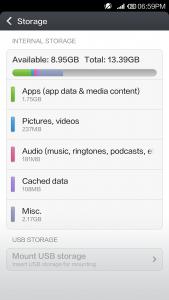
And also my screen shot is 1080 x 1920, which is the Mi3's resolution. But ur screenshot is 720 x 1280. Did u resize ur image? Or was it raw? as in u screen shot then straight away upload? try to update to latest firmware and c. This post has been edited by briantwj: Sep 2 2014, 07:08 PM |
|
|
Sep 2 2014, 07:32 PM
Return to original view | Post
#39
|
|
Senior Member
3,968 posts Joined: Sep 2012
|
QUOTE(slaughterer @ Sep 2 2014, 07:26 PM) I just use the phone screenshot..not editing at all.. hmm...based on the d MIUI version naming, urs seem to be China set. Not sure how the 64gb suppose to have the sd card as in additional memory or not. Maybe some other forummer using the 64gb version can verify for u that urs is genuine. |
|
|
Sep 2 2014, 09:33 PM
Return to original view | Post
#40
|
|
Senior Member
3,968 posts Joined: Sep 2012
|
If u bought from phone shop in LYP, pls do state the shop's name and highlight it. So that ppl will not get conned by the same shop and salesman again!
 |
|
Topic ClosedOptions
|
| Change to: |  0.0240sec 0.0240sec
 0.45 0.45
 7 queries 7 queries
 GZIP Disabled GZIP Disabled
Time is now: 12th December 2025 - 02:01 PM |
 Quote
Quote
