Welcome Guest ( Log In | Register )

140 Pages  1 2 3 > » Bottom

Outline · [ Standard ] · Linear+

 #Samsung Galaxy S4# Official Thread V9, Lolipop firmware Preview Video! Post #1

views
     
TSwajahebat
post Aug 7 2014, 09:50 PM, updated 11y ago

BoomBaDaBoom
******
Senior Member
1,951 posts

Joined: May 2009
From: In Your Underwear


=========================================================================
Samsung Galaxy S4 Official Thread Version Nine
------------------------------------------------------------------------------------------------------------------------------------
user posted image
=========================================================================
** EXCLUSIVE SECTION **

Lolipop Firmware Second Preview ** Samsung Galaxy S4!!

=========================================================================
Thread Index

Post #1 : Introduction
Post #2 : General Overview - Specification - Unboxing Review
Post #3 : Knox & Rooting Explanation
Post #4 : Advanced Rooting & CWM Recovery Guide


=========================================================================

Thread rules Click Spoiler Below
» Click to show Spoiler - click again to hide... «

=========================================================================

Previous thread versions Click Spoiler Below
An easy access to previous threads !

» Click to show Spoiler - click again to hide... «

===========================================================================
*


This post has been edited by wajahebat: Nov 21 2014, 11:17 AM
TSwajahebat
post Aug 7 2014, 09:53 PM

BoomBaDaBoom
******
Senior Member
1,951 posts

Joined: May 2009
From: In Your Underwear


=========================================================================
General overview
------------------------------------------------------------------------------------------------------------------------------------
Overviews and conclusions from various popular websites !

QUOTE
     "The Samsung Galaxy S4 is an Android smartphone produced by Samsung Electronics. First unveiled on March 13, 2013 at Samsung Mobile Unpacked in New York City, it is a successor to the Galaxy S III which maintains a similar design, but with upgraded hardware and an increased focus on software features that take advantage of its hardware capabilities—such as the ability to detect when a finger is hovered over the screen, and expanded eye tracking functionality (which includes scrolling). A hardware variant of the S4 also became the first ever smartphone to support the emerging LTE Advanced mobile network standard.

     The S4 was made available in late April 2013 on 327 carriers in 155 countries. Upon its release, it became the fastest selling smartphone in Samsung's history; the company sold 20 million S4 units worldwide in the two months following the device's launch. Samsung has since sold more than 40 million units."

-Wikipedia


QUOTE
"The Galaxy S4 is a stunning smartphone that won't let you down for a variety of tasks. It's not as good overall as the HTC One, especially when you factor in the design, but we love the S4 and would be proud to have it in our pocket."

-Techradar


QUOTE
"Samsung didn't exactly catch us by surprise with the Galaxy S4. Pretty much all the hardware improvements like the faster processor, better camera, and 5” 1080p screen were expected. Samsung simply had to have those in the Galaxy S4 if it wanted its product to be relevant in 2013. However, it's the flawless implementation of all the features that makes the Galaxy S4 the superb smartphone that it is. Design-wise, the latest Samsung flagship is nothing special. It looks OK and is comfortable to hold. We're more than happy to see that Samsung has managed to make the smartphone even smaller than the GS III, which is a remarkable achievement, considering the bigger screen."

-PhoneArena


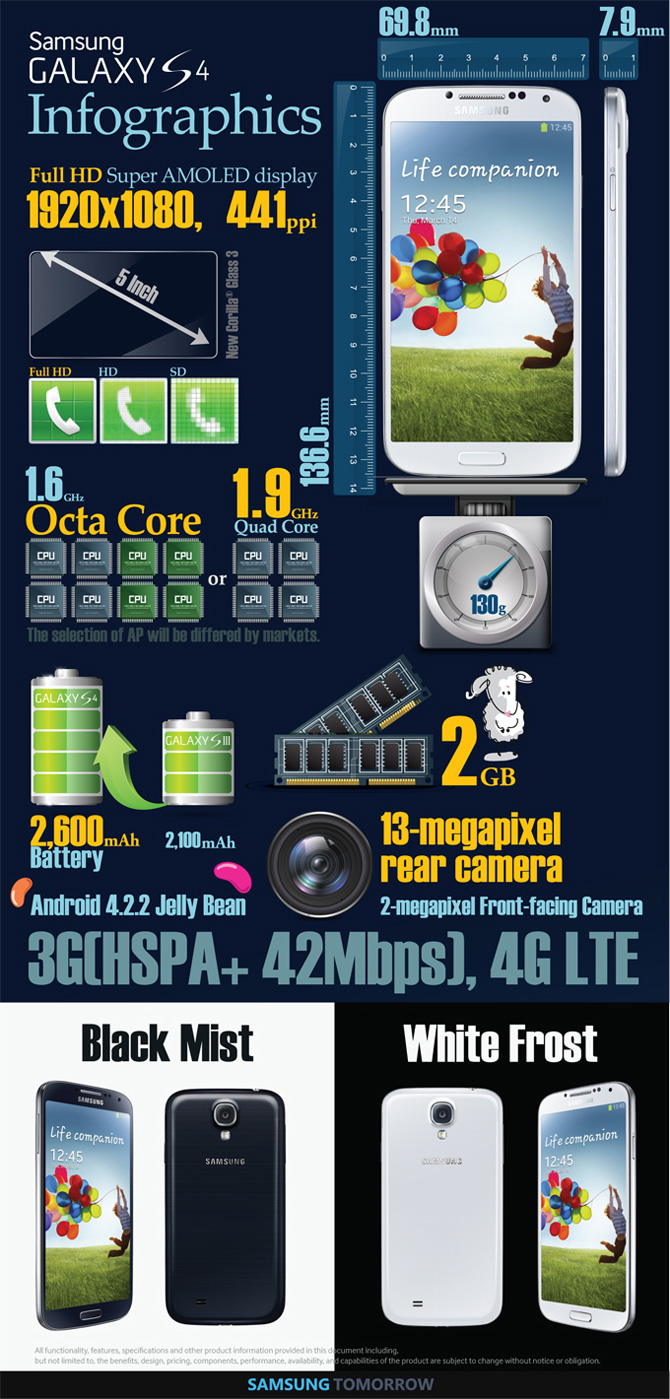
Specifications
------------------------------------------------------------------------------------------------------------------------------------
Wonder what's under the hood of your little monster ?

user posted image

Lets unboxing !!
------------------------------------------------------------------------------------------------------------------------------------
Bought your device ? What else ! Lets get unboxing now !!!!

user posted image

Video Unboxing Reviews Click Spoiler
» Click to show Spoiler - click again to hide... «

------------------------------------------------------------------------------------------------------------------------------------

Lazy to read ? Here you go !
------------------------------------------------------------------------------------------------------------------------------------
user posted image
=========================================================================
*


This post has been edited by wajahebat: Oct 16 2014, 01:18 PM
TSwajahebat
post Aug 7 2014, 09:59 PM

BoomBaDaBoom
******
Senior Member
1,951 posts

Joined: May 2009
From: In Your Underwear


What is KNOX ?
------------------------------------------------------------------------------------------------------------------------------------
WHAT IS THIS KNOX THAT PEOPLE ARE FUSSING ABOUT !?!?!!?!
Knox technical
Samsung Knox white paper
More on KNOX warranty void
» Click to show Spoiler - click again to hide... «

How to check KNOX's counter ?
------------------------------------------------------------------------------------------------------------------------------------
Want to know how many times have you triggered your KNOX ?

» Click to show Spoiler - click again to hide... «

------------------------------------------------------------------------------------------------------------------------------------
ROOTING INFO & FAQ

What is ROOT ??
Rooting is a fun, well-known techniques among Android users to exploit the system of their machine for more customization on all aspects. Its just like getting an Administrator Privilege inside your Windows, so that you can do whatever you want without restriction from system. Without Root permission, you as user is just a Guest to the system. As simple as it gets.

QUOTE
FAQ:

1.)Q:Does root valid warranty?
    A:Practically Yes, as rooting in i9500 will trigger the knox counter, but different story with Qualcomm variants i9505/G/i9506 as Qualcomm makes their source open to public, there is a workaround to root those devices without tripping the Knox, continue below to see links
  
2.)Q:After root, will there be any changes at the phone?
    A:None, your data will retain as before root, no such byte will be deleted, just that you have root access!

4.)Q:Root will brick my phone?
    A:Totally no, i never heard someone's phone gets bricked after root.
     
Links for Noob --Non-noob PROCEED TO NEXT POST

i9505 : https://towelroot.com/ (Towelroot method, Knox will not be triggered)
i9500 : http://forum.xda-developers.com/showthread.php?t=2292615 (Standard CF-Autoroot, will trigger knox)
There is still no workaround for Exynos variants to root without tripping knox yet

** DISCLAIMER **
-Please use Towelroo method if you are unsure or not ready to troubleshoot with steps below to root+cwm

This post has been edited by wajahebat: Nov 11 2014, 01:51 PM
TSwajahebat
post Aug 7 2014, 10:08 PM

BoomBaDaBoom
******
Senior Member
1,951 posts

Joined: May 2009
From: In Your Underwear


ROOT + Recovery CWM [HOW-TO-i9500//i9505]
-- To remind you guys, this method will trigger knox, dont bother to try this if you soo sayang your knox --
-- Applicable and tested on Kitkat firmware only --
-- Below steps flow generally like this : Inject CWM Recovery --> Root --
-- I try to make it as understandable as i can, please quote me on any question in mind --
-- In this method im using CWM Philz Touch Recovery, the most advanced available --

Download All Files Below First
Odin v3.09 :Download
Knox Removal Script :Download
i9500 CWM Recovery :Download
i9505 CWM Recovery :Download

Initial Steps : Installing CWM Recovery
1) Extract Odin3_v3.09.rar, Open the Odin folder, Right-Click on Odin3-v3.09.exe and choose Run As Administrator
2) In Odin, at Files section, Click on AP/PDA and File Browser windows will came out, point to the Recovery File you downloaded earlier whether i9500/i9505 depends on your phone model
3) Once you've chosen the required files click Open, now leave Odin for a while
4) Take your Phone, Turn it OFF, then Turn it ON with these Button Combo [Power+VolDown+Home] to enter Download Mode
5) Once in Download Mode, just ignore the warning and hit Volume Up button to Continue
6) In Download Mode, once you see Android Logo with Downloading words at the bottom, Connect your phone to your PC, recommended to use Original Cable
7) Once phone connected to PC, check in Odin make sure it identifies your Device (Color Popup on ID:COM)
8) At Option area in ODIN, make sure only Auto Reboot & F.Reset Time is CHECKED, others is unchecked. At Files[Download] area, only AP/PDA is checked, others is unchecked
9) Hit START! Let it be, once finished, your phone will automatically Reboot and in ODIN will show success word, if not then something wrong. Now your phone will have CWM recovery

To Enter Recovery :
Turn off phone, Turn it back on with pressing VolumeUP + Power + Home button until Samsung Logo screen appears, Release Power Button only while Keep pressing VolumeUP+Home until you enter recovery

Next Steps : ROOTING -- Before proceeding installing Knox Remover script, you can always perform Backup first, and recommended, you have been warned --
1) Once your phone Turned On after installing Recovery earlier in these steps, connect your phone to PC
2) Copy file DE-SAMSUNGNIZER_KNOX_REMOVAL_SCRIPT_V2.1.zip to your externalSD or InternalSDcard
3) Once copied, Turn OFF your phone, Turn ON again with these Button Combo [Power+VolUp+Home], Release Power Button only once your phone Vibrate but still keep pressing VolUP+Home until you enter Recovery
4) Once you entered CWM Recovery Mode, click on Install Zip and choose SDcard1 if you copied De-Samsungnizer file earlier in externalSD, choose SDcard if you copied to internalSD.
5) Once the file found, just proceed to Flash
6) Once done flashing, go back to Main Menu
7) Click on Advanced Philz Options / Choose Re-root system / Choose Yes Apply (SuperSu)
8) Wait until it finishes, once done just Reboot your phone and check if SuperSU is installed, if not just install manually from Play Store
9) When first time opening SuperSU, sometimes it will ask you to update Binaries with Two Options, just choose the NORMAL METHOD and ignore the TWRP/CWM Method

SIDENOTES --Afer Root

- Thanks to fkinmeng, i almost forgot. For i9505 users, after installing CWM Recovery, every eachtime when you want to enter recovery you will see (During Boot) three lines at your top left screen and one of them mention " RECOVERY IS NOT SEANDROID ENFORCING ", just ignore the warning.

- And if in case you cant enter Recovery after installing CWM Recovery, its not the case where your Recovery is not installed or failed but you just dont get to press the right button combination at the right timing. As long as Odin mentioned your flash is successful, means CWM Recovery is there, unless it stated Failed.

For Noobs Who Feels like The Above Guide is a hell of a story
» Click to show Spoiler - click again to hide... «


This post has been edited by wajahebat: Nov 11 2014, 12:04 PM

TSwajahebat
post Aug 7 2014, 10:09 PM

BoomBaDaBoom
******
Senior Member
1,951 posts

Joined: May 2009
From: In Your Underwear


An army of S4 users !!

Self Service Form Here!!!

You can now input your details in the self service form !!!

Please input your LYN username, SME/AP, Model, Capacity and Color, and any optional information you wish, and hit "Submit" on the form. -Credits to Mr Joytest

CLICK HERE for Owners' SUBMISSION FORM
User List

------------------------------------------------------------------------------------------------------------------------------------

This post has been edited by wajahebat: Oct 17 2014, 03:44 PM
DM3
post Aug 7 2014, 10:25 PM

INSPIRATOR
*******
Senior Member
6,619 posts

Joined: Jun 2009
wow so much info here, nice one
DM3
post Aug 7 2014, 10:25 PM

INSPIRATOR
*******
Senior Member
6,619 posts

Joined: Jun 2009
double post

This post has been edited by DM3: Aug 7 2014, 10:25 PM
yadea
post Aug 7 2014, 10:32 PM

Getting Started
**
Junior Member
127 posts

Joined: Aug 2010


Congrats on new thread rclxms.gif
Just wanna share some info. I just bought a new battery from Hulala, a groupon like site. This is the 2nd purchase I have made and will boycott this website from now on. First time they sold a "phillips" powerbank claim its 20k mah but its lighter than my S1. Charged my S1 2 times and its dead. Returned it and went thru all the trouble as well as threatening to report to consumers association before they agreed to refund me not via giving me onsite credits.
PS: Phillips doesn't even sell such powerbank. Its china one with the word phillips printed on it and came with 32gb fake 32gb kingston pendrive and fake 64gb kingston micro sd.

This time they sold s4 battery and put there 100% original. According to them last time if its original, they will put a stamp on the picture to say its original. This battery comes with NFC(unlike the previous one I bought from shop which looks authentic as well as having the seals to say dont buy if seal is broken and hologram sticker saying samsung original. Bought using book voucher so I dont care about changing it) and battery lasts but according to Battery Monitor, it cant charge at 2A speed mad.gif . I do use NFC as I have NFC stickers ready for writing.

user posted image
Package came as such. No Blue samsung sticker on it.

user posted image
Nova battery tester stats. See 2nd from bottom for results.

Apart from advising people not to patronize this party, I am asking for opinion. What would you people do in situations like this? Thanks.
ahodil
post Aug 7 2014, 10:34 PM

Forgive and Forget
******
Senior Member
1,939 posts

Joined: May 2013
From: Malaysia


Congratularions to new TS
TSwajahebat
post Aug 7 2014, 10:35 PM

BoomBaDaBoom
******
Senior Member
1,951 posts

Joined: May 2009
From: In Your Underwear


QUOTE(yadea @ Aug 7 2014, 10:32 PM)
Congrats on new thread  rclxms.gif
Just wanna share some info. I just bought a new battery from Hulala, a groupon like site. This is the 2nd purchase I have made and will boycott this website from now on. First time they sold a "phillips" powerbank claim its 20k mah but its lighter than my S1. Charged my S1 2 times and its dead. Returned it and went thru all the trouble as well as threatening to report to consumers association before they agreed to refund me not via giving me onsite credits.
PS: Phillips doesn't even sell such powerbank. Its china one with the word phillips printed on it and came with 32gb fake 32gb kingston pendrive and fake 64gb kingston micro sd.

This time they sold s4 battery and put there 100% original. According to them last time if its original, they will put a stamp on the picture to say its original. This battery comes with NFC(unlike the previous one I bought from shop which looks authentic as well as having the seals to say dont buy if seal is broken and hologram sticker saying samsung original. Bought using book voucher so I dont care about changing it) and battery lasts but according to Battery Monitor, it cant charge at 2A speed mad.gif . I do use NFC as I have NFC stickers ready for writing.

» Click to show Spoiler - click again to hide... «

Apart from advising people not to patronize this party, I am asking for opinion. What would you people do in situations like this? Thanks.
*
From the looks of the packaging itself, can know whether it is a legit product or not. Damn sites, should get them banned of the face of the earth already.

Pity you bro, better to buy in Lelong.my or here in Lowyat garage sales itself
kentchow75
post Aug 8 2014, 12:05 AM

Best Biz Card Printing Service
******
Senior Member
1,353 posts

Joined: May 2011
From: - -

QUOTE(yadea @ Aug 7 2014, 10:32 PM)
Congrats on new thread  rclxms.gif
Just wanna share some info. I just bought a new battery from Hulala, a groupon like site. This is the 2nd purchase I have made and will boycott this website from now on. First time they sold a "phillips" powerbank claim its 20k mah but its lighter than my S1. Charged my S1 2 times and its dead. Returned it and went thru all the trouble as well as threatening to report to consumers association before they agreed to refund me not via giving me onsite credits.
PS: Phillips doesn't even sell such powerbank. Its china one with the word phillips printed on it and came with 32gb fake 32gb kingston pendrive and fake 64gb kingston micro sd.

This time they sold s4 battery and put there 100% original. According to them last time if its original, they will put a stamp on the picture to say its original. This battery comes with NFC(unlike the previous one I bought from shop which looks authentic as well as having the seals to say dont buy if seal is broken and hologram sticker saying samsung original. Bought using book voucher so I dont care about changing it) and battery lasts but according to Battery Monitor, it cant charge at 2A speed mad.gif . I do use NFC as I have NFC stickers ready for writing.

user posted image
Package came as such. No Blue samsung sticker on it.

user posted image
Nova battery tester stats. See 2nd from bottom for results.

Apart from advising people not to patronize this party, I am asking for opinion. What would you people do in situations like this? Thanks.
*
Feel sorry for you but no, the site's not gonna be responsible much for this.
Their main purpose was to make money from the beginning of time, they are much like those Facebook advertiser calling their item authentic real item while they actually got it from pasar malam.

I'll definitely not buy from them after being cheated once.

Clan204
post Aug 8 2014, 01:01 AM

Getting Started
**
Junior Member
234 posts

Joined: Jan 2003
From: Somewhere in the backbone...

sent my s4 for home button warranty claim, and sc change the lcd, home button and charging board. all under 60 minutes at terminal 1 seremban sc. only they cant do anything with my tempered glass.

now my s4 just like new
yadea
post Aug 8 2014, 02:00 AM

Getting Started
**
Junior Member
127 posts

Joined: Aug 2010


QUOTE(wajahebat @ Aug 7 2014, 10:35 PM)
From the looks of the packaging itself, can know whether it is a legit product or not. Damn sites, should get them banned of the face of the earth already.

Pity you bro, better to buy in Lelong.my or here in Lowyat garage sales itself
*
Actually I don't quite trust lelong sellers either. I have better trust towards LYN sellers as I know they put more effort not to bluff as their reputation can be ruined very easily. I only buy china electronic products(eg: car lights) and certain very cheap off lelong as I know anything can settle exchange from seller. Bought a RM1 "perfume" powerbank off lelong. Battery was crap as it could only charge my s4 from about 4%-30% then died and when it died theres like some electric sound. After claiming refund from seller, I swapped the battery out to a samsung battery and it could charge from about 4% -8x% before dying. Now its quite handy for me.
nokia6280
post Aug 8 2014, 09:48 AM

Look at all my stars!!
*******
Senior Member
5,705 posts

Joined: Sep 2011


QUOTE(Clan204 @ Aug 8 2014, 01:01 AM)
sent my s4 for home button warranty claim, and sc change the lcd, home button and charging board. all under 60 minutes at terminal 1 seremban sc. only they cant do anything with my tempered glass.

now my s4 just like new
*
Finally!!!! new Thread.. thanks bro wajahebat... thumbup.gif rclxms.gif


ya.. forgot to mention... changing home button will change the entire mobo...

now you have a whole new phone... rclxms.gif icon_idea.gif

This post has been edited by nokia6280: Aug 8 2014, 09:50 AM
CR35G
post Aug 8 2014, 11:11 AM

Getting Started
**
Junior Member
228 posts

Joined: Mar 2008
Hi All, I'm using i9505, I having a problem recently. I'm currently overseas, and my family try to call me but my phone never ring. (Of course in Roaming). I tried to call back, it's ok. Just they call me, I their side the tone is ringing but my phone never. I wonder it's phone problem or network? Any solution? Tq
TSwajahebat
post Aug 8 2014, 11:13 AM

BoomBaDaBoom
******
Senior Member
1,951 posts

Joined: May 2009
From: In Your Underwear


QUOTE(yadea @ Aug 8 2014, 02:00 AM)
Actually I don't quite trust lelong sellers either. I have better trust towards LYN sellers as I know they put more effort not to bluff as their reputation can be ruined very easily. I only buy china electronic products(eg: car lights) and certain very cheap off lelong as I know anything can settle exchange from seller. Bought a RM1 "perfume" powerbank off lelong. Battery was crap as it could only charge my s4 from about 4%-30% then died and when it died theres like some electric sound. After claiming refund from seller, I swapped the battery out to a samsung battery and it could charge from about 4% -8x% before dying. Now its quite handy for me.
*
Well that depends. Im not sure about others. My method of buying things online is, I will check the background of the seller first, just use google. Google their nickname/phone number/ID/bank accounts, if they have been flagged before, google will find it.

Everytime before making any purchase, I'll do that steps first. Until now i've been dealing a lot in Lelong.my and Garage Sales itself. Good luck is still on my side
TSwajahebat
post Aug 8 2014, 11:14 AM

BoomBaDaBoom
******
Senior Member
1,951 posts

Joined: May 2009
From: In Your Underwear


QUOTE(CR35G @ Aug 8 2014, 11:11 AM)
Hi All, I'm using i9505, I having a problem recently. I'm currently overseas, and my family try to call me but my phone never ring. (Of course in Roaming). I tried to call back, it's ok. Just they call me, I their side the tone is ringing but my phone never. I wonder it's phone problem or network? Any solution? Tq
*
Your never ring, and not even an incoming call screen came out?
CR35G
post Aug 8 2014, 11:19 AM

Getting Started
**
Junior Member
228 posts

Joined: Mar 2008
QUOTE(wajahebat @ Aug 8 2014, 11:14 AM)
Your never ring, and not even an incoming call screen came out?
*
Exactly
TSwajahebat
post Aug 8 2014, 11:33 AM

BoomBaDaBoom
******
Senior Member
1,951 posts

Joined: May 2009
From: In Your Underwear


QUOTE(CR35G @ Aug 8 2014, 11:19 AM)
Exactly
*
Can't really say phone problem. Sometimes roaming is suxs, i have this issue where i call my sister in UK, it rings on my side but my sister in UK did'nt receive any incoming call. Its roaming problem
CR35G
post Aug 8 2014, 11:47 AM

Getting Started
**
Junior Member
228 posts

Joined: Mar 2008
QUOTE(wajahebat @ Aug 8 2014, 11:33 AM)
Can't really say phone problem. Sometimes roaming is suxs, i have this issue where i call my sister in UK, it rings on my side but my sister in UK did'nt receive any incoming call. Its roaming problem
*
Good to hear that. At least i know you have the same issue b4, and it's not my phone problem. biggrin.gif

140 Pages  1 2 3 > » Top
 

Change to:
| Lo-Fi Version
0.0352sec    0.55    6 queries    GZIP Disabled
Time is now: 12th December 2025 - 03:34 AM