Here is the link, I help my friend to ask only.
http://forum.xda-developers.com/showpost.p...03&postcount=40
Thanks sifu and guru and huawei users !

Huawei Honor 3C/3C Lite | Official Thread v5, 3C 2GB RAM / 3C Lite 1GB RAM
|
|
 Aug 6 2014, 10:16 PM Aug 6 2014, 10:16 PM
Return to original view | Post
#1
|
 
Senior Member
2,706 posts Joined: Feb 2013 From: Tech / Sports  
|
Hi guys ! My friend recently faced a problem. I have stated my problem here, hope that someone ( huawei user ) can help my friend. I can't help her because I'm not a huawei user, and not familiar to it.
Here is the link, I help my friend to ask only. http://forum.xda-developers.com/showpost.p...03&postcount=40 Thanks sifu and guru and huawei users ! |
|
|
|
|
|
Aug 7 2014, 04:47 PM
Return to original view | Post
#2
|
|
Senior Member
2,706 posts Joined: Feb 2013 From: Tech / Sports
|
QUOTE(SummerWind @ Aug 7 2014, 12:53 AM) She has three options: Thanks bro ! I'll send this to her and let her do herself. #1) Proceed with KitKat & use Live Recovery to apply modem fix, but can't use upgrade further unless she unlock it. #2) Use SPFT to revert back B108 4.2, then use OTA to update to latest B113. #3) Revert to B115 4.2 using UPDATE.APP (Ahead of Malaysia OTA B113) Guide for all options can be found HERE, option #2 is recommended for normal user. Only MY set will lose IMEI, AP set can upgrade without any problem.   But I have a question, the xda thread guide didn't mention the step, so I'm not sure whether she need to do this or not. So please guide me if I'm wrong, because I am a root user while she is not, so you guide me, I guide her. 1) boot into recovery mod 2) plug in her phone to computer 3) and then do all the steps mentioned in the xda ( Restore official stock rom using SPFT ) 4) boot the phone back 5) enjoy *the bold one I'm not sure need to boot into recover or not. Because for my s3 mini, I have to boot into recovery mode then only can flash it. Once again, thanks. This post has been edited by limyuyang: Aug 7 2014, 04:48 PM |
|
|
Aug 7 2014, 05:13 PM
Return to original view | Post
#3
|
|
Senior Member
2,706 posts Joined: Feb 2013 From: Tech / Sports
|
QUOTE(SummerWind @ Aug 7 2014, 06:04 PM) Perhaps the one done with computer will be too complicated to her either, let's try the easiest method #3. Indeed using method number 2 is harder for her. 1) Download B115 HERE. (684 MB) 2) Extract the downloaded zip, inside got /dload/UPDATE.APP, copy whole dload folder to to dir of SDCard. 3) Power off the phone, start by pressing & holding down ALL three side buttons. 4) Wait until flashing complete, done. * Note that everything will be deleted during the downgrade process. So you mean at 3rd step, the phone will automatically flash itself and reboot itself ? Am I right ? This post has been edited by limyuyang: Aug 7 2014, 05:14 PM |
|
|
Aug 7 2014, 05:37 PM
Return to original view | Post
#4
|
|
Senior Member
2,706 posts Joined: Feb 2013 From: Tech / Sports
|
QUOTE(SummerWind @ Aug 7 2014, 06:16 PM) Yes, correct, the only drawback is that this version is ahead of Malaysia latest OTA, but nothing bad about that IMHO. Thanks  But.... After flashing that, my friend can't receive OTA updates anymore ?  This post has been edited by limyuyang: Aug 7 2014, 05:37 PM |
|
|
Aug 7 2014, 06:19 PM
Return to original view | Post
#5
|
|
Senior Member
2,706 posts Joined: Feb 2013 From: Tech / Sports
|
QUOTE(SummerWind @ Aug 7 2014, 07:03 PM) You misunderstood. She can still receives OTA as long as the version pushed is never than B115. Ok thanks. You're really helpful. You cleared all my doubts, and I bet my friend is looking at us as well. ( because I gave her the link and ask her to learn herself )  Thanks for your help. Appreciate it. |
|
|
Aug 8 2014, 06:50 AM
Return to original view | Post
#6
|
|
Senior Member
2,706 posts Joined: Feb 2013 From: Tech / Sports
|
QUOTE(SummerWind @ Aug 7 2014, 06:04 PM) Perhaps the one done with computer will be too complicated to her either, let's try the easiest method #3. Bro, my friend did this yesterday and now she cannot turn her phone on. She told me the flashing shows a success, but it can't be turned on. 1) Download B115 HERE. (684 MB) 2) Extract the downloaded zip, inside got /dload/UPDATE.APP, copy whole dload folder to to dir of SDCard. 3) Power off the phone, start by pressing & holding down ALL three side buttons. 4) Wait until flashing complete, done. * Note that everything will be deleted during the downgrade process. Is there any special button combos to boot it up ? |
|
|
|
|
|
Aug 8 2014, 04:42 PM
Return to original view | Post
#7
|
|
Senior Member
2,706 posts Joined: Feb 2013 From: Tech / Sports
|
QUOTE(SummerWind @ Aug 8 2014, 04:24 PM) What situation? The phone should auto restart and boot to system once the upgrade process completed. Okay, not bootloop, it's black screen and vibrate. So should she follow method 2?Check what she mean by 'can't be turned on'? bootloop @ logo or just black screen & vibrates? Like sitescope said, take out the battery & retry, if still can't then no choice have to use the method #2. |
|
|
Aug 8 2014, 05:37 PM
Return to original view | Post
#8
|
|
Senior Member
2,706 posts Joined: Feb 2013 From: Tech / Sports
|
QUOTE(SummerWind @ Aug 8 2014, 05:52 PM) Yes My friend is not having a hard brick right? Its just a soft brick isn't? Okay, never mind , I have read the flashing official stock ROM using SPFT method, and it was normal steps for me but not for my friend, so I guess I'll take her phone back to my home and I'll help her to flash it. BTW, what do I need for the 2nd method? 1- SPFT 2- USB CABLE 3- B108 ROM 4- COMPUTER Anything I missed? I have a question as well, the XDA guide says we have to take the battery off and connect the phone to computer, is this true? This post has been edited by limyuyang: Aug 8 2014, 05:54 PM |
|
|
Aug 8 2014, 05:53 PM
Return to original view | Post
#9
|
|
Senior Member
2,706 posts Joined: Feb 2013 From: Tech / Sports
|
Sorry, double post.
This post has been edited by limyuyang: Aug 8 2014, 05:55 PM |
|
|
Aug 8 2014, 06:41 PM
Return to original view | Post
#10
|
|
Senior Member
2,706 posts Joined: Feb 2013 From: Tech / Sports
|
QUOTE(SummerWind @ Aug 8 2014, 07:38 PM) Yes there is another way, by unlocking bootloader, as soon as she do that her phone will be able to boot again, Okay. I'll download the drivers as soon as I get back to home. but i am not sure if i should recommend her to unlock it as that may void the phone warranty, not quite suitable for her and anyone who concerns about warranty/RMA, so she has only one choice left. You will also need the drivers, yes it's recommended to take out the battery while flashing, not compulsory but highly recommended. Hmm....better don't unlock bootloader for her because she's not like us, advance user. I'll try to flash for her. Wish me good luck. Anyway do you have any idea why her phone success flashing but when then reboot part, it can't boot up and only black screen + keep vibrating only? |
|
|
Aug 8 2014, 09:27 PM
Return to original view | Post
#11
|
|
Senior Member
2,706 posts Joined: Feb 2013 From: Tech / Sports
|
QUOTE(SummerWind @ Aug 8 2014, 07:51 PM) Let just say that the orders used to restore is very important to get things right, a misstep will ruin everything. Okay, because you said that, I trust you,I'll try it this Sunday as now I'm outstation. Another reason is that the locked bootloader is causing problem, unlocked BL will not have this problem. Okay, Good luck, and don't worry about that i did that for over hundred times. Oh and this method also can be used as unbrick method right? Because XDA guide wrote that haha. And, why you say once unlock bootloader, the phone sure can revive back? Is bootloader related to brick? |
|
|
Aug 8 2014, 10:33 PM
Return to original view | Post
#12
|
|
Senior Member
2,706 posts Joined: Feb 2013 From: Tech / Sports
|
QUOTE(SummerWind @ Aug 8 2014, 11:14 PM) WHhaaAttt? Am I to be blamed if things doesn't work out like i said? No bro, I mean I feel note confident to unbrick her phone after listening what you said. Don't get it wrong bro, I dont blame anyone if her phone brick because I understand the rules, no one is responsible for the brick phone.  Yea yea it can used to unbrick... yes yes bootloader has to do with the brick but it's more to incompatible issue. And if you trust the XDA guide then you have trust me either because i wrote the guides, and if you don't, you will have to wait until someone else who had solved this problem before to provide you the solution....  Oh now only I know you're the OP for the guide! I thought it was someone else This post has been edited by limyuyang: Aug 9 2014, 08:00 AM |
|
|
Aug 9 2014, 08:03 AM
Return to original view | Post
#13
|
|
Senior Member
2,706 posts Joined: Feb 2013 From: Tech / Sports
|
QUOTE(SummerWind @ Aug 9 2014, 12:48 AM) Haha, jk too la, i don't mind for complaints either. Nahhh.... You're an expert honor 3c sifu for me. At least you tried to help me and my friend, I'll try it this Sunday and give you the result  Well, back to topic, it's almost impossible to hard brick this device, no matter what you can always recover it. I have to admit it was my fault that i forgot to take locked BL into my consideration when providing the solutions, my bad. The earlier solution was suggested because during my tests i was able to restore even my BL is still locked. Perhaps my understanding about this device is still poor. |
|
|
|
|
|
Oct 4 2014, 05:50 PM
Return to original view | Post
#14
|
|
Senior Member
2,706 posts Joined: Feb 2013 From: Tech / Sports
|
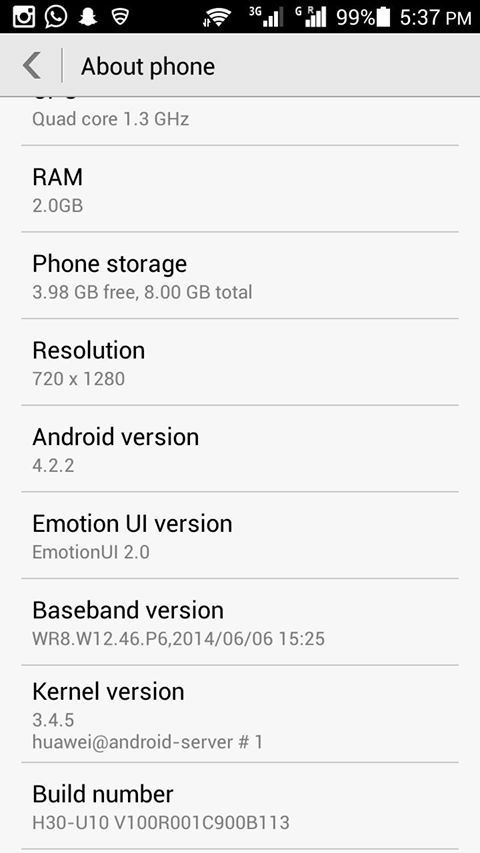
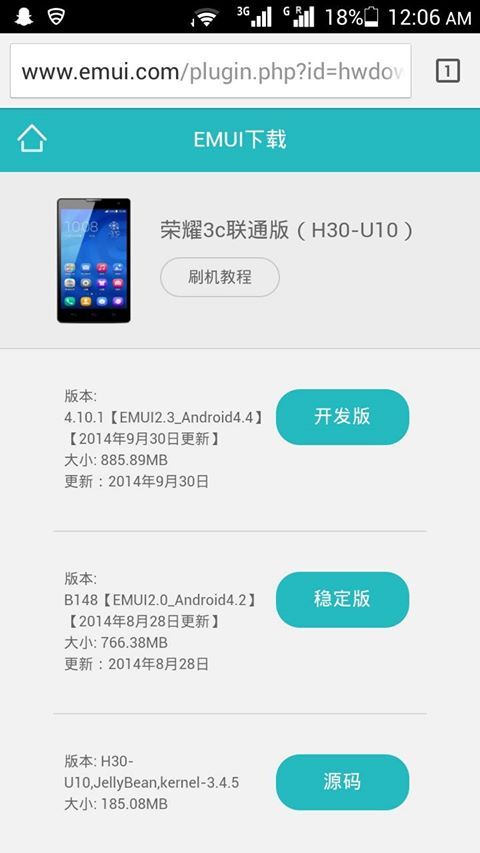
SummerWind hi there. Not sure if you remember me. Last time my friends 3c bricked, after that she doesn't want to unbrick then she went to the place where she bought. And they replaced a new unit for her.
And this time, she wants to make sure is this update safe for her phone ? Her phone's model » Click to show Spoiler - click again to hide... « This is the update she found. » Click to show Spoiler - click again to hide... « |
|
|
Oct 6 2014, 07:26 AM
Return to original view | Post
#15
|
|
Senior Member
2,706 posts Joined: Feb 2013 From: Tech / Sports
|
QUOTE(sitescope @ Oct 5 2014, 11:58 PM) ur friend's phone is msia/taiwan version and its aldy got latest update... Alright thanks bro. the updates she showed is for china version... dun use that unless u want to soft brick it again... just go to setting > updates > system updates > online update if no updates, then her phone aldy got latest update, no need to go to emui web... |
|
|
Jan 2 2015, 12:34 PM
Return to original view | Post
#16
|
|
Senior Member
2,706 posts Joined: Feb 2013 From: Tech / Sports
|
Guys, my friend accidentally deleted her systemui.apk on her honor 3c. Can she extract the systemui.apk from somewhere and manual push it back to /system/app ?
 |
| Change to: |  0.0362sec 0.0362sec
 0.70 0.70
 7 queries 7 queries
 GZIP Disabled GZIP Disabled
Time is now: 16th December 2025 - 07:58 AM |
 Quote
Quote