Welcome Guest ( Log In | Register )

Bump Topic Topic Closed RSS Feed

Outline · [ Standard ] · Linear+

 [WTS] IPEGA PG-9021 9021 BLUETOOTH GAME CONTROLLER, RM100. Bluetooth Gamepad/Game Controller

views
     
TSnigtra
post Jul 10 2014, 01:08 AM, updated 10y ago

Casual
***
Junior Member
427 posts

Joined: Jan 2013
From: Cheras, KL


IPEGA PG-9021 BLUETOOTH CLASSIC GAMEPAD

Latest version of the highly popular IPEGA PG-9021 is now available. The user guide now comes as a booklet with multi language instructions.
» Click to show Spoiler - click again to hide... «
The 9021 is a bluetooth game controller/gamepad with support for many popular Android/ IOS/ PC games.

- Simple, driverless Bluetooth 3.0 connection
- Access to Ipega Game Hall, an exclusive gaming application platform for Android
- Classical handheld gaming controller experience
- Built-in rechargeable lithium battery
- Telescopic holder supports phones up to 90mm wide in size
- Supports four gaming modes, activated by pressing A-Home, B-Home, X-Home and Y-Home
- Includes 5 media control keys for Volume Up, Volume Down, Previous Track, Next Track and Pause/Resume(Not available in Y-Home mode)
- Besides the 5 media control keys, there are also L2 and R2 triggers on the top
- Operating range of up to 6 meters in open uncongested areas
- Intelligent power saving mode
- Supports Android 3.2 and above, and also IOS 4.3 and above
- Compatible with iPod/iPhone/iPad as well as the vast majority of Android tablet PCs.

Item(s):
IPEGA PG-9021 BLUETOOTH CLASSIC GAMEPAD

Package includes:
Game controller, user guide and USB charging cable

Price:
RM100 only

Dealing method:
Bank-in(MBB, CIMB, RHB) + express delivery
Self collect

Location:
Cheras, KL

Contact method/details:
PM me here or Whatsapp, call or SMS me at 012-376 5487(CY)

Item(s) conditions:
New

This post has been edited by nigtra: May 6 2016, 12:12 PM


Attached thumbnail(s)
Attached Image Attached Image Attached Image Attached Image Attached Image
TSnigtra
post Jul 21 2014, 08:12 PM

Casual
***
Junior Member
427 posts

Joined: Jan 2013
From: Cheras, KL


IPEGA PG-9021: Reversed track control buttons for Next and Previous

Some buyers commented that the Next and Previous buttons on the PG-9021 were mislabeled, and that it should be the other way around.
I also thought similarly at first. But then I realized the confusion was due to the angled placement of the controls.

One could tilt the controller slightly towards the right and assume a horizontal layout of the buttons.
Attached Image
Pressing the second button from the left skips to the next track when it should go to the previous track.
This is counter-intuitive!

However, we could also assume a vertical orientation like this.
Attached Image
Now, this seems more logical; the second button from the bottom goes one track down from the list smile.gif

This post has been edited by nigtra: Jul 26 2014, 03:42 PM
TSnigtra
post Jul 25 2014, 01:24 PM

Casual
***
Junior Member
427 posts

Joined: Jan 2013
From: Cheras, KL


PG-9021: New device supported

Besides the more common Samsung Galaxy S4s and Note 3s,
I've just sold a PG-9021 to an Oppo Find 7 user.
Pairing and connection was OK.
Volume controls were also working.
The buyer tested with Dead Trigger 2 and could play the game after mapping the controls.
» Click to show Spoiler - click again to hide... «


This post has been edited by nigtra: Jul 26 2014, 03:47 PM
unohoo22
post Jul 26 2014, 01:55 AM

Getting Started
**
Junior Member
63 posts

Joined: Sep 2006
Just bought this game pad from seller! Fast response, quick cod and awesome sales service!

Initially wanted to get the p 9025, but bought this instead.

Compatiblity no issues with Samsung S4-LTE and no regrets getting 9021.

Recommended seller!
TSnigtra
post Jul 26 2014, 02:04 AM

Casual
***
Junior Member
427 posts

Joined: Jan 2013
From: Cheras, KL


QUOTE(unohoo22 @ Jul 26 2014, 01:55 AM)
Just bought this game pad from seller!  Fast response, quick cod and awesome sales service! 

Initially wanted to get the p 9025,  but bought this instead. 

Compatiblity no issues with Samsung S4-LTE and no regrets getting 9021.

Recommended seller!
*
Thank you for the support, bro!
Glad you like your purchase biggrin.gif
It was my pleasure doing business with you.
First class buyer! thumbup.gif thumbup.gif thumbup.gif

TSnigtra
post Jul 26 2014, 02:28 AM

Casual
***
Junior Member
427 posts

Joined: Jan 2013
From: Cheras, KL


PG-9021: New game supported

Today a buyer bought a PG-9021 and tested it with his favourite game,
Modern Combat 5: Blackout which was launched just days ago.

He was a fan of the series since the earlier versions
and bought MC5 straightaway when it was launched.

High end games work well with high end phones for which he has an Xperia Z2.

After testing, he was satisfied the PG-9021 worked well with MC5 and bought a unit smile.gif

This post has been edited by nigtra: Jul 26 2014, 01:00 PM


Attached thumbnail(s)
Attached Image
TSnigtra
post Jul 26 2014, 02:37 AM

Casual
***
Junior Member
427 posts

Joined: Jan 2013
From: Cheras, KL


PG-9021: New game supported

For those of you who are fans of classic arcade games,
you may like to know King of Fighters 97(SNK PLAYMORE) is supported.

Yup, this is the real Android version, not a version that requires an emulator.
Just pair in XHome and you're good to go biggrin.gif

Thanks to a buyer for sharing this with me smile.gif

Reading the game description on Play:
QUOTE
â– Fight against your friends through Bluetooth Multiplayer mode!
Decide who's the real KING OF FIGHTERS by challenging your friends via Bluetooth Multiplayer!
Looks like we can use an extra PG-9021 and VS against a buddy! icon_idea.gif

This post has been edited by nigtra: Jul 26 2014, 01:13 PM


Attached thumbnail(s)
Attached Image
TSnigtra
post Jul 26 2014, 04:31 PM

Casual
***
Junior Member
427 posts

Joined: Jan 2013
From: Cheras, KL


PG-9021: New game supported

Attached Image
Reaper by Hexage Ltd, a creative RPG with nice graphics and strange enemy monsters.
This game is supported directly by the PG-9021.
Pairing in regular XHome mode.

It is recommended to go through the tutorial to learn the controls
Basically, it is...
QUOTE
Left joystick or D-pad moves left or right
A = jump
AA = jump higher
AAA = whirlwind strike
L1 or L2 charges to the left
R1 or R2 charges to the right
X = uppercut
Y = strike down
AY = stomp
B = charges in the previous direction
Attached Image

The right joystick controls the cursor on the map.
Attached Image

Controls when in map.
Attached Image

During game play.
Attached Image
Moving towards the monsters activate auto killing.
This will earn you Rage skulls which you can use to strengthen your attacks using X or Y.

Attacking using X, Y, AAA or charging uses your Rage skulls.
However, jumping doesn't consume Rage skulls.

Enjoy smile.gif

This post has been edited by nigtra: Jul 26 2014, 04:38 PM
chinook
post Jul 30 2014, 03:52 PM

Getting Started
**
Junior Member
273 posts

Joined: May 2005
From: Kelana Jaya


hi there,

is the mount for the smartphone padded?
TSnigtra
post Jul 30 2014, 08:27 PM

Casual
***
Junior Member
427 posts

Joined: Jan 2013
From: Cheras, KL


QUOTE(chinook @ Jul 30 2014, 03:52 PM)
hi there,

is the mount for the smartphone padded?
*
Yes, bro, the phone holder is rubber padded on both the top and bottom
to provide a good grip and also to avoid scratches on sides of phones.

BTW, what phone are you using?

Thank you for your interest smile.gif
TSnigtra
post Aug 1 2014, 07:25 PM

Casual
***
Junior Member
427 posts

Joined: Jan 2013
From: Cheras, KL


PG-9021: New device supported

Just met a buyer using a Oneplus One.
Some people call this phone a 'Flagship Killer'.
And I understand why brows.gif
Its not the processor nor the screen size but rather its price!
Offering specs similar to flagship phones from Samsung, HTC and Sony
but at about half their prices for the 16Gb version rclxms.gif

However, this buyer decided to go one step further by getting the 64Gb version!!!
Pairing and connecting to the PG-9021 was successful.
The buyer prefers playing VS fighting games such as KOF98.

Couldn't see much from this photo. Super-slick, blacked-out display.
Attached Image

Here we could see more; the back; confirmation its a Oneplus One.
Attached Image

Thanks to this buyer for his support and his generosity for the photos thumbup.gif

Another thing I must mention, the Oneplus One runs on a rooted and customized version Cyanogenmod 11.
CM11 is itself a custom ROM and based on Android 4.4.

This post has been edited by nigtra: Aug 1 2014, 07:28 PM
TSnigtra
post Aug 1 2014, 08:11 PM

Casual
***
Junior Member
427 posts

Joined: Jan 2013
From: Cheras, KL


PG-9021: Support for custom ROM

I had the pleasure of meeting a buyer using a Samsung Note(GT-N7000).
This is no ordinary Note; it runs on a custom ROM called C-RoM.
C-RoM is based on Android 4.4.4 and aims to implement the best features
of many other great ROMs such as AOSP, CyanogenMod, AOKP, PARANOID and CarbonROM.

Pairing and connecting with the PG-9021 was first-time-success affair.
Media and volume controls were also working biggrin.gif

Buyer tested with Deadtrigger and found it to be working fine thumbup.gif

C-RoM is available from xdadevelopers here and its official site at c-rom.org


Attached thumbnail(s)
Attached Image
TSnigtra
post Aug 2 2014, 12:31 AM

Casual
***
Junior Member
427 posts

Joined: Jan 2013
From: Cheras, KL


PG-9021: New device supported

Modern Combat 5 is picking up pace since its launch.
More and more people are now playing this game.
This time its a Lenovo Vibe Z owner.

The Vibe Z, AKA K910, is the current flagship of Lenovo smartphones.
It uses Qualcomm chipset, which is rare for phones from this brand.
And because of this, pairing and connection with the PG-9021 was super smooth.
Volume and media controls were also working.

Though his phone has root access, we paired using XHome and tested with MC5.
Upon start up, the game detected the presence of a controller.
This was confirmed by showing a controller diagram with the functions for each of the control.

The Vibe Z owner bought the PG-9021 mainly to play MC5
and I can see the PG-9021 serve this purpose well for him smile.gif

This post has been edited by nigtra: Aug 2 2014, 12:33 AM


Attached thumbnail(s)
Attached Image
TSnigtra
post Aug 2 2014, 03:38 PM

Casual
***
Junior Member
427 posts

Joined: Jan 2013
From: Cheras, KL


PG-9021: What does the PG-9021 actually send over bluetooth to your phone when you press the buttons?

Normally we don't need to know this; all we wanted was to play our games. But here it is for anyone who needs it.
CODE
A-Home mode:
X: 1
A: 2
B: 3
Y: 4
L1: 5
R1: 6
L2: 7
R2: 8
Select: DEL
Start: ENTER
D-pad up, left: down, right: W, A, S, D
Right joystick up, left: down, right: I, J, K, L
Left joystick up, left: down, right: DPAD_UP, DPAD_LEFT, DPAD_DOWN, DPAD_RIGHT


CODE
X-Home mode:
X: BUTTON_X
A: BUTTON_A
B: BUTTON_B
Y: BUTTON_Y
L1: BUTTON_L1
R1: BUTTON_R1
L2: BUTTON_L2
R2: BUTTON_R2
Select: BUTTON_SELECT
Start: BUTTON_START
D-pad up, left: down, right: DPAD_UP, DPAD_LEFT, DPAD_DOWN, DPAD_RIGHT
Right joystick up, left: down, right:
Left joystick up, left: down, right: DPAD_UP, DPAD_LEFT, DPAD_DOWN, DPAD_RIGHT


CODE
B-Home mode:
X: YT
A:  HR
B:  UF
Y:  JN
L1: IM
R1: KP
L2: OG
R2: LV
Select: OG
Start: LV
D-pad up, left: down, right: WE, AQ, XZ, DC
Right joystick up, left: down, right:
Left joystick up, left: down, right: WE, AQ, XZ, DC


For all these modes, media and volume controls generated these(starting from Volume +):
CODE
VOLUME_UP, MEDIA_PREVIOUS, MEDIA_PLAY_PAUSE, MEDIA_NEXT, VOLUME_DOWN


This post has been edited by nigtra: Aug 2 2014, 05:28 PM
TSnigtra
post Aug 2 2014, 04:58 PM

Casual
***
Junior Member
427 posts

Joined: Jan 2013
From: Cheras, KL


PG-9021: What about Y-Home?

Before proceeding, you will be glad to know switching modes
DOESN'T require powering off the PG-9021 and do pairing again.
We can just press the button corresponding to the desired mode, and Home together, to switch between modes.

The ability to switch between modes like this allows access to mouse mode.
To enter mouse mode, we need to first enter one of the other modes and then press Y and Home together.
Moving the right joystick brings up the mouse cursor on the phone. L1 enters, R1 backs.
This is what the LEDs look like in mouse mode.
Attached Image
» Click to show Spoiler - click again to hide... «


Besides mouse mode, Y-Home also allows the PG-9021 to connect to rooted devices.
IPEGA called this APP mode as labeled on the third LED.
Attached Image

We can't 'switch in' to APP mode like we switched in to mouse mode.
To enter APP mode, we need to pair using the IPEGA GAME HALL or specifically Bitgames IME.

This was what was sent in APP mode.
CODE
Y-Home(APP) mode:
X: BUTTON_X
A: BUTTON_A DPAD_CENTER
B: BUTTON_B DPAD_CENTER
Y: BUTTON_Y
L1: BUTTON_L1
R1: BUTTON_R1
L2: BUTTON_L2
R2: BUTTON_R2
Select: BUTTON_SELECT MENU
Start: BUTTON_START
D-pad up, left: down, right: DPAD_UP, DPAD_LEFT, DPAD_DOWN, DPAD_RIGHT
Right joystick up, left: down, right:
Left joystick up, left: down, right: DPAD_UP, DPAD_LEFT, DPAD_DOWN, DPAD_RIGHT

» Click to show Spoiler - click again to hide... «

» Click to show Spoiler - click again to hide... «


This post has been edited by nigtra: Aug 2 2014, 05:23 PM
TSnigtra
post Aug 2 2014, 05:50 PM

Casual
***
Junior Member
427 posts

Joined: Jan 2013
From: Cheras, KL


PG-9021: Clickable joysticks

The PG-9021 has two clickable joysticks.
These are sent when they are clicked
CODE
A-Home mode:
Left joystick: 9
Right joystick: 0

B-Home mode:
Left joystick: OG
Right joystick: LV

X-Home mode:
Left joystick: BUTTON_THUMBL
Right joystick: BUTTON_THUMBR

Y-Home(APP) mode:
Left joystick: BUTTON_THUMBL DPAD_CENTER
Right joystick: BUTTON_THUMBR


This post has been edited by nigtra: Aug 2 2014, 05:50 PM
TSnigtra
post Aug 7 2014, 08:06 PM

Casual
***
Junior Member
427 posts

Joined: Jan 2013
From: Cheras, KL


PG-9021: New supported device

ASUS Zenfone 6. Intel Atom Z2580. 16Gb storage. 2Gb RAM. Original set. Without root access.
Pairing was smooth and easy. Games tested Grand Theft Auto Vice City and
Pro Evolution Soccer 2012 on PPSSPP Gold.
Attached Image

Thank you to buyer for his kind permission smile.gif
TSnigtra
post Aug 10 2014, 12:17 AM

Casual
***
Junior Member
427 posts

Joined: Jan 2013
From: Cheras, KL


PG-9021: Playing games on iDevices

Many buyers have asked me if they can use the
PG-9021 to play games on their iPhones or iPads.

Usually, I say:
QUOTE
The PG-9021 is compatible with iDevices;
we can pair and connect them with a PG-9021.
Just select and connect in iDevice mode, i.e. B-Home.
Then its just a matter of game selection.
This mode supports iCade games and most of them are retro.

What if we wanted to play some modern games?

Today, I'll talk about how we can play a modern, free and
highly popular racing game: Asphalt 8: Airborne with a PG-9021 on an iDevice.
Attached Image
I have an iPad mini, not on the latest IOS but still quite a recent version, i.e. 7.1.
» Click to show Spoiler - click again to hide... «
The first thing I did was jail break my iPad mini.
» Click to show Spoiler - click again to hide... «
Next, I installed Controllers for All.
» Click to show Spoiler - click again to hide... «
Switch over to BTstack and start A8A. Press X + Home on the PG-9021.
» Click to show Spoiler - click again to hide... «
A8A will automatically detect the presence of the PG-9021 and connect to it.
» Click to show Spoiler - click again to hide... «
I used Type B controller. Select this in OPTIONS, CONTROLS.
Attached Image
Here are some in-game controls:
CODE
Left joystick steers
Y changes camera view
B brakes
A applies nitro
Start pauses/resumes game
» Click to show Spoiler - click again to hide... «

Attached Image
Enjoy the game thumbup.gif

This post has been edited by nigtra: Aug 10 2014, 02:12 AM
TSnigtra
post Aug 12 2014, 09:42 PM

Casual
***
Junior Member
427 posts

Joined: Jan 2013
From: Cheras, KL


PG-9021: Happy buyer

Happy out-of-town buyer.
PG-9021 posted out yesterday, 11th August.
Receive it today, 12th August.

Thank you to this *****FIVE STAR BUYER***** for his support!!! thumbup.gif


Attached thumbnail(s)
Attached Image
TSnigtra
post Aug 13 2014, 12:31 AM

Casual
***
Junior Member
427 posts

Joined: Jan 2013
From: Cheras, KL


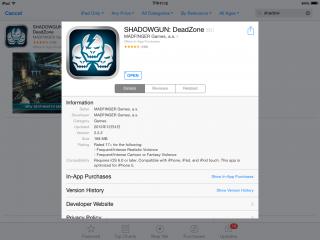
PG-9021: SHADOWGUN: DeadZone on IOS vs Android

There are differences between the same game on different platforms.
I've just installed SHADOWGUN: DeadZone on an Android and IOS device.
Both are the same version. Here's the Android screenshot.
Attached Image

This is the IOS equivalent.
Attached Image

On Android, after connecting the PG-9021,
I can map the controls by tapping on SET GAMEPAD.
Attached Image

But on IOS, the SET GAMEPAD option is missing!
Attached Image

Though I can connect my PG-9021 to the IOS device,
all controls, apart from the two joysticks, do NOT work at all sad.gif
I could only move and look around waiting for the inevitable.

This post has been edited by nigtra: Aug 13 2014, 12:33 AM
Bbiz
post Aug 13 2014, 05:14 PM

New Member
*
Newbie
3 posts

Joined: Aug 2013
Bro, I was wondering whether this controller or PG-9025 support IOS Monster Hunter Freedom Unite? I couldn't find any review for this game.
TSnigtra
post Aug 13 2014, 05:29 PM

Casual
***
Junior Member
427 posts

Joined: Jan 2013
From: Cheras, KL


QUOTE(Bbiz @ Aug 13 2014, 05:14 PM)
Bro, I was wondering whether this controller or PG-9025 support IOS Monster Hunter Freedom Unite? I couldn't find any review for this game.
*
Yes, bro, there are in fact two comments from buyers who play Monster Hunter on IOS in the PG-9025 thread.
It DOES work.
QUOTE
Just brought one to play Monster Hunter Freedom Unite for ios and it's work.


Feel much more better with the controller. Thanks


This one is not exactly Freedom Unite.
QUOTE
FREE BUMP for Seller ~ Currently playing Monster Hunter P 2G & OceanHorn on Iphone5 ~Fullyl Support & Working Great ~! Recommended ~! thumbup.gif


I believe the PG-9021 should also work as well.
Let me know which one is for you smile.gif

Thank you for your interest, bro.

This post has been edited by nigtra: Aug 13 2014, 05:38 PM
TSnigtra
post Aug 14 2014, 12:34 PM

Casual
***
Junior Member
427 posts

Joined: Jan 2013
From: Cheras, KL


Good day everyone.

New stock arrived! Stock level: HIGH. IPEGA PG-9021 ready for immediate order smile.gif
Attached Image
TSnigtra
post Aug 17 2014, 02:57 AM

Casual
***
Junior Member
427 posts

Joined: Jan 2013
From: Cheras, KL


PG-9021: Feature game

Attached Image
According to AndroidAuthority, BADLAND from Frogmind was the runner up for the best designed game for 2013.
I do agree the game was very well designed. I'm amazed at the creator's creativity too.
BADLAND in an adventure game where we play as forest dwellers navigating around obstacles.
It was very well designed because it is simple but also hard at the same time.
Simple because we only need to press 'A' to play; there are no complex buttons or joystick moves.
Hard because of the difficulty moving forward through different types of obstacles such as falling rocks and sharp blades.

BADLAND is compatible with the PG-9021.
Just pair in the regular X-Home mode.
In fact most of the time, you don't even need to tap on the screen to select menus.
Just use the left joystick and press 'A' for enter, 'B' for back.
This feature is significant because I played the game on a TRONSMART MK908II
which also means I don't have the luxury of using a touch screen for the menus.

Playing is even simpler: just press 'A'!!!

A stand out feature of this game is multi player mode over bluetooth.
There are two multi player modes: COOP and MULTIPLAYER.
COOP means you co-operate with your partner moving through the forest.
MULTIPLAYER is the versus mode. You race against your partner and who ever goes out of the playing screen loses.

First, connect two PG-9021s.
» Click to show Spoiler - click again to hide... «

Attached Image

Then choose COOP for co-operative play. The game continues as long as one of you is still in the play region.
Attached Image

Now select your Clony for your controllers.
» Click to show Spoiler - click again to hide... «

Attached Image
The first Clony is always the orange Clony.
Press 'A' on your controller for this.
Your partner now presses 'A' on his controller to play as the yellow Clony.
Attached Image

Both of you press 'A' a second time to get everything ready.
Attached Image

Next choose your forest.
Attached Image

Both press 'A' again to begin game play.
Attached Image

Besides 'A', you can also press 'X' and 'R2' to make your clonies fly.
Attached Image

If you've chosen MULTIPLAYER instead, the winner will be shown after the other player has been eliminated.
Attached Image

How about FOUR players? Let's find out.
» Click to show Spoiler - click again to hide... «
Here we connect four PG-9021s to our MK908II.
Attached Image

Press 'A' twice on each controller and all four Clonies are ready to play.
Attached Image

Press 'A' one more time on the controllers.
Attached Image

Look at the number of Clonies flying!
Attached Image

Blue Clony wins this time.
Attached Image

BADLAND is really a fun and addictive game especially for a family of four.
I enjoyed this game a lot; moving through very creative obstacles while gaining and loosing different characteristics on my Clony.
You should try BADLAND out yourself too. Its currently free on Google Play smile.gif

Bundle sale of IPEGA PG-9021s and TRONSMART MK908II available.
Please PM for details.

This post has been edited by nigtra: Aug 17 2014, 03:10 AM

TSnigtra
post Aug 18 2014, 04:36 PM

Casual
***
Junior Member
427 posts

Joined: Jan 2013
From: Cheras, KL


PG-9021: New device supported

A Lenovo smartphone based on Mediatek chipset: A880.
Attached Image

Buyer likes to play PSP games such as the Naruto and Metal Slug series, and thus installed PPSSPP.
Pairing and connecting was trouble free.
After pairing in A-Home mode, open up Settings and Controls, and map the controls you want to use.
Here's Naruto in action biggrin.gif
Attached Image
» Click to show Spoiler - click again to hide... «


This post has been edited by nigtra: Aug 18 2014, 04:40 PM
jimmychoo75
post Aug 20 2014, 05:07 PM

New Member
*
Junior Member
30 posts

Joined: Mar 2006


Bro, how to place order for 9021? Is the MHL adapter still free giveaway?
TSnigtra
post Aug 21 2014, 02:46 PM

Casual
***
Junior Member
427 posts

Joined: Jan 2013
From: Cheras, KL


QUOTE(jimmychoo75 @ Aug 20 2014, 05:07 PM)
Bro, how to place order for 9021? Is the MHL adapter still free giveaway?
*
Thank you for your interest, bro.

Just bank in to one of my accounts and I'll post it out to you.
Your item will be fully tested before posting.

Thank you again smile.gif
TSnigtra
post Sep 4 2014, 12:19 AM

Casual
***
Junior Member
427 posts

Joined: Jan 2013
From: Cheras, KL


PG-9021: SOULCRAFT 2 LEAGUE OF ANGELS

Attached Image
The new Soulcraft game, Soulcraft 2 League of Angels, is supported by the PG-9021.
Support is direct, root access is not required.
Just pair in X-Home mode and start playing.

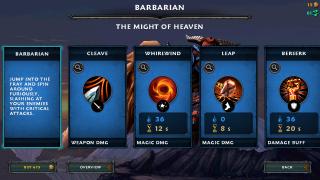
My chosen character was the Barbarian.
Attached Image

These are the skills of the Barbarian. They correspond to the ABXY buttons of the PG-9021.
Attached Image

This game is unique in the fact that it guides us using our PG-9021 in the menus.
Take a look below. Rename is X(the blue button), reset is Y(yellow) and to start playing is A(green).
Attached Image
» Click to show Spoiler - click again to hide... «

Attached Image
TSnigtra
post Sep 19 2014, 12:58 AM

Casual
***
Junior Member
427 posts

Joined: Jan 2013
From: Cheras, KL


PG-9021: Packing for delivery

We use a third party courier service to deliver the 9021 to our buyers.
After fully testing, the 9021 is packed properly using two layers of bubble wrap.
This is done to reduce the possibility of in-transit damages.
Attached Image

Also, in case the AWB gets detached or the address becomes unreadable,
the package can still reach the buyer because the address is repeated.
Attached Image
Haru Miyo
post Sep 19 2014, 01:18 PM

New Member
*
Newbie
1 posts

Joined: Sep 2014
QUOTE(nigtra @ Sep 19 2014, 12:58 AM)
PG-9021: Packing for delivery

We use a third party courier service to deliver the 9021 to our buyers.
After fully testing, the 9021 is packed properly using two layers of bubble wrap.
This is done to reduce the possibility of in-transit damages.
Attached Image

Also, in case the AWB gets detached or the address becomes unreadable,
the package can still reach the buyer because the address is repeated.
Attached Image
*
Will it work on Xiaomi Redmi Note?
And , is it possible to deliver it to Kelantan ?

This post has been edited by Haru Miyo: Sep 19 2014, 01:19 PM
TSnigtra
post Sep 19 2014, 04:46 PM

Casual
***
Junior Member
427 posts

Joined: Jan 2013
From: Cheras, KL


QUOTE(Haru Miyo @ Sep 19 2014, 01:18 PM)
Will it work on Xiaomi Redmi Note?
And , is it possible to deliver it to Kelantan ?
*
Please check your PM.
Thank you for your interest smile.gif
jasontaylor
post Sep 23 2014, 08:29 PM

New Member
*
Newbie
1 posts

Joined: Sep 2014


QUOTE(nigtra @ Jul 9 2014, 05:08 PM)
IPEGA PG-9021 BLUETOOTH CLASSIC GAMEPAD

Another great product by iPega: the PG-9021.
It is a bluetooth game controller/gamepad with support for many popular Android/ IOS/ PC games.

- Simple, driverless Bluetooth 3.0 connection
- Access to Ipega Game Hall, an exclusive gaming application platform for Android
- Classical handheld gaming controller experience
- Built-in rechargeable lithium battery
- Telescopic holder supports phones up to 90mm wide in size
- Supports four gaming modes, activated by pressing A-Home, B-Home, X-Home and Y-Home
- Includes 5 media control keys for Volume Up, Volume Down, Previous Track, Next Track and Pause/Resume(Not available in Y-Home mode)
- Besides the 5 media control keys, there are also L2 and R2 triggers on the top
- Operating range of up to 6 meters in open uncongested areas
- Intelligent power saving mode
- Supports Android 3.2 and above, and also IOS 4.3 and above
- Compatible with iPod/iPhone/iPad as well as the vast majority of Android tablet PCs.

Item(s):
IPEGA PG-9021 BLUETOOTH CLASSIC GAMEPAD

Package includes:
Game controller, user guide and USB charging cable
Free MHL Adapter of your choice(while stock lasts)

Price:
RM130 only

Warranty:
6 months

Dealing method:
Bank-in(MBB, CIMB, RHB) + express delivery
Self collect

Location:
Cheras, KL

Contact method/details:
PM me here or whatsapp, viber, line, wechat, call or SMS me at 012-376 5487(CY)

Item(s) conditions:
New

Reason for sale:
Online sales
*
Hi ive just received one of these today in the post and was using it to play modern combat 5 blackout on the samsung galaxy tab 4 tm-230 but the right hand joystick is realy slow at moving around in the game so I was wondering if theres a way to adjust the sensitivity on the controller as ive tried the sensitivity settings on the game but didnt make any diffrence.
TSnigtra
post Sep 24 2014, 02:11 PM

Casual
***
Junior Member
427 posts

Joined: Jan 2013
From: Cheras, KL


QUOTE(jasontaylor @ Sep 23 2014, 08:29 PM)
Hi ive just received one of these today in the post and was using it to play modern combat 5 blackout on the samsung galaxy tab 4 tm-230 but the right hand joystick is realy slow at moving around in the game so I was wondering if theres a way to adjust the sensitivity on the controller as ive tried the sensitivity settings on the game but didnt make any diffrence.
*
To confirm the issue,

- Was the speed of the left joystick ok?
- Did you try playing other games that also uses the right joystick, eg. Respawnables, DT2, SGDZ,
- Did you try MC5 on other devices?

Did you buy the 9025 from me? If there are manufacturing defects, kindly PM me your details.

Thank you.
PainHacker
post Oct 11 2014, 06:29 PM

Getting Started
**
Junior Member
235 posts

Joined: Dec 2009
which one better , 9021 or 9025?
TSnigtra
post Oct 12 2014, 04:19 PM

Casual
***
Junior Member
427 posts

Joined: Jan 2013
From: Cheras, KL


QUOTE(PainHacker @ Oct 11 2014, 06:29 PM)
which one better , 9021 or 9025?
*
Difficult to say. Both has its own strong points.
I guess it all boils down to your own preference in the design.

Some like the colour scheme of the 9025.
Some like that the 9021 holds the phone at an angle.

As far as compatibility is concern, both are the same.
If a game can be played on a 9025, it can also be played on a 9021.

Let me know your choice.

Thank you for your interest. smile.gif
x-1o8-x
post Oct 15 2014, 08:34 PM

Prosekaist
******
Senior Member
1,250 posts

Joined: Jun 2009
From: the land before time


Has anyone tried this on asphalt 8: airborne on android? Im using s5 and wanna know if can support or not
TSnigtra
post Oct 15 2014, 10:53 PM

Casual
***
Junior Member
427 posts

Joined: Jan 2013
From: Cheras, KL


QUOTE(x-1o8-x @ Oct 15 2014, 08:34 PM)
Has anyone tried this on asphalt 8: airborne on android? Im using s5 and wanna know if can support or not
*
Yes, of course, bro. A8A is supported by the 9021.
I've tested with S5 before.

When you start A8A, you'll be able to see a controller diagram with the functions of each controls.
This diagram does not appear if no controllers are connected.


x-1o8-x
post Oct 16 2014, 09:26 AM

Prosekaist
******
Senior Member
1,250 posts

Joined: Jun 2009
From: the land before time


QUOTE(nigtra @ Oct 15 2014, 10:53 PM)
Yes, of course, bro. A8A is supported by the 9021.
I've tested with S5 before.

When you start A8A, you'll be able to see a controller diagram with the functions of each controls.
This diagram does not appear if no controllers are connected.
*
wow thanks for the clarification!
Leax
post Oct 18 2014, 01:31 AM

New Member
*
Junior Member
5 posts

Joined: Oct 2014
Hello,

I just bought a 9021 and thought I would ask for some help.

I understood that the X-home is the most "natural" mode and would work on many games, and that for others, I would need the Y-home mode with the Ipega game center application.

nigtra, I saw that in the 9025 topic you were talking about mapping the controls with the Ipega app, how does it work ?
I managed to get FIFA15 UT working somehow but not in a playable way (with Y-home and the Ipega app), is there a way to change the way buttons are mapped ?

Thanks.
TSnigtra
post Oct 18 2014, 12:25 PM

Casual
***
Junior Member
427 posts

Joined: Jan 2013
From: Cheras, KL


QUOTE(Leax @ Oct 18 2014, 01:31 AM)
Hello,

I just bought a 9021 and thought I would ask for some help.

I understood that the X-home is the most "natural" mode and would work on many games, and that for others, I would need the Y-home mode with the Ipega game center application.

nigtra, I saw that in the 9025 topic you were talking about mapping the controls with the Ipega app, how does it work ?
I managed to get FIFA15 UT working somehow but not in a playable way (with Y-home and the Ipega app), is there a way to change the way buttons are mapped ?

Thanks.
*
Hi!

You got almost everything right, bro.
However, AFAIK, FIFA 15 UT works out of the box using X-Home.
Y-Home isn't necessary.
Try it smile.gif
generalevo87
post Oct 19 2014, 11:23 AM

New Member
*
Newbie
1 posts

Joined: Oct 2014
hello..hii..i'm new in Ipega PG-9021 Wireless Bluetooth Gaming Game Controller Gamepad Joystick..
I want ask..how to find reset switch on the joystick..??
the user manual says..
The Reset Switch: When the controller can't operate normally, please use the papperclip to touch the reset switch on the left corner of the grip back when the grip cannot shut down or crash.

but, where to find reset switch on the joystick..??
please help..TQ..

sorry for my bed english.. :-)
TSnigtra
post Oct 19 2014, 02:18 PM

Casual
***
Junior Member
427 posts

Joined: Jan 2013
From: Cheras, KL


QUOTE(generalevo87 @ Oct 19 2014, 11:23 AM)
hello..hii..i'm new in Ipega PG-9021 Wireless Bluetooth Gaming Game Controller Gamepad Joystick..
I want ask..how to find reset switch on the joystick..??
the user manual says..
The Reset Switch: When the controller can't operate normally, please use the papperclip to touch the reset switch on the left corner of the grip back when the grip cannot shut down or crash.

but, where to find reset switch on the joystick..??
please help..TQ..

sorry for my bed english.. :-)
*
Hi!

I believe its a typo on the manufacturer's part.

The 9021 doesn't have a reset button but the 9025 does.
They could've use the same material for the 9021's user guide.

If there's something wrong with your 9021, its best to contact your seller before warranty runs out.

BTW, did you buy from me? If yes, please PM me your details and I'll follow up and handle your case.
Besides being just a seller, I do support the items I sell.

Thank you.


Leax
post Oct 20 2014, 05:34 AM

New Member
*
Junior Member
5 posts

Joined: Oct 2014
QUOTE(nigtra @ Oct 18 2014, 12:25 PM)
Hi!

You got almost everything right, bro.
However, AFAIK, FIFA 15 UT works out of the box using X-Home.
Y-Home isn't necessary.
Try it smile.gif
*
Thank you for your answer bro.
It doesn't really work though, I can control the player with the joystick but the buttons won't work...
TSnigtra
post Oct 20 2014, 06:44 PM

Casual
***
Junior Member
427 posts

Joined: Jan 2013
From: Cheras, KL


QUOTE(Leax @ Oct 20 2014, 05:34 AM)
Thank you for your answer bro.
It doesn't really work though, I can control the player with the joystick but the buttons won't work...
*
When did you buy the 9021 from me?
Please PM me. I'll check my records and open a case for you.

The 9021 that I'm using now worked perfectly.
Besides controlling my players, I can tackle, pass and shoot.
Even controlling the power of the shot is possible.

Let me know. Thank you smile.gif

This post has been edited by nigtra: Oct 20 2014, 06:46 PM
Leax
post Oct 21 2014, 08:03 PM

New Member
*
Junior Member
5 posts

Joined: Oct 2014
Thanks man, unfortunately I did not buy my controller from you smile.gif
I live in London and bought it through Amazon. The crazy thing is that it's hard to find resources about this controller anywhere on the web, so I ended up here flex.gif
Thanks for your help anyways, I really appreciate it!
TSnigtra
post Oct 21 2014, 09:39 PM

Casual
***
Junior Member
427 posts

Joined: Jan 2013
From: Cheras, KL


QUOTE(Leax @ Oct 21 2014, 08:03 PM)
Thanks man, unfortunately I did not buy my controller from you  smile.gif
I live in London and bought it through Amazon. The crazy thing is that it's hard to find resources about this controller anywhere on the web, so I ended up here  flex.gif
Thanks for your help anyways, I really appreciate it!
*
Well, in that case, it may be better to contact your seller at Amazon.
BTW, do the buttons work at all for other games?
If they do, then my guess yours is not broken but just not compatible with FIFA 15.

As a long time seller of Ipega controllers, I can say there are indeed different versions of the same model.
I have sold 9025s that behave differently from batch to batch, more so if we're talking about different sellers.
The factory 'upgraded' firmware without announcements.
I believe it not only happens with iPega but many other products from China as well.

This is where we sellers come in to provide advice to potential buyers.

Thank you for dropping by smile.gif
Leax
post Oct 26 2014, 08:45 PM

New Member
*
Junior Member
5 posts

Joined: Oct 2014
QUOTE(nigtra @ Oct 21 2014, 09:39 PM)
Well, in that case, it may be better to contact your seller at Amazon.
BTW, do the buttons work at all for other games?
If they do, then my guess yours is not broken but just not compatible with FIFA 15.

As a long time seller of Ipega controllers, I can say there are indeed different versions of the same model.
I have sold 9025s that behave differently from batch to batch, more so if we're talking about different sellers.
The factory 'upgraded' firmware without announcements.
I believe it not only happens with iPega but many other products from China as well.

This is where we sellers come in to provide advice to potential buyers.

Thank you for dropping by  smile.gif
*
Yes, the controller works perfectly with other games, so I was surprised it wouldn't work with FIFA.
Thanks for your help !

Stevieyakki
post Oct 27 2014, 08:58 PM

New Member
*
Newbie
2 posts

Joined: Oct 2014
Hello I was wondering if the arm would hold a small phone.I have an Xperia z3 compact and couldn't find any info on weather it would hold it or not.cheers
TSnigtra
post Oct 27 2014, 10:52 PM

Casual
***
Junior Member
427 posts

Joined: Jan 2013
From: Cheras, KL


QUOTE(Stevieyakki @ Oct 27 2014, 08:58 PM)
Hello I was wondering if the arm would hold a small phone.I have an Xperia z3 compact and couldn't find any info on weather it would hold it or not.cheers
*
Everyone was worried if their phones are too big for the 9021....
Your question is unique, bro smile.gif

Yes, it can hold your Z3 compact.
Please check your PM for details.

Thank you.
Stevieyakki
post Oct 27 2014, 11:26 PM

New Member
*
Newbie
2 posts

Joined: Oct 2014
Oh dear I feel a little inadequate now. Lol. cheers for the quick reply.

QUOTE(nigtra @ Oct 27 2014, 10:52 PM)
Everyone was worried if their phones are too big for the 9021....
Your question is unique, bro  smile.gif

Yes, it can hold your Z3 compact.
Please check your PM for details.

Thank you.
*
Leax
post Oct 28 2014, 01:01 AM

New Member
*
Junior Member
5 posts

Joined: Oct 2014
QUOTE(Stevieyakki @ Oct 27 2014, 11:26 PM)
Oh dear I feel a little inadequate now. Lol. cheers for the quick reply.
*
I use mine with a Xperia Z1 compact, exactly same size, and it fits perfectly! smile.gif
TSnigtra
post Oct 28 2014, 01:11 PM

Casual
***
Junior Member
427 posts

Joined: Jan 2013
From: Cheras, KL


QUOTE(Stevieyakki @ Oct 27 2014, 11:26 PM)
Oh dear I feel a little inadequate now. Lol. cheers for the quick reply.
*
Everyone has their own preferences when it comes phones smile.gif
» Click to show Spoiler - click again to hide... «
The same goes for iPegas.
In terms of software/firmware, there's no difference between my 9025, 9021 or even the bigger 9023.
Its just a choice of style.
» Click to show Spoiler - click again to hide... «

RX-78-2
post Nov 2 2014, 03:28 PM

Enthusiast
*****
Senior Member
790 posts

Joined: Jan 2003
Free bump for you bro!

I have try 9021 and 9023 both are great!!
easily paired up with my Z1 Compact and my friends Redmi!

And another good news is.... IT CAN WORK WITH PC!!!
Tested with my Asus laptop and the new VivoPC Vm62, it can paired up via bluetooth! although it is not as smooth as pairing with android because sometime the PC need to re pairing again after the controller off. stupid Windows especially the new Windows8 is painful for all kind of configuration.

iostream
post Nov 2 2014, 07:46 PM

Getting Started
**
Junior Member
286 posts

Joined: Jan 2003


Great and responsive seller! You deserve a thumb up! smile.gif
TSnigtra
post Nov 2 2014, 07:51 PM

Casual
***
Junior Member
427 posts

Joined: Jan 2013
From: Cheras, KL


QUOTE(RX-78-2 @ Nov 2 2014, 03:28 PM)
Free bump for you bro!

I have try 9021 and 9023 both are great!!
easily paired up with my Z1 Compact and my friends Redmi!

And another good news is.... IT CAN WORK WITH PC!!!
Tested with my Asus laptop and the new VivoPC Vm62, it can paired up via bluetooth! although it is not as smooth as pairing with android because sometime the PC need to re pairing again after the controller off. stupid Windows especially the new Windows8 is painful for all kind of configuration.
*
Thank you for the info and free bump, bro!
Appreciated it a lot. Happy Gaming smile.gif
TSnigtra
post Nov 2 2014, 07:53 PM

Casual
***
Junior Member
427 posts

Joined: Jan 2013
From: Cheras, KL


QUOTE(iostream @ Nov 2 2014, 07:46 PM)
Great and responsive seller! You deserve a thumb up! smile.gif
*
Thank you for the compliments, bro.
Let me know if you have any questions on the 9021.
A+ buyer!!! biggrin.gif
Jay Chua CC
post Nov 3 2014, 12:39 AM

~Dont settle for good. Demand great~
*******
Senior Member
5,907 posts

Joined: Dec 2012
From: Taiping,Perak


best price with postage pls. ABle to fit xperia z ultra?
TSnigtra
post Nov 3 2014, 11:34 AM

Casual
***
Junior Member
427 posts

Joined: Jan 2013
From: Cheras, KL


QUOTE(Jay Chua CC @ Nov 3 2014, 12:39 AM)
best price with postage pls. ABle to fit xperia z ultra?
*
Hi!

Z Ultra fits but just.
Most likely you'll need to remove the casing, if any, coz the phone is really big.
Also, you may need to slide it into the holder from the sides.

Due to the size of the Z Ultra, you may want to consider the 9023.
Its more suitable for large phones and tablets.
It has a rubber padding for the phone's back and grips the Z ultra securely on three sides.

Please check PM for more info.
Thank you for your interest smile.gif
RX-78-2
post Nov 3 2014, 12:10 PM

Enthusiast
*****
Senior Member
790 posts

Joined: Jan 2003
i found the 9023 with wider hander is very comfortable even i not using tablet.
your both hands will separate wider from each other and feel more natural. That's my own feeling.
technoraver
post Nov 19 2014, 01:01 PM

★ ayam watching jew ★
*****
Senior Member
944 posts

Joined: Nov 2006
From: Cheras,Cyberjaya


I just COD with TS yesterday. Very good person and answering my question about the controller. TS even explain patiently 1 by 1 about the features and functions. Highly recomended! Keep up the good work bro

Tested with my note2 and redmi note, working fine
TSnigtra
post Nov 19 2014, 02:07 PM

Casual
***
Junior Member
427 posts

Joined: Jan 2013
From: Cheras, KL


QUOTE(technoraver @ Nov 19 2014, 01:01 PM)
I just COD with  TS yesterday. Very good person and answering my question about the controller. TS even explain patiently 1 by 1 about the features and functions. Highly recomended! Keep up the good work bro rclxub.gif

Tested with my note2 and redmi note, working fine
*
Thank you for the thumbs up bro! thumbup.gif

Nice dealing with you too. First class buyer biggrin.gif
Happy Gaming!
Elanges
post Nov 22 2014, 09:23 AM

Enthusiast
*****
Senior Member
706 posts

Joined: Jan 2005


bought the ipega PG9021 from this seller... very friendly and helpful.
This controller are works well on Minix Neo X8-H.
x-1o8-x
post Nov 22 2014, 06:30 PM

Prosekaist
******
Senior Member
1,250 posts

Joined: Jun 2009
From: the land before time


Hi,

May I know if the ipega PG-9021 or PG-9023 can support Injustice: Gods Among Us android?
TSnigtra
post Nov 22 2014, 07:56 PM

Casual
***
Junior Member
427 posts

Joined: Jan 2013
From: Cheras, KL


QUOTE(Elanges @ Nov 22 2014, 09:23 AM)
bought the ipega PG9021 from this seller... very friendly and helpful.
This controller are works well on Minix Neo X8-H.
*
Thank you for the precious feedback, bro!
Very much appreciated smile.gif

Guys, the Minix Neo X8-H is one of the higher end TV boxes with Amlogic S802-H CPU and eight GPU cores supporting UHD video playback and XBMC.
x-1o8-x
post Nov 23 2014, 03:16 PM

Prosekaist
******
Senior Member
1,250 posts

Joined: Jun 2009
From: the land before time


I've yet to buy a gamepad from TS, but he does provide good support and his pricing is the cheapest I've seen so far. Thanks TS for your great support when I asked about which game is supported smile.gif
TSnigtra
post Nov 24 2014, 11:23 AM

Casual
***
Junior Member
427 posts

Joined: Jan 2013
From: Cheras, KL


QUOTE(x-1o8-x @ Nov 23 2014, 03:16 PM)
I've yet to buy a gamepad from TS, but he does provide good support and his pricing is the cheapest I've seen so far. Thanks TS for your great support when I asked about which game is supported smile.gif
*
Thank you for your feedback, bro! biggrin.gif
dlwk1988
post Dec 7 2014, 03:38 AM

Getting Started
**
Junior Member
126 posts

Joined: Dec 2008


Hi bro still got stock? delivery to PJ? best price please biggrin.gif
TSnigtra
post Dec 7 2014, 03:59 PM

Casual
***
Junior Member
427 posts

Joined: Jan 2013
From: Cheras, KL


QUOTE(dlwk1988 @ Dec 7 2014, 03:38 AM)
Hi bro still got stock? delivery to PJ? best price please  biggrin.gif
*
Yes, bro. the 9021 is still available.
Please check PM for details.

Thank you for your interest smile.gif
dlwk1988
post Dec 9 2014, 12:06 PM

Getting Started
**
Junior Member
126 posts

Joined: Dec 2008


Received the product as promised by seller. friendly & good service~
TSnigtra
post Dec 9 2014, 12:24 PM

Casual
***
Junior Member
427 posts

Joined: Jan 2013
From: Cheras, KL


QUOTE(dlwk1988 @ Dec 9 2014, 12:06 PM)
Received the product as promised by seller. friendly & good service~
*
Appreciate your kind words, bro.
Though I've posted your item but I forgot to provide you the tracking number.My bad.
Thank you for business. It was my pleasure.
Let me know if you have any questions on it.

And Happy Gaming! biggrin.gif biggrin.gif biggrin.gif

gavinlim
post Dec 20 2014, 12:00 AM

New Member
*
Junior Member
14 posts

Joined: Oct 2008
Hi there, may I know if this will work well with M3? I would like to use this on my laptop too.
Zhafran45
post Dec 20 2014, 03:30 PM

New Member
*
Newbie
1 posts

Joined: Dec 2014


Pm. Want to buy ipega pg 9021 controller.

TSnigtra
post Dec 20 2014, 04:32 PM

Casual
***
Junior Member
427 posts

Joined: Jan 2013
From: Cheras, KL


QUOTE(gavinlim @ Dec 20 2014, 12:00 AM)
Hi there, may I know if this will work well with M3? I would like to use this on my laptop too.
*
Hi!

Do you mean Xiaomi mi3? If yes, then yes, it works well with the mi3 and also pc with bluetooth.

Thank you for your interest:)
dbosz
post Dec 22 2014, 04:41 PM

New Member
*
Newbie
2 posts

Joined: Oct 2005
interested to buy ipega 9021.. Please PM me.. tq
TSnigtra
post Dec 22 2014, 08:01 PM

Casual
***
Junior Member
427 posts

Joined: Jan 2013
From: Cheras, KL


QUOTE(Zhafran45 @ Dec 20 2014, 03:30 PM)
Pm.  Want to buy ipega pg 9021 controller.
*
Sorry for the late reply bro.
Please check your PM.

Thank you for your interest smile.gif

TSnigtra
post Dec 22 2014, 08:15 PM

Casual
***
Junior Member
427 posts

Joined: Jan 2013
From: Cheras, KL


QUOTE(dbosz @ Dec 22 2014, 04:41 PM)
interested to buy  ipega 9021.. Please PM me.. tq
*
PMed bro. Please check.

Thank you for your interest smile.gif
TSnigtra
post Jan 2 2015, 10:29 PM

Casual
***
Junior Member
427 posts

Joined: Jan 2013
From: Cheras, KL


PG-9021: New device supported

Huawei Ascend Mate 7. This device is rare not because of its 6" screen or anything but the chipset it uses: Kirin 925 with four A15 cores and four A7 cores. This chipset is produced by a company called HiSilicon which is fully owned by Huawei. Pairing and connecting the 9021 with the Mate 7 was smooth.

This post has been edited by nigtra: Jan 10 2015, 10:36 PM


Attached thumbnail(s)
Attached Image
TSnigtra
post Jan 10 2015, 10:50 PM

Casual
***
Junior Member
427 posts

Joined: Jan 2013
From: Cheras, KL


PG-9021: New device supported.

Actually partial support.

Lenovo A3300. This is a 7", Mediatek chipset, android tablet with 3G capability.
Initially we paired in X-Home mode. Though the A3300 and the LED on the 9021 shows Connected, we weren't able to control anything at all. Not even volume.
We then proceed to pair in A-Home(keyboard mode). Volume control was OK and this was a good sign. So we decided to test with PPSSPP.
Mapping was successful! We mapped ALL controls including L2, R2 and the right joystick. All OK. Needless to say, buyer was pleased biggrin.gif

This post has been edited by nigtra: Jan 10 2015, 10:53 PM
RamSatesh
post Jan 14 2015, 08:56 PM

Getting Started
**
Junior Member
54 posts

Joined: Jan 2013


Still available?

TSnigtra
post Jan 14 2015, 11:39 PM

Casual
***
Junior Member
427 posts

Joined: Jan 2013
From: Cheras, KL


QUOTE(RamSatesh @ Jan 14 2015, 08:56 PM)
Still available?
*
Yes, bro. The 9021 is still available.
Please check PM.

Thank you for your interest smile.gif
gxthelord
post Jan 24 2015, 05:09 AM

Tech Enthusiast
*******
Senior Member
2,313 posts

Joined: May 2009


Just wanna give a double thumbs up to TS. Even before buying the 9021 TS is honest and resourceful. biggrin.gif Not only that he was fast and responsive. Received the item after a day or two payment was done. ^^ Very happy with his service. biggrin.gif

Btw I also have Good News to Redmi Note 3G WCDMA version that all button works now on Android 4.4(Beta Rom Tho).

And also you can basically use this controller and your phone to be something similar as Nvidia Shield which basicly allows you to stream all your favorite PC Games on Your PC to your phone and controller.
You need an Nvidia Graphic Card and LimeLight and a decent internet speed.
Using XHome and tested a few games with it all button works flawlessly.
Game Tested that is 100% working : Crysis 3, Far Cry 4, L4D2.
» Click to show Spoiler - click again to hide... «


Now I can lye on my sofa(or anywhere at home) and play my favourite games with this. ^^
*Take Note that you really should have a decent internet speed or it will really lags and spoilt the experience*


TSnigtra
post Jan 25 2015, 05:55 PM

Casual
***
Junior Member
427 posts

Joined: Jan 2013
From: Cheras, KL


QUOTE(gxthelord @ Jan 24 2015, 05:09 AM)
Just wanna give a double thumbs up to TS. Even before buying the 9021 TS is honest and resourceful. biggrin.gif Not only that he was fast and responsive. Received the item after a day or two payment was done. ^^ Very happy with his service. biggrin.gif

Btw I also have Good News to Redmi Note 3G WCDMA version that all button works now on Android 4.4(Beta Rom Tho).

And also you can basically use this controller and your phone to be something similar as Nvidia Shield which basicly allows you to stream all your favorite PC Games on Your PC to your phone and controller.

You need an Nvidia Graphic Card and LimeLight and a decent internet speed.
Using XHome and tested a few games with it all button works flawlessly.
Game Tested that is 100% working : Crysis 3, Far Cry 4, L4D2.
» Click to show Spoiler - click again to hide... «


Now I can lye on my sofa(or anywhere at home) and play my favourite games with this. ^^
*Take Note that you really should have a decent internet speed or it will really lags and spoilt the experience*
*
Thanks for the comments and sharing the tip bro.
Glad you like the 9021.
My pleasure dealing with you.
Five star buyer***** rclxms.gif rclxms.gif rclxms.gif
alvchen80
post Feb 2 2015, 03:34 PM

New Member
*
Junior Member
31 posts

Joined: Mar 2008


Will it work with Galaxy tab 7.7?
TSnigtra
post Feb 3 2015, 11:35 AM

Casual
***
Junior Member
427 posts

Joined: Jan 2013
From: Cheras, KL


QUOTE(alvchen80 @ Feb 2 2015, 03:34 PM)
Will it work with Galaxy tab 7.7?
*
What version of Android is on your Tab 7.7?

For tablets, would the 9023 would be a better choice?

Thank you for your interest smile.gif

This post has been edited by nigtra: Feb 3 2015, 11:37 AM
TSnigtra
post Feb 5 2015, 05:38 PM

Casual
***
Junior Member
427 posts

Joined: Jan 2013
From: Cheras, KL


PG-9021: New device supported

Alcatel OneTouch Flash(6042D) is found to be fully compatible with the 9021(and also the 9028). This phone is one of the more affordable options that uses the eight core Mediatek MT6592M chipset. It runs on Android Kitkat. Pairing was a one-time affair and all the controls worked including all directions of the right joystick. rclxms.gif This is, of course, great news for users who plays Riptide GP2 or Expendables Rearmed that uses the right joystick extensively.

This post has been edited by nigtra: Feb 5 2015, 05:45 PM


Attached thumbnail(s)
Attached Image
rexshadow
post Feb 17 2015, 05:55 PM

Getting Started
**
Junior Member
84 posts

Joined: Dec 2014
Pm best price
TSnigtra
post Feb 18 2015, 11:48 PM

Casual
***
Junior Member
427 posts

Joined: Jan 2013
From: Cheras, KL


QUOTE(rexshadow @ Feb 17 2015, 05:55 PM)
Pm best price
*
Thank you for your purchase, bro☺ I will post your item right after the CNY holidays. Thanks again and Happy Holidays!
rexshadow
post Feb 19 2015, 08:06 PM

Getting Started
**
Junior Member
84 posts

Joined: Dec 2014
QUOTE(nigtra @ Feb 18 2015, 11:48 PM)
Thank you for your purchase, bro☺ I will post your item right after the CNY holidays. Thanks again and Happy Holidays!
*
Good seller. Think of his buyers first before selling it.
TSnigtra
post Mar 1 2015, 04:51 PM

Casual
***
Junior Member
427 posts

Joined: Jan 2013
From: Cheras, KL


The latest version of the very popular 9021 is now available.

How do we know we're getting the latest version?
Older versions came with a leaflet as a user guide.
Now all newer versions come with a booklet with instructions in four languages including English.
Attached Image

Attached Image

This is the QC sticker of the latest 9021.
Attached Image

This post has been edited by nigtra: Mar 1 2015, 05:00 PM
syazx
post Mar 5 2015, 08:25 PM

Getting Started
**
Junior Member
57 posts

Joined: Feb 2005


hi.. PM me best price for IPEGA PG-9021.. can COD nearby any LRT area?

thanx
TSnigtra
post Mar 6 2015, 12:00 PM

Casual
***
Junior Member
427 posts

Joined: Jan 2013
From: Cheras, KL


QUOTE(syazx @ Mar 5 2015, 08:25 PM)
hi.. PM me best price for IPEGA PG-9021.. can COD nearby any LRT area?

thanx
*
Done, bro, please check your PM.

The 9021 is really a very good gaming controller.
Thank you for your interest smile.gif
TSnigtra
post Mar 7 2015, 12:46 AM

Casual
***
Junior Member
427 posts

Joined: Jan 2013
From: Cheras, KL


PG-9021: New device supported

This is the first time I got in touch with a Meizu M1 Note smart phone with the MT6752 chipset. This is a 64bit chipset with eight A53 cores running at 1.7Ghz from Mediatek. Pairing and connection the 9021 with the M1 Note was easy. We paired using X-Home and tested with PPSSPP. We were able to map all relevant controls. The track and volume controls worked flawlessly too.

Thanks to this friendly buyer for sharing this photo thumbup.gif

This post has been edited by nigtra: Mar 7 2015, 12:48 AM


Attached thumbnail(s)
Attached Image
MjMax15
post Mar 7 2015, 05:44 PM

Uncle Scrooge is back!
******
Senior Member
1,372 posts

Joined: Nov 2004
From: Heritage Waterfront City


interesting, this unit got vibration?
TSnigtra
post Mar 7 2015, 08:06 PM

Casual
***
Junior Member
427 posts

Joined: Jan 2013
From: Cheras, KL


QUOTE(MjMax15 @ Mar 7 2015, 05:44 PM)
interesting, this unit got vibration?
*
Nope, bro. There's no built-in motor. Thank you for your interest smile.gif
MjMax15
post Mar 7 2015, 08:09 PM

Uncle Scrooge is back!
******
Senior Member
1,372 posts

Joined: Nov 2004
From: Heritage Waterfront City


QUOTE(nigtra @ Mar 7 2015, 08:06 PM)
Nope, bro. There's no built-in motor. Thank you for your interest smile.gif
*
alright, thanks
my wishlist
jgoonting
post Mar 12 2015, 06:48 AM

New Member
*
Newbie
3 posts

Joined: Mar 2015


QUOTE(nigtra @ Mar 7 2015, 12:46 AM)
PG-9021: New device supported

This is the first time I got in touch with a Meizu M1 Note smart phone with the MT6752 chipset. This is a 64bit chipset with eight A53 cores running at 1.7Ghz from Mediatek. Pairing and connection the 9021 with the M1 Note was easy. We paired using X-Home and tested with PPSSPP. We were able to map all relevant controls. The track and volume controls worked flawlessly too.

Thanks to this friendly buyer for sharing this photo thumbup.gif
*
Must that phone be rooted?
TSnigtra
post Mar 12 2015, 12:07 PM

Casual
***
Junior Member
427 posts

Joined: Jan 2013
From: Cheras, KL


QUOTE(jgoonting @ Mar 12 2015, 06:48 AM)
Must that phone be rooted?
*
I'm not sure that particular Meizu M1 Note has root access or not; we don't need it coz the buyer played PPSSPP games only and PPSSPP doesn't require root access, just like most emulators.

To pair and connect the 9021 with a Meizu M1 Note root access is NOT required. The difference between a rooted phone and a non-rooted one is that you can play more games with the 9021 on a rooted device. One such example is Need For Speed: Most Wanted which requires root access if you want to play it with a 9021.

PM me if you want to get one. Ready stock. Postage option available.
BTW, are u also using a M1 note?

Thank you for your interest smile.gif

This post has been edited by nigtra: Mar 12 2015, 12:28 PM
Stark Industries
post Mar 12 2015, 02:06 PM

Getting Started
**
Junior Member
101 posts

Joined: May 2013
From: HEAVEN ON EARTH


QUOTE(nigtra @ Jul 25 2014, 02:24 PM)
PG-9021: New device supported

Besides the more common Samsung Galaxy S4s and Note 3s,
I've just sold a PG-9021 to an Oppo Find 7 user.
Pairing and connection was OK.
Volume controls were also working.
The buyer tested with Dead Trigger 2 and could play the game after mapping the controls.
» Click to show Spoiler - click again to hide... «

*
can use to play World of tank blitz on mega 2?
TSnigtra
post Mar 12 2015, 03:33 PM

Casual
***
Junior Member
427 posts

Joined: Jan 2013
From: Cheras, KL


QUOTE(Stark Industries @ Mar 12 2015, 02:06 PM)
can use to play World of tank blitz on mega 2?
*
Our Malaysian Mega 2 is the SM-G750F variant and uses Samsung own Exynos 4415 chipset which is seldom used by other devices. I have not tested the Mega 2 nor WOT Blitz. So I cannot tell for sure if it the 9021 would work with your phone/game. I'll try to test the game out some day if I have the time.

Or we can meet up and test it out before buying. PM me or Whatsapp me at 012-376 5487(CY) if you're interested. Thank you smile.gif
jgoonting
post Mar 12 2015, 04:52 PM

New Member
*
Newbie
3 posts

Joined: Mar 2015


QUOTE(nigtra @ Mar 12 2015, 12:07 PM)
I'm not sure that particular Meizu M1 Note has root access or not; we don't need it coz the buyer played PPSSPP games only and PPSSPP doesn't require root access, just like most emulators.

To pair and connect the 9021 with a Meizu M1 Note root access is NOT required. The difference between a rooted phone and a non-rooted one is that you can play more games with the 9021 on a rooted device. One such example is Need For Speed: Most Wanted which requires root access if you want to play it with a 9021.

PM me if you want to get one. Ready stock. Postage option available.
BTW, are u also using a M1 note?

Thank you for your interest smile.gif
*
Planning to get that phone but from what I heard, mediatek based devices won't really work with Bluetooth controllers. I play modern combat 5, so I'm just wondering if it'll work. If there's gonna be problem connecting it, I will get another phone instead. My purpose is to play mc5 and I only play it with a controller. So, if he phone won't be able to play it, I'm doomed haha. I don't want to root my phone btw.
TSnigtra
post Mar 12 2015, 05:39 PM

Casual
***
Junior Member
427 posts

Joined: Jan 2013
From: Cheras, KL


QUOTE(jgoonting @ Mar 12 2015, 04:52 PM)
Planning to get that phone but from what I heard, mediatek based devices won't really work with Bluetooth controllers. I play modern combat 5, so I'm just wondering if it'll work. If there's gonna be problem connecting it, I will get another phone instead. My purpose is to play mc5 and I only play it with a controller. So, if he phone won't be able to play it, I'm doomed haha. I don't want to root my phone btw.
*
MC5 does NOT require a rooted device.

Mediatek based devices do have a poorer track record when it comes to compatibility with an iPega. The chipset by itself may not totally be at blame. Customizations on top of stock android by manufacturers may also play a part. I have seen older Mediatek devices with JB failing to pair at all. Some did paired but some critical controls weren't working rendering it useless. This is regardless of the device having root access or not. But things may be improving. The same model after having upgraded to the official manufacturer's ROM based on KK showed marked improvements. I would like to think KK-based Mediatek devices have better compatibility than earlier versions - just like this recent Meizu M1 Note I tested, and also the KK+Mediatek-based Alcatel OneTouch Flash.

There were also cases where buyers installed custom ROMs on their otherwise-known-partial-support-Mediatek-based devices and everything worked well. But not everyone would like to take this path.

The M1 Note did grabbed my attention. It had a large 5.5" 1080p screen, supports our LTE, 2Gb of RAM, a 64bit chipset and an attractive price. My buyer paid more coz he took the 32Gb storage option - there's no microSD slot for expansion. It wasn't flagship performance - it did stuttered a bit - when I switched apps it but it could be due to the apps the buyer installed. And we're not paying flagship money for it too. Do take note, his unit was a grey import unit.

Currently, for best compatibility with iPegas, Snapdragon on default ROM is the choice.

This post has been edited by nigtra: Mar 12 2015, 10:23 PM
TSnigtra
post Mar 12 2015, 10:32 PM

Casual
***
Junior Member
427 posts

Joined: Jan 2013
From: Cheras, KL


QUOTE(nigtra @ Mar 12 2015, 05:39 PM)
MC5 does NOT require a rooted device.

Mediatek based devices do have a poorer track record when it comes to compatibility with an iPega. The chipset by itself may not totally be at blame. Customizations on top of  stock android by manufacturers may also play a part. I have seen older Mediatek devices with JB failing to pair at all. Some did paired but some critical controls weren't working rendering it useless. This is regardless of the device having root access or not. But things may be improving. The same model after having upgraded to the official manufacturer's ROM based on KK showed marked improvements. I would like to think KK-based Mediatek devices have better compatibility than earlier versions - just like this recent Meizu M1 Note I tested, and also the KK+Mediatek-based Alcatel OneTouch Flash.

There were also cases where buyers installed custom ROMs on their otherwise-known-partial-support-Mediatek-based devices and everything worked well. But not everyone would like to take this path.

The M1 Note did grabbed my attention. It had a large 5.5" 1080p screen, supports our LTE, 2Gb of RAM, a 64bit chipset and an attractive price. My buyer paid more coz he took the 32Gb storage option - there's no microSD slot for expansion. It wasn't flagship performance - it did stuttered a bit  - when I switched apps it but it could be due to the apps the buyer installed. And we're not paying flagship money for it too. Do take note, his unit was a grey import unit.

Currently, for best compatibility with iPegas, Snapdragon on default ROM is the choice.
*
Latest update from my 9021 buyer using the Meizu M1 Note was still a positive one on PPSSPP, and also FPse.
syazx
post Mar 12 2015, 11:05 PM

Getting Started
**
Junior Member
57 posts

Joined: Feb 2005


QUOTE(nigtra @ Mar 12 2015, 10:32 PM)
Latest update from my 9021 buyer using the Meizu M1 Note was still a positive one on PPSSPP, and also FPse.
*
nigtra, just want to update..

My M1 Note is NOT ROOTed when I test the iPEGA with PPSSPP and FPse...


TSnigtra
post Mar 13 2015, 01:36 PM

Casual
***
Junior Member
427 posts

Joined: Jan 2013
From: Cheras, KL


QUOTE(syazx @ Mar 12 2015, 11:05 PM)
nigtra, just want to update..

My M1 Note is NOT ROOTed when I test the iPEGA with PPSSPP and FPse...
*
Thanks for the update, bro thumbup.gif Do comment back here on anything related to gaming with your 9021 on your M1 Note. Thanks again.
jgoonting
post Mar 14 2015, 01:26 AM

New Member
*
Newbie
3 posts

Joined: Mar 2015


QUOTE(nigtra @ Mar 12 2015, 05:39 PM)
MC5 does NOT require a rooted device.

Mediatek based devices do have a poorer track record when it comes to compatibility with an iPega. The chipset by itself may not totally be at blame. Customizations on top of  stock android by manufacturers may also play a part. I have seen older Mediatek devices with JB failing to pair at all. Some did paired but some critical controls weren't working rendering it useless. This is regardless of the device having root access or not. But things may be improving. The same model after having upgraded to the official manufacturer's ROM based on KK showed marked improvements. I would like to think KK-based Mediatek devices have better compatibility than earlier versions - just like this recent Meizu M1 Note I tested, and also the KK+Mediatek-based Alcatel OneTouch Flash.

There were also cases where buyers installed custom ROMs on their otherwise-known-partial-support-Mediatek-based devices and everything worked well. But not everyone would like to take this path.

The M1 Note did grabbed my attention. It had a large 5.5" 1080p screen, supports our LTE, 2Gb of RAM, a 64bit chipset and an attractive price. My buyer paid more coz he took the 32Gb storage option - there's no microSD slot for expansion. It wasn't flagship performance - it did stuttered a bit  - when I switched apps it but it could be due to the apps the buyer installed. And we're not paying flagship money for it too. Do take note, his unit was a grey import unit.

Currently, for best compatibility with iPegas, Snapdragon on default ROM is the choice.
*
Sorry for the late reply bro. Yeah, the safest bet is to go with snapdragon devices first if you don't plan on rooting. I got myself The New Padfone Infinity by Asus. (a.k.a Asus Padfone Infinity 2). Okay, handphones aside, I have something to ask about the ipega-9021. Does it click when you press the shoulder buttons and d-pad? I have an ipega-9037, I have to press the buttons all the way in and it has to click for it to be considered a button press. It feels very unnatural to me.
TSnigtra
post Mar 15 2015, 10:50 PM

Casual
***
Junior Member
427 posts

Joined: Jan 2013
From: Cheras, KL


QUOTE(jgoonting @ Mar 14 2015, 01:26 AM)
Sorry for the late reply bro. Yeah, the safest bet is to go with snapdragon devices first if you don't plan on rooting. I got myself The New Padfone Infinity by Asus. (a.k.a Asus Padfone Infinity 2). Okay, handphones aside, I have something to ask about the ipega-9021. Does it click when you press the shoulder buttons and d-pad? I have an ipega-9037, I have to press the buttons all the way in and it has to click for it to be considered a button press. It feels very unnatural to me.
*
Yes bro, you do have to somewhat positively press the shoulder buttons and also the d-pad to register a button down event. However I do not know exactly how much pressure or at what percentage of depress will it consider as sufficient. Its not touch based for sure.

If the 9037 does not meet your requirements in regards to the button press action I don't think the 9021 will. But the choice is yours bro.

Thank you.
TSnigtra
post Mar 21 2015, 12:10 AM

Casual
***
Junior Member
427 posts

Joined: Jan 2013
From: Cheras, KL


PG-9021: New device found to be ***UNSUPPORTED***

If you see a phone with layered magnesium alloy in different colours, you'll immediately recognize it as the Lenovo Vibe X2. This is one unique looking phone. I had the chance to test it with a 9021 recently. Unfortunately, I had problems even in pairing. I tried using X-Home mode. It took quite a number of times to get them connected.
» Click to show Spoiler - click again to hide... «
After finally getting the 9021's LED to stay steadily lit and "Connected" on the X2, I proceed to randomly press the buttons and move the joysticks around at the home screen. Normally on most other phones the left joystick/D-pad brings up the cursor. But this time they didn't. In fact NO CONTROLS WORKED shakehead.gif Not even the volume controls.
» Click to show Spoiler - click again to hide... «
Fortunately the X2 had root access. The owner installed Gamepad Assistant and managed to play some games that normally require root access to play with an iPega.
» Click to show Spoiler - click again to hide... «
So, those planning to game on a Vibe X2 with an iPega, do take note. The owner's X2 was on KitKat. Perhaps an update to Lollipop would improve matters? hmm.gif

This post has been edited by nigtra: Mar 21 2015, 12:14 AM
ai_m
post Mar 25 2015, 12:16 PM

Getting Started
**
Junior Member
86 posts

Joined: Jun 2014
after reading all the comments on what is working and what is not, I am really interested in this item. can pm me location for cod? do you have test units for all (or almost all) of the controller?

i want to bring my laptop and test on gaming on my pc and my phone. as long as i can game on just using one controller it will be awesome.
TSnigtra
post Mar 25 2015, 03:59 PM

Casual
***
Junior Member
427 posts

Joined: Jan 2013
From: Cheras, KL


QUOTE(ai_m @ Mar 25 2015, 12:16 PM)
after reading all the comments on what is working and what is not, I am really interested in this item. can pm me location for cod? do you have test units for all (or almost all) of the controller?

i want to bring my laptop and test on gaming on my pc and my phone. as long as i can game on just using one controller it will be awesome.
*
PMed bro. Please check. I do have test units. Welcome to come over and test before you buy. Thank you for your interest smile.gif
ybpow
post Mar 25 2015, 04:18 PM

Getting Started
**
Junior Member
185 posts

Joined: Nov 2012
Hi bro where do you COD in Cheras area?
TSnigtra
post Mar 25 2015, 05:29 PM

Casual
***
Junior Member
427 posts

Joined: Jan 2013
From: Cheras, KL


QUOTE(ybpow @ Mar 25 2015, 04:18 PM)
Hi bro where do you COD in Cheras area?
*
Replied, please check details in PM. bro. Thank you for your interest smile.gif
ybpow
post Mar 29 2015, 12:50 PM

Getting Started
**
Junior Member
185 posts

Joined: Nov 2012
COD with TS yesterday, he is very friendly and helpful thumbup.gif

BTW, do I need any software/ driver if I want to use it with windows 8? I have paired the device successfully w/ win8 (X+Home mode), but the game doesn't recognise the input
TSnigtra
post Mar 30 2015, 02:54 PM

Casual
***
Junior Member
427 posts

Joined: Jan 2013
From: Cheras, KL


QUOTE(ybpow @ Mar 29 2015, 12:50 PM)
COD with TS yesterday, he is very friendly and helpful  thumbup.gif

BTW, do I need any software/ driver if I want to use it with windows 8? I have paired the device successfully w/ win8 (X+Home mode), but the game doesn't recognise the input
*
Thank you for your support bro! thumbup.gif thumbup.gif thumbup.gif

I see many gamers use x360ce. Search for it. It allows you play games as if you're using a XBOX 360 controller biggrin.gif
ybpow
post Mar 30 2015, 07:49 PM

Getting Started
**
Junior Member
185 posts

Joined: Nov 2012
QUOTE(nigtra @ Mar 30 2015, 02:54 PM)
Thank you for your support bro!  thumbup.gif  thumbup.gif  thumbup.gif

I see many gamers use x360ce. Search for it. It allows you play games as if you're using a XBOX 360 controller  biggrin.gif
*
I tried x360ce & the steam controller mapping, but it doesn't seems to recognise the input at all hmm.gif

edit: Finally got it working!

This post has been edited by ybpow: Mar 30 2015, 08:36 PM
TSnigtra
post Mar 31 2015, 02:45 PM

Casual
***
Junior Member
427 posts

Joined: Jan 2013
From: Cheras, KL


QUOTE(ybpow @ Mar 30 2015, 07:49 PM)
I tried x360ce & the steam controller mapping, but it doesn't seems to recognise the input at all hmm.gif

edit: Finally got it working!
*
Good for you, bro!!! rclxms.gif rclxms.gif rclxms.gif

Glad you got it working.
Please share your method here if you don't mind.

Thanks and Happy Gaming!
RedDevils88
post Apr 2 2015, 03:02 PM

Look at all my stars!!
*******
Senior Member
3,244 posts

Joined: Aug 2008
may i know what is the difference between this and MOGA Pro controller?
TSnigtra
post Apr 2 2015, 05:59 PM

Casual
***
Junior Member
427 posts

Joined: Jan 2013
From: Cheras, KL


QUOTE(RedDevils88 @ Apr 2 2015, 03:02 PM)
may i know what is the difference between this and MOGA Pro controller?
*
Sorry, bro, I don't have a Moga Pro, so I can't compare their differences. They look very similar though.

Thank you for your interest smile.gif
ybpow
post Apr 3 2015, 01:59 PM

Getting Started
**
Junior Member
185 posts

Joined: Nov 2012
QUOTE(nigtra @ Mar 31 2015, 02:45 PM)
Good for you, bro!!! rclxms.gif  rclxms.gif  rclxms.gif

Glad you got it working.
Please share your method here if you don't mind.

Thanks and Happy Gaming!
*
I uninstall it from Device Manager and repair it biggrin.gif
jupiter91
post Apr 30 2015, 06:03 PM

New Member
*
Newbie
1 posts

Joined: Apr 2015
hi all! is this controller working on my iphone 5? i can't to connect with my phone. and it doesn't work playing mc5
Mr.k----man
post May 20 2015, 12:45 AM

New Member
*
Newbie
1 posts

Joined: Aug 2012
can this be use with 10 inch tablet, bro..? sony xperia z tablet to be exact...
TSnigtra
post May 20 2015, 11:27 AM

Casual
***
Junior Member
427 posts

Joined: Jan 2013
From: Cheras, KL


QUOTE(Mr.k----man @ May 20 2015, 12:45 AM)
can this be use with 10 inch tablet, bro..? sony xperia z tablet to be exact...
*
Shouldn't be an issue as it uses a Snapdragon.
You may also want to consider the 9023 as it is the only model that can hold tablets.
Please check PM for further details.

Thank you smile.gif
phatboyj
post Jul 23 2015, 07:11 AM

New Member
*
Newbie
1 posts

Joined: Jul 2015
QUOTE(nigtra @ Mar 1 2015, 04:51 AM)
The latest version of the very popular 9021 is now available.

How do we know we're getting the latest version?
Older versions came with a leaflet as a user guide.
Now all newer versions come with a booklet with instructions in four languages including English.
Attached Image

Attached Image

This is the QC sticker of the latest 9021.
Attached Image
*
@nigtra

Bought two of these used from AMAZON $15.00 US. I'm pretty sure they are of the early version as you said they came with a leaflet & not a booklet.

AnyWay if You can Shoot me a good price and ship to US I would love to purchase from you the newer model of-course
and I'll simply return the two I got from Amazon seller.

" I don't realy like to return things, but one of the controllers was missing the charge cord and the user manuals and was shipped very loosely. "

Also do you still offer the free MHL or other comparable deal with the new 9021

lastly, I'm interested in a wireless/Qi charging car mount setup that doesn't brake the bank if you sell one or are aware of a good one, Also looking for a good price on the iBOLT Dock & Play Cable for Samsung Galaxy S4 Active , S4-ZOOM C-105a, Note 3

" Sorry for all of the ands and alsos. "

Where is you Store-Front?


Thanks in advance,
Phatboyj

This post has been edited by phatboyj: Jul 24 2015, 08:17 AM
locolyric
post Aug 24 2015, 03:19 PM

Getting Started
**
Junior Member
185 posts

Joined: Nov 2005
From: Seremban
is this controller compatible with mtk devices?
TSnigtra
post Aug 24 2015, 03:59 PM

Casual
***
Junior Member
427 posts

Joined: Jan 2013
From: Cheras, KL


QUOTE(locolyric @ Aug 24 2015, 03:19 PM)
is this controller compatible with mtk devices?
*
It depends on the actual device. Some phones using MTK chipset are OK while some aren't. Lenovo's K3 Note with MT6752 running Lollipop gave me problems while Meizu's M1 Note which also use MT6752 running Kitkat was supported. Both devices were running default ROMs. For MTK devices its better to test the 9021 with the games you play. BTW, what device are you using?

Thank you for your interest smile.gif
locolyric
post Aug 31 2015, 11:51 PM

Getting Started
**
Junior Member
185 posts

Joined: Nov 2005
From: Seremban
QUOTE(nigtra @ Aug 24 2015, 03:59 PM)
It depends on the actual device. Some phones using MTK chipset are OK while some aren't. Lenovo's K3 Note with MT6752 running Lollipop gave me problems while Meizu's M1 Note which also use MT6752 running Kitkat was supported. Both devices were running default ROMs. For MTK devices its better to test the 9021 with the games you play. BTW, what device are you using?

Thank you for your interest smile.gif
*
using k3 note at this moment. looking for a bluetooth gamepad. But not sure which on is compatible .
TSnigtra
post Sep 1 2015, 05:41 PM

Casual
***
Junior Member
427 posts

Joined: Jan 2013
From: Cheras, KL


QUOTE(locolyric @ Aug 31 2015, 11:51 PM)
using k3 note at this moment. looking for a bluetooth gamepad. But not sure which on is compatible .
*
A post from my 9037 thread...
QUOTE(nigtra @ Jun 11 2015, 05:23 PM)
The new Lenovo K3 Note has very attractive specs coupled with an equally attractive price: FullHD 5.5" screen with 2gb RAM, expandable storage and a sizeable 3000mAh battery. Chipset of choice was Mediatek MT6752 with 8 cortex A53 cores.

I got to test a K3 Note with a 9037 recently. Given that the K3 Note runs Lollipop I was hoping to see improvements in terms of compatibility with a 9037 or an iPega controller in general brows.gif  Pairing and connecting them wasn't an issue. We got them connected in X-Home after a try or two. Moving the cursor or D-pad in the home screen didn't bring up the cursor/highlight, however. Not a very good sign blink.gif  but Lenovo ROMs usually behave that way. Nonetheless we proceeded to test games. We tested Grand Theft Auto San Andreas(GTASA), a game known to work well with iPega controllers. No luck here shakehead.gif  The game didn't respond to both joysticks nor buttons. Next up was PPSSPP. The first thing we did was attempt mapping. Didn't work here either; again no response from the joysticks nor the buttons. For one last try we re-paired in keyboard mode(A-Home). Control mapping was now possible within PPSSPP. We confirm by testing with a few PSP games. All-in-all the K3 Note owner had to contend with gaming in keyboard mode for the moment.
» Click to show Spoiler - click again to hide... «

*
The ROM on that buyer's K3 Note was stock.

In short, its OK if you mainly play emulator games on a Lenovo K3 Note.
locolyric
post Sep 2 2015, 06:23 PM

Getting Started
**
Junior Member
185 posts

Joined: Nov 2005
From: Seremban
you mean only 9037 is part workable with k3 note?
TSnigtra
post Sep 2 2015, 06:35 PM

Casual
***
Junior Member
427 posts

Joined: Jan 2013
From: Cheras, KL


QUOTE(locolyric @ Sep 2 2015, 06:23 PM)
you mean only 9037 is part workable with k3 note?
*
No, it is more in general across Ipega controllers.
Synx
post Sep 5 2015, 10:56 PM

New Member
*
Newbie
2 posts

Joined: Sep 2015
Is This Gamepad/Controller Works With LG G3 With MTK Chipset?
TSnigtra
post Sep 6 2015, 01:14 AM

Casual
***
Junior Member
427 posts

Joined: Jan 2013
From: Cheras, KL


QUOTE(Synx @ Sep 5 2015, 10:56 PM)
Is This Gamepad/Controller Works With LG G3 With MTK Chipset?
*
LG G3 with MTK chipset? I'm not sure about this.

I have tested the LG G3 with a Snapdragon 801 though and they work fine.
PM me if you want to drop by and test them out. I'm also interested to know smile.gif
Synx
post Sep 7 2015, 06:56 PM

New Member
*
Newbie
2 posts

Joined: Sep 2015
QUOTE(nigtra @ Sep 6 2015, 01:14 AM)
LG G3 with MTK chipset? I'm not sure about this.

I have tested the LG G3 with a Snapdragon 801 though and they work fine.
PM me if you want to drop by and test them out. I'm also interested to know  smile.gif
*
Ive Tested it It Wont work im playing minecraft and only the top scroller works and the other buttons wont work can you help me? Ive tried beach buggy it works but i cant play minecraft Help pls

This post has been edited by Synx: Sep 7 2015, 09:41 PM
1Besik
post Sep 12 2015, 09:23 PM

New Member
*
Newbie
1 posts

Joined: Sep 2015


Is it possible to update the firmware?
TSnigtra
post Sep 18 2015, 03:32 PM

Casual
***
Junior Member
427 posts

Joined: Jan 2013
From: Cheras, KL


9021: New device supported

Attached Image

Lenovo A7000. This smartphone uses Mediatek MT6752m chipset and runs Lollipop.
Initial pairing was unsuccessful.

Fortunately after a simple phone restart we were able to pair.
Tested media controls. OK. Game tested: Real Racing 3. OK

To confirm compatibility we unpaired and tried pairing again.
This time we got it on first attempt thumbup.gif
TSnigtra
post Sep 18 2015, 03:50 PM

Casual
***
Junior Member
427 posts

Joined: Jan 2013
From: Cheras, KL


9021: New device supported

Attached Image

Sony Xperia C5 Ultra. This is a six incher Mediatek MT6752 smartphone.
Max processor frequency is bumped up to 1.7Ghz compared to 1.5Ghz on the MT6752m Lenovo A7000.
Other interesting features of the C5 Ultra are two 13mp cameras(front and back) and its bezels - there's almost none!

Buyer has just got the phone and hasn't installed any games yet.
He managed to installed the ever popular PPSSPP though.
A side benefit of PPSSPP is that we can use it to test functional compatibility with the 9021.

After pairing we proceeded to map the controls using PPSSPP.
All controls can be properly mapped.
Media controls were also working.
Moving the D-pad and left joystick brings up the highlight cursor too thumbup.gif
This, ladies and gentlemen, I would call it a success biggrin.gif

This post has been edited by nigtra: Sep 18 2015, 03:52 PM
ichiJxvi
post Oct 22 2015, 04:04 AM

New Member
*
Newbie
0 posts

Joined: Oct 2015
Hello there! smile.gif I have difficulties about my new iPega 9021. I started it using the Gamepad Mode (X + Home) and tried playing A8A, but only the left analog and D-Pad are responding. But when I tried pairing it with iPega Game Center all buttons are ok. What might be the reason for that?

BTW I'm from Philippines.
TSnigtra
post Oct 22 2015, 04:23 PM

Casual
***
Junior Member
427 posts

Joined: Jan 2013
From: Cheras, KL


QUOTE(ichiJxvi @ Oct 22 2015, 04:04 AM)
Hello there! smile.gif I have difficulties about my new iPega 9021. I started it using the Gamepad Mode (X + Home) and tried playing A8A, but only the left analog and D-Pad are responding. But when I tried pairing it with iPega Game Center all buttons are ok. What might be the reason for that?

BTW I'm from  Philippines.
*
Hi, what phone or tablet are you using?
ichiJxvi
post Oct 25 2015, 11:07 AM

New Member
*
Newbie
0 posts

Joined: Oct 2015
QUOTE(nigtra @ Oct 22 2015, 05:23 PM)
Hi, what phone or tablet are you using?
*
Cherry Mobile Flare S (exclusive only in the Philippines)
Click here for more info
CODE
http://www.unbox.ph/gadget/cherry-mobile-flare-s-review-power-packed-budget-smartphone/


Correction TS, even though all buttons are functioning when I test it in Y+Home Mode, but when I play A8A it doesn't move nor responding to any default keys ingame though it is ok on Dead Trigger and Soulcraft. I use GH Touch for mapping purposes on A8A. Hope you'll get what I am saying. Thanks smile.gif
TSnigtra
post Oct 26 2015, 01:47 PM

Casual
***
Junior Member
427 posts

Joined: Jan 2013
From: Cheras, KL


QUOTE(ichiJxvi @ Oct 25 2015, 11:07 AM)
Cherry Mobile Flare S (exclusive only in the Philippines)
Click here for more info
CODE
http://www.unbox.ph/gadget/cherry-mobile-flare-s-review-power-packed-budget-smartphone/


Correction TS, even though all buttons are functioning when I test it in Y+Home Mode, but when I play A8A it doesn't move nor responding to any default keys ingame though it is ok on Dead Trigger and Soulcraft. I use GH Touch for mapping purposes on A8A. Hope you'll get what I am saying. Thanks smile.gif
*
Did you manage to pair in X-Home(not using IGC) at all? If you can, were you able to map all the controls including the triggers, bumpers and sticks?

Perhaps you can try updating the ROM to the latest available version. If that doesn't help, try looking for a custom ROM for your device. I've seen devices failing to pair with factory ROMs but after flashing a custom ROM, the compatibility issues were gone.
ichiJxvi
post Oct 26 2015, 04:47 PM

New Member
*
Newbie
0 posts

Joined: Oct 2015
Yes TS, I managed to pair it in X+Home Mode. Only the Left Joystick is responding. I can't remap controls in this mode, but I can in Y+Home Mode. Maybe you're right it's about the ROM compatibility. Recently I've downloaded MC5 and try using Y+Home Mode but it failed, hope X+Home Mode is OK.
andrewcoffee
post Nov 10 2015, 03:22 PM

New Member
*
Junior Member
28 posts

Joined: May 2012
Can anyone suggest any offline Android games compatible with this Ipega controller?

So far I have tried a few offline games like Riptide GP 1 & 2, Arcane Soul, Xenowerk, Beach Buggy, Dead Trigger 1 and they all work well. But I need a bigger library of games to play when I am away from home with no internet connection.
ChuanHong
post Dec 20 2015, 10:23 AM

I <3 Xperia
*******
Senior Member
4,412 posts

Joined: Jan 2013


hi.. I connect with ipega 9021 with my Xperia z5 premium.. dead trigger, shadowgun and MC5 is okay. but asphalt 8, sonic transformed racing is not able to work.. it registered the controller as keyboard mode.... me using X+Home key..
TSnigtra
post Dec 20 2015, 07:20 PM

Casual
***
Junior Member
427 posts

Joined: Jan 2013
From: Cheras, KL


QUOTE(ChuanHong @ Dec 20 2015, 10:23 AM)
hi.. I connect with ipega 9021 with my Xperia z5 premium.. dead trigger, shadowgun and MC5 is okay. but asphalt 8, sonic transformed racing is not able to work.. it registered the controller as keyboard mode.... me using X+Home key..
*
Asphalt 8: Airborne works for me. AFAIK this game supports the 9021 in X-Home mode. Take note there's also Nitro and Overdrive. I think these two aren't supported. Haven't tried Sonic Racing Transformed though. Thanks for dropping by smile.gif
ChuanHong
post Dec 20 2015, 07:29 PM

I <3 Xperia
*******
Senior Member
4,412 posts

Joined: Jan 2013


QUOTE(nigtra @ Dec 20 2015, 07:20 PM)
Asphalt 8: Airborne works for me. AFAIK this game supports the 9021 in X-Home mode. Take note there's also Nitro and Overdrive. I think these two aren't supported. Haven't tried Sonic Racing Transformed though. Thanks for dropping by smile.gif
*
Thanks. Mine unit not worked for me. Game recognized my controller as keyboard. Don't know why. Previously my dualshock 3 was supported most game. It's okay.. Thanks. It's good if you can compile the compatible ipega game list in your thread first post..

**Updated.. after latest update of asphalt 8, controller worked already.. finally gamepad mode instead of recognized as keyboard mode..

This post has been edited by ChuanHong: Dec 21 2015, 09:35 PM
Coltstraik
post Jan 11 2016, 05:21 AM

New Member
*
Newbie
0 posts

Joined: Jan 2016


Hello can someone please upload stock firmware for 9021 ?
Neomax3
post Jan 28 2016, 06:02 PM

Enthusiast
*****
Senior Member
981 posts

Joined: Feb 2005


Hi!

TS what is the difference between this model and PG-9037?
TSnigtra
post Jan 29 2016, 03:29 PM

Casual
***
Junior Member
427 posts

Joined: Jan 2013
From: Cheras, KL


QUOTE(Neomax3 @ Jan 28 2016, 06:02 PM)
Hi!

TS what is the difference between this model and PG-9037?
*
Not much, really. Mostly a slightly different shape and colour scheme.
In terms of game support, they are the same.

Thank you for your interest smile.gif
eddieyewchinwei
post Feb 14 2016, 11:49 PM

New Member
*
Newbie
3 posts

Joined: May 2012


bro, can pm best price? need 2 units, can help check whether iphone 6s+ and Samsung S6E+ fit?
TSnigtra
post Feb 15 2016, 03:41 PM

Casual
***
Junior Member
427 posts

Joined: Jan 2013
From: Cheras, KL


QUOTE(eddieyewchinwei @ Feb 14 2016, 11:49 PM)
bro, can pm best price? need 2 units, can help check whether iphone 6s+ and Samsung S6E+ fit?
*
Both your phones fit. Thank you smile.gif
rr9501
post Feb 21 2016, 03:02 AM

New Member
*
Newbie
0 posts

Joined: Feb 2016


just purchased my Ipega 9021 and both of the games i currently play, neither one of them works with this controller, (Kill Shot Bravo and Sniper X) can someone point me to a list of compatible games? or am i doing something wrong?...is there an APP that i need to install to run it compatibly? haven't had any help yet...
TSnigtra
post Feb 22 2016, 10:59 AM

Casual
***
Junior Member
427 posts

Joined: Jan 2013
From: Cheras, KL


QUOTE(rr9501 @ Feb 21 2016, 03:02 AM)
just purchased my Ipega 9021 and both of the games i currently play, neither one of them works with this controller, (Kill Shot Bravo and Sniper X) can someone point me to a list of compatible games? or am i doing something wrong?...is there an APP that i need to install to run it compatibly? haven't had any help yet...
*
Haven't tried Kill Shot Bravo nor Sniper X but Sniper Fury is supported. Bear in mind not all games support controllers/IPEGA.
Neomax3
post Feb 24 2016, 01:53 PM

Enthusiast
*****
Senior Member
981 posts

Joined: Feb 2005


Bought this controller from TS earlier this month..

Simple review:
Looking for a controller that can be used on both smartphone and PC and this one fit in nicely.. solid built, nice buttons and comfortable in hand.. though at first having difficulties in paring with my LG and Samsung phone but after some fiddling it work charmly.. now as my Street Fighter V and PES16 controller on my PC as it is under utilized on my phones.. Seller is also very nice with prompt reply.. hard nowdays to get one that replies promptly to customer questions.. Recommended!
TSnigtra
post Feb 24 2016, 09:42 PM

Casual
***
Junior Member
427 posts

Joined: Jan 2013
From: Cheras, KL


QUOTE(Neomax3 @ Feb 24 2016, 01:53 PM)
Bought this controller from TS earlier this month..

Simple review:
Looking for a controller that can be used on both smartphone and PC and this one fit in nicely..  solid built, nice buttons and comfortable in hand.. though at first having difficulties in paring with my LG and Samsung phone but after some fiddling it work charmly.. now as my Street Fighter V and PES16 controller on my PC as it is under utilized on my phones.. Seller is also very nice with prompt reply.. hard nowdays to get one that replies promptly to customer questions.. Recommended!
*
Thanks for the comments, bro. Glad you're satisfied with the 9021. Happy gaming smile.gif
RedDevils88
post Apr 11 2016, 11:50 PM

Look at all my stars!!
*******
Senior Member
3,244 posts

Joined: Aug 2008
Hi is this compatible with VR games? also can galaxy s7 edge fit on this?
TSnigtra
post Apr 12 2016, 04:21 PM

Casual
***
Junior Member
427 posts

Joined: Jan 2013
From: Cheras, KL


QUOTE(RedDevils88 @ Apr 11 2016, 11:50 PM)
Hi is this compatible with VR games? also can galaxy s7 edge fit on this?
*
Hi,

S7 edge can fit into the 9021.

As for VR game compatibility, it really depends on the VR game itself. Just like regular android games, some have built-in gamepad support while some don't. These games are controlled using just the phone sensors such as the gyro/screen input, Though you have connected the 9021 to your phone, moving the joysticks may not have any effect.

Thank you.
Acher13
post Apr 16 2016, 04:38 PM

Getting Started
**
Junior Member
182 posts

Joined: Apr 2007
Hehe, bought from TS last 2 weeks but I haven't had the time to play and experiment with this thing but now that I had time, It really works.
Second time meeting, He will explain stuff to you during cod - seller knows his item well and took time to explore options to make thing goes right for buyer to be, 10/10 will deal again if I found anything interesting XD.

Here's what I've paired with the gamepad,
Paired blutooth on mobile:
Samsung S3(Snapdragon chipset) - working fine smile.gif
Xiaomi Note2(MTK chipset) - working fine smile.gif

Gamepad can be used on most emulator such as Gameboy, Snes and PSP/PSX
Certain mobile games would require add-on to be installed such as this one, since it doesn't have the remap button.
user posted image
no worries, there's plenty of gamepad to touch app on the store brows.gif
Downside with bluetooth connection to mobile phones, you need to change your input setting to keyboard manually if you need to write something.
(Do correct me if someone has found the alternative way)

Paired blutooth on computer:
Asus N53 laptop(Intel chipset) - working fine smile.gif (Both USB dongle / Built-in can just connect and play)
Lenovo G40(AMD chipset) - working fine smile.gif (Both USB dongle / Built-in can just connect and play)

Most my games are indie or steam stuff, X360CE and Joy2Key works well too biggrin.gif
Downside with bluetooth connection to computers is that once I'm connected to another device, I need to do a new pairing to get it connected to the previous computer.

My personal opinion of this gamepad? It's totally worth it! tongue.gif tongue.gif
Classic design, wireless, long battery hour, media control... I can just bring one gamepad while travelling and still can play with my games thumbup.gif
TSnigtra
post Apr 18 2016, 11:49 AM

Casual
***
Junior Member
427 posts

Joined: Jan 2013
From: Cheras, KL


QUOTE(Acher13 @ Apr 16 2016, 04:38 PM)
Hehe, bought from TS last 2 weeks but I haven't had the time to play and experiment with this thing but now that I had time, It really works.
Second time meeting, He will explain stuff to you during cod - seller knows his item well and took time to explore options to make thing goes right for buyer to be, 10/10 will deal again if I found anything interesting XD.

Here's what I've paired with the gamepad,
Paired blutooth on mobile:
Samsung S3(Snapdragon chipset) - working fine smile.gif
Xiaomi Note2(MTK chipset) - working fine smile.gif

Gamepad can be used on most emulator such as Gameboy, Snes and PSP/PSX
Certain mobile games would require add-on to be installed such as this one, since it doesn't have the remap button.
user posted image
no worries, there's plenty of gamepad to touch app on the store brows.gif
Downside with bluetooth connection to mobile phones, you need to change your input setting to keyboard manually if you need to write something.
(Do correct me if someone has found the alternative way)

Paired blutooth on computer:
Asus N53 laptop(Intel chipset) - working fine smile.gif (Both USB dongle / Built-in can just connect and play)
Lenovo G40(AMD chipset) - working fine smile.gif (Both USB dongle / Built-in can just connect and play)

Most my games are indie or steam stuff, X360CE and Joy2Key works well too biggrin.gif
Downside with bluetooth connection to computers is that once I'm connected to another device, I need to do a new pairing to get it connected to the previous computer.

My personal opinion of this gamepad? It's totally worth it!  tongue.gif  tongue.gif
Classic design, wireless, long battery hour, media control... I can just bring one gamepad while travelling and still can play with my games  thumbup.gif
*
Thanks bro for your support and sharing your experience with the 9021.
QUOTE
you need to change your input setting to keyboard manually if you need to write something

Yes, I do think so too. Its depends on the host device. When it detects an input device, it assumes we wanted to use it for input hence hiding the soft keyboard. What I usually do is I just power down the 9021 and the keyboard re-appears. It may be different for other devices. I have a bluetooth trackpad/keyboard. When connected to my Android device, the soft keyboard doesn't hide, however.

Thanks again and happy gaming smile.gif


Topic ClosedOptions
 

Change to:
| Lo-Fi Version
1.8622sec    0.66    6 queries    GZIP Disabled
Time is now: 14th December 2025 - 05:43 PM