Welcome Guest ( Log In | Register )

Bump Topic Topic Closed RSS Feed
5 Pages  1 2 3 > » Bottom

Outline · [ Standard ] · Linear+

 [WTS] IPEGA PG-9021 9021 BLUETOOTH GAME CONTROLLER, RM100. Bluetooth Gamepad/Game Controller

views
     
TSnigtra
post Jul 10 2014, 01:08 AM, updated 10y ago

Casual
***
Junior Member
427 posts

Joined: Jan 2013
From: Cheras, KL


IPEGA PG-9021 BLUETOOTH CLASSIC GAMEPAD

Latest version of the highly popular IPEGA PG-9021 is now available. The user guide now comes as a booklet with multi language instructions.
» Click to show Spoiler - click again to hide... «
The 9021 is a bluetooth game controller/gamepad with support for many popular Android/ IOS/ PC games.

- Simple, driverless Bluetooth 3.0 connection
- Access to Ipega Game Hall, an exclusive gaming application platform for Android
- Classical handheld gaming controller experience
- Built-in rechargeable lithium battery
- Telescopic holder supports phones up to 90mm wide in size
- Supports four gaming modes, activated by pressing A-Home, B-Home, X-Home and Y-Home
- Includes 5 media control keys for Volume Up, Volume Down, Previous Track, Next Track and Pause/Resume(Not available in Y-Home mode)
- Besides the 5 media control keys, there are also L2 and R2 triggers on the top
- Operating range of up to 6 meters in open uncongested areas
- Intelligent power saving mode
- Supports Android 3.2 and above, and also IOS 4.3 and above
- Compatible with iPod/iPhone/iPad as well as the vast majority of Android tablet PCs.

Item(s):
IPEGA PG-9021 BLUETOOTH CLASSIC GAMEPAD

Package includes:
Game controller, user guide and USB charging cable

Price:
RM100 only

Dealing method:
Bank-in(MBB, CIMB, RHB) + express delivery
Self collect

Location:
Cheras, KL

Contact method/details:
PM me here or Whatsapp, call or SMS me at 012-376 5487(CY)

Item(s) conditions:
New

This post has been edited by nigtra: May 6 2016, 12:12 PM


Attached thumbnail(s)
Attached Image Attached Image Attached Image Attached Image Attached Image
TSnigtra
post Jul 21 2014, 08:12 PM

Casual
***
Junior Member
427 posts

Joined: Jan 2013
From: Cheras, KL


IPEGA PG-9021: Reversed track control buttons for Next and Previous

Some buyers commented that the Next and Previous buttons on the PG-9021 were mislabeled, and that it should be the other way around.
I also thought similarly at first. But then I realized the confusion was due to the angled placement of the controls.

One could tilt the controller slightly towards the right and assume a horizontal layout of the buttons.
Attached Image
Pressing the second button from the left skips to the next track when it should go to the previous track.
This is counter-intuitive!

However, we could also assume a vertical orientation like this.
Attached Image
Now, this seems more logical; the second button from the bottom goes one track down from the list smile.gif

This post has been edited by nigtra: Jul 26 2014, 03:42 PM
TSnigtra
post Jul 25 2014, 01:24 PM

Casual
***
Junior Member
427 posts

Joined: Jan 2013
From: Cheras, KL


PG-9021: New device supported

Besides the more common Samsung Galaxy S4s and Note 3s,
I've just sold a PG-9021 to an Oppo Find 7 user.
Pairing and connection was OK.
Volume controls were also working.
The buyer tested with Dead Trigger 2 and could play the game after mapping the controls.
» Click to show Spoiler - click again to hide... «


This post has been edited by nigtra: Jul 26 2014, 03:47 PM
TSnigtra
post Jul 26 2014, 02:04 AM

Casual
***
Junior Member
427 posts

Joined: Jan 2013
From: Cheras, KL


QUOTE(unohoo22 @ Jul 26 2014, 01:55 AM)
Just bought this game pad from seller!  Fast response, quick cod and awesome sales service! 

Initially wanted to get the p 9025,  but bought this instead. 

Compatiblity no issues with Samsung S4-LTE and no regrets getting 9021.

Recommended seller!
*
Thank you for the support, bro!
Glad you like your purchase biggrin.gif
It was my pleasure doing business with you.
First class buyer! thumbup.gif thumbup.gif thumbup.gif

TSnigtra
post Jul 26 2014, 02:28 AM

Casual
***
Junior Member
427 posts

Joined: Jan 2013
From: Cheras, KL


PG-9021: New game supported

Today a buyer bought a PG-9021 and tested it with his favourite game,
Modern Combat 5: Blackout which was launched just days ago.

He was a fan of the series since the earlier versions
and bought MC5 straightaway when it was launched.

High end games work well with high end phones for which he has an Xperia Z2.

After testing, he was satisfied the PG-9021 worked well with MC5 and bought a unit smile.gif

This post has been edited by nigtra: Jul 26 2014, 01:00 PM


Attached thumbnail(s)
Attached Image
TSnigtra
post Jul 26 2014, 02:37 AM

Casual
***
Junior Member
427 posts

Joined: Jan 2013
From: Cheras, KL


PG-9021: New game supported

For those of you who are fans of classic arcade games,
you may like to know King of Fighters 97(SNK PLAYMORE) is supported.

Yup, this is the real Android version, not a version that requires an emulator.
Just pair in XHome and you're good to go biggrin.gif

Thanks to a buyer for sharing this with me smile.gif

Reading the game description on Play:
QUOTE
â– Fight against your friends through Bluetooth Multiplayer mode!
Decide who's the real KING OF FIGHTERS by challenging your friends via Bluetooth Multiplayer!
Looks like we can use an extra PG-9021 and VS against a buddy! icon_idea.gif

This post has been edited by nigtra: Jul 26 2014, 01:13 PM


Attached thumbnail(s)
Attached Image
TSnigtra
post Jul 26 2014, 04:31 PM

Casual
***
Junior Member
427 posts

Joined: Jan 2013
From: Cheras, KL


PG-9021: New game supported

Attached Image
Reaper by Hexage Ltd, a creative RPG with nice graphics and strange enemy monsters.
This game is supported directly by the PG-9021.
Pairing in regular XHome mode.

It is recommended to go through the tutorial to learn the controls
Basically, it is...
QUOTE
Left joystick or D-pad moves left or right
A = jump
AA = jump higher
AAA = whirlwind strike
L1 or L2 charges to the left
R1 or R2 charges to the right
X = uppercut
Y = strike down
AY = stomp
B = charges in the previous direction
Attached Image

The right joystick controls the cursor on the map.
Attached Image

Controls when in map.
Attached Image

During game play.
Attached Image
Moving towards the monsters activate auto killing.
This will earn you Rage skulls which you can use to strengthen your attacks using X or Y.

Attacking using X, Y, AAA or charging uses your Rage skulls.
However, jumping doesn't consume Rage skulls.

Enjoy smile.gif

This post has been edited by nigtra: Jul 26 2014, 04:38 PM
TSnigtra
post Jul 30 2014, 08:27 PM

Casual
***
Junior Member
427 posts

Joined: Jan 2013
From: Cheras, KL


QUOTE(chinook @ Jul 30 2014, 03:52 PM)
hi there,

is the mount for the smartphone padded?
*
Yes, bro, the phone holder is rubber padded on both the top and bottom
to provide a good grip and also to avoid scratches on sides of phones.

BTW, what phone are you using?

Thank you for your interest smile.gif
TSnigtra
post Aug 1 2014, 07:25 PM

Casual
***
Junior Member
427 posts

Joined: Jan 2013
From: Cheras, KL


PG-9021: New device supported

Just met a buyer using a Oneplus One.
Some people call this phone a 'Flagship Killer'.
And I understand why brows.gif
Its not the processor nor the screen size but rather its price!
Offering specs similar to flagship phones from Samsung, HTC and Sony
but at about half their prices for the 16Gb version rclxms.gif

However, this buyer decided to go one step further by getting the 64Gb version!!!
Pairing and connecting to the PG-9021 was successful.
The buyer prefers playing VS fighting games such as KOF98.

Couldn't see much from this photo. Super-slick, blacked-out display.
Attached Image

Here we could see more; the back; confirmation its a Oneplus One.
Attached Image

Thanks to this buyer for his support and his generosity for the photos thumbup.gif

Another thing I must mention, the Oneplus One runs on a rooted and customized version Cyanogenmod 11.
CM11 is itself a custom ROM and based on Android 4.4.

This post has been edited by nigtra: Aug 1 2014, 07:28 PM
TSnigtra
post Aug 1 2014, 08:11 PM

Casual
***
Junior Member
427 posts

Joined: Jan 2013
From: Cheras, KL


PG-9021: Support for custom ROM

I had the pleasure of meeting a buyer using a Samsung Note(GT-N7000).
This is no ordinary Note; it runs on a custom ROM called C-RoM.
C-RoM is based on Android 4.4.4 and aims to implement the best features
of many other great ROMs such as AOSP, CyanogenMod, AOKP, PARANOID and CarbonROM.

Pairing and connecting with the PG-9021 was first-time-success affair.
Media and volume controls were also working biggrin.gif

Buyer tested with Deadtrigger and found it to be working fine thumbup.gif

C-RoM is available from xdadevelopers here and its official site at c-rom.org


Attached thumbnail(s)
Attached Image
TSnigtra
post Aug 2 2014, 12:31 AM

Casual
***
Junior Member
427 posts

Joined: Jan 2013
From: Cheras, KL


PG-9021: New device supported

Modern Combat 5 is picking up pace since its launch.
More and more people are now playing this game.
This time its a Lenovo Vibe Z owner.

The Vibe Z, AKA K910, is the current flagship of Lenovo smartphones.
It uses Qualcomm chipset, which is rare for phones from this brand.
And because of this, pairing and connection with the PG-9021 was super smooth.
Volume and media controls were also working.

Though his phone has root access, we paired using XHome and tested with MC5.
Upon start up, the game detected the presence of a controller.
This was confirmed by showing a controller diagram with the functions for each of the control.

The Vibe Z owner bought the PG-9021 mainly to play MC5
and I can see the PG-9021 serve this purpose well for him smile.gif

This post has been edited by nigtra: Aug 2 2014, 12:33 AM


Attached thumbnail(s)
Attached Image
TSnigtra
post Aug 2 2014, 03:38 PM

Casual
***
Junior Member
427 posts

Joined: Jan 2013
From: Cheras, KL


PG-9021: What does the PG-9021 actually send over bluetooth to your phone when you press the buttons?

Normally we don't need to know this; all we wanted was to play our games. But here it is for anyone who needs it.
CODE
A-Home mode:
X: 1
A: 2
B: 3
Y: 4
L1: 5
R1: 6
L2: 7
R2: 8
Select: DEL
Start: ENTER
D-pad up, left: down, right: W, A, S, D
Right joystick up, left: down, right: I, J, K, L
Left joystick up, left: down, right: DPAD_UP, DPAD_LEFT, DPAD_DOWN, DPAD_RIGHT


CODE
X-Home mode:
X: BUTTON_X
A: BUTTON_A
B: BUTTON_B
Y: BUTTON_Y
L1: BUTTON_L1
R1: BUTTON_R1
L2: BUTTON_L2
R2: BUTTON_R2
Select: BUTTON_SELECT
Start: BUTTON_START
D-pad up, left: down, right: DPAD_UP, DPAD_LEFT, DPAD_DOWN, DPAD_RIGHT
Right joystick up, left: down, right:
Left joystick up, left: down, right: DPAD_UP, DPAD_LEFT, DPAD_DOWN, DPAD_RIGHT


CODE
B-Home mode:
X: YT
A:  HR
B:  UF
Y:  JN
L1: IM
R1: KP
L2: OG
R2: LV
Select: OG
Start: LV
D-pad up, left: down, right: WE, AQ, XZ, DC
Right joystick up, left: down, right:
Left joystick up, left: down, right: WE, AQ, XZ, DC


For all these modes, media and volume controls generated these(starting from Volume +):
CODE
VOLUME_UP, MEDIA_PREVIOUS, MEDIA_PLAY_PAUSE, MEDIA_NEXT, VOLUME_DOWN


This post has been edited by nigtra: Aug 2 2014, 05:28 PM
TSnigtra
post Aug 2 2014, 04:58 PM

Casual
***
Junior Member
427 posts

Joined: Jan 2013
From: Cheras, KL


PG-9021: What about Y-Home?

Before proceeding, you will be glad to know switching modes
DOESN'T require powering off the PG-9021 and do pairing again.
We can just press the button corresponding to the desired mode, and Home together, to switch between modes.

The ability to switch between modes like this allows access to mouse mode.
To enter mouse mode, we need to first enter one of the other modes and then press Y and Home together.
Moving the right joystick brings up the mouse cursor on the phone. L1 enters, R1 backs.
This is what the LEDs look like in mouse mode.
Attached Image
» Click to show Spoiler - click again to hide... «


Besides mouse mode, Y-Home also allows the PG-9021 to connect to rooted devices.
IPEGA called this APP mode as labeled on the third LED.
Attached Image

We can't 'switch in' to APP mode like we switched in to mouse mode.
To enter APP mode, we need to pair using the IPEGA GAME HALL or specifically Bitgames IME.

This was what was sent in APP mode.
CODE
Y-Home(APP) mode:
X: BUTTON_X
A: BUTTON_A DPAD_CENTER
B: BUTTON_B DPAD_CENTER
Y: BUTTON_Y
L1: BUTTON_L1
R1: BUTTON_R1
L2: BUTTON_L2
R2: BUTTON_R2
Select: BUTTON_SELECT MENU
Start: BUTTON_START
D-pad up, left: down, right: DPAD_UP, DPAD_LEFT, DPAD_DOWN, DPAD_RIGHT
Right joystick up, left: down, right:
Left joystick up, left: down, right: DPAD_UP, DPAD_LEFT, DPAD_DOWN, DPAD_RIGHT

» Click to show Spoiler - click again to hide... «

» Click to show Spoiler - click again to hide... «


This post has been edited by nigtra: Aug 2 2014, 05:23 PM
TSnigtra
post Aug 2 2014, 05:50 PM

Casual
***
Junior Member
427 posts

Joined: Jan 2013
From: Cheras, KL


PG-9021: Clickable joysticks

The PG-9021 has two clickable joysticks.
These are sent when they are clicked
CODE
A-Home mode:
Left joystick: 9
Right joystick: 0

B-Home mode:
Left joystick: OG
Right joystick: LV

X-Home mode:
Left joystick: BUTTON_THUMBL
Right joystick: BUTTON_THUMBR

Y-Home(APP) mode:
Left joystick: BUTTON_THUMBL DPAD_CENTER
Right joystick: BUTTON_THUMBR


This post has been edited by nigtra: Aug 2 2014, 05:50 PM
TSnigtra
post Aug 7 2014, 08:06 PM

Casual
***
Junior Member
427 posts

Joined: Jan 2013
From: Cheras, KL


PG-9021: New supported device

ASUS Zenfone 6. Intel Atom Z2580. 16Gb storage. 2Gb RAM. Original set. Without root access.
Pairing was smooth and easy. Games tested Grand Theft Auto Vice City and
Pro Evolution Soccer 2012 on PPSSPP Gold.
Attached Image

Thank you to buyer for his kind permission smile.gif
TSnigtra
post Aug 10 2014, 12:17 AM

Casual
***
Junior Member
427 posts

Joined: Jan 2013
From: Cheras, KL


PG-9021: Playing games on iDevices

Many buyers have asked me if they can use the
PG-9021 to play games on their iPhones or iPads.

Usually, I say:
QUOTE
The PG-9021 is compatible with iDevices;
we can pair and connect them with a PG-9021.
Just select and connect in iDevice mode, i.e. B-Home.
Then its just a matter of game selection.
This mode supports iCade games and most of them are retro.

What if we wanted to play some modern games?

Today, I'll talk about how we can play a modern, free and
highly popular racing game: Asphalt 8: Airborne with a PG-9021 on an iDevice.
Attached Image
I have an iPad mini, not on the latest IOS but still quite a recent version, i.e. 7.1.
» Click to show Spoiler - click again to hide... «
The first thing I did was jail break my iPad mini.
» Click to show Spoiler - click again to hide... «
Next, I installed Controllers for All.
» Click to show Spoiler - click again to hide... «
Switch over to BTstack and start A8A. Press X + Home on the PG-9021.
» Click to show Spoiler - click again to hide... «
A8A will automatically detect the presence of the PG-9021 and connect to it.
» Click to show Spoiler - click again to hide... «
I used Type B controller. Select this in OPTIONS, CONTROLS.
Attached Image
Here are some in-game controls:
CODE
Left joystick steers
Y changes camera view
B brakes
A applies nitro
Start pauses/resumes game
» Click to show Spoiler - click again to hide... «

Attached Image
Enjoy the game thumbup.gif

This post has been edited by nigtra: Aug 10 2014, 02:12 AM
TSnigtra
post Aug 12 2014, 09:42 PM

Casual
***
Junior Member
427 posts

Joined: Jan 2013
From: Cheras, KL


PG-9021: Happy buyer

Happy out-of-town buyer.
PG-9021 posted out yesterday, 11th August.
Receive it today, 12th August.

Thank you to this *****FIVE STAR BUYER***** for his support!!! thumbup.gif


Attached thumbnail(s)
Attached Image
TSnigtra
post Aug 13 2014, 12:31 AM

Casual
***
Junior Member
427 posts

Joined: Jan 2013
From: Cheras, KL


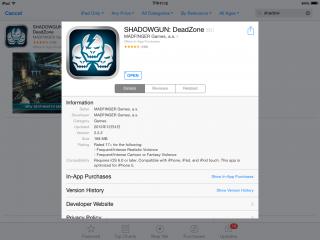
PG-9021: SHADOWGUN: DeadZone on IOS vs Android

There are differences between the same game on different platforms.
I've just installed SHADOWGUN: DeadZone on an Android and IOS device.
Both are the same version. Here's the Android screenshot.
Attached Image

This is the IOS equivalent.
Attached Image

On Android, after connecting the PG-9021,
I can map the controls by tapping on SET GAMEPAD.
Attached Image

But on IOS, the SET GAMEPAD option is missing!
Attached Image

Though I can connect my PG-9021 to the IOS device,
all controls, apart from the two joysticks, do NOT work at all sad.gif
I could only move and look around waiting for the inevitable.

This post has been edited by nigtra: Aug 13 2014, 12:33 AM
TSnigtra
post Aug 13 2014, 05:29 PM

Casual
***
Junior Member
427 posts

Joined: Jan 2013
From: Cheras, KL


QUOTE(Bbiz @ Aug 13 2014, 05:14 PM)
Bro, I was wondering whether this controller or PG-9025 support IOS Monster Hunter Freedom Unite? I couldn't find any review for this game.
*
Yes, bro, there are in fact two comments from buyers who play Monster Hunter on IOS in the PG-9025 thread.
It DOES work.
QUOTE
Just brought one to play Monster Hunter Freedom Unite for ios and it's work.


Feel much more better with the controller. Thanks


This one is not exactly Freedom Unite.
QUOTE
FREE BUMP for Seller ~ Currently playing Monster Hunter P 2G & OceanHorn on Iphone5 ~Fullyl Support & Working Great ~! Recommended ~! thumbup.gif


I believe the PG-9021 should also work as well.
Let me know which one is for you smile.gif

Thank you for your interest, bro.

This post has been edited by nigtra: Aug 13 2014, 05:38 PM
TSnigtra
post Aug 14 2014, 12:34 PM

Casual
***
Junior Member
427 posts

Joined: Jan 2013
From: Cheras, KL


Good day everyone.

New stock arrived! Stock level: HIGH. IPEGA PG-9021 ready for immediate order smile.gif
Attached Image

5 Pages  1 2 3 > » Top
Topic ClosedOptions
 

Change to:
| Lo-Fi Version
0.0191sec    0.55    7 queries    GZIP Disabled
Time is now: 15th December 2025 - 12:54 PM