
Bro, I was wondering whether this controller or PG-9025 support IOS Monster Hunter Freedom Unite? I couldn't find any review for this game.
[WTS] IPEGA PG-9021 9021 BLUETOOTH GAME CONTROLLER, RM100. Bluetooth Gamepad/Game Controller
 Lowyat.NET -> Garage Sales -> Mobile Phones & Tablets Garage Sales -> Mobile Accessories Garage Sales
[WTS] IPEGA PG-9021 9021 BLUETOOTH GAME CONTROLLER, RM100. Bluetooth Gamepad/Game Controller
|
|
 Aug 13 2014, 05:14 PM Aug 13 2014, 05:14 PM
|
 
Newbie
3 posts Joined: Aug 2013 
|
Bro, I was wondering whether this controller or PG-9025 support IOS Monster Hunter Freedom Unite? I couldn't find any review for this game.
|
|
|
|
|
|
Aug 13 2014, 05:29 PM
|
|
Junior Member
427 posts Joined: Jan 2013 From: Cheras, KL 
|
QUOTE(Bbiz @ Aug 13 2014, 05:14 PM) Bro, I was wondering whether this controller or PG-9025 support IOS Monster Hunter Freedom Unite? I couldn't find any review for this game. Yes, bro, there are in fact two comments from buyers who play Monster Hunter on IOS in the PG-9025 thread.  It DOES work. QUOTE Just brought one to play Monster Hunter Freedom Unite for ios and it's work. Feel much more better with the controller. Thanks This one is not exactly Freedom Unite. QUOTE FREE BUMP for Seller ~ Currently playing Monster Hunter P 2G & OceanHorn on Iphone5 ~Fullyl Support & Working Great ~! Recommended ~! thumbup.gif I believe the PG-9021 should also work as well. Let me know which one is for you  Thank you for your interest, bro. This post has been edited by nigtra: Aug 13 2014, 05:38 PM |
|
|
Aug 14 2014, 12:34 PM
|
|
Junior Member
427 posts Joined: Jan 2013 From: Cheras, KL
|
Good day everyone.
New stock arrived! Stock level: HIGH. IPEGA PG-9021 ready for immediate order 
|
|
|
Aug 17 2014, 02:57 AM
|
|
Junior Member
427 posts Joined: Jan 2013 From: Cheras, KL
|
PG-9021: Feature game

According to AndroidAuthority, BADLAND from Frogmind was the runner up for the best designed game for 2013. I do agree the game was very well designed. I'm amazed at the creator's creativity too. BADLAND in an adventure game where we play as forest dwellers navigating around obstacles. It was very well designed because it is simple but also hard at the same time. Simple because we only need to press 'A' to play; there are no complex buttons or joystick moves. Hard because of the difficulty moving forward through different types of obstacles such as falling rocks and sharp blades. BADLAND is compatible with the PG-9021. Just pair in the regular X-Home mode. In fact most of the time, you don't even need to tap on the screen to select menus. Just use the left joystick and press 'A' for enter, 'B' for back. This feature is significant because I played the game on a TRONSMART MK908II which also means I don't have the luxury of using a touch screen for the menus. Playing is even simpler: just press 'A'!!! A stand out feature of this game is multi player mode over bluetooth. There are two multi player modes: COOP and MULTIPLAYER. COOP means you co-operate with your partner moving through the forest. MULTIPLAYER is the versus mode. You race against your partner and who ever goes out of the playing screen loses. First, connect two PG-9021s. » Click to show Spoiler - click again to hide... « 
Then choose COOP for co-operative play. The game continues as long as one of you is still in the play region. 
Now select your Clony for your controllers. » Click to show Spoiler - click again to hide... « 
The first Clony is always the orange Clony. Press 'A' on your controller for this. Your partner now presses 'A' on his controller to play as the yellow Clony. 
Both of you press 'A' a second time to get everything ready. 
Next choose your forest. 
Both press 'A' again to begin game play. 
Besides 'A', you can also press 'X' and 'R2' to make your clonies fly. 
If you've chosen MULTIPLAYER instead, the winner will be shown after the other player has been eliminated. 
How about FOUR players? Let's find out. » Click to show Spoiler - click again to hide... « Here we connect four PG-9021s to our MK908II.
Press 'A' twice on each controller and all four Clonies are ready to play. 
Press 'A' one more time on the controllers. 
Look at the number of Clonies flying! 
Blue Clony wins this time. 
BADLAND is really a fun and addictive game especially for a family of four. I enjoyed this game a lot; moving through very creative obstacles while gaining and loosing different characteristics on my Clony. You should try BADLAND out yourself too. Its currently free on Google Play Bundle sale of IPEGA PG-9021s and TRONSMART MK908II available. Please PM for details. This post has been edited by nigtra: Aug 17 2014, 03:10 AM |
|
|
Aug 18 2014, 04:36 PM
|
|
Junior Member
427 posts Joined: Jan 2013 From: Cheras, KL
|
PG-9021: New device supported
A Lenovo smartphone based on Mediatek chipset: A880. 
Buyer likes to play PSP games such as the Naruto and Metal Slug series, and thus installed PPSSPP. Pairing and connecting was trouble free. After pairing in A-Home mode, open up Settings and Controls, and map the controls you want to use. Here's Naruto in action  
» Click to show Spoiler - click again to hide... « This post has been edited by nigtra: Aug 18 2014, 04:40 PM |
|
|
Aug 20 2014, 05:07 PM
|

Junior Member
30 posts Joined: Mar 2006
|
Bro, how to place order for 9021? Is the MHL adapter still free giveaway?
|
|
|
|
|
|
Aug 21 2014, 02:46 PM
|
|
Junior Member
427 posts Joined: Jan 2013 From: Cheras, KL
|
QUOTE(jimmychoo75 @ Aug 20 2014, 05:07 PM) Bro, how to place order for 9021? Is the MHL adapter still free giveaway? Thank you for your interest, bro.Just bank in to one of my accounts and I'll post it out to you. Your item will be fully tested before posting. Thank you again |
|
|
Sep 4 2014, 12:19 AM
|
|
Junior Member
427 posts Joined: Jan 2013 From: Cheras, KL
|
PG-9021: SOULCRAFT 2 LEAGUE OF ANGELS

The new Soulcraft game, Soulcraft 2 League of Angels, is supported by the PG-9021. Support is direct, root access is not required. Just pair in X-Home mode and start playing. My chosen character was the Barbarian. 
These are the skills of the Barbarian. They correspond to the ABXY buttons of the PG-9021. 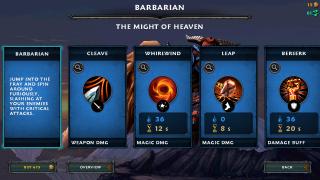
This game is unique in the fact that it guides us using our PG-9021 in the menus. Take a look below. Rename is X(the blue button), reset is Y(yellow) and to start playing is A(green). 
» Click to show Spoiler - click again to hide... « 
|
|
|
Sep 19 2014, 12:58 AM
|
|
Junior Member
427 posts Joined: Jan 2013 From: Cheras, KL
|
PG-9021: Packing for delivery
We use a third party courier service to deliver the 9021 to our buyers. After fully testing, the 9021 is packed properly using two layers of bubble wrap. This is done to reduce the possibility of in-transit damages. 
Also, in case the AWB gets detached or the address becomes unreadable, the package can still reach the buyer because the address is repeated. 
|
|
|
Sep 19 2014, 01:18 PM
|
|
Newbie
1 posts Joined: Sep 2014
|
QUOTE(nigtra @ Sep 19 2014, 12:58 AM) PG-9021: Packing for delivery Will it work on Xiaomi Redmi Note?We use a third party courier service to deliver the 9021 to our buyers. After fully testing, the 9021 is packed properly using two layers of bubble wrap. This is done to reduce the possibility of in-transit damages.
Also, in case the AWB gets detached or the address becomes unreadable, the package can still reach the buyer because the address is repeated.
And , is it possible to deliver it to Kelantan ? This post has been edited by Haru Miyo: Sep 19 2014, 01:19 PM |
|
|
Sep 19 2014, 04:46 PM
|
|
Junior Member
427 posts Joined: Jan 2013 From: Cheras, KL
|
QUOTE(Haru Miyo @ Sep 19 2014, 01:18 PM) Will it work on Xiaomi Redmi Note? Please check your PM.And , is it possible to deliver it to Kelantan ? Thank you for your interest |
|
|
 Sep 23 2014, 08:29 PM Sep 23 2014, 08:29 PM
|
|
Newbie
1 posts Joined: Sep 2014
|
QUOTE(nigtra @ Jul 9 2014, 05:08 PM) IPEGA PG-9021 BLUETOOTH CLASSIC GAMEPAD Hi ive just received one of these today in the post and was using it to play modern combat 5 blackout on the samsung galaxy tab 4 tm-230 but the right hand joystick is realy slow at moving around in the game so I was wondering if theres a way to adjust the sensitivity on the controller as ive tried the sensitivity settings on the game but didnt make any diffrence.Another great product by iPega: the PG-9021. It is a bluetooth game controller/gamepad with support for many popular Android/ IOS/ PC games. - Simple, driverless Bluetooth 3.0 connection - Access to Ipega Game Hall, an exclusive gaming application platform for Android - Classical handheld gaming controller experience - Built-in rechargeable lithium battery - Telescopic holder supports phones up to 90mm wide in size - Supports four gaming modes, activated by pressing A-Home, B-Home, X-Home and Y-Home - Includes 5 media control keys for Volume Up, Volume Down, Previous Track, Next Track and Pause/Resume(Not available in Y-Home mode) - Besides the 5 media control keys, there are also L2 and R2 triggers on the top - Operating range of up to 6 meters in open uncongested areas - Intelligent power saving mode - Supports Android 3.2 and above, and also IOS 4.3 and above - Compatible with iPod/iPhone/iPad as well as the vast majority of Android tablet PCs. Item(s): IPEGA PG-9021 BLUETOOTH CLASSIC GAMEPAD Package includes: Game controller, user guide and USB charging cable Free MHL Adapter of your choice(while stock lasts) Price: RM130 only Warranty: 6 months Dealing method: Bank-in(MBB, CIMB, RHB) + express delivery Self collect Location: Cheras, KL Contact method/details: PM me here or whatsapp, viber, line, wechat, call or SMS me at 012-376 5487(CY) Item(s) conditions: New Reason for sale: Online sales |
|
|
Sep 24 2014, 02:11 PM
|
|
Junior Member
427 posts Joined: Jan 2013 From: Cheras, KL
|
QUOTE(jasontaylor @ Sep 23 2014, 08:29 PM) Hi ive just received one of these today in the post and was using it to play modern combat 5 blackout on the samsung galaxy tab 4 tm-230 but the right hand joystick is realy slow at moving around in the game so I was wondering if theres a way to adjust the sensitivity on the controller as ive tried the sensitivity settings on the game but didnt make any diffrence. To confirm the issue,- Was the speed of the left joystick ok? - Did you try playing other games that also uses the right joystick, eg. Respawnables, DT2, SGDZ, - Did you try MC5 on other devices? Did you buy the 9025 from me? If there are manufacturing defects, kindly PM me your details. Thank you. |
|
|
|
|
|
Oct 11 2014, 06:29 PM
|

Junior Member
235 posts Joined: Dec 2009
|
which one better , 9021 or 9025?
|
|
|
Oct 12 2014, 04:19 PM
|
|
Junior Member
427 posts Joined: Jan 2013 From: Cheras, KL
|
QUOTE(PainHacker @ Oct 11 2014, 06:29 PM) which one better , 9021 or 9025? Difficult to say. Both has its own strong points.I guess it all boils down to your own preference in the design. Some like the colour scheme of the 9025. Some like that the 9021 holds the phone at an angle. As far as compatibility is concern, both are the same. If a game can be played on a 9025, it can also be played on a 9021. Let me know your choice. Thank you for your interest. |
|
|
Oct 15 2014, 08:34 PM
|

Senior Member
1,250 posts Joined: Jun 2009 From: the land before time
|
Has anyone tried this on asphalt 8: airborne on android? Im using s5 and wanna know if can support or not
|
|
|
Oct 15 2014, 10:53 PM
|
|
Junior Member
427 posts Joined: Jan 2013 From: Cheras, KL
|
QUOTE(x-1o8-x @ Oct 15 2014, 08:34 PM) Has anyone tried this on asphalt 8: airborne on android? Im using s5 and wanna know if can support or not Yes, of course, bro. A8A is supported by the 9021.I've tested with S5 before. When you start A8A, you'll be able to see a controller diagram with the functions of each controls. This diagram does not appear if no controllers are connected. |
|
|
Oct 16 2014, 09:26 AM
|
|
Senior Member
1,250 posts Joined: Jun 2009 From: the land before time
|
QUOTE(nigtra @ Oct 15 2014, 10:53 PM) Yes, of course, bro. A8A is supported by the 9021. wow thanks for the clarification!I've tested with S5 before. When you start A8A, you'll be able to see a controller diagram with the functions of each controls. This diagram does not appear if no controllers are connected. |
|
|
Oct 18 2014, 01:31 AM
|
|
Junior Member
5 posts Joined: Oct 2014
|
Hello,
I just bought a 9021 and thought I would ask for some help. I understood that the X-home is the most "natural" mode and would work on many games, and that for others, I would need the Y-home mode with the Ipega game center application. nigtra, I saw that in the 9025 topic you were talking about mapping the controls with the Ipega app, how does it work ? I managed to get FIFA15 UT working somehow but not in a playable way (with Y-home and the Ipega app), is there a way to change the way buttons are mapped ? Thanks. |
|
|
Oct 18 2014, 12:25 PM
|
|
Junior Member
427 posts Joined: Jan 2013 From: Cheras, KL
|
QUOTE(Leax @ Oct 18 2014, 01:31 AM) Hello, Hi!I just bought a 9021 and thought I would ask for some help. I understood that the X-home is the most "natural" mode and would work on many games, and that for others, I would need the Y-home mode with the Ipega game center application. nigtra, I saw that in the 9025 topic you were talking about mapping the controls with the Ipega app, how does it work ? I managed to get FIFA15 UT working somehow but not in a playable way (with Y-home and the Ipega app), is there a way to change the way buttons are mapped ? Thanks. You got almost everything right, bro. However, AFAIK, FIFA 15 UT works out of the box using X-Home. Y-Home isn't necessary. Try it |
|
Topic ClosedOptions
|
| Change to: |  0.0446sec 0.0446sec
 0.42 0.42
 6 queries 6 queries
 GZIP Disabled GZIP Disabled
Time is now: 17th December 2025 - 03:09 AM |
 Quote
Quote
