Welcome Guest ( Log In | Register )

Outline · [ Standard ] · Linear+

 Introducing: M3 Freeware Video Converter, w900, k800, w800, w600, w550, w300, k610

views
     
TSiori57
post Aug 16 2006, 11:08 PM, updated 19y ago

私は..思い出はならないさ
******
Senior Member
1,174 posts

Joined: Feb 2005


904sh ipod K610 K750 K800 M600 P990 UIQ3safe W300 W550 W600 W800 W810 W850 W900 W950 Z610 or equivalent phones with same resolution or similar hardware etc... other phones beside sony ericsson may also use this program however u have to set the resolution etc yourself to the closest one

Introducing

M3 Freeware Video Converter


One of the best converter that gives the best video quality in just a few clicks, very user friendly and "lazy" friendly... fully automated

but the install process a bit mafan... and need to install microsoft .net framework 2.0 which i don't like that much also but anyway..

here's a step to step guide to get it on and working...once u get it to work you can easily convert any of your favourite videos to high (if not best) quality mobile video on earth

1. Download and Install Microsoft .NET Framework Version 2.0 (dotnetfx.exe)
dotnetfx
2. Download and Install M3
M3-0.8.9.8-Installer.exe (url might change if new version is out, go to esato board for any news of M3 and the link for the latest version)
the program also has auto update function so no worry
3. go to this page and click "i agree" to download the codec...
nero digital
Unzip and put neroaacenc.exe in c:\program files\m3\bin

This post has been edited by iori57: Apr 15 2007, 10:46 PM
oneeleven
post Aug 16 2006, 11:38 PM

Regular
******
Senior Member
1,515 posts

Joined: Dec 2005
QUOTE(iori57 @ Aug 16 2006, 11:08 PM)
but the install process a bit mafan... and need to install microsoft .net framework 2.0 which i don't like that much also but anyway..
the program still in beta stage, and the programmer is updating it quite frequently that fixes bugs etc.
*
Free "SUPER ©" @ erightsoft.com doesn't have such problems. Compare & let us know if any advantages here.

111
allvin
post Aug 16 2006, 11:52 PM

......
*******
Senior Member
4,506 posts

Joined: Aug 2005

Well, i had mention this in some phones thread, i think k750 and k800 thread.

The only advantage is the video quality. No software like "SUPER" can complete in this m3 app in terms of high video quality. This app is using the same method as this thread.
http://forum.lowyat.net/index.php?showtopic=280116 or http://www.vapulus.com/w900i

One of the forumer from esato forum, write this small app. So far, it don't support mkv format. It's a great app for users who want high quality video in a few clicks smile.gif

This post has been edited by allvin: Aug 16 2006, 11:53 PM
TSiori57
post Aug 16 2006, 11:53 PM

私は..思い出はならないさ
******
Senior Member
1,174 posts

Joined: Feb 2005


i used Super, xilisoft, imTOO and this and this one has the highest quality with around the same file size... and its easiest to use

the others are also good, and lots of settings can be customized so you might get the same quality as M3 if you know what to set, however after compared super with xilisoft and imTOO, i found that xilisoft and imTOO are actually same (i think one of them is a clone of the other with more/less functions, if you use two of them you'll know what i mean) and generally with most of the settings same, xilisoft/imTOO has better quality than super, however super can still be customized to have better quality, overall M3 wins in terms of quality with almost the same settings and file size
if you're lazy and not quite sure which settings to use, use M3 to get the best quality without setting anything
for people who prefer their on settings, M3 is still very customizable , or u can just use Super/xilisoft/imtoo or other converters (let me know if you found a good one)
jcwc84
post Aug 21 2006, 12:34 AM

Getting Started
**
Junior Member
56 posts

Joined: Jun 2006
wao. sounds interesting. i will try it. thanks.
Peisqo
post Aug 22 2006, 03:02 PM

5 Star Member !!
*****
Senior Member
900 posts

Joined: Jan 2003


hmm link from number 1 seems to be broken ?
jcwc84
post Aug 22 2006, 06:41 PM

Getting Started
**
Junior Member
56 posts

Joined: Jun 2006
QUOTE(Peisqo @ Aug 22 2006, 03:02 PM)
hmm link from number 1 seems to be broken ?
*
dotnetfx.exe

here. get it.
jcwc84
post Aug 22 2006, 07:30 PM

Getting Started
**
Junior Member
56 posts

Joined: Jun 2006
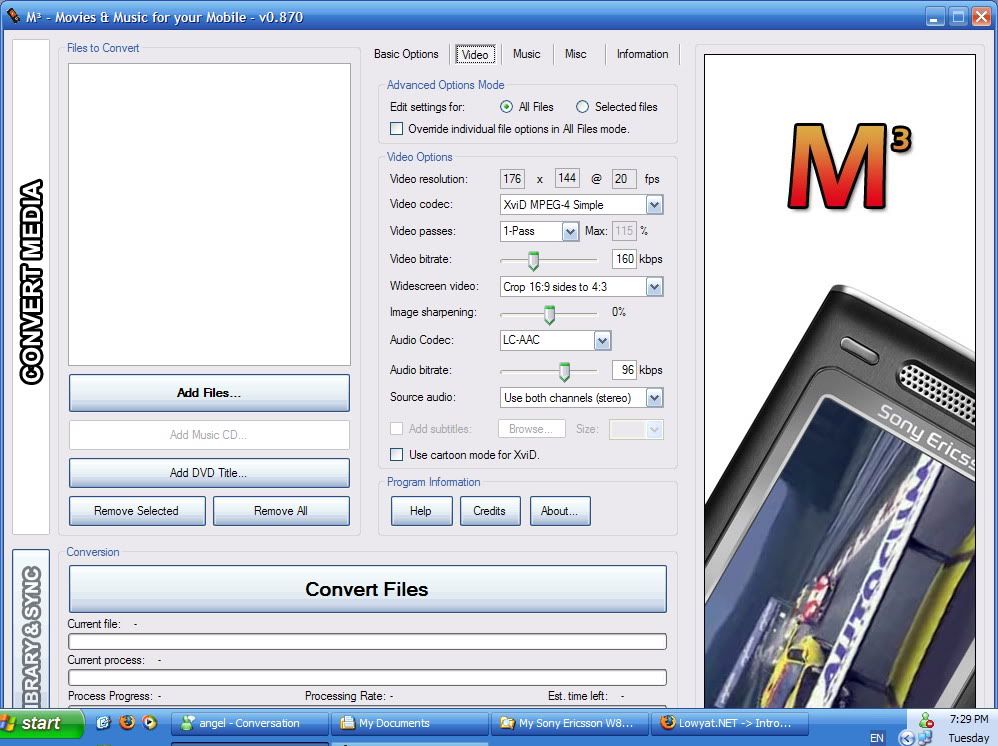
iori57, how u set this one for video configuration.

user posted image

This post has been edited by jcwc84: Aug 22 2006, 07:30 PM
TSiori57
post Aug 22 2006, 08:58 PM

私は..思い出はならないさ
******
Senior Member
1,174 posts

Joined: Feb 2005


QUOTE(jcwc84 @ Aug 22 2006, 07:30 PM)
iori57, how u set this one for video configuration.
you don't have to touch anything here if you not really know what you are doing, at the basic options tab just choose your file, your phone model, click convert and viola

most of the time works just fine
jcwc84
post Aug 23 2006, 03:11 AM

Getting Started
**
Junior Member
56 posts

Joined: Jun 2006
yea. confirm. this softwre works! better den super cause its output format is mp4. super can concert into 3gp but its mp4 doesn't support for SE. but M3 convert some format to mp4. The video and sound quality damn good. No lagging. Size a bit larger only. Thanks yea iori57.
Peisqo
post Aug 23 2006, 01:50 PM

5 Star Member !!
*****
Senior Member
900 posts

Joined: Jan 2003


link 3 pulak not working now lol
allvin
post Aug 23 2006, 04:25 PM

......
*******
Senior Member
4,506 posts

Joined: Aug 2005

QUOTE(jcwc84 @ Aug 23 2006, 04:11 AM)
yea. confirm. this softwre works! better den super cause its output format is mp4. super can concert into 3gp but its mp4 doesn't support for SE. but M3 convert some format to mp4. The video and sound quality damn good. No lagging. Size a bit larger only. Thanks yea iori57.
*
Hmm.. i think some feature in super, which u active them. So the mp4 cant view in SE phone.

If u want even better quality, i suggest u select 2-passes. The conversion will be longer a lit bit biggrin.gif The video bitrate u can adjust up to 180kbps for 176x144 resolution. Once the quality is better, of cos the file size will be bigger. thumbup.gif

QUOTE(Peisqo @ Aug 23 2006, 02:50 PM)
link 3 pulak not working now lol
*
u mean nero digital codec right? Well, after u install m3, it will auto get nero digital codec once u launch the apps. Provided your pc is online smile.gif
vincent_ng86
post Aug 23 2006, 04:27 PM

Regular
******
Senior Member
1,659 posts

Joined: Feb 2005


Does it convert rmvb file to avi?
jcwc84
post Aug 23 2006, 04:31 PM

Getting Started
**
Junior Member
56 posts

Joined: Jun 2006
QUOTE(vincent_ng86 @ Aug 23 2006, 04:27 PM)
Does it convert rmvb file to avi?
*
No. supported media -- avi, mpg, mpeg, dat, wmv.
allvin
post Aug 23 2006, 11:55 PM

......
*******
Senior Member
4,506 posts

Joined: Aug 2005

QUOTE(jcwc84 @ Aug 23 2006, 05:31 PM)
No. supported media -- avi, mpg, mpeg, dat, wmv.
*
YEp! Only those format. That's the only downside. But i bet that guy will fix that issue, just have to wait cool.gif
Peisqo
post Aug 24 2006, 01:04 PM

5 Star Member !!
*****
Senior Member
900 posts

Joined: Jan 2003


walaw so much problem , when i install the 1st 1 they say need some microsoft blablabla .. wtf is all tat .. so 7 mafan
jcwc84
post Aug 25 2006, 03:59 AM

Getting Started
**
Junior Member
56 posts

Joined: Jun 2006
QUOTE(Peisqo @ Aug 24 2006, 01:04 PM)
walaw so much problem , when i install the 1st 1 they say need some microsoft blablabla .. wtf is all tat .. so 7 mafan
*
hahaha. really so mafan? i just install the dotnetfx.exe. Install M3 software. Then done. Then convert pretty leng leng's MV. May be u should try it several times. tongue.gif
allvin
post Aug 25 2006, 01:15 PM

......
*******
Senior Member
4,506 posts

Joined: Aug 2005

Peisqo, for high-quality, u need to sacrifice some effort, ok? biggrin.gif CHeer. Just install dot.fix. Everything will be fine
MADReaLJL
post Aug 26 2006, 01:30 PM

Look at all my stars!!
*******
Senior Member
4,050 posts

Joined: Mar 2005


i cant download the M3 software
anybody can upload it at rapidshare for me pls?
jcwc84
post Aug 26 2006, 03:01 PM

Getting Started
**
Junior Member
56 posts

Joined: Jun 2006
QUOTE(MADReaLJL @ Aug 26 2006, 01:30 PM)
i cant download the M3 software
anybody can upload it at rapidshare for me pls?
*
why cant? i can download it. or u try use download manager.
MADReaLJL
post Aug 27 2006, 12:58 AM

Look at all my stars!!
*******
Senior Member
4,050 posts

Joined: Mar 2005


owh.. juz downloaded it icon_rolleyes.gif
maybe the site down before
TSiori57
post Aug 28 2006, 06:23 AM

私は..思い出はならないさ
******
Senior Member
1,174 posts

Joined: Feb 2005


glad you guys like it

in case the author also lowyat forum member, thank you for making such a great software smile.gif
MADReaLJL
post Aug 28 2006, 11:28 AM

Look at all my stars!!
*******
Senior Member
4,050 posts

Joined: Mar 2005


haha.. the quality is good
anyway i convert a 40 min movie
when it first start is good
but when 20 minutes the video is slower than audio
how to set huh?
GuyzNexDoor
post Aug 28 2006, 05:08 PM

Casual
***
Junior Member
486 posts

Joined: Jul 2006
From: Above the Sky


QUOTE(allvin @ Aug 23 2006, 04:25 PM)
If u want even better quality, i suggest u select 2-passes. The conversion will be longer a lit bit biggrin.gif The video bitrate u can adjust up to 180kbps for 176x144 resolution. Once the quality is better, of cos the file size will be bigger.  thumbup.gif
u mean nero digital codec right? Well, after u install m3, it will auto get nero digital codec once u launch the apps. Provided your pc is online smile.gif
*
How to change the resolution?? After installing this M3, it seems 320 X 240 @ 25 fps is the default setting.. The output size with this setting is very big, around 11,000 kb - 12,000 kb for 3 - 4 minutes songs. I would like to change to 176 X 144 resolution @ 20 fps. i have try to delete the number but cannot... sweat.gif sweat.gif
MADReaLJL
post Aug 28 2006, 05:52 PM

Look at all my stars!!
*******
Senior Member
4,050 posts

Joined: Mar 2005


change fon setting instead w900 to k750/w800
allvin
post Aug 28 2006, 10:21 PM

......
*******
Senior Member
4,506 posts

Joined: Aug 2005

QUOTE(MADReaLJL @ Aug 28 2006, 12:28 PM)
haha.. the quality is good
anyway i convert a 40 min movie
when it first start is good
but when 20 minutes the video is slower than audio
how to set huh?
*
Hmm.. u using which phone? In that video, u got try play in pc? See whether it will occur or not? Sometimes it's your source file smile.gif

QUOTE(GuyzNexDoor @ Aug 28 2006, 06:08 PM)
How to change the resolution?? After installing this M3, it seems 320 X 240 @ 25 fps is the default setting.. The output size with this setting is very big, around 11,000 kb - 12,000 kb for 3 - 4 minutes songs. I would like to change to 176 X 144 resolution @ 20 fps. i have try to delete the number but cannot... sweat.gif  sweat.gif
*
Which phone u using? Hmm... those size ain't big for me tongue.gif Anyway, just set to other model phone as MADReaLJL suggestion smile.gif
cspace
post Aug 28 2006, 11:32 PM

Getting Started
**
Junior Member
111 posts

Joined: Jan 2003
From: KL


Guys, I tried this fantastic tool and liked the results. The only complaint I have is that at Full Screen on my W810i it still has a line right at the bottom and far right which I presume belongs to my wallpaper in the background. Any way to make it TRULY full screen? The line is just 1 pixel wide...
MADReaLJL
post Aug 28 2006, 11:43 PM

Look at all my stars!!
*******
Senior Member
4,050 posts

Joined: Mar 2005


about the audio is not sync wif video, anyone know how to fix this
the video slow about 1.5 second la
allvin
post Aug 28 2006, 11:58 PM

......
*******
Senior Member
4,506 posts

Joined: Aug 2005

QUOTE(MADReaLJL @ Aug 29 2006, 12:43 AM)
about the audio is not sync wif video, anyone know how to fix this
the video slow about 1.5 second la
*
U sure when u play in pc, the video and audio will sync? I just need to comfirm, ok?
MADReaLJL
post Aug 29 2006, 12:03 AM

Look at all my stars!!
*******
Senior Member
4,050 posts

Joined: Mar 2005


ermm.. hard to say.. my pc dun have audio out
built in sound prob
allvin
post Aug 29 2006, 12:58 AM

......
*******
Senior Member
4,506 posts

Joined: Aug 2005

QUOTE(MADReaLJL @ Aug 29 2006, 01:03 AM)
ermm.. hard to say.. my pc dun have audio out
built in sound prob
*
Ouch!

Anyway, i ask that question cos' maybe your source file is VFR video, after conversion, the video will be out of sync. One of the way is by writing avs script in order to solve this problem. And i don't think u like that idea. whistling.gif

If your source file is not VFR, the problem is using too high video bitrate which sometimes can cause the video to be out of sync when playback in mobile phone. To overcome this, just simply reduce the video bitrate.

After you reduce the video bitrate, it's still the same. That's mean your source file is VFR which need avs script to fix that. Sorry, i dunno another method than using avs script. Btw, what your source file format? wink.gif
TSiori57
post Aug 29 2006, 08:22 AM

私は..思い出はならないさ
******
Senior Member
1,174 posts

Joined: Feb 2005


MADReaLJL I'll help u ask the author see what he says
MADReaLJL
post Aug 29 2006, 05:37 PM

Look at all my stars!!
*******
Senior Member
4,050 posts

Joined: Mar 2005


ermm.. 160kbps considered high bitrate?
n what is VFR
my original video is in .wmv format
allvin
post Aug 29 2006, 06:01 PM

......
*******
Senior Member
4,506 posts

Joined: Aug 2005

QUOTE(MADReaLJL @ Aug 29 2006, 06:37 PM)
ermm.. 160kbps considered high bitrate?
n what is VFR
my original video is in .wmv format
*
http://en.wikipedia.org/wiki/Variable_frame_rate

Hmm... i suspect your source file is VFR smile.gif WMV, RM/RMVB and mkv, mostly the video inside is VFR.
MADReaLJL
post Aug 29 2006, 06:06 PM

Look at all my stars!!
*******
Senior Member
4,050 posts

Joined: Mar 2005


ooo.. thx
anyway 160kbps considered high?
allvin
post Aug 29 2006, 09:34 PM

......
*******
Senior Member
4,506 posts

Joined: Aug 2005

QUOTE(MADReaLJL @ Aug 29 2006, 07:06 PM)
ooo.. thx
anyway 160kbps considered high?
*
For k750/w800 right? No high at all. 190kbps is consider high bitrate
jcwc84
post Aug 30 2006, 02:46 AM

Getting Started
**
Junior Member
56 posts

Joined: Jun 2006
QUOTE(cspace @ Aug 28 2006, 11:32 PM)
Guys, I tried this fantastic tool and liked the results. The only complaint I have is that at Full Screen on my W810i it still has a line right at the bottom and far right which I presume belongs to my wallpaper in the background. Any way to make it TRULY full screen? The line is just 1 pixel wide...
*
i convert some mvs. only 1 appear like that. seems not perfect. not sure why. may be the source file?
donnyyeo
post Sep 2 2006, 02:19 PM

On my way
****
Senior Member
583 posts

Joined: Jan 2003
From: Klang, Selangor


M3 Video Converter doesn't support subtitles. I tried converting a video which has subtitles in .SRT format. How is make sure that the subtitles are included in the output MP4 videos?

Edit: Sorry, I got the answer. I just found the subtitle checkbox in M3 Video Converter.

This post has been edited by donnyyeo: Sep 2 2006, 02:56 PM
Peisqo
post Sep 3 2006, 12:12 AM

5 Star Member !!
*****
Senior Member
900 posts

Joined: Jan 2003


aiyoh mafan like crap .. i install the dotnetfix something then they say need microsoft window installer 3.0 ? wtf where to get .. my windows of coz ahem version .. can dl from microsoft.com ?
GuyzNexDoor
post Sep 3 2006, 12:53 PM

Casual
***
Junior Member
486 posts

Joined: Jul 2006
From: Above the Sky


Vry good software thumbup.gif thumbup.gif .. luv all d video... IMO, it depends on d source file. great input produce an excellent output..
allvin
post Sep 3 2006, 12:55 PM

......
*******
Senior Member
4,506 posts

Joined: Aug 2005

QUOTE(Peisqo @ Sep 3 2006, 01:12 AM)
aiyoh mafan like crap .. i install the dotnetfix something then they say need microsoft window installer 3.0 ? wtf where to get .. my windows of coz ahem version .. can dl from microsoft.com ?
*
huh.gif that's weird. I using .net Framework 2.0 or dotnetfx2

Anyway, here's the link for dotnetfx3

http://www.microsoft.com/downloads/details...&displaylang=en
KeonG118
post Sep 8 2006, 01:31 AM

- Do as Infinity -
******
Senior Member
1,156 posts

Joined: Mar 2005
From: * Care-L *


I've downloaded the M3, it's a very convenience converter! thumbup.gif
Will try the SUPER tomolo..

Thx for sharing.. biggrin.gif
low yat 82
post Sep 18 2006, 12:02 PM

time is nearing to end
*******
Senior Member
4,081 posts

Joined: Aug 2005


wanna ask does this convertor can convert video biggerr than 100mb?
allvin
post Sep 18 2006, 06:34 PM

......
*******
Senior Member
4,506 posts

Joined: Aug 2005

QUOTE(low yat 82 @ Sep 18 2006, 01:02 PM)
wanna ask does this convertor can convert video biggerr than 100mb?
*
what u mean bigger than 100MB? So far, it don't support mkv container. As long as your source file is NOT mkv container, den it sure can convert smile.gif
low yat 82
post Sep 19 2006, 09:06 AM

time is nearing to end
*******
Senior Member
4,081 posts

Joined: Aug 2005


QUOTE(allvin @ Sep 18 2006, 06:34 PM)
what u mean bigger than 100MB? So far, it don't support mkv container. As long as your source file is NOT mkv container, den it sure can convert smile.gif
*
coz i try super convertor to convert file bigger than 100mb, its unable to do so...
allvin
post Sep 19 2006, 02:05 PM

......
*******
Senior Member
4,506 posts

Joined: Aug 2005

QUOTE(low yat 82 @ Sep 19 2006, 10:06 AM)
coz i try super convertor to convert file bigger than 100mb, its unable to do so...
*
True or not? I used super before. It can. I convert 600MB mkv into mp4. It successed convert smile.gif Maybe your source file not good or codec problem. There's many possibility why your conversion fail. cool.gif
low yat 82
post Sep 19 2006, 02:23 PM

time is nearing to end
*******
Senior Member
4,081 posts

Joined: Aug 2005


QUOTE(allvin @ Sep 19 2006, 02:05 PM)
True or not? I used super before. It can. I convert 600MB mkv into mp4. It successed convert smile.gif Maybe your source file not good or codec problem. There's many possibility why your conversion fail.  cool.gif
*
mine is avi file.... its fail to do so.... btw, i convert it to 3gp... NEway, ill try mp4.. see can or not
allvin
post Sep 19 2006, 08:12 PM

......
*******
Senior Member
4,506 posts

Joined: Aug 2005

QUOTE(low yat 82 @ Sep 19 2006, 03:23 PM)
mine is avi file.... its fail to do so.... btw, i convert it to 3gp... NEway, ill try mp4.. see can or not
*
i suspect might be your source file. U can try using other convertor. If it's still sama, that's mean your source file or your codec. Sometimes codec can cause that sort of thing. Believe me, i experience that before. Try re-install a fresh copy of k-lite codec or any other codec pack u like smile.gif
nbee
post Oct 2 2006, 08:25 PM

Getting Started
**
Junior Member
178 posts

Joined: Jan 2006
From: Land Below the Wind


can u giv me a link that i can check the updated ver of the shareware?
the forum is too messy, i mean Esato...
TSiori57
post Oct 3 2006, 02:07 AM

私は..思い出はならないさ
******
Senior Member
1,174 posts

Joined: Feb 2005


latest version is M3-0.8.7.5-Installer.exe

unfortunately I also don't know what's the link that can check the updated version of the shareware...

cheers
allvin
post Oct 3 2006, 10:06 AM

......
*******
Senior Member
4,506 posts

Joined: Aug 2005

QUOTE(nbee @ Oct 2 2006, 09:25 PM)
can u giv me a link that i can check the updated ver of the shareware?
the forum is too messy, i mean Esato...
*
i don't think it's too mess. biggrin.gif

QUOTE(iori57 @ Oct 3 2006, 03:07 AM)
latest version is M3-0.8.7.5-Installer.exe

unfortunately I also don't know what's the link that can check the updated version of the shareware...

cheers
*
Yep! The only way is to go to that forum. They will post the latest link in esato.

Or

You can auto-update when u launch the M3 smile.gif
ahhann
post Nov 22 2006, 02:30 PM

Lim Peh
****
Senior Member
545 posts

Joined: Mar 2006
From: The Weirdo River O_o


latest codec by Nero support convertion of RM file to MP4
great news smile.gif
TSiori57
post Dec 12 2006, 09:41 PM

私は..思い出はならないさ
******
Senior Member
1,174 posts

Joined: Feb 2005


new version up smile.gif
must let everyone know about this great program
PetroToxin
post Dec 13 2006, 01:29 AM

Regular
******
Senior Member
1,179 posts

Joined: Jul 2005
From: SS2, Petaling Jaya, Selangor


very good software... rclxms.gif

but some mp3 files just crashes the program for no reason though...... blink.gif
boris
post Dec 15 2006, 03:23 PM

you bastard~!!
*****
Senior Member
955 posts

Joined: Jan 2003


hi all, i have one question here:
in order to install m3, i need to install Microsoft .NET Framework n to do so, i need windows xp sp2... but i'm using windows xp sp1... is there any other way so i can install m3? thanx~!!
PetroToxin
post Dec 16 2006, 03:36 PM

Regular
******
Senior Member
1,179 posts

Joined: Jul 2005
From: SS2, Petaling Jaya, Selangor


QUOTE(boris @ Dec 15 2006, 03:23 PM)
hi all, i have one question here:
in order to install m3, i need to install Microsoft .NET Framework n to do so, i need windows xp sp2... but i'm using windows xp sp1... is there any other way so i can install m3? thanx~!!
*
go update your windows to sp2... or you can try using it without .net framework

http://www.microsoft.com/windowsxp/sp2/default.mspx
youngkies
post Dec 16 2006, 05:02 PM

Monday <--> Friday
Group Icon
VIP
9,511 posts

Joined: Apr 2005


QUOTE(boris @ Dec 15 2006, 04:23 PM)
hi all, i have one question here:
in order to install m3, i need to install Microsoft .NET Framework n to do so, i need windows xp sp2... but i'm using windows xp sp1... is there any other way so i can install m3? thanx~!!
*
install mic. net framework then.. it is about >100mb size..
cradle0fFilth
post Dec 20 2006, 09:54 PM

On my way
****
Senior Member
666 posts

Joined: Oct 2006
From: Klang


urm.. i install it.. but after i click agree to the nero aac codec eula, 1 box come out..wt nothin..

any 1 can help?
skylinegtr34rule4life
post Dec 23 2006, 01:56 PM

13k elite :P
********
Senior Member
13,340 posts

Joined: Feb 2005
From: back from vacation XD


i have found the latest version dy thumbup.gif
http://www.vapulus.com/w900i/M3-0.8.9.6-Installer.exe

Gen-X
post Dec 27 2006, 01:45 AM

Lifetime LYN Member
Group Icon
Elite
8,601 posts

Joined: Jan 2003
From: KL

iori57, thanks for sharing this freeware.

Downloaded it and followed the instructions, and immediately could convert vcd into my Z610i smile.gif So easy to use.
Gen-X
post Dec 27 2006, 02:42 PM

Lifetime LYN Member
Group Icon
Elite
8,601 posts

Joined: Jan 2003
From: KL

icon_question.gif when i first try the conversion i tested on a small DAT file (ad in the vcd) and it works fine. But just try to covert the movie from the same vcd and after conversion there's no sound but got the movie? rclxub.gif
evilhomura89
post Dec 30 2006, 10:17 PM

Look at all my stars!!
*******
Senior Member
5,886 posts

Joined: Jan 2003
From: BM


QUOTE(iori57 @ Aug 16 2006, 11:08 PM)
w900, k800/k790, w800, k750, w810, w600, w550, w300, k610 or equivalent phones with same resolution or similar hardware etc... other phones beside sony ericsson may also use this program however u have to set the resolution etc yourself to the closest one

Introducing

M3 Freeware Video Converter
One of the best converter that gives the best video quality in just a few clicks, very user friendly and "lazy" friendly... fully automated

but the install process a bit mafan... and need to install microsoft .net framework 2.0 which i don't like that much also but anyway..

here's a step to step guide to get it on and working...once u get it to work you can easily convert any of your favourite videos to high (if not best) quality mobile video on earth

1. Download and Install Microsoft .NET Framework Version 2.0 (dotnetfx.exe)
dotnetfx
2. Download and Install M3
M3-0.8.9.1-Installer.exe (url might change if new version is out, go to esato board for any news of M3 and the link for the latest version)
the program also has auto update function so no worry
3. go to this page and click "i agree" to download the codec...
nero digital
Unzip and put neroaacenc.exe in c:\program files\m3\bin

the program still in beta stage, and the programmer is updating it quite frequently that fixes bugs etc.
*
International link down, having difficulties download the NeroDigital thingy.
Can anyone upload it to here or is there any other mirror to it??
evilhomura89
post Dec 31 2006, 06:11 PM

Look at all my stars!!
*******
Senior Member
5,886 posts

Joined: Jan 2003
From: BM


Can it convert .flv to .3gp??
Doesn't work for me though.......tried converting .flv files but no output
tycheah_7
post Jan 6 2007, 02:18 AM

Enthusiast
*****
Senior Member
795 posts

Joined: Jan 2003
I use imtoo converter... server me pretty well... Have not try this thing yet... Currently do not put videos to my phone d.. Put to my psp tongue.gif
jhlou
post Jan 9 2007, 07:46 AM

Enthusiast
*****
Senior Member
826 posts

Joined: Oct 2004


Anyone using this Media Coder? http://mediacoder.sourceforge.net/download.htm

It's a freeware as well, which I prefer over Super. Tried converting rmvb file with Super and it ate 1.5Gb of my hdd. Don't have such problem with MediaCoder though.
PetroToxin
post Jan 14 2007, 05:56 PM

Regular
******
Senior Member
1,179 posts

Joined: Jul 2005
From: SS2, Petaling Jaya, Selangor


Well... This is the most convenient converter I found so far.... rclxms.gif
Pumpkin_G
post Jan 15 2007, 09:55 PM

Casual
***
Junior Member
348 posts

Joined: Sep 2006
From: Puchong/Subang


err. regarding this m3 converter, i just tried downloading it from the specific website listed on the 1st page, but it turned out that the page cant be found.. is there a problem with tat page or is it just me? mind check it out TS? thx very much..
allvin
post Jan 15 2007, 10:30 PM

......
*******
Senior Member
4,506 posts

Joined: Aug 2005

QUOTE(Pumpkin_G @ Jan 15 2007, 10:55 PM)
err. regarding this m3 converter, i just tried downloading it from the specific website listed on the 1st page, but it turned out that the page cant be found.. is there a problem with tat page or is it just me? mind check it out TS? thx very much..
*
Here you go..

http://www.vapulus.com/w900i/M3-0.8.9.6-Installer.exe

Actually that link post at the 3rd page biggrin.gif Make sure you use proxy to dl it since the international link still down
Pumpkin_G
post Jan 15 2007, 11:20 PM

Casual
***
Junior Member
348 posts

Joined: Sep 2006
From: Puchong/Subang


hehehehe. thank you thank you very much allvin.. biggrin.gif will try it out right after its done.. biggrin.gif
speedguy10
post Jan 17 2007, 09:03 AM

~Do not look at my avatar~
******
Senior Member
1,828 posts

Joined: Sep 2004


QUOTE(allvin @ Jan 15 2007, 10:30 PM)
Here you go..

http://www.vapulus.com/w900i/M3-0.8.9.6-Installer.exe

Actually that link post at the 3rd page biggrin.gif Make sure you use proxy to dl it since the international link still down
*
notworthy.gif think of give up this when link is dead. Luckily saw this.

TS pls update ur 1st post with this link. thumbup.gif
2kia
post Jan 23 2007, 04:09 PM

Custom member title?
******
Senior Member
1,985 posts

Joined: Sep 2005
From: Penang Island


geez, thx man! thought of installing other converter d too!
kyoko4eva
post Mar 13 2007, 02:33 PM

idle!
*****
Senior Member
908 posts

Joined: Feb 2005
From: Home


any other alternative converter which doesn't require such installation process but doesn't lose out much in term of features/quality as in m3 ?
kInOzAwA
post Mar 14 2007, 02:00 AM

LYN Ninja
*******
Senior Member
2,889 posts

Joined: Jul 2006
From: Intranet & Internet

i noticed that the link from the first page out of resources.. thanks to allvin for the new link biggrin.gif thumbup.gif
GuyzNexDoor
post Mar 27 2007, 12:54 AM

Casual
***
Junior Member
486 posts

Joined: Jul 2006
From: Above the Sky


Vapulus.com page has been suspended. Seems that we cannot download it anymore frem there. Anyone knows where else can i get the new version??
TSiori57
post Apr 15 2007, 10:50 PM

私は..思い出はならないさ
******
Senior Member
1,174 posts

Joined: Feb 2005


updated first post with new link, should be ok now
kanzaki
post Apr 17 2007, 03:56 AM

Getting Started
**
Junior Member
81 posts

Joined: May 2005


after i convert the file it turns out to be mpg4 file... does k800i support this type of file ? i tot k800i only supports 3gp video file.. if wad i say is rite... how do i convert my video into 3gp format instead of mpg4 ?
youngkies
post Apr 17 2007, 04:03 AM

Monday <--> Friday
Group Icon
VIP
9,511 posts

Joined: Apr 2005


QUOTE(kanzaki @ Apr 17 2007, 03:56 AM)
after i convert the file it turns out to be mpg4 file... does k800i support this type of file ? i tot k800i only supports 3gp video file.. if wad i say is rite... how do i convert my video into 3gp format instead of mpg4 ?
*
mpeg4 works in k800i. just transfer it into the phone and see if it works?
kanzaki
post Apr 17 2007, 05:10 AM

Getting Started
**
Junior Member
81 posts

Joined: May 2005


yeah it actually does...lol juz tat the video dun really fit the whole...anyway the quality is really good....thanx for this great app.
sir_impesto
post Apr 17 2007, 11:29 PM

Enthusiast
*****
Senior Member
729 posts

Joined: Mar 2006
From: Kuala Lumpur


I have tried this software. It works really great compare to other converter. The compression of the video is not visible. Nice converter.... thumbup.gif


yitjuan
post Apr 19 2007, 10:35 PM

arc reactor
****
Senior Member
688 posts

Joined: Jan 2006
i like it. i watch south park with my friends in the lecture halls instead of listening to the old chinese guy blab in a foreign accent now. smile.gif

but seriously, it's good. I like it a lot.
TSiori57
post Apr 26 2007, 01:07 AM

私は..思い出はならないさ
******
Senior Member
1,174 posts

Joined: Feb 2005


hehe glad you all like it, i tested alot of converters and this one is still the best and easiest to use... that's why i'm sharing it
yenx
post May 1 2007, 05:28 PM

Regular
******
Senior Member
1,957 posts

Joined: Jan 2003
unable to install Microsoft .NET Framework Version 2.0...
it said that Microsoft Installer 3.0 is needed
went to their webbies to download it but somehow they said that i cant..
*ahem version of windows sweat.gif
how to get the Microsoft Installer?
anyone ? sweat.gif notworthy.gif
chicaman
post May 1 2007, 06:33 PM

( ;゚Д゚) t(-.-t)
*******
Senior Member
9,707 posts

Joined: Feb 2005
From: Why U wana know? Status: Meditating™
nokia can use this?
allvin
post May 3 2007, 01:02 PM

......
*******
Senior Member
4,506 posts

Joined: Aug 2005

QUOTE(chicaman @ May 1 2007, 07:33 PM)
nokia can use this?
*
can. as long as you know what's your phone support up to how much the bitrate video and also the resolution wink.gif
DaViDcHiN
post May 9 2007, 11:30 PM

Look at all my stars!!
*******
Senior Member
2,720 posts

Joined: Jan 2005
From: Kuala Lumpur


What a nice program! I have been looking for it for so long!!!! Well done!

very easy!
Vincentmomo
post May 13 2007, 09:41 PM

Casual
***
Junior Member
420 posts

Joined: Jun 2006
From: Klang, Subang, PJ


Hey bro, thanks for the converter. Its useful.
kyoko4eva
post May 13 2007, 11:44 PM

idle!
*****
Senior Member
908 posts

Joined: Feb 2005
From: Home


QUOTE(tam_ironcup @ May 13 2007, 07:15 PM)
can someun recommend me a converter so that i can rip stuff from youtube and get it in a format suitable for my w810?
*
i use vixy.net to convert youtube videos into .avi, then i use SUPER to convert them into suitable form for my hp
kyoko4eva
post May 16 2007, 09:50 PM

idle!
*****
Senior Member
908 posts

Joined: Feb 2005
From: Home


QUOTE(tam_ironcup @ May 15 2007, 10:55 PM)
if im using super, can u teach me how to use it to convert flv and avi files to a format suitable for a w810 please
*
Attached Image

after that jz drag the video u wanted to convert into the box below, and click encode
tajinder
post May 17 2007, 12:20 AM

Getting Started
**
Junior Member
132 posts

Joined: Jan 2007


this only for mobile phones ar??
Snuffykl
post Jun 20 2007, 04:06 AM

**emolified**
*****
Senior Member
835 posts

Joined: Oct 2006
From: Malacca


can someone send me this software ?heheh
arafat
post Jun 25 2007, 11:45 PM

ROCK ON!
******
Senior Member
1,747 posts

Joined: Nov 2004
From: serdang selangor

need to install the quick time?
i already got k-lite mega codec..
hosty
post Jun 30 2007, 03:03 AM

Getting Started
**
Junior Member
169 posts

Joined: Jul 2005
From: Miri


I've installed M3 but 1 big problem.It closes down itself few seconds after i jus open it.Anyone experiencing this problem? How to solve it? sad.gif

Edit: M3 working,seems like ppl are also getting the prob due to the auto update function.Since the M3 didn't get any reply it closes itself.SO turn off ur internet only after you opened M3. smile.gif


Added on July 24, 2007, 8:19 pmI've jus installed M3 0.8.9.8 and getting ffdshow undetected problem - I have installed K lite codec pack FULL and ffdshow but still the problem is still there. icon_question.gif

This post has been edited by hosty: Jul 24 2007, 08:19 PM


Change to:
| Lo-Fi Version
0.0461sec    0.72    6 queries    GZIP Disabled
Time is now: 21st December 2025 - 07:31 AM