

wao. sounds interesting. i will try it. thanks.
Introducing: M3 Freeware Video Converter, w900, k800, w800, w600, w550, w300, k610
Introducing: M3 Freeware Video Converter, w900, k800, w800, w600, w550, w300, k610
|
|
 Aug 21 2006, 12:34 AM Aug 21 2006, 12:34 AM
Return to original view | Post
#1
|
 
Junior Member
56 posts Joined: Jun 2006 
|
wao. sounds interesting. i will try it. thanks.
|
|
|
|
|
|
Aug 22 2006, 06:41 PM
Return to original view | Post
#2
|
|
Junior Member
56 posts Joined: Jun 2006
|
QUOTE(Peisqo @ Aug 22 2006, 03:02 PM) hmm link from number 1 seems to be broken ? dotnetfx.exe here. get it. |
|
|
Aug 22 2006, 07:30 PM
Return to original view | Post
#3
|
|
Junior Member
56 posts Joined: Jun 2006
|
iori57, how u set this one for video configuration.
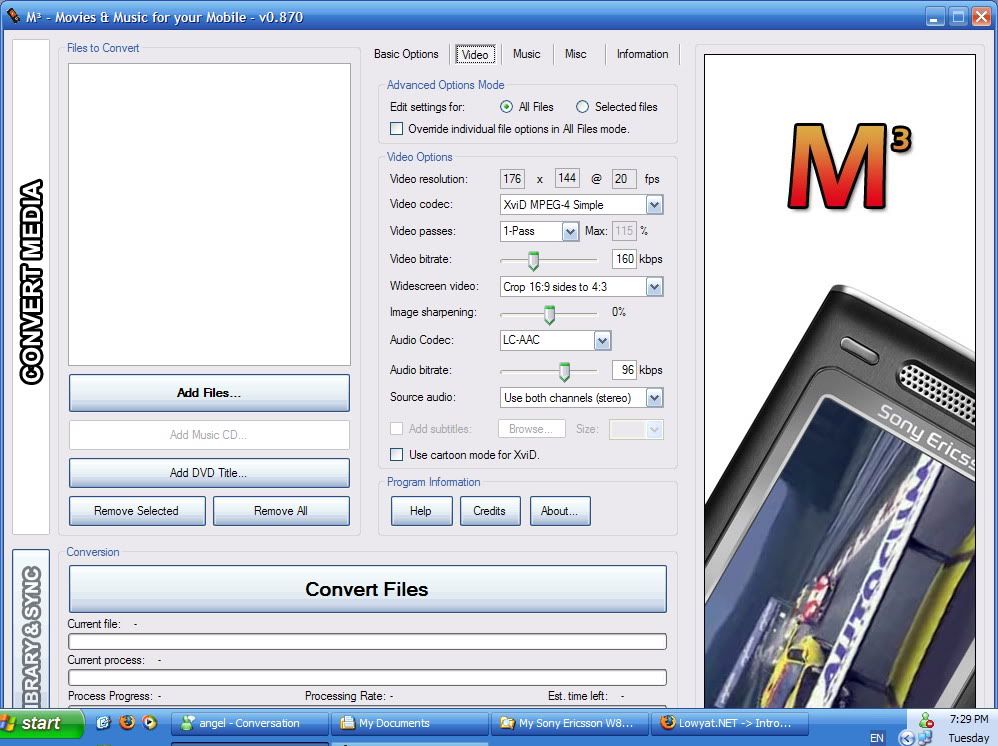 This post has been edited by jcwc84: Aug 22 2006, 07:30 PM |
|
|
Aug 23 2006, 03:11 AM
Return to original view | Post
#4
|
|
Junior Member
56 posts Joined: Jun 2006
|
yea. confirm. this softwre works! better den super cause its output format is mp4. super can concert into 3gp but its mp4 doesn't support for SE. but M3 convert some format to mp4. The video and sound quality damn good. No lagging. Size a bit larger only. Thanks yea iori57.
|
|
|
Aug 23 2006, 04:31 PM
Return to original view | Post
#5
|
|
Junior Member
56 posts Joined: Jun 2006
|
QUOTE(vincent_ng86 @ Aug 23 2006, 04:27 PM) Does it convert rmvb file to avi? No. supported media -- avi, mpg, mpeg, dat, wmv. |
|
|
Aug 25 2006, 03:59 AM
Return to original view | Post
#6
|
|
Junior Member
56 posts Joined: Jun 2006
|
QUOTE(Peisqo @ Aug 24 2006, 01:04 PM) walaw so much problem , when i install the 1st 1 they say need some microsoft blablabla .. wtf is all tat .. so 7 mafan hahaha. really so mafan? i just install the dotnetfx.exe. Install M3 software. Then done. Then convert pretty leng leng's MV. May be u should try it several times.  |
|
|
Aug 26 2006, 03:01 PM
Return to original view | Post
#7
|
|
Junior Member
56 posts Joined: Jun 2006
|
QUOTE(MADReaLJL @ Aug 26 2006, 01:30 PM) i cant download the M3 software why cant? i can download it. or u try use download manager.anybody can upload it at rapidshare for me pls? |
|
|
Aug 30 2006, 02:46 AM
Return to original view | Post
#8
|
|
Junior Member
56 posts Joined: Jun 2006
|
QUOTE(cspace @ Aug 28 2006, 11:32 PM) Guys, I tried this fantastic tool and liked the results. The only complaint I have is that at Full Screen on my W810i it still has a line right at the bottom and far right which I presume belongs to my wallpaper in the background. Any way to make it TRULY full screen? The line is just 1 pixel wide... i convert some mvs. only 1 appear like that. seems not perfect. not sure why. may be the source file? |
| Change to: |  0.0198sec 0.0198sec
 0.70 0.70
 7 queries 7 queries
 GZIP Disabled GZIP Disabled
Time is now: 21st December 2025 - 09:20 AM |
 Quote
Quote