QUOTE(masterpoloking @ Jun 11 2014, 11:35 PM)
thanks bro, i appreciate your reply very very much... but i tried looking around at SS official website and couldnt find a specific page to download firmware? only can find the page to download the driver which is this
http://steelseries.com/support/downloadsand of course i tried googling it but it keep redirecting me to this website above too... if you could be kind enough, can you actually lead me to the page to download this kana v2 firmware ?
thanks for the link to lyn steelseries thread.. will spend some time abit reading it on friday...thanks..
edit: my bad, there is actually a firmware update tool but only for sensei and kana...not kana v2. this kana probably not compatible with kana v2? i know its only 3.9mb and i could have tried it myself... but sorry im actually outstation and couldnt try it...
oh i didn't notice that the download page for kana v2 has no link for the firmware tool. it's available at kinzu v2. the reason why i think the firmware tool is compatible with kana v2 is because of this:

QUOTE(llk @ Jun 11 2014, 11:41 PM)
I'm using SS Rival actually, using SS Engine 3, as far as i know when you plug in the mouse if got any latest firmware the SS software will pop up message to ask for upgrade.
Btw regarding you mouse issue do u plug correctly for the USB port? My experience, if plug wrongly the firmware upgrade cannot run.
kana v2 uses different engine/driver.
QUOTE(masterpoloking @ Jun 11 2014, 11:45 PM)
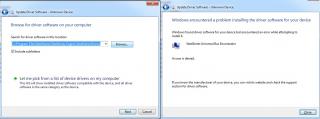
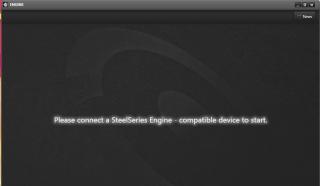
i did tried plugging in into different usb ports, in fact i tried all of them including 2 of my usb3 port, but none of them has different results. is ss engine 3 compatible with kana v2? i dont think so right ? i've tried experimenting, i uninstalling everything and unplug the kana v2, restart my pc and then i just install the ss engine without having my kana v2 plugged. after installing, it came out message saying 'driver not available. please check compatibility', this message will surely popup and i have to close it, and when i try to open the ss engine, no reaction at all... all this is done without the kana v2 plugged in into the computer
suspect its my computer or windows problem ?

there might also be a possibility that the mouse has issues. maybe you should get a replacement. before you do that, try it on a different machine first, to see if it's working. (because by default the generic mouse driver in windows should allow you to use the mouse without ss.driver)
also, like llk said, you should make sure your mouse and usb port are working fine. it's not wise to run that firmware update if one or both of them are not working well.
edit: oh llk has answered haha
This post has been edited by horns: Jun 11 2014, 11:59 PM 

 Jun 10 2014, 11:20 PM, updated 12y ago


 Quote
Quote






 0.0308sec
 0.33
0.33
 6 queries
 GZIP Disabled