

I got mine also from Fedex.
Xiaomi Mi3 Official Thread V7, The fastest thread ever milestone!
Xiaomi Mi3 Official Thread V7, The fastest thread ever milestone!
|
|
 Jun 2 2014, 01:32 PM Jun 2 2014, 01:32 PM
Return to original view | Post
#1
|
 
All Stars
18,672 posts Joined: Jan 2003 From: Penang  
|
I got mine also from Fedex.
|
|
|
|
|
|
Jun 2 2014, 05:59 PM
Return to original view | Post
#2
|
|
All Stars
18,672 posts Joined: Jan 2003 From: Penang
|
Some kind hearted soul please post how to apply screen protector in English in the first page. Hehe
|
|
|
Jun 2 2014, 06:07 PM
Return to original view | Post
#3
|
|
All Stars
18,672 posts Joined: Jan 2003 From: Penang
|
QUOTE(michael9413 @ Jun 2 2014, 06:03 PM) Bro search in YouTube... go a lot... oh tq QUOTE(db07mufan @ Jun 2 2014, 06:03 PM) one is practice film, the other two well packed is the actual SP. The practice one scratches easily. ok tq 1) Wipe everything off of dust. 2) Peel number 1, the number 1 surface will stick on your phone. 3) Then just push all the air bubbles out through the sides with a card, if got dust trapped then unpeel, wipeoff and reapply, if cannot use the next SP. 4) Once all bubbles out, peel number 2. That should be it. I also did not understand the chinese instructions but this seems like it HAHA. And i don't know what the blue piece is for, it says on the website as STATIC FILM   QUOTE(Kyl3 @ Jun 2 2014, 06:04 PM) Grab a glass tampered SP, very easy to apply. erm.. maybe lor... see how coz my unit come with screen protector |
|
|
Jun 2 2014, 06:08 PM
Return to original view | Post
#4
|
|
All Stars
18,672 posts Joined: Jan 2003 From: Penang
|
QUOTE(WTSNWTB @ Jun 2 2014, 06:07 PM) Let me recall, okie okie.. .thanks for writing so long for me If your phone is new, it's easier as you can straight take out the original protector then straight apply. Imagine, pull the protector abit, then place the new sp on top to align, dun take off the whole protector. Then once the alignment is correct, peel + apply at same time. Usually if ur room is clean, dust free, and phone brand new should be 99% dust n dot free. If once u apply and take off the old protector, see lots of dots on side n stuff, dun panic. Use salo tape, or double side tape, tape it on the side of the sp, then peel it, ur original sp will start to peel out, then u can use salo or double sided tape to pick off those hair, dust n wuteva. Once all the above steps done, you should have a dust free, dot or bubble free screen. Of course, if you room, or environment is clean you will have much less trouble. Actually I found places with aircon, or most office is quite clean while our own home is quite dusty and many tiny hair floating around especially if u got pets. I try to write up a proper way to apply it wif pics n stuff. Planning to actually do many things but my bz schedule can't complete. So far got sum pics and simple test run on Tegra4 VS Snapdragon Mi3.  |
|
|
Jun 2 2014, 06:11 PM
Return to original view | Post
#5
|
|
All Stars
18,672 posts Joined: Jan 2003 From: Penang
|
QUOTE(db07mufan @ Jun 2 2014, 06:09 PM) When applying onto your screen it helps to just peel the first half or first quarter on the top, position the holes and camera holes and make sure the top aligned. Then as u press down on the screen peel the remaining one as u slide down. Okie, align hole first.  |
|
|
Jun 2 2014, 06:12 PM
Return to original view | Post
#6
|
|
All Stars
18,672 posts Joined: Jan 2003 From: Penang
|
QUOTE(WTSNWTB @ Jun 2 2014, 06:09 PM) The blue piece suppose to help u clean those dust particle off and make your screen less statis, but I prefer to use salo tape to tape my screen b4 apply. Well use good one, dun use cheapo ones coz the gum might stick to ur phone and cause more trouble. So far I apply sp just need time, and I actually take 10 to even 30 minute to apply. ok, I'm at office now. I apply now. Haha... but how you use the blue piece? My wife tot I fall down in toilet or sumthing when I apply my 1st phone years ago. Had to make the bathroom steamy so the dust is less, but lately I apply SP at office quite good as well, found that my toilet, home, is actually more dusty compare to office. My wife tot I fall down in toilet or sumthing when I apply my 1st phone years ago. Had to make the bathroom steamy so the dust is less, but lately I apply SP at office quite good as well, found that my toilet, home, is actually more dusty compare to office.  |
|
|
|
|
|
Jun 2 2014, 06:35 PM
Return to original view | Post
#7
|
|
All Stars
18,672 posts Joined: Jan 2003 From: Penang
|
QUOTE(snigapoe @ Jun 2 2014, 06:25 PM) Blue size to be use for clear static and dust before apply Done. But got 1 bubble. Hahaha.. I think I accidentally use the training SP. Maybe need to redo next time. |
|
|
Jun 2 2014, 06:48 PM
Return to original view | Post
#8
|
|
All Stars
18,672 posts Joined: Jan 2003 From: Penang
|
QUOTE(chlim @ Jun 2 2014, 06:36 PM) There is no real secret. 1) Make sure you are in a room that is fanless, fan blows up too much dust. 2) Make sure the room is well lighted better still work with a table lamp, can spot dust better. 3) Start from area which need precise alignment eg. home button. Take your time and BTW glass SP are so much easier to apply. Good luck! Haha, true.QUOTE(Pistacio @ Jun 2 2014, 06:39 PM) i also got bubbles at the edges @_@ Yeah, I think got dust. |
|
|
Jun 2 2014, 07:25 PM
Return to original view | Post
#9
|
|
All Stars
18,672 posts Joined: Jan 2003 From: Penang
|
Initial impression:-
Screen too yellowish even at cool and less saturate setting. |
|
|
Jun 2 2014, 08:09 PM
Return to original view | Post
#10
|
|
All Stars
18,672 posts Joined: Jan 2003 From: Penang
|
QUOTE(UNDERGROUND @ Jun 2 2014, 07:31 PM) Maybe the guy doing comparison in YouTube is the dude Oh i use the setting only lol Bro, any app to recommend to change the color temperature of the screen? |
|
|
Jun 2 2014, 09:02 PM
Return to original view | Post
#11
|
|
All Stars
18,672 posts Joined: Jan 2003 From: Penang
|
QUOTE(mjoe @ Jun 2 2014, 08:05 PM) is it true some users said about below par for the camera image? any real sample to share here...tq. my unit will arrive anytime this week. 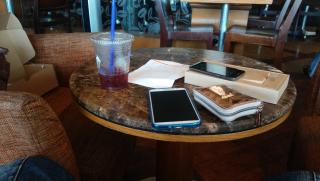
|
|
|
Jun 2 2014, 09:03 PM
Return to original view | Post
#12
|
|
All Stars
18,672 posts Joined: Jan 2003 From: Penang
|
QUOTE(kennethkee93 @ Jun 2 2014, 09:00 PM) At least there's a way for you to reduce the battery consumption by using black background. LCD black or white still eats up same quantity of battery. Black background only work for OLED |
|
|
Jun 2 2014, 10:46 PM
Return to original view | Post
#13
|
|
All Stars
18,672 posts Joined: Jan 2003 From: Penang
|
QUOTE(mjoe @ Jun 2 2014, 09:35 PM) thanks, picture looks great for me... QUOTE(tineagle @ Jun 2 2014, 09:44 PM) the camera is perfectly fine to me. i dont see what the fuss is about beating at a rm889 phone! And it's the first pic I took. Didn't even try to set anything. |
|
|
|
|
|
Jun 2 2014, 10:51 PM
Return to original view | Post
#14
|
|
All Stars
18,672 posts Joined: Jan 2003 From: Penang
|
QUOTE(DanceAgain @ Jun 2 2014, 10:47 PM) Is it just me or the "full charge" is only at 99% because my battery is at 99 for very long and I've been waiting for it to turn 100... 100% here. But I charge when it is off |
|
|
Jun 2 2014, 11:07 PM
Return to original view | Post
#15
|
|
All Stars
18,672 posts Joined: Jan 2003 From: Penang
|
QUOTE(WiLeKiyO @ Jun 2 2014, 10:57 PM) Mi3 original charger is only 1A, the output of Mi PB is 2.1A. I use Samsung 2A charger. That's the reason I get 100%? |
|
|
Jun 2 2014, 11:13 PM
Return to original view | Post
#16
|
|
All Stars
18,672 posts Joined: Jan 2003 From: Penang
|
QUOTE(Nxxbkiller @ Jun 2 2014, 11:12 PM) how to set alarm? need to download apps? No need. Go to clock app. |
|
|
Jun 3 2014, 07:15 AM
Return to original view | Post
#17
|
|
All Stars
18,672 posts Joined: Jan 2003 From: Penang
|
Compare to my Mega, mi3 screen is terrible
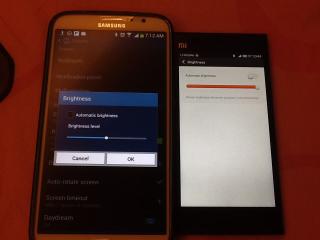
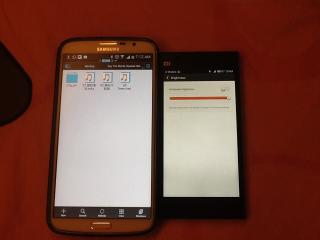
|
|
|
Jun 3 2014, 08:14 AM
Return to original view | Post
#18
|
|
All Stars
18,672 posts Joined: Jan 2003 From: Penang
|
QUOTE(10071985 @ Jun 3 2014, 08:03 AM) In display u can change the color temperature. Its cool setting already.Try check is it accidentally set to Warm |
|
|
Jun 3 2014, 08:18 AM
Return to original view | Post
#19
|
|
All Stars
18,672 posts Joined: Jan 2003 From: Penang
|
QUOTE(mamasos @ Jun 3 2014, 07:32 AM) the screen so yellowish . Its max bright but still dim |
|
|
Jun 3 2014, 08:19 AM
Return to original view | Post
#20
|
|
All Stars
18,672 posts Joined: Jan 2003 From: Penang
|
QUOTE(noobandroid @ Jun 3 2014, 08:17 AM) you do realise you are comparing 2 distinct display mechanism right? Amoled vs IPS No i dont realise it. My mega is 720p LCD. Maybe you want to say I'm comparingMega LCD vs Mi3 IPS? LCD >> IPS?  This post has been edited by gogo2: Jun 3 2014, 08:22 AM |
|
Topic ClosedOptions
|
| Change to: |  0.0227sec 0.0227sec
 0.32 0.32
 7 queries 7 queries
 GZIP Disabled GZIP Disabled
Time is now: 3rd December 2025 - 09:03 PM |
 Quote
Quote