


If it says Unknown like below...
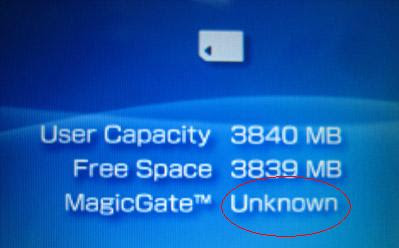
Then you know its not genuine.
This post has been edited by jtdc: Feb 18 2011, 06:46 PM
Guide To Identified Fake & Ori Memory, All Brands & Pic Comparison
|
|
 Feb 18 2011, 06:46 PM Feb 18 2011, 06:46 PM
Return to original view | Post
#1
|
 
Junior Member
245 posts Joined: Nov 2008 From: Cyberjaya  
|
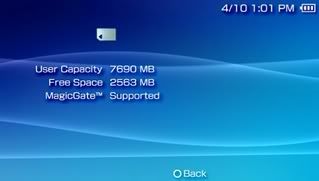
To ensure a memory stick pro duo (magicgate) is original / genuine, put it on a PSP, and on the information, it should say MagicGate Supported.
If it says Unknown like below... Then you know its not genuine. This post has been edited by jtdc: Feb 18 2011, 06:46 PM |
|
|
Feb 20 2011, 06:01 AM
Return to original view | Post
#2
|
|
Junior Member
245 posts Joined: Nov 2008 From: Cyberjaya
|
An effective way of determining if your flash storage is genuine, is by running H2testw.
It will test the thing enough to ensure all the claimed space is usable, and will provide speed report as well. This is a sample output of a real 4GB media which seems possibly a Class 6 speed (definitely a Class 4). 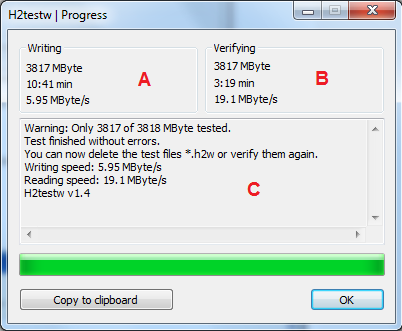 This is an example of a really unmistakably shameless fake media : A 32GB capacity with only 8GB usable, and painfully slow speeds.  Here's the speed guide on what Class means. http://kb.sandisk.com/app/answers/detail/a...valRsS1cxbms%3D Basically, a Class 4 media should have a minimum write performance of 4 megaybtes per second before it can be qualified as such. |
| Change to: |  0.0143sec 0.0143sec
 0.59 0.59
 7 queries 7 queries
 GZIP Disabled GZIP Disabled
Time is now: 13th December 2025 - 11:51 AM |
 Quote
Quote