
Hi nicety, may I know how can I increase cache kodi since when I want to resume movie from kodi it always said cache is full.
[WTS] HIMEDIA Q16 Quad Core 4K Android, 16GB EMMC, best Himedia Android Player
 Lowyat.NET -> Garage Sales -> Special Interest Garage Sales -> Home Electronics & Wares Garage Sales
[WTS] HIMEDIA Q16 Quad Core 4K Android, 16GB EMMC, best Himedia Android Player
|
|
 Apr 2 2015, 04:21 PM Apr 2 2015, 04:21 PM
|
 
Junior Member
53 posts Joined: Jan 2003  
|
Hi nicety, may I know how can I increase cache kodi since when I want to resume movie from kodi it always said cache is full.
|
|
|
|
|
|
Apr 2 2015, 06:43 PM
|

Junior Member
108 posts Joined: Aug 2011 From: Penang
|
QUOTE(franlow @ Apr 2 2015, 09:24 AM) Morning everyone, Bro, pls pm me which app auto launch? I will help you to resolve this.I have been running the Q16 for 3 days now and all I can say that it has been good. As I am very new to the box, I have been clicking on everything just to explore. In the process, I must have accidently enabled an app to launch on startup. So now when I turn on the box, it launched the aptoide app instead of going to the home page. Searched for an hour but still could not find where to disable it. Can someone tell me where I can disable it? Thanks  |
|
|
Apr 2 2015, 06:55 PM
|
|
Junior Member
108 posts Joined: Aug 2011 From: Penang
|
QUOTE(se3333 @ Apr 2 2015, 01:54 PM) Hi nicety, do you know any way/apps that we can use to take screenshot of our current screen ? just like our PC keyboard PrintScreen button ? thanks. So far only found the screen capture app that use power button combination key to snap the screen, this app doesn't work for set top box because it wil power down the box.Will share with you if found any apps using different combination to snap screen. |
|
|
Apr 2 2015, 07:36 PM
|
|
Junior Member
108 posts Joined: Aug 2011 From: Penang
|
QUOTE(mynor @ Apr 2 2015, 04:21 PM) Hi nicety, may I know how can I increase cache kodi since when I want to resume movie from kodi it always said cache is full. Please try the below :http://kodi.wiki/view/HOW-TO:Modify_the_video_cache Work perfectly with Gotham 13, but yet to test on Kodi Helix 14. |
|
|
Apr 2 2015, 07:51 PM
|

Junior Member
31 posts Joined: Feb 2007
|
QUOTE(nicety @ Apr 2 2015, 06:55 PM) So far only found the screen capture app that use power button combination key to snap the screen, this app doesn't work for set top box because it wil power down the box. okay thanks bro Will share with you if found any apps using different combination to snap screen.  if anyone here know how pls share with us... thanks ! if anyone here know how pls share with us... thanks ! |
|
|
Apr 3 2015, 08:25 PM
|

Junior Member
91 posts Joined: Feb 2005 From: From the Air
|
Please pm me details TQ. How to COD at Penang?
|
|
|
|
|
|
Apr 3 2015, 09:09 PM
|
|
Junior Member
108 posts Joined: Aug 2011 From: Penang
|
QUOTE(tkhpeng @ Apr 3 2015, 08:25 PM) Please pm me details TQ. How to COD at Penang? Prefer cod at McD greenlane, just pm to you.This post has been edited by nicety: Apr 3 2015, 09:10 PM |
|
|
Apr 3 2015, 09:36 PM
|
|
Junior Member
108 posts Joined: Aug 2011 From: Penang
|
QUOTE(franlow @ Apr 2 2015, 09:24 AM) Morning everyone, There are few ways to set auto launch :I have been running the Q16 for 3 days now and all I can say that it has been good. As I am very new to the box, I have been clicking on everything just to explore. In the process, I must have accidently enabled an app to launch on startup. So now when I turn on the box, it launched the aptoide app instead of going to the home page. Searched for an hour but still could not find where to disable it. Can someone tell me where I can disable it? Thanks A). Via app setting. Some app has the auto launch setting yiu can turn On or turn Off. For example VST and youku as below photo : 
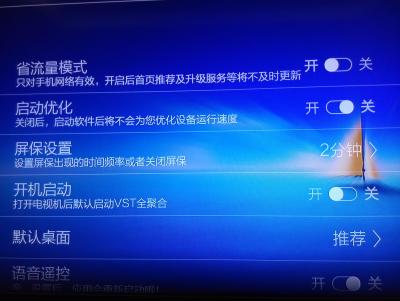
B). Via Himedia Application Manager Select the app you would llike to auto launch in Application, press Menu button on remote controller, just click Default Start as below screen. To turn Off the auto start just do the same steps and click "Close Start". 
|
|
|
Apr 4 2015, 10:00 AM
|

Junior Member
49 posts Joined: Feb 2015
|
Thanks bro,
I usually like to press here press there just to learn more about the box. So sometimes accidently press something and cant remember pressed what. |
|
|
Apr 5 2015, 04:47 PM
|
|
Junior Member
191 posts Joined: Oct 2010
|
Nice seller, answer every single questions I asked. Tested the player foe me as well. Recommended to all
|
|
|
Apr 6 2015, 08:03 PM
|
|
Junior Member
108 posts Joined: Aug 2011 From: Penang
|
QUOTE(franlow @ Apr 4 2015, 10:00 AM) Thanks bro, Just to share with you, in case happen again you know how to reverse back.I usually like to press here press there just to learn more about the box. So sometimes accidently press something and cant remember pressed what. |
|
|
Apr 6 2015, 08:33 PM
|
|
Junior Member
108 posts Joined: Aug 2011 From: Penang
|
QUOTE(baocord @ Apr 5 2015, 04:47 PM) Nice seller, answer every single questions I asked. Tested the player foe me as well. Recommended to all The question and answer actually very important For expectation matching to ensure our customer expectation is matched before the deal. Thank you for your support bro. |
|
|
Apr 6 2015, 08:37 PM
|

All Stars
24,454 posts Joined: Nov 2010
|
QUOTE(mynor @ Apr 2 2015, 04:21 PM) Hi nicety, may I know how can I increase cache kodi since when I want to resume movie from kodi it always said cache is full. i m curious about this... which addon on kodi r u using that gave u this message?i thought this problem is history... i used to muck around with this advancedsettings.xml (as posted by nicety) last year. but i observed that was no longer necessary with kodi on q16. btw, do try this advancedsettings.xml technique n see if it helps. but u do need to know how to do the file editing/copy n paste between pc->android with es file explorer, may be hard for a new user... QUOTE(franlow @ Apr 4 2015, 10:00 AM) Thanks bro, sign of a serious user - that's the ONLY way to learn the device inside out! I usually like to press here press there just to learn more about the box. So sometimes accidently press something and cant remember pressed what.  This post has been edited by AVFAN: Apr 6 2015, 08:40 PM |
|
|
|
|
|
Apr 7 2015, 09:45 AM
|

Senior Member
1,727 posts Joined: Nov 2004 From: Planet Earth
|
Just place an order ......now waiting for email reply
|
|
|
Apr 7 2015, 01:47 PM
|
|
Junior Member
108 posts Joined: Aug 2011 From: Penang
|
QUOTE(cofin @ Apr 7 2015, 09:45 AM) Just place an order ......now waiting for email reply Thank you bro, payment received. Will dispatch by tomorrow. |
|
|
Apr 7 2015, 08:54 PM
Show posts by this member only | IPv6 | Post
#595
|
|
Newbie
1 posts Joined: Mar 2008
|
Received Q16 today, highly recommended seller.
|
|
|
Apr 9 2015, 10:38 PM
|
|
Junior Member
108 posts Joined: Aug 2011 From: Penang
|
QUOTE(hatibudak @ Apr 7 2015, 08:54 PM) Received Q16 today, highly recommended seller. Thank you for acknowledge receipt. |
|
|
Apr 10 2015, 12:35 PM
|
|
Senior Member
1,727 posts Joined: Nov 2004 From: Planet Earth
|
Got my box already .......working fine .....playing movie from the box seems more clear than my UHD samsung TV ....
Thanks ......... |
|
|
Apr 10 2015, 07:25 PM
|
|
Junior Member
108 posts Joined: Aug 2011 From: Penang
|
QUOTE(cofin @ Apr 10 2015, 12:35 PM) Got my box already .......working fine .....playing movie from the box seems more clear than my UHD samsung TV .... Thank you for acknowledge receipt bro.Thanks ......... |
|
|
Apr 12 2015, 02:15 PM
|
|
Junior Member
108 posts Joined: Aug 2011 From: Penang
|
QUOTE(nicety @ Dec 10 2014, 09:54 PM) So sorry I took some time to troubleshoot your problem, finally got good advise from one of my AV expect customer, thank you to Mr Lai. Dear Customer,It is confirmed that TrueHD 7.1 Atmos passthru is not supported since Atmos just annouced by Dolby in August 2014, normal TrueHD 7.1 passthru works very well. 1). To identify it is normal TrueHD 7.1 or Atmos, please refer to the original source blue ray disc, you can verify from www.blu-ray.com 2). I have raised the request to Himedia, hopefully they could add Atmos pssthru into the future firmware. More about Dolby Atmos->http://cdn-blog.dolby.com/wp-content/uploads/2014/08/Dolby-Atmos-for-the-Home-Theater.pdf After long waiting, Dolby TrueHD Atmos Passthru finally fixed in the firmware 1.0.8. Both Q5 and Q16 quad core are available in the Skydrive already, if you need Atmos, please download and upgrade the firmware as per step by step guide in the Skydrive. Below are the change log for firmware 1.0.8 1). Fix Dolby Atmos True-HD unable to passthru 2). Fix 3rd part Live TV screen ratio in HDP, TVAPK 3). Fix compatibility issue of some source content such as OBS Oh! My God, Ment.ts (Korean Movie) 4). Fix MangoTV h.265 movies black screen problem 5). Fix the problem when switch 4K to 180P resolution 6). Fix the problem of Thor: The Dark World BDMV at 6minutes 41second 7). Enhanced Blu-ray 3D compatibility 8). Fix some MG launcher user interface bugs P/S : As usual, if you satisfy with current firmware, please do not upgrade. Unless you have the above mention issues in the change log. This post has been edited by nicety: Apr 12 2015, 02:17 PM |
|
Topic ClosedOptions
|
| Change to: |  0.0297sec 0.0297sec
 0.41 0.41
 6 queries 6 queries
 GZIP Disabled GZIP Disabled
Time is now: 4th December 2025 - 05:56 PM |
 Quote
Quote