Welcome Guest ( Log In | Register )

Bump Topic Topic Closed RSS Feed

Outline · [ Standard ] · Linear+

 [WTS] HIMEDIA Q16 Quad Core 4K Android, 16GB EMMC, best Himedia Android Player

views
     
TSnicety
post Mar 29 2015, 01:45 PM

Getting Started
**
Junior Member
108 posts

Joined: Aug 2011
From: Penang


QUOTE(unknownlowyat @ Mar 27 2015, 12:36 AM)
finally got the time to comment about my purchase.
Nicety is very nice and responsive seller, last minute ask him whether free for COD, after 1-2 hours, we met and seal the deal. biggrin.gif
u r not only buying product from him but also his service and support.
Q16 is really solid and he has pre-install the basic program that can at least keep me busy for few days.
i haven really got the chance to get to know more about cloudtv as thats the main reason i got this device for.
thumbs up and glad to know tht he is also from Penang biggrin.gif
*
Thank you for the compliment bro. To be noted CloudTV premium trial is limited to two days only. Pls use premium trial to test because this is the actual channels you get when you subscribe. The free content does not reflex the actual paid channels. Many buyer buyer mistaken judge CloudTV base on free content.
TSnicety
post Mar 29 2015, 04:14 PM

Getting Started
**
Junior Member
108 posts

Joined: Aug 2011
From: Penang


QUOTE(naphewz_84 @ Mar 29 2015, 09:37 AM)
Hi nicety..do you sell himedia q16 remote control?my remote suddenly cannot be used..
*
Yes, just pmed to you.

Please double check your remote battery, is there red light indicator when you press any button?


memento81
post Mar 30 2015, 09:24 AM

Getting Started
**
Junior Member
65 posts

Joined: Jan 2013


hi pm me..best priced and best package devices

This post has been edited by memento81: Mar 30 2015, 09:25 AM
colossians
post Mar 30 2015, 12:12 PM

New Member
*
Junior Member
37 posts

Joined: Dec 2009
QUOTE(unknownlowyat @ Mar 27 2015, 12:36 AM)

u r not only buying product from him but also his service and support.

*
I will second that. Nicety follows up with after sales service on advice and handson on testing to help get the best out of your system. Highly recommend this seller.
franlow
post Mar 30 2015, 12:58 PM

New Member
*
Junior Member
49 posts

Joined: Feb 2015
finally received the Q16 at 12pm today thanks to pos(not so laju). Anyways, great and responsive seller. Definitely will recommend to friends
unknownlowyat
post Apr 1 2015, 12:01 AM

New Member
*
Newbie
4 posts

Joined: Jun 2012
another good experience that need to be shared.
electronic device can be very dependent of luck.
i received mine with some problem and verified with Nicety and he just changed another one unit for me without a word.
and he guided me thru on how to use some of the apps patiently.
Superb !!!

TSnicety
post Apr 1 2015, 01:41 AM

Getting Started
**
Junior Member
108 posts

Joined: Aug 2011
From: Penang


QUOTE(memento81 @ Mar 30 2015, 09:24 AM)
hi pm me..best priced and best package devices
*
Thank you for inquiry. Pmed yo you yesterday, looking forward your response.
TSnicety
post Apr 1 2015, 01:52 AM

Getting Started
**
Junior Member
108 posts

Joined: Aug 2011
From: Penang


QUOTE(colossians @ Mar 30 2015, 12:12 PM)
I will second that. Nicety follows up with after sales service on advice and handson on testing to help get the best out of your system. Highly recommend this seller.
*
QUOTE(franlow @ Mar 30 2015, 12:58 PM)
finally received the Q16 at 12pm today thanks to pos(not so laju). Anyways, great and responsive seller. Definitely will recommend to friends
*
Thank you for the support bro. Our service is not stop here, I treat my customers as friend and share what I learn from time to time. In return my customers do share with me when they found new apps or new tips.

Sometime my response could be slow due to time constraint, hope you don't mind.


TSnicety
post Apr 1 2015, 11:47 PM

Getting Started
**
Junior Member
108 posts

Joined: Aug 2011
From: Penang


QUOTE(unknownlowyat @ Apr 1 2015, 12:01 AM)
another good experience that need to be shared.
electronic device can be very dependent of luck.
i received mine with some problem and verified with Nicety and he just changed another one unit for me without a word.
and he guided me thru on how to use some of the apps patiently.
Superb !!!
*
No problem bro. It is our responsible to replace if faulty. From our experience, we could roughly judge the root cause base on your description. Most of the problem are software issue, hardware issue is very rare therefore we could identify easily.
franlow
post Apr 2 2015, 09:24 AM

New Member
*
Junior Member
49 posts

Joined: Feb 2015
Morning everyone,

I have been running the Q16 for 3 days now and all I can say that it has been good.

As I am very new to the box, I have been clicking on everything just to explore. In the process, I must have accidently enabled an app to launch on startup. So now when I turn on the box, it launched the aptoide app instead of going to the home page.

Searched for an hour but still could not find where to disable it.

Can someone tell me where I can disable it?

Thanks
se3333
post Apr 2 2015, 01:54 PM

New Member
*
Junior Member
31 posts

Joined: Feb 2007
Hi nicety, do you know any way/apps that we can use to take screenshot of our current screen ? just like our PC keyboard PrintScreen button ? thanks.
mynor
post Apr 2 2015, 04:21 PM

Getting Started
**
Junior Member
53 posts

Joined: Jan 2003


Hi nicety, may I know how can I increase cache kodi since when I want to resume movie from kodi it always said cache is full.
TSnicety
post Apr 2 2015, 06:43 PM

Getting Started
**
Junior Member
108 posts

Joined: Aug 2011
From: Penang


QUOTE(franlow @ Apr 2 2015, 09:24 AM)
Morning everyone,

I have been running the Q16 for 3 days now and all I can say that it has been good.

As I am very new to the box, I have been clicking on everything just to explore. In the process, I must have accidently enabled an app to launch on startup. So now when I turn on the box, it launched the aptoide app instead of going to the home page.

Searched for an hour but still could not find where to disable it.

Can someone tell me where I can disable it?

Thanks
*
Bro, pls pm me which app auto launch? I will help you to resolve this.
TSnicety
post Apr 2 2015, 06:55 PM

Getting Started
**
Junior Member
108 posts

Joined: Aug 2011
From: Penang


QUOTE(se3333 @ Apr 2 2015, 01:54 PM)
Hi nicety, do you know any way/apps that we can use to take screenshot of our current screen ? just like our PC keyboard PrintScreen button ? thanks.
*
So far only found the screen capture app that use power button combination key to snap the screen, this app doesn't work for set top box because it wil power down the box.

Will share with you if found any apps using different combination to snap screen.
TSnicety
post Apr 2 2015, 07:36 PM

Getting Started
**
Junior Member
108 posts

Joined: Aug 2011
From: Penang


QUOTE(mynor @ Apr 2 2015, 04:21 PM)
Hi nicety, may I know how can I increase cache kodi since when I want to resume movie from kodi it always said cache is full.
*
Please try the below :

http://kodi.wiki/view/HOW-TO:Modify_the_video_cache

Work perfectly with Gotham 13, but yet to test on Kodi Helix 14.
se3333
post Apr 2 2015, 07:51 PM

New Member
*
Junior Member
31 posts

Joined: Feb 2007
QUOTE(nicety @ Apr 2 2015, 06:55 PM)
So far only found the screen capture app that use power button combination key to snap the screen, this app doesn't work for set top box because it wil power down the box.

Will share with you if found any apps using different combination to snap screen.
*
okay thanks bro smile.gif if anyone here know how pls share with us... thanks !
tkhpeng
post Apr 3 2015, 08:25 PM

Getting Started
**
Junior Member
91 posts

Joined: Feb 2005
From: From the Air


Please pm me details TQ. How to COD at Penang?

TSnicety
post Apr 3 2015, 09:09 PM

Getting Started
**
Junior Member
108 posts

Joined: Aug 2011
From: Penang


QUOTE(tkhpeng @ Apr 3 2015, 08:25 PM)
Please pm me details TQ. How to COD at Penang?
*
Prefer cod at McD greenlane, just pm to you.

This post has been edited by nicety: Apr 3 2015, 09:10 PM
TSnicety
post Apr 3 2015, 09:36 PM

Getting Started
**
Junior Member
108 posts

Joined: Aug 2011
From: Penang


QUOTE(franlow @ Apr 2 2015, 09:24 AM)
Morning everyone,

I have been running the Q16 for 3 days now and all I can say that it has been good.

As I am very new to the box, I have been clicking on everything just to explore. In the process, I must have accidently enabled an app to launch on startup. So now when I turn on the box, it launched the aptoide app instead of going to the home page.

Searched for an hour but still could not find where to disable it.

Can someone tell me where I can disable it?

Thanks
*
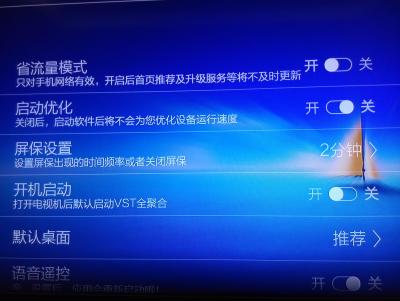
There are few ways to set auto launch :

A). Via app setting. Some app has the auto launch setting yiu can turn On or turn Off. For example VST and youku as below photo :
Attached Image Attached Image

B). Via Himedia Application Manager
Select the app you would llike to auto launch in Application, press Menu button on remote controller, just click Default Start as below screen. To turn Off the auto start just do the same steps and click "Close Start".
Attached Image

franlow
post Apr 4 2015, 10:00 AM

New Member
*
Junior Member
49 posts

Joined: Feb 2015
Thanks bro,

I usually like to press here press there just to learn more about the box. So sometimes accidently press something and cant remember pressed what.

61 Pages « < 28 29 30 31 > » Top
Topic ClosedOptions
 

Change to:
| Lo-Fi Version
0.0355sec    0.48    6 queries    GZIP Disabled
Time is now: 10th December 2025 - 10:39 AM