

QUOTE(kizwan @ Aug 31 2014, 04:08 PM)
Why you don't want to set custom fan profile instead? 

@@ i set rdy....to 47 now at profileAMD Radeon™ Discussion V11, Latest - 14.12 | WHQL - 14.12
|
|
 Aug 31 2014, 04:25 PM Aug 31 2014, 04:25 PM
Return to original view | Post
#21
|
 
Senior Member
676 posts Joined: Jul 2007 From: Soviet Union 
|
QUOTE(kizwan @ Aug 31 2014, 04:08 PM) Why you don't want to set custom fan profile instead? @@ i set rdy....to 47 now at profile |
|
|
|
|
|
Aug 31 2014, 04:44 PM
Return to original view | Post
#22
|
|
Senior Member
676 posts Joined: Jul 2007 From: Soviet Union
|
ok i read AMD say '' We have designed the 290 Series to operate at a steady state of 95C. By running at 95C, we are both maximizing the performance and minimizing the acoustics of the product. Be assured, that 95C is a perfectly safe temperature at which the GPU can operate for its entire life. There is no technical reason to reduce the target temperature below 95C. '' so no need to worry
|
|
|
Aug 31 2014, 05:11 PM
Return to original view | Post
#23
|
|
Senior Member
676 posts Joined: Jul 2007 From: Soviet Union
|
QUOTE(kizwan @ Aug 31 2014, 04:55 PM) You need to set higher than that. Mine running in 80s with custom fan profile & I can get it down to 70s if I'm running the fan at 100% speed (actually depends on the ambient, if ambient maintained at 29 - 31C like when it's raining, I can run at 80% fan speed to maintain 70s Celsius). Ask yourself this, why would you want to turn down the card performance just because you want it to run cooler if you can achieve the same thing with custom fan profile & not loosing performance? if use the MSI custom fan will get super lough.....and boot to 70-80% fan speed.....will this damage the fan cooler?Rather than lower the card performance, better exchange to 280 or 270. *custom fan profile means, set the fan to running at certain speed at certain temperature, increase the fan speed when temperature increase (you can use range, e.g. 60% speed for 50 - 60 Celsius). This post has been edited by commanderz: Aug 31 2014, 05:20 PM Attached thumbnail(s) 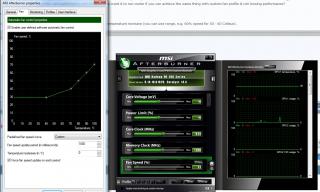
|
|
|
Nov 18 2014, 09:10 AM
Return to original view | Post
#24
|
|
Senior Member
676 posts Joined: Jul 2007 From: Soviet Union
|
hi...having a little problem here....after almost use for 1 year of My Asus R290 reference card.......some time i get black screen when playing heavy....like far cry 4 or call of duty advance warfare or bf 4 in run at max setting and i need to hard reboot my PC....even i clock the vram 1250 to 1100 mhz.....and i using Afterburn to adjust my fans speed also.......Any solution for this?......if not im thinking trade off my card and jump back to Nvidia....since this AMD give me alot of problem......regret change to AMD card...
This post has been edited by commanderz: Nov 18 2014, 09:14 AM |
|
|
Nov 18 2014, 09:14 AM
Return to original view | Post
#25
|
|
Senior Member
676 posts Joined: Jul 2007 From: Soviet Union
|
hi...having a little problem here....after almost use for 1 year of My Asus R290 reference card.......some time i get black screen when playing heavy....like far cry 4 or call of duty advance warfare or bf 4 in run at max setting and i need to hard reboot my PC....even i clock the vram 1250 to 1100 mhz.....and i using Afterburn to adjust my fans speed also.......Any solution for this?......if not im thinking trade off my card and jump back to Nvidia....since this AMD give me alot of problem......regret change to AMD card...
|
|
|
Nov 18 2014, 09:53 AM
Return to original view | Post
#26
|
|
Senior Member
676 posts Joined: Jul 2007 From: Soviet Union
|
QUOTE(arifhasim85 @ Sep 2 2014, 10:57 AM) bro i have same problem with u before.. so many things ive tried to solve the problems such as reinstall driver and windows, trying different version of drivers/ccc, reseat the coolers.. but the black screen problems still happened.. then a friend told me that many r9 290 cards have problems in voltage stability at stock especially with the reference one.. so he advised me to try overvolt and overclock a bit.. i oced my cards to 1100core and 1350mem with +50mv volt and the problem solved.. no more black screen.. now im comfortably gaming with 1170core and 1400mem with +100mv volt.. i did wanted to try flash the card but it seems not needed.. The exactly same problem I face now..if run heavy games at ultra setting. ...ok gonna try overvolt abit see what happen than ...This post has been edited by commanderz: Nov 18 2014, 09:57 AM |
|
|
|
|
|
Nov 18 2014, 09:59 AM
Return to original view | Post
#27
|
|
Senior Member
676 posts Joined: Jul 2007 From: Soviet Union
|
QUOTE(arifhasim85 @ Nov 18 2014, 09:46 AM) try this method.. disable ccc, overclock and overvolt the gpu a bit using afterburner or trixx.. last time i also facing same problem but after i oc the card 1120core, 1350mem, +50mv the problem solved.. the most important is overvolt the card and disable ccc.. oc without overvolt may not solve the issue.. Ok thank for reply gonna test it later with max setting on far cry 4 |
|
|
Nov 18 2014, 05:03 PM
Return to original view | Post
#28
|
|
Senior Member
676 posts Joined: Jul 2007 From: Soviet Union
|
QUOTE(terradrive @ Nov 18 2014, 12:29 PM) Maybe try to clean the card? after increase votlage....my card when playing game keep 94C =.=Probably dusts inside thr heatsink. If not then go for rma. My card is 10 months old, first 2 months ran overclocked 24/7 100% load doing mining and it is still fine. http://imgur.com/mQf4YZh This post has been edited by commanderz: Nov 18 2014, 05:27 PM |
|
|
Nov 18 2014, 06:23 PM
Return to original view | Post
#29
|
|
Senior Member
676 posts Joined: Jul 2007 From: Soviet Union
|
QUOTE(terradrive @ Nov 18 2014, 05:59 PM) Reference card memang runs at the 94/95C temperature target. should i set anything - or + power limit? to 25%?Unless you got custom cooler 290 cards like mine, it is 70-80C depending on your room temperature. |
|
Topic ClosedOptions
|
| Change to: |  0.0459sec 0.0459sec
 0.33 0.33
 7 queries 7 queries
 GZIP Disabled GZIP Disabled
Time is now: 8th December 2025 - 08:56 AM |
 Quote
Quote