Outline ·
[ Standard ] ·
Linear+
AMD Radeon™ Discussion V11, Latest - 14.12 | WHQL - 14.12
|
commanderz
|
 Jul 4 2014, 10:26 PM Jul 4 2014, 10:26 PM
|

|
hi...i think having problem with my Asus R290.....some time when i play game like dota 2 or watch dogs.....the graphic card is running fan is running so loud....than it will sudden just shut down my entire PC.......anyone know how to fix it?? i didn't not overclock anything and also never encounter this problem last time using nvidia card...using driver 14.6 beta version now
This post has been edited by commanderz: Jul 4 2014, 10:30 PM
|
|
|
|
|
|
commanderz
|
Jul 4 2014, 10:59 PM
|
|
|
QUOTE(hazard_puppet @ Jul 4 2014, 10:54 PM) try 14.4 stable version first? ya i think 14.4 is more stable..........my card temp is 70C when not gaming....but gaming is arounf 80-90 This post has been edited by commanderz: Jul 5 2014, 03:16 AM |
|
|
|
|
|
commanderz
|
Jul 4 2014, 11:10 PM
|
|
|
anything here i need to set or fix? update: ok after testing on MSI Kombustor 3.0....it seem when my card go over 92-95 temp it just shut down the whole PC......maybe is PWS faulty ? This post has been edited by commanderz: Jul 5 2014, 04:42 AM Attached thumbnail(s)
|
|
|
|
|
|
commanderz
|
Jul 5 2014, 01:45 PM
|
|
|
QUOTE(M1X @ Jul 5 2014, 01:33 PM) Noticed several things: 1, fan always around 25%? seems really low. 2, core under 1GHz but voltage almost 1.3v? sounds high to me. Ok...final test confirm now is graphic card problem .. when test benchmark over 92 C temp it just shut down......and I did not over clock or set anything at GPU tweak....err fan speed I set to Auto and any recommand setting for voltage ? This post has been edited by commanderz: Jul 5 2014, 01:53 PM |
|
|
|
|
|
commanderz
|
Jul 5 2014, 01:58 PM
|
|
|
Update : when try to lower voltage than now become black screen =.=
|
|
|
|
|
|
commanderz
|
Jul 5 2014, 02:09 PM
|
|
|
QUOTE(M1X @ Jul 5 2014, 02:00 PM) Don't hit that thing so hard... The way to do undervolt is decrease little by little and test for stability... I do suspect there something wrong with the cooler though, as I see other people don't got such hot even on much higher settings. Try manual fan speed see how much it helps, 25% sounds like just ~500rpm. like this?or GPU clock i need to increase? Attached thumbnail(s)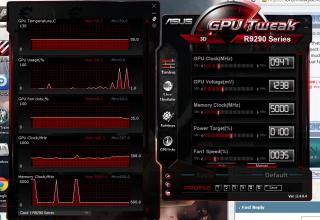
|
|
|
|
|
|
commanderz
|
Jul 5 2014, 02:20 PM
|
|
|
QUOTE(M1X @ Jul 5 2014, 02:15 PM) if you increase GPU clock you just potentially make it even hotter  and crash when it don't have enough voltage. try 40%+ fan speed, game and see what's going on. the GPU voltage cannot lower than 1.240 ...it will just black screen = =....ok sett to 40 fan speed rdy.....and i saw other forum say R290 is design to run hot and no problem when 95 C also This post has been edited by commanderz: Jul 5 2014, 02:24 PM |
|
|
|
|
|
commanderz
|
Jul 5 2014, 02:27 PM
|
|
|
And maybe I can disable overheart option some way ??? I try disable ovrheart at bios but not working ..
This post has been edited by commanderz: Jul 5 2014, 02:29 PM
|
|
|
|
|
|
commanderz
|
Jul 5 2014, 02:51 PM
|
|
|
QUOTE(Acid_RuleZz @ Jul 5 2014, 02:42 PM) Reference card default voltage is under 1.2v. Did Asus screw that up too?  http://www.anandtech.com/show/7481/the-amd...9-290-review/15 http://www.anandtech.com/show/7481/the-amd...9-290-review/15Try, uninstall GPU Tweak, use DDU to remove driver and install back WHQL 14.4 or 13.12. Err so how bring back lowyat for change other brand? Or can I use Msi afterburner to check the voltage after uninstall 14.6 and GPU tweak driver ? This post has been edited by commanderz: Jul 5 2014, 02:53 PM |
|
|
|
|
|
commanderz
|
Jul 5 2014, 03:06 PM
|
|
|
Ok will update later thank very much !!
|
|
|
|
|
|
commanderz
|
Jul 5 2014, 07:10 PM
|
|
|
Update : it seem i need to Manual set the fan speed to 40 -47% to prevent overhearting shut down....but when gaming still 94 C temp.....now feel regret from ATI jump to nvidia .... This post has been edited by commanderz: Jul 5 2014, 08:54 PM Attached thumbnail(s)
|
|
|
|
|
|
commanderz
|
Jul 5 2014, 09:57 PM
|
|
|
QUOTE(M1X @ Jul 5 2014, 09:48 PM) Best just send back to shop for exchange. Your card doesn't looks normal at all  Screenshots / reviews around all maintain decent 70c+- even pushing near 1.35v. I will guess is the thermal paste not properly applied. Don't underestimate that little "thing"... really? but i saw few review also say when gaming it will go over 90 C? here the link http://www.guru3d.com/articles_pages/radeo...chmarks,11.html |
|
|
|
|
|
commanderz
|
Jul 5 2014, 10:33 PM
|
|
|
QUOTE(M1X @ Jul 5 2014, 10:03 PM) that is reference AMD card, of course. But aren't your's Asus Direct CU II as written on your sig? Or did I misunderstood? You're using reference version?  OK looking at your clock speed, you're using the reference version, I thought is Direct CU II. Reference card are made to run at 95°c... /ninja edited 999 times... my is normal version only card version is Asus R9290-4GD5...so which mean is normal to run at 95 C? This post has been edited by commanderz: Jul 5 2014, 11:00 PM |
|
|
|
|
|
commanderz
|
Jul 6 2014, 12:49 AM
|
|
|
QUOTE(TheHitman47 @ Jul 5 2014, 11:47 PM) wait, you regret changing to AMD or Nvidia?.  nvidia to AMD =.= |
|
|
|
|
|
commanderz
|
Jul 6 2014, 12:53 AM
|
|
|
QUOTE(M1X @ Jul 6 2014, 12:26 AM) that reference AMD cooler is, well, trash. the GPU will be maintained 90c~95c, where the performance will start to get throttled (decreased) to maintain that temperature. despite AMD claims that is perfectly normal, but to be honest - that is insanely hot. up to you, if you're comfortable to let it run at 90c... as long as you keep the fan speed up to prevent it from overheating. otherwise do something about it - underclock, undervolt, change to aftermarket cooler, or swap to factory cooler version altogether. so what do u recommend ? set 40-47 fan speed permanent? and if underclock....what memory and clock u recommend >.<? |
|
|
|
|
|
commanderz
|
Aug 30 2014, 05:39 PM
|
|
|
hi....i using Asus 290 reference card here with normal cooler....everytime i play heavy game like metro 2033, battlefield 4 or any other high graphic games.....my temp just contast over 90 C......i try use MSI after burn de-clock 950/1250 to 900/1100.......now temp seem to going down 80-85 C.....any idea can how to lower down the temp?? change the graphic card fans or need to buy water cooler =.= ? need advice please.....
This post has been edited by commanderz: Aug 30 2014, 05:40 PM
|
|
|
|
|
|
commanderz
|
Aug 30 2014, 08:30 PM
|
|
|
QUOTE(terradrive @ Aug 30 2014, 07:13 PM) Reference R9 290 are designed to run at 94C. It's normal and no need to worry about the temperature. Powertune 2.0 in the 290 adjusted clockspeed to the tdp limit & temperature limit. So it'll run at maximum clockspeed allowable under a set amount of tdp and temperature. If you want to lower the temperatures, change to aftermarket coolers. But my advice just use it and biar the temps at 94C, that's what warranty is for. lol.....ok really no problem for any game run constant 90 C ++?? i scare my graphic burn down  |
|
|
|
|
|
commanderz
|
Aug 30 2014, 11:31 PM
|
|
|
QUOTE(marfccy @ Aug 30 2014, 10:33 PM) AMD said their R9 290 series are designed to run at 95C so you should be fine ok than  |
|
|
|
|
|
commanderz
|
Aug 30 2014, 11:53 PM
|
|
|
i still declock about 5%....dunwan my card get so hot @@
|
|
|
|
|
|
commanderz
|
Aug 31 2014, 03:50 PM
|
|
|
QUOTE(terradrive @ Aug 31 2014, 02:54 PM) Set the powetunes to -10% or something like that. The settings limit the TDP allowed for the card. Lower TDp then means lower power consumption and heat, but also the card will run slower. i using MSI afterburn....how to set powertunes -10%? This post has been edited by commanderz: Aug 31 2014, 03:53 PM Attached thumbnail(s)
|
|
|
|
|




 Quote
Quote

 0.0422sec
 0.30
0.30
 7 queries
 GZIP Disabled