Welcome Guest ( Log In | Register )

Bump Topic Topic Closed RSS Feed

Outline · [ Standard ] · Linear+

Q and A Turn off harddisk?, power save settings in control panel

views
     
TSjunster
post Jul 21 2006, 03:59 AM, updated 20y ago

Casual
***
Junior Member
396 posts

Joined: Dec 2004
From: A Pile of Junks


im using 2 harddisk.1 is for the windows and other 1 is for file storage.
my question is whether is there any problem if i activate the "turn off my harddisks" option??will it affect my com??cuz i always left my com on..will the "turn off my harddisk" thing can prolong my harddisk lifespan???
alextan99
post Jul 21 2006, 07:48 AM

Wassup
*******
Senior Member
2,660 posts

Joined: Jan 2003
From: Somewhere in the world
it will help....but not that much
samurai1337
post Jul 21 2006, 09:20 AM

@_@
Group Icon
VIP
11,594 posts

Joined: Jan 2003
From: Area 51

you can disable your unused device in device manager.

I don't think it will help much in prolonging your hardrive lifespan
I've been using my 80GB hardisk for intensive BTing in these 2 years and haven't had any problem yet.
Christopher_LKL
post Jul 21 2006, 09:25 AM

Kairi Kawaii ^^
******
Senior Member
1,399 posts

Joined: Jan 2003
From: Destiny Island


^- i wont help much in prolong life, but might help much in saving electivity? tongue.gif not sure bout it ... lets say u r able to disable those cd roms, dvd roms, and some unused harddisk .... able to save alot ka?

WaCKy-Angel
post Jul 21 2006, 09:26 AM

PeACe~~
*********
All Stars
21,963 posts

Joined: Dec 2004
From: KL


U mean turning off primary or secondary hdd ?

Christopher_LKL
post Jul 21 2006, 09:46 AM

Kairi Kawaii ^^
******
Senior Member
1,399 posts

Joined: Jan 2003
From: Destiny Island


^- any except primary?
eXPeri3nc3
post Jul 21 2006, 02:27 PM

It's coming! 3ɔu3ıɹǝdxǝ ♥
*******
Senior Member
9,257 posts

Joined: Aug 2005
From: Not so sure myself Status: 1+3+3=7


will this actually help in saving electricity?
except BT-ing perhaps? smile.gif
AsenDURE
post Jul 21 2006, 02:51 PM

je suis desole. je n'y crois pas a ces conneries!!
Group Icon
VIP
2,496 posts

Joined: Jan 2003
From: LowYatDotNet Status:Agast
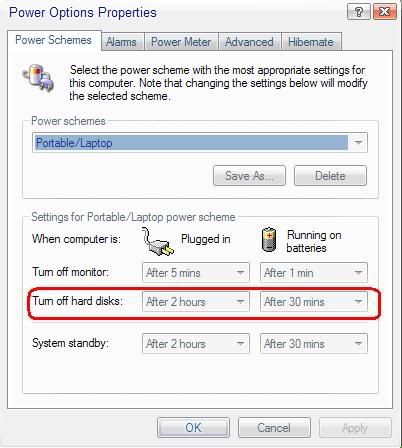
erm. i think he's referring to this.

user posted image

in which case the option is to reduce power consumption of your hard drive by making it stop spinning when you're not actively using it.

how much energy does it actually save? i haven't a clue. should be less than 25 Watts per drive.
sniper on the roof
post Jul 21 2006, 02:58 PM

20k VIP Club
Group Icon
VIP
23,414 posts

Joined: Jan 2003
From: Taipei
I've got some hard disk power consumption figures here:

http://forum.lowyat.net/index.php?showtopi...dpost&p=7765163
WaCKy-Angel
post Jul 21 2006, 03:06 PM

PeACe~~
*********
All Stars
21,963 posts

Joined: Dec 2004
From: KL


QUOTE(AsenDURE @ Jul 21 2006, 02:51 PM)
erm. i think he's referring to this.

user posted image

in which case the option is to reduce power consumption of your hard drive by making it stop spinning when you're not actively using it.

how much energy does it actually save? i haven't a clue. should be less than 25 Watts per drive.
*
As you can see....i dont think computer supports individual hdd like that..
And if u turn off primary means your pc aint working..no point if u want BT..

Maybe there's custom programs can do what u want?
Or u can buy a USB casing for secondary hdd ?
TSjunster
post Jul 21 2006, 03:09 PM

Casual
***
Junior Member
396 posts

Joined: Dec 2004
From: A Pile of Junks


electricity is not the problem..what im afraid is hd get overheated??(does it happen??)
WaCKy-Angel
post Jul 22 2006, 09:35 AM

PeACe~~
*********
All Stars
21,963 posts

Joined: Dec 2004
From: KL


QUOTE(junster @ Jul 21 2006, 03:09 PM)
electricity is not the problem..what im afraid is hd get overheated??(does it happen??)
*
I never heard of HDD get overheated.
Anyway u can buy hdd cooler if your worried.
sotong168
post Jul 22 2006, 12:04 PM

in retiring mode
*******
Senior Member
5,291 posts

Joined: Dec 2004
From: I Luv Msia
QUOTE(WaCKy-Angel @ Jul 22 2006, 09:35 AM)
I never heard of HDD get overheated.
Anyway u can buy hdd cooler if your worried.
*
yeah, just a cooler will do or use the external enclosure
TSjunster
post Jul 22 2006, 04:12 PM

Casual
***
Junior Member
396 posts

Joined: Dec 2004
From: A Pile of Junks


if i turn on the "turn off harddisk" option,will it affect my BTing?will it clash or something??
samurai1337
post Jul 22 2006, 04:16 PM

@_@
Group Icon
VIP
11,594 posts

Joined: Jan 2003
From: Area 51

QUOTE(junster @ Jul 22 2006, 04:12 PM)
if i turn on the "turn off harddisk" option,will it affect my BTing?will it clash or something??
*
If you turn off your hardisk, your hardisk will be disabled.

what does it mean by affect BTing? clash or something? If you're not using THAT hardisk for BTing, of course it won't be affected
WaCKy-Angel
post Jul 23 2006, 02:02 PM

PeACe~~
*********
All Stars
21,963 posts

Joined: Dec 2004
From: KL


QUOTE(junster @ Jul 22 2006, 04:12 PM)
if i turn on the "turn off harddisk" option,will it affect my BTing?will it clash or something??
*
QUOTE(samurai1337 @ Jul 22 2006, 04:16 PM)
If you turn off your hardisk, your hardisk will be disabled.

what does it mean by affect BTing? clash or something? If you're not using THAT hardisk for BTing, of course it won't be affected
*
What do u mean affect BT?
If u turn off HDD that means your HDD will not be longer in used..
Which means your BT will not be moving....Its like "pausing" your computer.

But i wonder if that option starts to kicks-in when? when cpu is idle?
If thats so, BT will keep the hdd moving, meaning hdd off will never kicks-in...rite?
eXPeri3nc3
post Jul 23 2006, 02:40 PM

It's coming! 3ɔu3ıɹǝdxǝ ♥
*******
Senior Member
9,257 posts

Joined: Aug 2005
From: Not so sure myself Status: 1+3+3=7


QUOTE(sotong168 @ Jul 22 2006, 01:04 PM)
yeah, just a cooler will do or use the external enclosure
*
A cooler to cool the chip right?
If I had not mistaken... tongue.gif
alvintan84
post Jul 24 2006, 11:44 AM

Game Enthusiast & Food Hunter
****
Senior Member
549 posts

Joined: Jul 2006
From: KL, Malaysia


Even with a cooler the HD couldn't cool down that fast..Coz is only a small fan afterall.. If u have aircond maybe can help cool down faster..Anyway, the best solution is set a time frame on the HD usage..Let the HD rest 1-2hrs/day since u use it very often. No offence yea? biggrin.gif
sotong168
post Jul 25 2006, 08:48 AM

in retiring mode
*******
Senior Member
5,291 posts

Joined: Dec 2004
From: I Luv Msia
QUOTE(eXPeri3nc3 @ Jul 23 2006, 02:40 PM)
A cooler to cool the chip right?
If I had not mistaken...  tongue.gif
*
er....tat will cool down the disk indirectly as well ?

QUOTE(alvintan84 @ Jul 24 2006, 11:44 AM)
Even with a cooler the HD couldn't cool down that fast..Coz is only a small fan afterall.. If u have aircond maybe can help cool down faster..Anyway, the best solution is set a time frame on the HD usage..Let the HD rest 1-2hrs/day since u use it very often. No offence yea?  biggrin.gif
*
any auto spin-down function? izzit under turnoff hd after xx min under power scheme?
shockw@ve
post Jul 26 2006, 04:58 PM

d[-_-]b
Group Icon
VIP
1,889 posts

Joined: Jan 2003
You can't manually turn off your HDD permanently in Windows, probably the only way is by unplugging the power cable. That power setting allows the HDD to spin down if it has been idle after x mins that have been set (allows the magnetic head to rest and overall consume less power).

However, if you are BT-ing or running any programs that frequently read/write to the HDD, your HDD will almost never spin down (or for only brief periods of time before having to spin up again) and that power saving setting would not have any effect on a whole.

This post has been edited by shockw@ve: Jul 26 2006, 04:59 PM

Topic ClosedOptions
 

Change to:
| Lo-Fi Version
0.0186sec    0.45    5 queries    GZIP Disabled
Time is now: 21st December 2025 - 11:07 PM