Wow, the promotion is really tempting. Ughhh.
Bookmark it for future reference. Calculating budget for new gear.
Closed, Closed
Closed, Closed
|
|
 Jul 14 2015, 09:49 AM Jul 14 2015, 09:49 AM
Return to original view | IPv6 | Post
#1
|
 
Junior Member
128 posts Joined: Sep 2011 
|
Wow, the promotion is really tempting. Ughhh.
Bookmark it for future reference. Calculating budget for new gear. |
|
|
|
|
|
Aug 7 2015, 12:50 AM
Return to original view | Post
#2
|
|
Junior Member
128 posts Joined: Sep 2011
|
Placing order for D5 & Z5 model. Haha, my wallet cry big time today.
 Anyway thanks for your helpful service & patience sir. Hope can see and get some new stuff from from you in the future.  Wish can see ur HQ and try some stuff at there. |
|
|
Aug 24 2015, 06:38 PM
Return to original view | Post
#3
|
|
Junior Member
128 posts Joined: Sep 2011
|
2nd version of Z5?
From the sketch, seems an "upgrade version" from it. (Damn should wait a little longer for this, tch.....) This post has been edited by hayrol: Aug 24 2015, 06:39 PM |
|
|
Sep 5 2015, 03:08 PM
Return to original view | Post
#4
|
|
Junior Member
128 posts Joined: Sep 2011
|
QUOTE(Prince J @ Sep 5 2015, 12:52 PM) Of course we will have it, but don't think customers who wait for Skylake will benefit much because skylake prices are much higher, without much performance increase in gaming because the new Skylake will still use GTX900M series GPU. Ringgit is also getting weaker and weaker. Agree with your point sir. |
|
|
Sep 7 2015, 02:02 PM
Return to original view | Post
#5
|
|
Junior Member
128 posts Joined: Sep 2011
|
Just my though.
I don't know why people so hype or giving high expectation on skylake. It just giving a minimal feature compare to previous gen. |
|
|
Sep 21 2015, 09:53 PM
Return to original view | Post
#6
|
|
Junior Member
128 posts Joined: Sep 2011
|
Finally picking up my Z5 & D5 yesterday, quite surprise to see the box was quite huge.
 My huge parcel. 
Inside the parcel. 
Illegear D5 unit 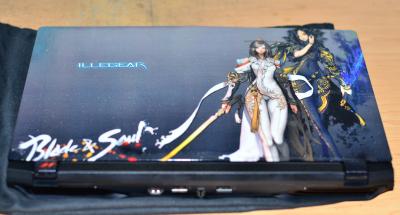
Illegear Z5 unit 
Anyway having a test run both of the running Blade & Soul Online with ultra setting today with my friend. Quite happy with both of the laptop. Will test more game on it later on. 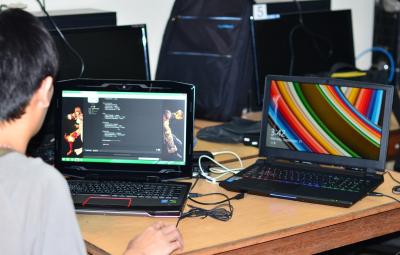
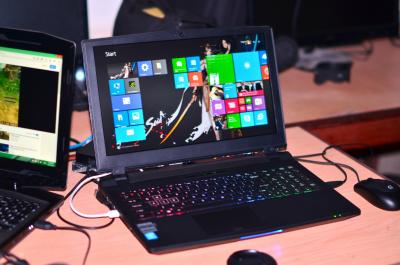


Thanks Illegear for your passion and work effort. |
|
|
|
|
|
Oct 9 2015, 10:24 AM
Return to original view | Post
#7
|
|
Junior Member
128 posts Joined: Sep 2011
|
Hello everyone,
Need some help here, feeling a bad day today. My 3 weeks old D5 seems having problem today. Im turning on my laptop but the LED light from power button & processor keep repeating blinking with out showing anything from monitor. At the same time the fan from laptop seems like repeating turning off - on. I'm checking the power adapter of my laptop seems working fine, testing my laptop with using power adapter on it and without power adapter (using battery), both of the similar situation of problem I stat above. Checking my power outlet, seems my PC running with 550W seem work fine. I'm suspecting the problem comes from the laptop itself. Need assist what should I do since I'm from Sarawak. T.T This post has been edited by hayrol: Oct 9 2015, 10:28 AM |
|
|
Oct 9 2015, 10:52 AM
Return to original view | Post
#8
|
|
Junior Member
128 posts Joined: Sep 2011
|
QUOTE(Prince J @ Oct 9 2015, 10:44 AM) Hi, Actually even my monitor didn't show up anything when Im pressing the power button, the keyboard and bottom led, power button led and processor led keep blinking (processor led blinking green and then yellow) and both of the fan seem on and off (can heard the sound from both of it).One of the fans probably stop working, can you use fn+1 to test it? |
|
|
Oct 9 2015, 11:43 AM
Return to original view | Post
#9
|
|
Junior Member
128 posts Joined: Sep 2011
|
Hello Prince J,
I've try ur method but seems didn't work. Already remove the stock ram and replace with my other DDR3L ram Corsair from my ASUS laptop also didn't work out. P/s: I'malso notice the heat produce from the left corner of the screen (not from the fan from gpu or cpu). its kinda weird for me. This post has been edited by hayrol: Oct 9 2015, 11:45 AM |
|
|
Nov 3 2015, 09:02 PM
Return to original view | Post
#10
|
|
Junior Member
128 posts Joined: Sep 2011
|
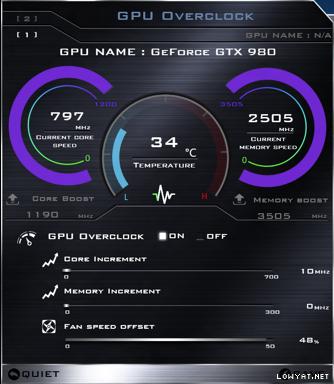
» Click to show Spoiler - click again to hide... « Oh, finally you guys comes with Clevo P870DM line-up soon. It will be interesting to see how this beast can handle with new Nvidia GTX980 for notebook series later on (especially when GPU overclock feature comes out). » Click to show Spoiler - click again to hide... « *Now I can can patiently wait for it comes out** This post has been edited by hayrol: Nov 3 2015, 09:21 PM |
|
|
Nov 4 2015, 09:03 PM
Return to original view | Post
#11
|
|
Junior Member
128 posts Joined: Sep 2011
|
QUOTE(aswad1986 @ Nov 4 2015, 07:29 PM) d series can upgrade to desktop gtx980? How you suppose to put desktop GTX 980 to the notebook.  Anyway, if you mean by upgrading your current notebook GPU to GTX980 for notebook GPU series (not the GTX980M version), it probably possible since D series (CLEVO P7xxM) using MXM 3.0 form factor 180W (115x83mm). There are some variants of MXM 3.0 for GTX 980 notebook GPU series - so far there are 5 variants of MXM GTX980 notebook GPU that been known. More info for GTX980 notebook GPU variants and image at here. http://forum.techinferno.com/clevo/11083-g...l-variants.html P/s: Planning to upgrade my current GPU (GTX980M to GTX980) as well, but see how the GTX980 work & performs, especially when handling the heat and power management, which my concern. This post has been edited by hayrol: Nov 4 2015, 09:32 PM |
|
|
Nov 11 2015, 11:38 AM
Return to original view | Post
#12
|
|
Junior Member
128 posts Joined: Sep 2011
|
Notice that new GTX 980 (MXM3.0) have extra power port on the top of the card. May require additional power supply to power the card.
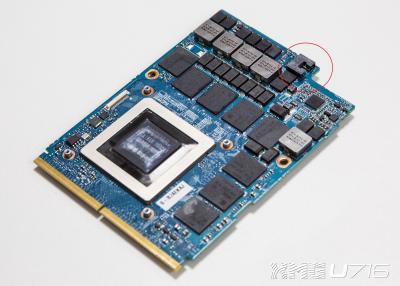
The assemble for GTX980 (MXM3.0) for new Clevo P775DM1(-G) (similar design for Illegear D5 and D7 series but with different mobo). New version of D5 & D7 (Clevo P7xxDM series) may have the chance to upgrade their GPU in the future. As the previous gen D5 & D7 (Clevo P7xxZM series) probably will be much more difficult to upgrade to GTX980 - may require additional modding to the mobo.  This post has been edited by hayrol: Nov 11 2015, 01:15 PM |
|
|
Jan 10 2016, 09:51 PM
Return to original view | Post
#13
|
|
Junior Member
128 posts Joined: Sep 2011
|
Hello everyone.
Need some guide here. Is anyone here ever try to remove the keyboard on D5 or D7)? Want to put extra RAM on my D5 & since another extra RAM slot is underneath the keyboard, so I need to remove it 1st. Thanks This post has been edited by hayrol: Jan 10 2016, 09:53 PM |
|
|
|
|
|
Jan 28 2016, 11:21 AM
Return to original view | Post
#14
|
|
Junior Member
128 posts Joined: Sep 2011
|
It's look nice.
I wonder if its fit with Illegear D5 model as well. |
|
|
Feb 17 2016, 08:44 PM
Return to original view | Post
#15
|
|
Junior Member
128 posts Joined: Sep 2011
|
Hello PrinceJ,
Can D9X model have Windows 8.1 as prefer OS instead of Windows 10? Thanks |
|
|
Mar 12 2016, 09:02 AM
Return to original view | Post
#16
|
|
Junior Member
128 posts Joined: Sep 2011
|
Hello everyone.
Anyone here facing problem after updating the new Nvidia latest graphic driver. I trying update the latest Nvidia graphic driver (ver 364.51) for my D5 Haswell. After the update, all my USB driver didn't work. Same issue when I trying to update with Nvidia Driver (ver 362.00). Have to revert back to Nvidia Driver ver 361.75 and all my USB driver work fine again. |
|
|
Mar 12 2016, 06:12 PM
Return to original view | Post
#17
|
|
Junior Member
128 posts Joined: Sep 2011
|
QUOTE(aswad1986 @ Mar 12 2016, 01:21 PM) latest or recent nvidia driver got many issue...please not to update for now.. as stated http://www.pcgamer.com/geforce-drivers-364...trophic-errors/ I see. Thanks for the note.https://forums.geforce.com/default/topic/92...leased-3-7-16-/ im using 362.00 version still ok.. nto updating to latest yet as noted ther are a lot of issues for the latest driver... |
|
|
Mar 24 2016, 08:55 AM
Return to original view | Post
#18
|
|
Junior Member
128 posts Joined: Sep 2011
|
Hello PrinceJ,
I'm having problem with all USB connector on my D5 (Maxwell) are unable to detect any device (my keyboard & mouse suddenly didn't work on it) . Any idea to solve it? Thanks Funny thing is I can use my USB keyboard to enter BIOS setting but it didn't work when enter the Windows. This post has been edited by hayrol: Mar 24 2016, 09:52 AM |
|
|
Mar 24 2016, 11:19 AM
Return to original view | Post
#19
|
|
Junior Member
128 posts Joined: Sep 2011
|
QUOTE(Prince J @ Mar 24 2016, 10:57 AM) Hi hayrol, Hello PrinceJ,If it happened when you enter into the windows, can you try on another OS to see if the same problem persists? You can try installing windows in another HDD. Thanks for the reply. Already solve the problem. Seems it related to the windows itself. Already send the reply to Microsoft tech before & it seem the problem cause from Intel USB 3.0 XHCI (which they they tell me its a common problem comes from windows 8 & windows 10).  http://i.imgur.com/SUTeyJe.jpg So they ask me to Uninstall the device for all USB controllers from Device Manager (except for Intel 9 Series Chipset Family USB) & restart the laptop. Finally my USB port works fine again. Anyway, thanks again for help. This post has been edited by hayrol: Mar 24 2016, 11:26 AM |
| Change to: |  0.0486sec 0.0486sec
 0.22 0.22
 7 queries 7 queries
 GZIP Disabled GZIP Disabled
Time is now: 7th December 2025 - 01:02 AM |
 Quote
Quote