This is somewhat a mixed review of the RX-17 EVO/ Clevo P377SM-A/Sager NP9377 and also of Illegear’s GPU upgrade kit.
I purchased my laptop in March of 2015. Originally it had a single 980m which is plenty powerful on its own. I could run Witcher 2 (this is the most graphic intensive game I have as I support GOG.com and its anti DRM policy) on full ultra (with only ubersampling disabled) at 1080p and it’ll stay at 60FPS the whole time no problem. Sadly, Witcher 3 is a bit more intense and reviews say that 60fps full ultra is only possible with SLI so I decided it’s time for me to bump it up to a SLI. So on Friday I contacted Prince J and booked myself an appointment on Saturday to pick up the GPU upgrade kit.
The kit that I purchased comes with the 2nd Heatsink, Fan, SLI Cable, the 980M MXM card as well as the necessary screws.

When I first unboxed the kit, I was pretty surprised that the GPU had leftover thermal paste as well as micro scratches on the GPU die. The heatsink had the impression of the 980M’s memory modules and no stock thermal paste on it as well as the appearance of being cleaned.
I thought I had been given a used kit but a message to Prince J assured me that they only tested it and flashed vbios prior to bundling it up.
Illegear should probably consider telling its customer’s about this process (to avoid a lot of misunderstanding) and be a bit gentler with the cleaning of thermal paste, especially if it used IC Diamond during testing as it is known to be abrasive on head spreaders and heat sinks. Using a softer cloth could’ve helped. Nevertheless, this kit comes with a 6-month warranty.
Changing the GPU is a real easy process on Illegear laptops. Some of the other items you’ll probably need are:

1. Thermal paste cleaning liquids (Isopropyl alcohol, alcohol swabs or Arctic Clean. I recommend Arctic Clean as this stuff works better than 99% isopropyl). Pipette used to drip alcohol
2. Good quality thermal paste. Optional but you’re spending a good money on a high end stuff you really want good paste to manage temps. I purchased IC diamond 7 and GC Extreme to test them out since most Clevo models used these but I heard good things about GC Extreme and both rank up there amongst the best thermal pastes you can buy. More on paste and temps later.
3. Microfiber cleaning cloth. No tissue paper or rough cloth on copper heatsinks or GPU dies as they can scratch easily. (Illegear please take note! >.<)
You might also want:-
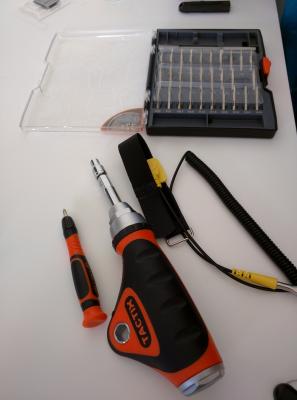
1. ESD protection. Less of a concern in Malaysia due to the humidity here but never hurts to be careful. You don’t want to short out the laptop or the component.
2. #0 philips screwdriver – For general screw removal
3. #2 or #3 socket driver – Specifically because the RX-17 EVO uses a socketed screw for holding down the 980M. Use a flathead if not available as there is a groove on the screw for this purpose.
The upgrade process itself is real simple. Boot into windows, delete existing graphics driver. Shutdown the laptop, unplug from power. Turn the laptop over and remove the battery. The bottom panel is removed by removing 4 screws, then sliding the panel off to reveal the internals of the laptop.
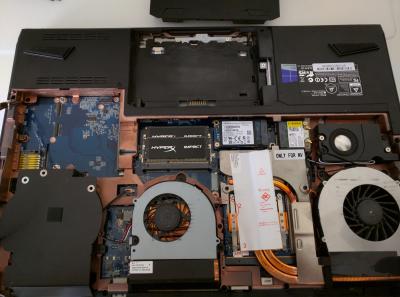
I was hoping to just plug in the SLI cable through the heatsink as it is and install the 2nd GPU as the laptop had a really good paste job on the master GPU but sadly the space is real tight so this isn’t possible. You have to dismantle the master heatsink to get to the SLI connector (circled in red). This again is real easy. Unscrew the heatsink following the screws numbered from 7 to 1 and then gently wiggle the heatsink

With that done, clean up the old thermal paste on the GPU die and the heatsink, being extra careful if you had IC diamond on it. The 2nd GPU is mounted into slot and screwed in. The fan is plugged into the power port indicated in the red circle and the SLI cable attached into the connectors on the respective cards.
After this, put a drop of thermal paste on the GPU dies. I used a 0.5cm half pea sized drop and with the pressure from the heatsink, it spread out very nicely. It helps to press down a bit while screwing to help the paste spread. Both heatsinks are mounted from the top and screwed into place following the order of screws 1 to 7 as labeled. With that, installation is done and the bottom panel is installed back onto the machine and the battery put back in place. Time to see if I did it right.
Turning on the machine and booting into the bios shows that both cards are recognized by the Bios. Yay!
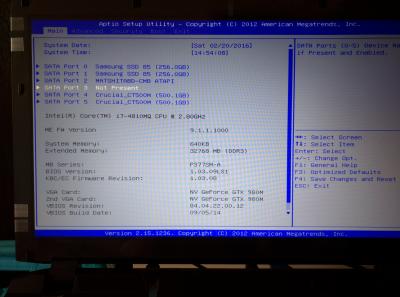
Boot into windows and re-install the graphics driver. From there on it’s a simple process to have SLI activated using the Nvidia Control Panel.
Testing the setup.
On its own, the 980M is pretty powerful. My laptop has the following configuration:-
17-4810MQ
32GB Kingston HyperX DDR3 1600mHz
2 x Samsung 850 Pro 256GB in Raid 0 configuration
Windows 8.1 64bit
2 x Crucial MX200 mSata 500GB (that I've since removed since I didn't use it for anything)
Intel AC7260 wireless card
With a single 980M, I achieved a Firestrike 1.1 score of 8492 the day before I did the upgrade. Nvidia driver revision is 36.191 and all settings are stock
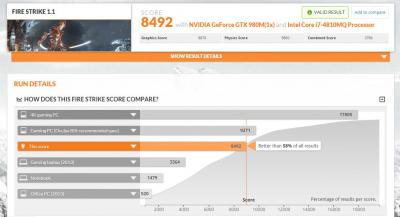 http://www.3dmark.com/fs/7608245
Using GPU-Z, the monitored temps were 40C-45C at light/idle use (surfing/ youtube), which is approximately 15C-20C away from ambient temperature. This is my estimation using google as i do not have a thermometer at home. Still very good temps, considering how warm Malaysia is versus western countries.
During the benchmark, temperatures rose to 74C at max. After the load, the auto fans kicked in and quickly lowered temps back to normal. During gameplay, the normal temperatures I would observe hovers around 60-65C. This card had IC Diamond as thermal paste.
The ASIC score as read by GPU-Z is 72.5% and the Bios revision is 84.04.22.00.14. Clevo/Kapok shows up as the subvendor so this is reassuring as they provide the barebones for Illegear. The 980M uses Samsung memory modules, one of the better ones used in the 980M.
The upgrade kit I purchased from Illegear had an ASIC score of 75.5%, a BIOS revision of 84.04.22.14. Clevo/Kapok is also the vendor and it uses the Samsung memory modules as well. Luckily the vBios matched or I would have had to flash them. AFAIK vBios doesnt make much of a difference in SLI so long as they are not too far apart but I'm OCD like that

Firestrike 1.1 on the SLI gives 13,307, a 56% improvement in score!
 http://www.3dmark.com/fs/7625768
Witcher 3 here I come! or not, since I have not downloaded it yet:(
Temperatures for the master GPU remained mostly the same as before. For the slave gpu, it idled at 40C. On load, it also rose to 70C but the fans do a good job of cooling it down. Havent tried gaming with the SLi setup yet due to work:( so no temperatures to report but as again IC diamond does a good job.
Thermal paste commentary
When I initially installed the 2 980M's I used GC Extreme just to test it out. I have had concerns about using IC Diamond as there has been reports that it is abrasive and can scratch the mirror finish on the heatsink or the heat spreader on the GPU/CPU chips if removed wrongly. Another reason I had wanted to avoid IC Diamond as from personal experience, it stained my copper heatsinks.

Upper heatsink previously used ICD and lower heatsink is fresh from Illegear
I don't think it does any kind of damage or impairs cooling but it is definitely a cause for concern.
However, during testing, GC Extreme gave me higher idle temperatures, reaching 50Cs for the master GPU and 45C for the slave as well as higher load temps, up to 79C. This could be due to my application method but I strived to ensure the same quantity as well as method was used when applying ICD and GC Extreme.
So I opted back for IC Diamond. IC Diamond needs to be re-liquefied using acetone, isopropyl alcohol or Arctic Cleaner and dabbed off, not wiped with pressure. My original 980M had maintained its mirror finish when I cleaned it this way, so Illegear do take note as well when testing and cleaning next time:(


 Jan 21 2016, 02:52 PM


 Quote
Quote

 0.0382sec
 0.63
0.63
 7 queries
 GZIP Disabled