

QUOTE(TradingHouse @ Feb 4 2014, 08:31 PM)
Just applied nillkin h+ glass sp. Very nice, easy to apply

No spider web watermark?The Google Nexus 5 Official Thread V5, Dolphin Browser are not trusted- XDA
|
|
 Feb 4 2014, 08:47 PM Feb 4 2014, 08:47 PM
Return to original view | Post
#21
|
 
Senior Member
1,843 posts Joined: Jan 2011  
|
QUOTE(TradingHouse @ Feb 4 2014, 08:31 PM) Just applied nillkin h+ glass sp. Very nice, easy to apply No spider web watermark? |
|
|
|
|
|
Feb 7 2014, 12:16 AM
Return to original view | Post
#22
|
|
Senior Member
1,843 posts Joined: Jan 2011
|
|
|
|
Feb 7 2014, 03:45 PM
Return to original view | Post
#23
|
|
Senior Member
1,843 posts Joined: Jan 2011
|
Damn. It's already 3.44PM. Where the hell is postman? He suppose to bring me the new year gift today! ><
|
|
|
Feb 8 2014, 01:30 AM
Return to original view | Post
#24
|
|
Senior Member
1,843 posts Joined: Jan 2011
|
I have the spider web mark on screen. Using Nillkin Glass. How to get rid? Tried using nails, didn't work. T_T
|
|
|
Feb 8 2014, 08:32 PM
Return to original view | Post
#25
|
|
Senior Member
1,843 posts Joined: Jan 2011
|
Is wireless charging damaging battery?
|
|
|
Feb 8 2014, 09:33 PM
Return to original view | Post
#26
|
|
Senior Member
1,843 posts Joined: Jan 2011
|
Damn. Windows 8.1 does not detecting my phone. :S
I have tested on other machine. Windows 8.1 too, but having no problem detecting my device. What's wrong really? Please help.  This post has been edited by bugb34r: Feb 8 2014, 09:46 PM |
|
|
|
|
|
Feb 9 2014, 01:04 AM
Return to original view | Post
#27
|
|
Senior Member
1,843 posts Joined: Jan 2011
|
QUOTE(xxdesire @ Feb 8 2014, 10:18 PM) Try download the N5 drivers? QUOTE(djlah @ Feb 8 2014, 10:25 PM) try more other USB ports. QUOTE(kehadapan @ Feb 8 2014, 11:17 PM) do you have adb driver installed on your windows ? I've been following all the steps below, change USB cable @ port, still same. Plug on other laptop, works fine. No need to install driver what so ever. Please help. Laptop model : Clevo W350ST @ Illegear RE-15 http://www.android.gs/download-and-install...s-adb-fastboot/ 
|
|
|
Feb 9 2014, 01:11 AM
Return to original view | Post
#28
|
|
Senior Member
1,843 posts Joined: Jan 2011
|
QUOTE(tanjinjack @ Feb 9 2014, 01:09 AM) USB 3.0 port? Tested on 3.0 and 2.0 port. Same. Is it because of driver conflict? This post has been edited by bugb34r: Feb 9 2014, 01:11 AM |
|
|
Feb 9 2014, 01:21 AM
Return to original view | Post
#29
|
|
Senior Member
1,843 posts Joined: Jan 2011
|
Checked MTP, still same. Strange how I don't need to configures all this stuff when I plug in the phone to other laptop. It works fine. Haihz. Now trying to install Google USB driver via SDK since Nexus 5 does not listed on device manager.
|
|
|
Feb 9 2014, 01:32 AM
Return to original view | Post
#30
|
|
Senior Member
1,843 posts Joined: Jan 2011
|
QUOTE(Ahmaz @ Feb 9 2014, 01:28 AM) If you had a previous driver, it will conflict. I'm on win 8.1 and it's working for me. When I try to install manually via Device Manager, all it said that "Windows was unable to install this driver..."Had to uninstall the current one (and any other conflicting ones i.e. android usb drivers). get the google usb driver and MANUALLY update from device manager 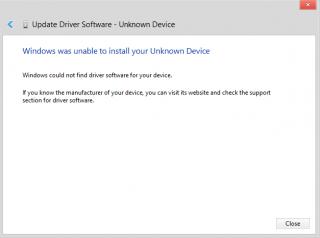
And it stated under Other Devices > Unknown Device. (Instead of Nexus 5 with exclamation mark)  Update** : Install Google USB driver via SDK, same problem. Still showing unknown device. Help me. 
This post has been edited by bugb34r: Feb 9 2014, 02:28 AM |
|
|
Feb 9 2014, 02:50 AM
Return to original view | Post
#31
|
|
Senior Member
1,843 posts Joined: Jan 2011
|
QUOTE(C-Note @ Feb 9 2014, 02:40 AM) use wugfresh's toolkit. i had the same problem as yours Yes I did. Tried all the 4 steps for driver installation. Failed. Anyone who can help me via TeamViewer will be much appreciated. |
|
|
Feb 9 2014, 02:42 PM
Return to original view | Post
#32
|
|
Senior Member
1,843 posts Joined: Jan 2011
|
Anyone who can help me via TeamViewer? I'm already frustrated .
Tried SkipSoft driver toolkit. Same issue. |
|
|
Feb 9 2014, 03:38 PM
Return to original view | Post
#33
|
|
Senior Member
1,843 posts Joined: Jan 2011
|
QUOTE(S-Two @ Feb 9 2014, 03:28 PM) Try this one: Tried both method. Can't find USB Composite Device. Tried similar name to USB not able to install it too.Plug the phone into your computer. Go to "Device Manager" and find the Nexus <x> device where-ever it's listed (may not be called "Nexus...", though on my machine with the real drivers it was). Right click, choose "update driver software" Select "browse my computer" Select "let me pick..." Choose the option. "usb composite device" Apply and close all windows. Disconnect and reconnect the phone to the computer. Hope this could work  EDIT; Found another one: http://forum.xda-developers.com/showpost.p...664&postcount=7 |
|
|
|
|
|
Feb 9 2014, 03:55 PM
Return to original view | Post
#34
|
|
Senior Member
1,843 posts Joined: Jan 2011
|
QUOTE(iceman31 @ Feb 9 2014, 03:45 PM) how about installing koush universal adb driver? Yep. Just tried. Same issue. |
|
|
Feb 9 2014, 03:59 PM
Return to original view | Post
#35
|
|
Senior Member
1,843 posts Joined: Jan 2011
|
QUOTE(iceman31 @ Feb 9 2014, 03:56 PM) just wondering have you press the usb debugging under developer setting? Yeah man. Enable that. Change MTP / PTP, you name it, i've tried it all. Lol. I even install Google USB driver via SDK, same thing. T_T |
|
|
Feb 10 2014, 11:51 PM
Return to original view | Post
#36
|
|
Senior Member
1,843 posts Joined: Jan 2011
|
No wonder the phone not able to detect, I need to update BIOS for this laptop.
|
|
|
Feb 11 2014, 12:16 AM
Return to original view | Post
#37
|
|
Senior Member
1,843 posts Joined: Jan 2011
|
QUOTE(Ahmaz @ Feb 11 2014, 12:14 AM) So.. now can detect...? No. I haven't update yet. Got someone post at Illegear thread to update the BIOS in order to fix the issue. I never try to update the BIOS before, need guidance from them. xD |
|
|
Feb 11 2014, 02:09 AM
Return to original view | Post
#38
|
|
Senior Member
1,843 posts Joined: Jan 2011
|
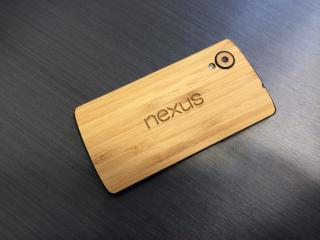
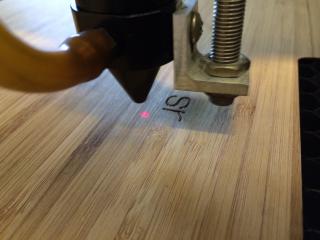
Real bamboo skin anyone?  |
|
|
Feb 11 2014, 02:54 PM
Return to original view | Post
#39
|
|
Senior Member
1,843 posts Joined: Jan 2011
|
ElementalX kernel is awesome. 6hours idle, only drop 1%.
 |
|
|
Feb 13 2014, 12:04 AM
Return to original view | Post
#40
|
|
Senior Member
1,843 posts Joined: Jan 2011
|
QUOTE(ndragon @ Feb 12 2014, 11:54 PM) so u guys buy the faux paid apps tuner?.. worth buying?.. Buy to support dev. PM me to get half price.  |
|
Topic ClosedOptions
|
| Change to: |  0.0250sec 0.0250sec
 0.43 0.43
 7 queries 7 queries
 GZIP Disabled GZIP Disabled
Time is now: 5th December 2025 - 01:36 AM |
 Quote
Quote