

anyway can i fix this?
ps; i did try booting the hdd in my desktop, so i dont think is hardware problem

This post has been edited by 1qaz1qaz: Jan 28 2014, 08:07 PM
Window 7 boot error, error code : 0xc000000f
|
|
 Jan 28 2014, 08:06 PM, updated 12y ago Jan 28 2014, 08:06 PM, updated 12y ago
Show posts by this member only | Post
#1
|
 
Senior Member
1,894 posts Joined: Jul 2011 From: Heaven in Hell 
|
my laptop having error when booting up as title
anyway can i fix this? ps; i did try booting the hdd in my desktop, so i dont think is hardware problem This post has been edited by 1qaz1qaz: Jan 28 2014, 08:07 PM |
|
|
|
|
|
Jan 28 2014, 08:58 PM
Show posts by this member only | Post
#2
|
Junior Member
425 posts Joined: Apr 2012 
|
format it.
|
|
|
Jan 29 2014, 05:54 AM
Show posts by this member only | Post
#3
|

All Stars
14,909 posts Joined: Jul 2005 
|
Just insert the Windows installation disc as requested see if that can solve your problem.
|
|
|
Jan 29 2014, 04:01 PM
Show posts by this member only | Post
#4
|

Senior Member
1,677 posts Joined: Sep 2009
|
You can try Startup Repair.
Most of the times it can fix this kind of problem. http://windows.microsoft.com/en-us/windows...q#1TC=windows-7 This post has been edited by Townshend: Jan 29 2014, 04:01 PM |
|
|
Jan 29 2014, 07:00 PM
Show posts by this member only | Post
#5
|
|
Junior Member
182 posts Joined: Jan 2014 From: GGWP 
|
Like Townshend said, use Startup Repair.
There are two situations: Situation 1. If your Windows OS appears in the next dialog but shows as 0 MB, I'm afraid your partition now is a RAW partition. Like this: 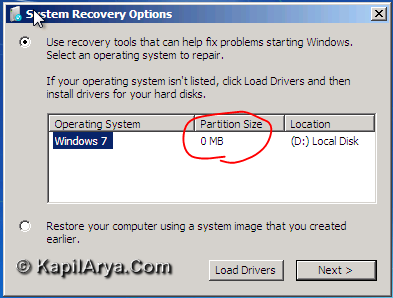 Source: KapilArya.com Under the command prompt type this, one by one: "diskpart" "list volume" , not including the quote symbol. If there is a RAW partition, type this: exit Then this: chkdsk /r /f *: , the * symbol indicates your RAW partition. Look at the label Ltr. e.g: chkdsk /r /f D: Let it do the job, then reboot after the repair. If the error does not appearing anymore, the problem is solved. However, Situation 2. If it is not shown( no Windows OS), then you need a clean install, fully formatting your disk. I've done this before and it solves my problem and my data were still intact.  |
|
|
Feb 12 2014, 12:33 AM
Show posts by this member only | Post
#6
|

Junior Member
250 posts Joined: Dec 2013 
|
QUOTE(1qaz1qaz @ Jan 28 2014, 08:06 PM) my laptop having error when booting up as title there's STOP error there, surely it generates blue screen?anyway can i fix this? ps; i did try booting the hdd in my desktop, so i dont think is hardware problem  enable kernel memory dump as outlined here - https://forum.lowyat.net/topic/346230 then upload the dump file for analysis |
|
Topic ClosedOptions
|
| Change to: |  0.0170sec 0.0170sec
 1.30 1.30
 5 queries 5 queries
 GZIP Disabled GZIP Disabled
Time is now: 17th December 2025 - 08:36 AM |
 Quote
Quote