

 Jan 29 2014, 07:00 PM


There are two situations:
Situation 1. If your Windows OS appears in the next dialog but shows as 0 MB, I'm afraid your partition now is a RAW partition.
Like this:
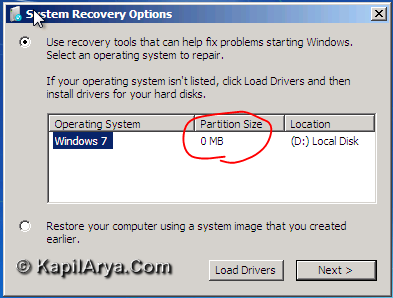
Source: KapilArya.com
Under the command prompt type this, one by one:
"diskpart"
"list volume" , not including the quote symbol.
If there is a RAW partition, type this:
exit
Then this:
chkdsk /r /f *: , the * symbol indicates your RAW partition. Look at the label Ltr.
e.g: chkdsk /r /f D:
Let it do the job, then reboot after the repair. If the error does not appearing anymore, the problem is solved.
However,
Situation 2. If it is not shown( no Windows OS), then you need a clean install, fully formatting your disk.
I've done this before and it solves my problem and my data were still intact.

 Quote
Quote
 0.0148sec
 0.74
0.74
 6 queries
 GZIP Disabled