Welcome Guest ( Log In | Register )

Bump Topic Topic Closed RSS Feed
125 Pages « < 8 9 10 11 12 > » Bottom

Outline · [ Standard ] · Linear+

 Sony XPERIA™ Z1, Official Thread V6, 4.3 (14.2.A.0.290 OTA) out now!

views
     
WindChaseR
post Dec 27 2013, 11:30 PM

WindChaseR
*******
Senior Member
3,359 posts

Joined: Nov 2005
From: Seremban


QUOTE(ckchan @ Dec 27 2013, 11:28 PM)
Yeah... I got the notification too. But will we be able to keep our root after the update?
*
if not mistaken its going to be same as some of the custom rom out there.. root access still there but unable to mount /system for RW access..
patienceGNR
post Dec 27 2013, 11:32 PM

♥ Ride All Day ♥
*******
Senior Member
2,058 posts

Joined: Mar 2011
From: Today: 9:03 AM


QUOTE(WindChaseR @ Dec 27 2013, 11:29 PM)
i had the same thing yesterday.. no screen show up, power + vol up no respond..
but i just plug in for flashmode as usual no problem.. just that there're no LED indicator on only..
*
Unfortunately, mine is not reacting to anything.

Not even fastboot.
ckchan
post Dec 27 2013, 11:49 PM

Look at all my stars!!
*******
Senior Member
3,026 posts

Joined: Jan 2009


QUOTE(WindChaseR @ Dec 27 2013, 11:30 PM)
if not mistaken its going to be same as some of the custom rom out there.. root access still there but unable to mount /system for RW access..
*
Actually I don't understand what's the meaning of full root here.
WindChaseR
post Dec 28 2013, 12:01 AM

WindChaseR
*******
Senior Member
3,359 posts

Joined: Nov 2005
From: Seremban


QUOTE(ckchan @ Dec 27 2013, 11:49 PM)
Actually I don't understand what's the meaning of full root here.
*
if my understanding is not wrong, it means we couldnt WRITE to system partition.. eg: focus button to turn screen on cant do because we cant write to the gpio-keys.kl file.. but they claim that apps that required root access still working, maybe those app only requires READ access..

i'll try do the OTA update when i get it.. no sign of it yet :\

QUOTE(patienceGNR @ Dec 27 2013, 11:32 PM)
Unfortunately, mine is not reacting to anything.

Not even fastboot.
*
@@" this is really bad..

This post has been edited by WindChaseR: Dec 28 2013, 12:02 AM
Bernard Yeo
post Dec 28 2013, 01:34 AM

On my way
****
Senior Member
570 posts

Joined: May 2006
QUOTE(patienceGNR @ Dec 27 2013, 11:32 PM)
Unfortunately, mine is not reacting to anything.

Not even fastboot.
*
Sh1t. The last time I bricked something, it was an iPhone 3GS. Stuck in a bootloop as well. What did the xda forums say so far? Any hope of recovery?
patienceGNR
post Dec 28 2013, 01:46 AM

♥ Ride All Day ♥
*******
Senior Member
2,058 posts

Joined: Mar 2011
From: Today: 9:03 AM


QUOTE(Bernard Yeo @ Dec 28 2013, 01:34 AM)
Sh1t. The last time I bricked something, it was an iPhone 3GS. Stuck in a bootloop as well. What did the xda forums say so far? Any hope of recovery?
*
Mine macam no hope. Sending back to Sony tomorrow.

If bootloop I'm not scared. Mine currently brick to the state it'll not respond.
ZeneticX
post Dec 28 2013, 01:55 AM

stars for what
********
All Stars
12,413 posts

Joined: Jan 2008
From: KL - Cardiff - Subang - Sydney


QUOTE(patienceGNR @ Dec 28 2013, 01:46 AM)
Mine macam no hope. Sending back to Sony tomorrow.

If bootloop I'm not scared. Mine currently brick to the state it'll not respond.
*
lol bro. still have to say thank you to you. all because of your efforts of trying out the different methods to discover the correct root for .290


just an advice, try using the wall charger to charge it ?

This post has been edited by ZeneticX: Dec 28 2013, 02:00 AM
ZeneticX
post Dec 28 2013, 01:56 AM

stars for what
********
All Stars
12,413 posts

Joined: Jan 2008
From: KL - Cardiff - Subang - Sydney


QUOTE(ckchan @ Dec 27 2013, 11:28 PM)
Yeah... I got the notification too. But will we be able to keep our root after the update?
*
why not just straight away update. then u will know tongue.gif
ZeneticX
post Dec 28 2013, 02:00 AM

stars for what
********
All Stars
12,413 posts

Joined: Jan 2008
From: KL - Cardiff - Subang - Sydney


QUOTE(WindChaseR @ Dec 28 2013, 12:01 AM)
if my understanding is not wrong, it means we couldnt WRITE to system partition.. eg: focus button to turn screen on cant do because we cant write to the gpio-keys.kl file.. but they claim that apps that required root access still working, maybe those app only requires READ access..

i'll try do the OTA update when i get it.. no sign of it yet :\
@@" this is really bad..
*
if like this i guess no problem... bcoz our gpio-keys.kl file already edited before right? once update will go back to original file ?
ZeneticX
post Dec 28 2013, 02:08 AM

stars for what
********
All Stars
12,413 posts

Joined: Jan 2008
From: KL - Cardiff - Subang - Sydney


lol forget about the OTA. if you're rooted you will fail on OTA

reported in xda

This post has been edited by ZeneticX: Dec 28 2013, 02:09 AM
Bernard Yeo
post Dec 28 2013, 02:25 AM

On my way
****
Senior Member
570 posts

Joined: May 2006
QUOTE(patienceGNR @ Dec 28 2013, 01:46 AM)
Mine macam no hope. Sending back to Sony tomorrow.

If bootloop I'm not scared. Mine currently brick to the state it'll not respond.
*
Have you tried using a pen to press the red reset button next to the SIM tray? Try this while plugged in and charging from the wall socket and without. Hope that helps.
tcchuin
post Dec 28 2013, 02:40 AM

On my way
****
Senior Member
511 posts

Joined: Nov 2007
does anyone face memory leak on 4.3?sad.gif
ckchan
post Dec 28 2013, 06:59 AM

Look at all my stars!!
*******
Senior Member
3,026 posts

Joined: Jan 2009


QUOTE(ZeneticX @ Dec 28 2013, 02:08 AM)
lol forget about the OTA. if you're rooted you will fail on OTA

reported in xda
*
Yup. Just tried to update. Failed...

But I think it's because of the recovery. Any way to uninstall the recovery?

This post has been edited by ckchan: Dec 28 2013, 07:11 AM
patienceGNR
post Dec 28 2013, 10:10 AM

♥ Ride All Day ♥
*******
Senior Member
2,058 posts

Joined: Mar 2011
From: Today: 9:03 AM


QUOTE(Bernard Yeo @ Dec 28 2013, 02:25 AM)
Have you tried using a pen to press the red reset button next to the SIM tray? Try this while plugged in and charging from the wall socket and without. Hope that helps.
*
Done. Also no cure, charged over the night, woke up, no cure also. cry.gif

QUOTE(ckchan @ Dec 28 2013, 06:59 AM)
Yup. Just tried to update. Failed...

But I think it's because of the recovery. Any way to uninstall the recovery?
*
Chances are due to recovery. Try removing recovery. If you're using XZDR, you just need to delete its files via Root Explorer. but i forgot the location hmm.gif you need to check on XDA.

ZeneticX
Do you ahve recovery? Remove then try OTA again. Root will not affect OTA but recovery does, as far as I know during my experiment to preserve root yesterday.

This post has been edited by patienceGNR: Dec 28 2013, 10:11 AM

WindChaseR
post Dec 28 2013, 11:23 AM

WindChaseR
*******
Senior Member
3,359 posts

Joined: Nov 2005
From: Seremban


Some ppl success in updating thru OTA and preserve partial root,
some unable to preserve and some failed to update

http://forum.xda-developers.com/showthread.php?t=2586911
Kenneth93
post Dec 28 2013, 11:39 AM

New Member
*
Junior Member
26 posts

Joined: Dec 2012
QUOTE(patienceGNR @ Dec 27 2013, 10:08 PM)
Hard bricked my phone. Not responding to any keys.

Not POWER + VOL UP, not even the hidden button at SIM card slot.

Flashmode, bootloader mode also not able to start.
*
hey bro. Last time i also hard bricked the Z1 during flashing, press any physical key also no response. However, after 10 mins like that my z1 got vibrate, then i can power on again.
patienceGNR
post Dec 28 2013, 11:41 AM

♥ Ride All Day ♥
*******
Senior Member
2,058 posts

Joined: Mar 2011
From: Today: 9:03 AM


QUOTE(Kenneth93 @ Dec 28 2013, 11:39 AM)
hey bro. Last time i also hard bricked the Z1 during flashing, press any physical key also no response. However, after 10 mins like that my z1 got vibrate, then i can power on again.
*
Mine one whole night dy lol. At least 15 hours now.
Kenneth93
post Dec 28 2013, 11:44 AM

New Member
*
Junior Member
26 posts

Joined: Dec 2012
QUOTE(((Xa))0102 @ Dec 27 2013, 06:48 PM)
Were you on WiFi all the time?

Sony users are lucky. Updates improves battery life while Samsung deteriorates it.
*
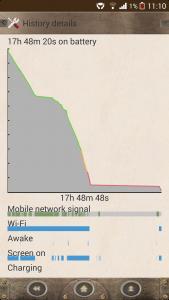
erm. 9 hrs SOT is on wifi when needed. If my z1 on wifi all the time. This is what i got. (50% auto brightness, wifi off only during i was sleeping, web-browsing, surfing online video, hd movie playing, tower of savior).

This post has been edited by Kenneth93: Dec 28 2013, 11:49 AM


Attached thumbnail(s)
Attached Image Attached Image
Kenneth93
post Dec 28 2013, 11:46 AM

New Member
*
Junior Member
26 posts

Joined: Dec 2012
QUOTE(patienceGNR @ Dec 28 2013, 11:41 AM)
Mine one whole night dy lol. At least 15 hours now.
*
last time, i just keep pressing the power button.. then miracle came outs. Hey, if u wan go sony, remember go plaza berjaya or amcorp mall's service centre. They are the hq of malaysia sony mobile service centre, so they service faster.
patienceGNR
post Dec 28 2013, 11:54 AM

♥ Ride All Day ♥
*******
Senior Member
2,058 posts

Joined: Mar 2011
From: Today: 9:03 AM


QUOTE(Kenneth93 @ Dec 28 2013, 11:46 AM)
last time, i just keep pressing the power button.. then miracle came outs. Hey, if u wan go sony, remember go plaza berjaya or amcorp mall's service centre. They are the hq of malaysia sony mobile service centre, so they service faster.
*
I planned to go Amcorp as I can drop by Book Xcess laugh.gif

thanks for the info though, that assured me better.

125 Pages « < 8 9 10 11 12 > » Top
Topic ClosedOptions
 

Change to:
| Lo-Fi Version
0.0182sec    0.35    6 queries    GZIP Disabled
Time is now: 13th December 2025 - 04:05 AM