Outline ·
[ Standard ] ·
Linear+
how to stay on internet connection, newbie here
|
TSkokyun
|
 Jun 27 2006, 01:40 AM, updated 20y ago Jun 27 2006, 01:40 AM, updated 20y ago
|

|
i am using mac os x tiger 10.4.6 how can i keep the internet connection so that i can keep updating and downloading my stuff it keep pop up a message box every 10 minutes like that. the message says this is reminder that your connection is still active, do you wan to remain connected? disconnect and stay connnect. how to keep stay connected and the pop up will not shown again every 10 minutes like that ????? Attached thumbnail(s)
|
|
|
|
|
|
siawgu
|
Jun 27 2006, 08:16 AM
|
|
|
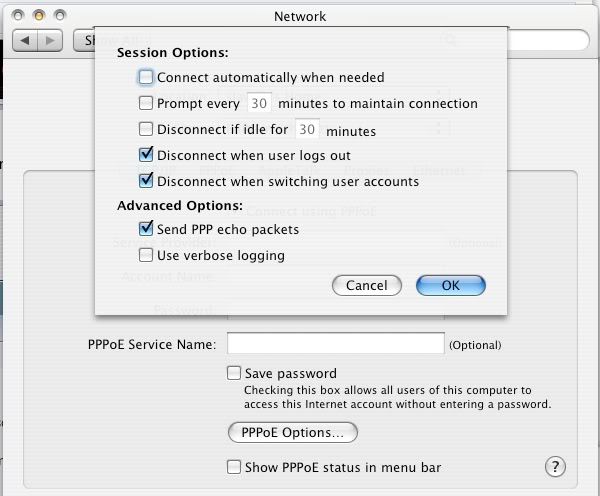 Go to System Preferences... > Network > Built-in Ethernet > PPPoE > PPPoE Options...You try to untick the Prompt every (30) minutes to maintain connection to disable it.. Hope this can help you... |
|
|
|
|
|
TSkokyun
|
Jun 27 2006, 09:53 AM
|
|
|
oh yea. it is so good. working . . thanks ya .
|
|
|
|
|



 Quote
Quote


 0.0162sec
 0.83
0.83
 6 queries
 GZIP Disabled