Welcome Guest ( Log In | Register )

Outline · [ Standard ] · Linear+

Router Configuration Prolink 9300G (Billion 7402GL) Users' club, V5.53 (29th of January, 2008)

views
     
TSyangxi
post Jun 25 2006, 02:28 PM, updated 18y ago

Violinist ^.^ å›§ å›§
*******
Senior Member
4,189 posts

Joined: Jan 2003
From: Age Quod Agis


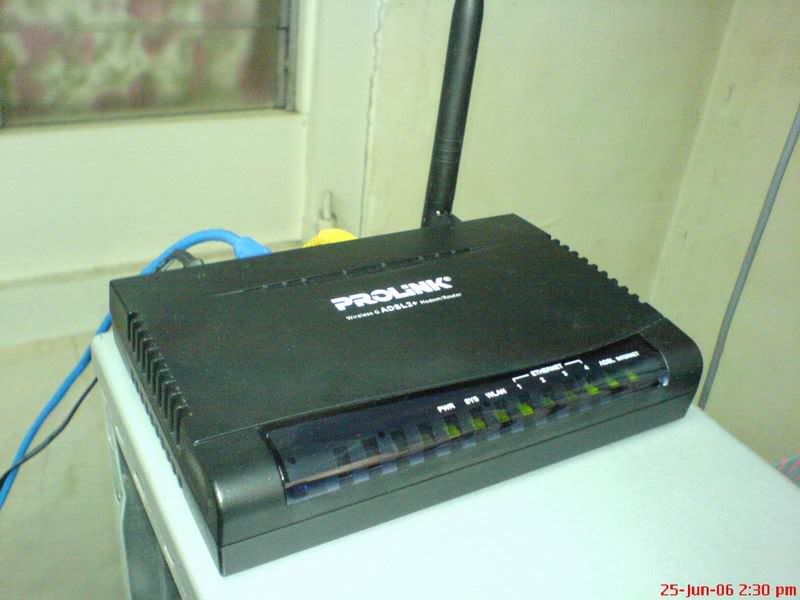
user posted image


Who have purchase Prolink 9300G/GV , .... discuss here~ cool.gif

user posted image

ADSL2+ Chipset = Connexant ARGON 432
OEM by = BILLION 7402G/GL

*With the 5dbi detachable antenna.


AWARD
http://www.billion.com/news/news0708.htm


Hurricane 9300G Wireless ADSL2+ Modem/Router
http://www.prolink2u.com/self/products/wireless/h9300g.php


SNMP Viewer

user posted image

user posted image

=========================================================================

Official PROLINK firmware:

Version: V5.52h ( Sept, 2007)
PROLINK 9300G (non VPN model)

http://www.prolink2u.com/self/support/down...s/dl_h9300g.php

http://www.prolink2u.com/downloads/drivers...2h_firmware.rar


* BILLION FIRMWARE *

~ At own risk ! , might void warranty ~

Prolink 9300G (Billion 7402GL)
http://www.billion.com.au/downloads/FOR_PC...7402GLv5.53.zip

Version: V5.53 (29th of January, 2008)

New Features:
- Added DNS Suffix support, it can be found at DHCP Server setting page

Improvements:
- User can check PSTN voltage without Internet connection established.
- Update wireless AP driver version to 1.1.2.0.
- Corrected some ADSL information on web page.
- Corrected Network Busy/Congestion Tones for Spain.
- Modified DHCP server's reply packets for HOSTNAME option (option 12) behaviour.
- Added the capability to display local SNR Margin and Line Attenuation for 85xx.

Bugs Fixed:
- Fixed the bug whereby wireless WPA/WPA2 connection is not stable with Intel 4965AGN.
- Fixed the bug whereby IPSec won't reconnect with RFC1483 routed mode.
- Fixed the bug when doing diagnostic test, ping to www.google.com will fail sometimes.
- Fixed the bug whereby user will get error message "webserver:error: vim namespace from error: invalid operation" when changing wireless security setting.
- Fixed the bug whereby IPSec Preshared key is deleted when Road Warrior connection is terminated
Page 3 / 16
- Fixed IPSec bug: Not include HASH in 2'nd message of Aggressive mode, if DPD is enabled.
- Fixed the bug whereby DHCP Client cannot get IP address from specify DHCP Server.
- Fixed the bug whereby access from remote site can pass the firewall if no NAT session table or Virtual Server rule matched.


» Click to show Spoiler - click again to hide... «


MORE DETAIL:

» Click to show Spoiler - click again to hide... «


where to buy ? @RM2xx/unit


FIDA SYSTEMS (M) SDN BHD
29 Jalan USJ 1/31,
47600 Subang Jaya,
Selangor Darul Ehsan, Malaysia.

Tel: (603) 8024 9151
Fax: (603) 8024 9161

Sales Enquiries: sales_my@fida.com
Support Email: support_my@fida.com

This post has been edited by yangxi: Feb 12 2008, 02:53 AM
zeehond
post Jun 26 2006, 10:22 PM

Getting Started
**
Junior Member
94 posts

Joined: Oct 2005
Hi,

yes I had my eye on this one too, but I did not find much info on the internet.

Where did you find it was a Billion oem with a conexant aragon chipset.

Did you open it ?

Did you try to flash the billion firmware too it ? Did it accept it ?

I know it runs vxworks, which has it's own bootloader, but it in the past they always used tags to prevent people from illegaly loading a other firmware.


TSyangxi
post Jun 26 2006, 11:18 PM

Violinist ^.^ å›§ å›§
*******
Senior Member
4,189 posts

Joined: Jan 2003
From: Age Quod Agis


QUOTE(zeehond @ Jun 26 2006, 10:22 PM)
Hi,

yes I had my eye on this one too, but I did not find much info on the internet.

Where did you find it was a Billion oem with a conexant aragon chipset.

Did you open it ?

Did you try to flash the billion firmware too it ? Did it accept it ?

I know it runs vxworks, which has it's own bootloader, but it in the past they always used tags to prevent people from illegaly loading a other firmware.
*
Ask Fida System R&D . tongue.gif

*I sucess upgrade my Prolink 9300G(vpn series) to Billion 7402G

and this model not base on vxworks firmware.


zeehond
post Jun 26 2006, 11:36 PM

Getting Started
**
Junior Member
94 posts

Joined: Oct 2005
QUOTE(yangxi @ Jun 26 2006, 11:18 PM)
Ask Fida System R&D . tongue.gif 

*I sucess upgrade my Prolink 9300G(vpn series) to Billion 7402G

and this model not base on vxworks firmware.
*
so you don't know anything....
TSyangxi
post Jun 26 2006, 11:47 PM

Violinist ^.^ å›§ å›§
*******
Senior Member
4,189 posts

Joined: Jan 2003
From: Age Quod Agis


QUOTE(zeehond @ Jun 26 2006, 11:36 PM)
so you don't know anything....
*
Router information:

ARGON 432 chipset

user posted image

This post has been edited by yangxi: Jun 26 2006, 11:47 PM


Attached thumbnail(s)
Attached Image
zeehond
post Jun 27 2006, 12:27 AM

Getting Started
**
Junior Member
94 posts

Joined: Oct 2005
QUOTE(yangxi @ Jun 26 2006, 11:47 PM)
Router information:

ARGON 432 chipset

user posted image
*
Why should I contact Prolink R&D when you can read this info from the modem. Puzzling !

Anyway open it up and post a picture of the board.

You are right it does not run vxworks, but Atmos Virata aka ISOS.


TSyangxi
post Jun 27 2006, 01:24 PM

Violinist ^.^ å›§ å›§
*******
Senior Member
4,189 posts

Joined: Jan 2003
From: Age Quod Agis


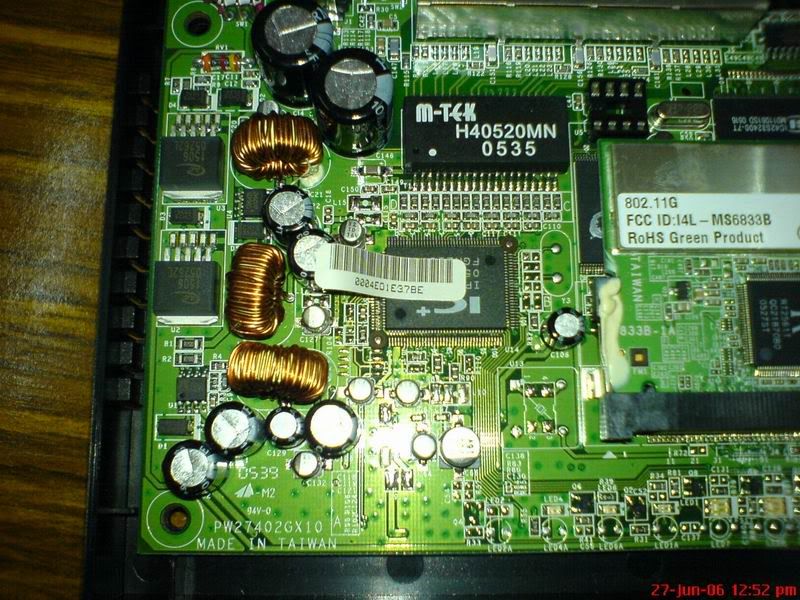
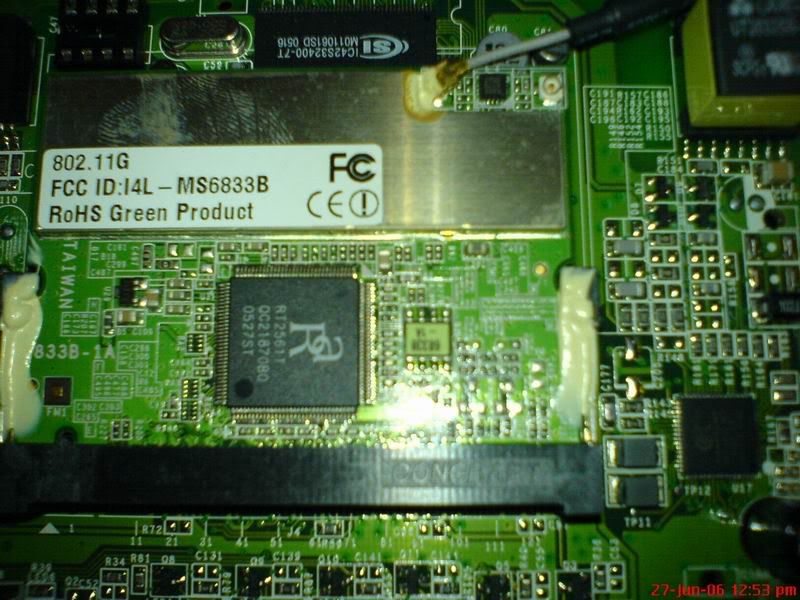
Prolink 9300GV picture:

user posted image

user posted image

user posted image
*Conexant Argon 432 chipset (under wifi card)

This post has been edited by yangxi: Jun 27 2006, 01:25 PM
jio
post Jul 5 2006, 06:42 AM

Casual
***
Junior Member
383 posts

Joined: May 2005
Yangxi, how much you paid for your 9300GV? I got mine for RM390 couple months back. Btw it is possible for you to flash normal 9300G to 9300GV(7402G) by using console cable & using the emergency flash. I flashed my normal 9300G to 7402G. I tested the PPTP VPN is ok, but I can't test the L2TP & IPSEC as the IKE profiles only will be created when the ipwan interface is connected. Can't test this via LAN. As for console cable, you can make your own using the cable from old ps/2 & serial mouse cable.

This adsl router is much better than those TI AR7 based craps from D-Link, LinkSys & Aztech. Broadcom chipset based should also be good.

This post has been edited by jio: Jul 5 2006, 06:50 AM
TSyangxi
post Jul 5 2006, 10:13 AM

Violinist ^.^ å›§ å›§
*******
Senior Member
4,189 posts

Joined: Jan 2003
From: Age Quod Agis


can crossflash ?? the console cable can buy at any shop ? is it serial com -> ps/2 cable ??
if can, i can save ~RM100 to have the VPN router.

I bought my 9300GV = RM330 last month . dealer price.

This post has been edited by yangxi: Jul 5 2006, 10:14 AM
jio
post Jul 5 2006, 02:33 PM

Casual
***
Junior Member
383 posts

Joined: May 2005
Can crossflash, so far PPTP is tested OK, L2TP & IPSec not yet tested. But after crossflash you will need to flash it to the latest firmware as the emergency flash firmware for 7402G had different wifi driver module. Later firmware should have the correct driver. I didn't find any 'extra chip' on 9300GV other than it had an addition 8 pin DIP socket, unless it is hidden beneath the wifi module.

The console cable you have to make your own, I made mine from old ps/2 cable + DB9 female connector. Use multimeter to test the wiring. Signal ground (pin 5) is connected to the signal ground & ps/2 ground as well (use ohmmeter). With voltmeter function you can find both Rx/Tx (need to power on router to test). So you only needed to connect 3 or 4 wires only. That should be sufficient.

Connect using 9600bps 8 , N , 1 , no flow control.
TSyangxi
post Jul 5 2006, 02:43 PM

Violinist ^.^ å›§ å›§
*******
Senior Member
4,189 posts

Joined: Jan 2003
From: Age Quod Agis


QUOTE(jio @ Jul 5 2006, 02:33 PM)

The console cable you have to make your own, I made mine from old ps/2 cable + DB9 female connector. Use multimeter to test the wiring. Signal ground (pin 5) is connected to the signal ground & ps/2 ground as well (use ohmmeter). With voltmeter function you can find both Rx/Tx (need to power on router to test). So you only needed to connect 3 or 4 wires only. That should be sufficient.

Connect using 9600bps 8 , N , 1 , no flow control.
*
a bit confuse ...try later~~ sweat.gif

can make one for me ? how much tongue.gif
jio
post Jul 5 2006, 02:48 PM

Casual
***
Junior Member
383 posts

Joined: May 2005
I think provide the pinout schema enough. I'll check my cable when I reach home.
jio
post Jul 5 2006, 08:17 PM

Casual
***
Junior Member
383 posts

Joined: May 2005
CODE

PS/2       DB9
6 # 5     5 4 3 2 1
4   3      9 8 7 6
 2 1


PS/2       DB9
1    <=>    2
4    <=>    5
5    <=>    3


TSyangxi
post Jul 5 2006, 09:45 PM

Violinist ^.^ å›§ å›§
*******
Senior Member
4,189 posts

Joined: Jan 2003
From: Age Quod Agis


QUOTE(jio @ Jul 5 2006, 08:17 PM)
CODE

PS/2       DB9
6 # 5     5 4 3 2 1
4   3      9 8 7 6
 2 1
PS/2       DB9
1    <=>    2
4    <=>    5
5    <=>    3


*
THANKS.


ORZ ~~ notworthy.gif
mattchin
post Jul 8 2006, 05:02 PM

!ga0 ga0 lik!
******
Senior Member
1,645 posts

Joined: Jan 2003
From: aMPanG, KL


hey dudez..

is this thing here able 2 run p2p (after DMZ/open port) without any disconnection? i know.. it's a dumb question.. cz i'm goinna get 1 very soon but i'm not sure about the features...
cz the 1 i'm using now from linksys is givin me a headache now.. very frequent disconnection..

thanks thanks!~ notworthy.gif

This post has been edited by mattchin: Jul 8 2006, 05:02 PM
TSyangxi
post Jul 8 2006, 05:35 PM

Violinist ^.^ å›§ å›§
*******
Senior Member
4,189 posts

Joined: Jan 2003
From: Age Quod Agis


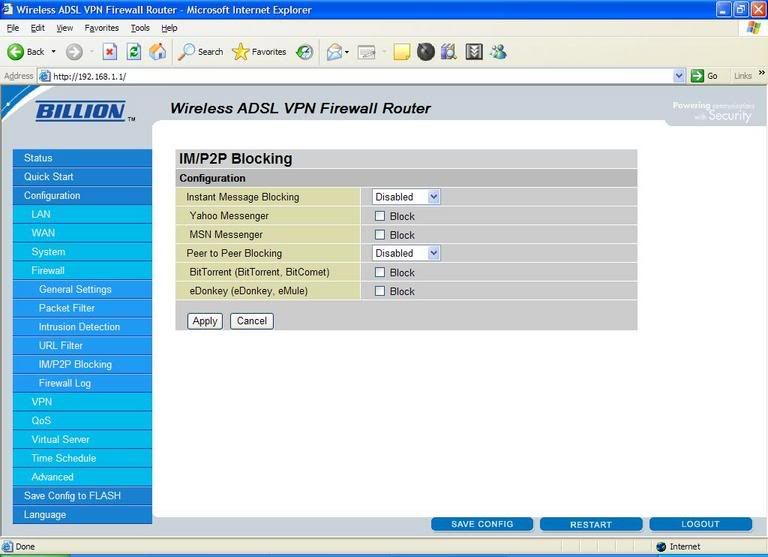
not recommend open dmz for p2p , afraid hacker attack your pc.

open port in virtual server. and try unable UPNP

This post has been edited by yangxi: Jul 8 2006, 05:42 PM


Attached thumbnail(s)
Attached Image
eric84cool
post Jul 12 2006, 01:06 AM

I'm BACK!!!
*******
Senior Member
4,540 posts

Joined: Jan 2003
From: Sing-a-poor / Kayell / Jay-Bee


I'm new owner for this model...hope to learn more from you guyz......anyways...I dare not to flash my firmware to BILLION ....afraid my MODEM KONG....hahahaha
eric84cool
post Jul 12 2006, 01:10 AM

I'm BACK!!!
*******
Senior Member
4,540 posts

Joined: Jan 2003
From: Sing-a-poor / Kayell / Jay-Bee


anyways...how to update to the lastest firmware...as mine is v5.05 leh......my uTORRENT now is giving me some problem..I don't know whether need to disable my DHT or not?!

This post has been edited by eric84cool: Jul 12 2006, 11:35 AM
TSyangxi
post Jul 13 2006, 06:42 PM

Violinist ^.^ å›§ å›§
*******
Senior Member
4,189 posts

Joined: Jan 2003
From: Age Quod Agis


new firmware release !!

Version: V5.07 ( July, 2006)
eric84cool
post Jul 15 2006, 09:53 PM

I'm BACK!!!
*******
Senior Member
4,540 posts

Joined: Jan 2003
From: Sing-a-poor / Kayell / Jay-Bee


QUOTE(yangxi @ Jul 13 2006, 06:42 PM)
new firmware release !!

Version: V5.07 ( July, 2006)
*
where to download?!~ smile.gif
TSyangxi
post Jul 16 2006, 12:07 AM

Violinist ^.^ å›§ å›§
*******
Senior Member
4,189 posts

Joined: Jan 2003
From: Age Quod Agis


so far , Prolink not release any firmware . sweat.gif


http://www.billion.com.au/support/bipac7402gl.php

for advance user only , suggest newbie don't flash this~.


This post has been edited by yangxi: Jul 16 2006, 12:09 AM
eric84cool
post Jul 16 2006, 10:32 PM

I'm BACK!!!
*******
Senior Member
4,540 posts

Joined: Jan 2003
From: Sing-a-poor / Kayell / Jay-Bee


eh..only 4 of us in LY.forum using this modem ar?! anyways, the wireless connection from my room to my dad's pc at downthere is 'very good' when my room door remained open but not when the door is closed, as the speed status is 'low'......

wondering which brand is good for repeater or any other method?
IntegraTypeR
post Jul 18 2006, 04:33 PM

Guitar alien
*****
Senior Member
736 posts

Joined: Jan 2003
From: Kota Damansara / Sunway


I am still using Prolink 9000W. If it dies, i buy this model.

Prolink works pretty well with BT, well, at least for the current one i am using now.
TSyangxi
post Jul 19 2006, 12:01 AM

Violinist ^.^ å›§ å›§
*******
Senior Member
4,189 posts

Joined: Jan 2003
From: Age Quod Agis


to eric84cool:

QOS setting.


Attached thumbnail(s)
Attached Image
eric84cool
post Jul 20 2006, 09:44 AM

I'm BACK!!!
*******
Senior Member
4,540 posts

Joined: Jan 2003
From: Sing-a-poor / Kayell / Jay-Bee


Hey Yangxi....based on your setting for Virtual Server....I'm wondering which IP address
should I set for it?? Referring to the asterik mark in the pic attached below....

user posted image

the ipaddress for BT part is supposed to your computer IP address or the internet IP address?

MY com IP address is 192.168.1.101...iszit correct?! your house got how many pc connected to ur modem?
TSyangxi
post Jul 20 2006, 10:03 AM

Violinist ^.^ å›§ å›§
*******
Senior Member
4,189 posts

Joined: Jan 2003
From: Age Quod Agis


QUOTE
the ipaddress for BT part is supposed to your computer IP address or the internet IP address?

MY com IP address is 192.168.1.101...iszit correct?! your house got how many pc connected to ur modem?


yap, same with your com ip address.

my home have 5pc + 2adsl + 2 wifi combo router.
eric84cool
post Jul 22 2006, 01:51 AM

I'm BACK!!!
*******
Senior Member
4,540 posts

Joined: Jan 2003
From: Sing-a-poor / Kayell / Jay-Bee


In this modem configuration.....my downstream is showing 484000 and upstream is 384000....iszit common for 1Mbps user here??
TSyangxi
post Jul 22 2006, 02:15 AM

Violinist ^.^ å›§ å›§
*******
Senior Member
4,189 posts

Joined: Jan 2003
From: Age Quod Agis


your real speed is 484k(down) , 384k(up).

what is your streamyx package ? it seems that telekom cap wrong speed.
eric84cool
post Jul 22 2006, 10:13 AM

I'm BACK!!!
*******
Senior Member
4,540 posts

Joined: Jan 2003
From: Sing-a-poor / Kayell / Jay-Bee


QUOTE(yangxi @ Jul 22 2006, 02:15 AM)
your real speed is  484k(down) , 384k(up).

what is your streamyx package ? it seems that telekom cap wrong speed.
*
I'm 1Mbps user..paying 88 buck per month...actually last few days ago, I got checked with the speedometer.....it's about 1000 something in the meter....I guess the speed is quite ok for me...

it's just happen that since last 2 days ago, my BT download slow and then I suspect that my speed is not like the previous......I also wondering whether TM net did capped my speed if my download is too good? blink.gif
TSyangxi
post Jul 22 2006, 10:25 AM

Violinist ^.^ å›§ å›§
*******
Senior Member
4,189 posts

Joined: Jan 2003
From: Age Quod Agis


QUOTE(eric84cool @ Jul 22 2006, 10:13 AM)
I'm 1Mbps user..paying 88 buck per month...actually last few days ago, I got checked with the speedometer.....it's about 1000 something in the meter....I guess the speed is quite ok for me...

it's just happen that since last 2 days ago, my BT download slow and then I suspect that my speed is not like the previous......I also wondering whether TM net did capped my speed if my download is too good? blink.gif
*
1MB package
max download should be ~100k/s

Attached Image

This post has been edited by yangxi: Jul 22 2006, 10:25 AM
eric84cool
post Jul 22 2006, 10:26 AM

I'm BACK!!!
*******
Senior Member
4,540 posts

Joined: Jan 2003
From: Sing-a-poor / Kayell / Jay-Bee


yeah...that's the speed I got last few days ago.....but then how come u can use ADSL 2+??might to teach me....can I use it as well??what's the difference between ADSL and ADSL 2+?
TSyangxi
post Jul 22 2006, 10:35 AM

Violinist ^.^ å›§ å›§
*******
Senior Member
4,189 posts

Joined: Jan 2003
From: Age Quod Agis


*I crossflash another modem Prolink 9300G -> Billion 7402G smile.gif

refer here:
http://forum.lowyat.net/index.php?showtopic=301675&hl=adsl2

better line signal.

This post has been edited by yangxi: Jul 22 2006, 10:36 AM
eric84cool
post Jul 22 2006, 10:41 AM

I'm BACK!!!
*******
Senior Member
4,540 posts

Joined: Jan 2003
From: Sing-a-poor / Kayell / Jay-Bee


QUOTE(yangxi @ Jul 22 2006, 10:35 AM)
*I crossflash another modem Prolink 9300G -> Billion 7402G smile.gif

refer here:
http://forum.lowyat.net/index.php?showtopic=301675&hl=adsl2

better line signal.
*
AHHHHH!!!!~~~curiosity does kill ppl....I want to crossflash...but I don't dare too....but how come PROLINK can't support ADSL 2+ ...I mean when I change it to ADSL 2+ ...there is no incoming signal at all.....then forced to use ADSL instead of ADSL 2+....haihz
TSyangxi
post Jul 22 2006, 10:43 AM

Violinist ^.^ å›§ å›§
*******
Senior Member
4,189 posts

Joined: Jan 2003
From: Age Quod Agis


maybe your area DSLAM didn't upgrade to ADSL2.

but prolink sync adsl2 line much longer. suggest u change back to ADSL

note:
latest firmware version
. Annex A: Upgrade to E67.5.33

This post has been edited by yangxi: Jul 22 2006, 10:46 AM
jio
post Jul 22 2006, 06:00 PM

Casual
***
Junior Member
383 posts

Joined: May 2005
Original firmwares for both Prolink 9300G & 9300GV v5.05. In case you wanna revert back to it's original Prolink firmware. If you compare the firmware with Billion firmware, you will notice it is exactly the same with exception of the id string & images.

http://rapidshare.de/files/26610394/Prolin..._v5.05.zip.html

This post has been edited by jio: Jul 22 2006, 07:10 PM
eric84cool
post Jul 25 2006, 09:32 PM

I'm BACK!!!
*******
Senior Member
4,540 posts

Joined: Jan 2003
From: Sing-a-poor / Kayell / Jay-Bee


QUOTE(jio @ Jul 22 2006, 06:00 PM)
Original firmwares for both Prolink 9300G & 9300GV v5.05. In case you wanna revert back to it's original Prolink firmware. If you compare the firmware with Billion firmware, you will notice it is exactly the same with exception of the id string & images.

http://rapidshare.de/files/26610394/Prolin..._v5.05.zip.html
*
thx guyz~!!!! notworthy.gif

anyways, yangxi...that day u gave me the link for improve the wireless signal..what's that link ar???

iszt this?
http://192.168.1.254/configuration/hidden_txpower.html

I tried it today...but can't found the site...how come?!why that day I can....I was curious...hohoo

This post has been edited by eric84cool: Jul 25 2006, 09:33 PM
TSyangxi
post Jul 25 2006, 09:58 PM

Violinist ^.^ å›§ å›§
*******
Senior Member
4,189 posts

Joined: Jan 2003
From: Age Quod Agis


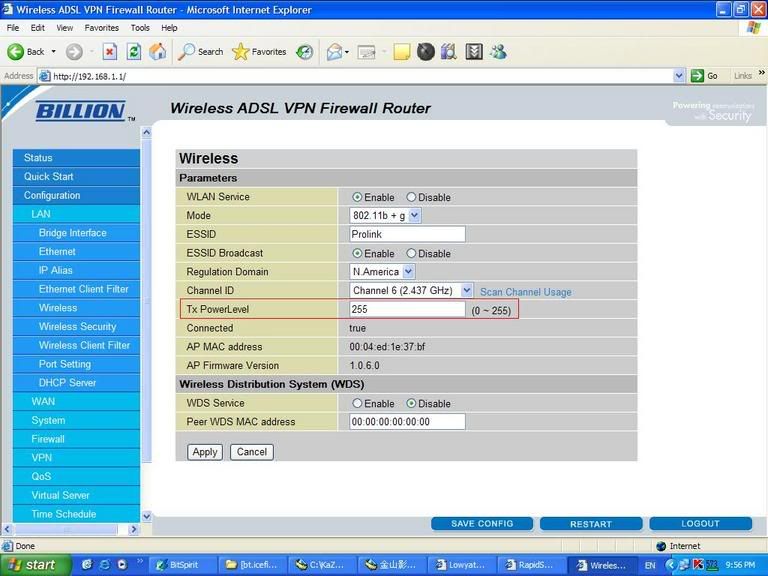
latest firmware
. Added Tx power level configuration to web interface.


user posted image

This post has been edited by yangxi: Jul 25 2006, 10:02 PM
TSyangxi
post Jul 25 2006, 10:00 PM

Violinist ^.^ å›§ å›§
*******
Senior Member
4,189 posts

Joined: Jan 2003
From: Age Quod Agis


QUOTE(jio @ Jul 22 2006, 06:00 PM)
Original firmwares for both Prolink 9300G & 9300GV v5.05. In case you wanna revert back to it's original Prolink firmware. If you compare the firmware with Billion firmware, you will notice it is exactly the same with exception of the id string & images.

http://rapidshare.de/files/26610394/Prolin..._v5.05.zip.html
*
THANKS flex.gif

*do you have Prolink 9000P latest firmware ?
jio
post Jul 26 2006, 11:40 PM

Casual
***
Junior Member
383 posts

Joined: May 2005
QUOTE(yangxi @ Jul 25 2006, 10:00 PM)
THANKS  flex.gif

*do you have Prolink 9000P latest firmware ?
*
Isn't 9000P using the conexant chipset same with aztech 305eu? I remember there are firmwares from origo that is some what compatible with 305eu. Risky though.
TSyangxi
post Aug 4 2006, 10:58 PM

Violinist ^.^ å›§ å›§
*******
Senior Member
4,189 posts

Joined: Jan 2003
From: Age Quod Agis


QUOTE(jio @ Jul 26 2006, 11:40 PM)
Isn't 9000P using the conexant chipset same with aztech 305eu? I remember there are firmwares from origo that is some what compatible with 305eu. Risky though.
*
THanks.
Firmware compatible with SAFECOM modem .
TSyangxi
post Aug 4 2006, 11:00 PM

Violinist ^.^ å›§ å›§
*******
Senior Member
4,189 posts

Joined: Jan 2003
From: Age Quod Agis


PROLINK 9000G

connect 16days without disconnect. tongue.gif

user posted image
alfie
post Aug 16 2006, 01:27 AM

Getting Started
**
Junior Member
177 posts

Joined: Nov 2005
From: KL


QUOTE(yangxi @ Aug 4 2006, 11:00 PM)
PROLINK 9000G

connect 16days without disconnect. tongue.gif

user posted image
*
I have the hurricane 9300G (non VPN model). do i still update with 7402GL firmware?

thanx


TSyangxi
post Aug 16 2006, 01:35 AM

Violinist ^.^ å›§ å›§
*******
Senior Member
4,189 posts

Joined: Jan 2003
From: Age Quod Agis


If u want get extra function (fix wireless and upnp ) , go for update Billion firmware.

BUT "void warranty" . own risk.

plastictree
post Aug 28 2006, 10:03 AM

Getting Started
**
Junior Member
99 posts

Joined: Jan 2003
From: Recycle plastic


Have any info on Prolink 9200 modem&router firmware? what oem?
kit_kit
post Oct 7 2006, 04:00 AM

Casual
***
Junior Member
457 posts

Joined: Jan 2003
From: Melaka


here comes another 9300G user ...

can anybody upload the original prolink firmwar?E?
TSyangxi
post Oct 7 2006, 09:42 AM

Violinist ^.^ å›§ å›§
*******
Senior Member
4,189 posts

Joined: Jan 2003
From: Age Quod Agis


QUOTE(kit_kit @ Oct 7 2006, 04:00 AM)
here comes another 9300G user ...

can anybody upload the original prolink firmwar?E?
*
Prolink 9300G v5.05 firmware
http://www.live-share.com/files/55558/Prol...0Gv505.rar.html
eric84cool
post Oct 7 2006, 12:07 PM

I'm BACK!!!
*******
Senior Member
4,540 posts

Joined: Jan 2003
From: Sing-a-poor / Kayell / Jay-Bee


Hehehe...I wait until the warranty expired then only I update to Billion firmware......
c0c0nut
post Oct 8 2006, 11:33 PM

CrAzY aBt aRoWaNa'S !
******
Senior Member
1,970 posts

Joined: Jan 2003
From: Malacca


QUOTE(yangxi @ Aug 4 2006, 11:00 PM)
PROLINK 9000G

connect 16days without disconnect. tongue.gif

user posted image
*
hi noob here....can print screen on more of your settings ? there is too much settings and i don know how to set them all....my router still get dc once in a while ....any idea ?

yahoo msg and msn msg also will dc even when adsl line is ok......is it my line prob ? or wat ?...battle net lag....and out of 3 games 3 i got dc why ah ?....need help... rclxub.gif

This post has been edited by c0c0nut: Oct 9 2006, 12:13 AM
AtMostFear
post Oct 9 2006, 01:03 AM

Enthusiast
*****
Senior Member
810 posts

Joined: Mar 2006
From: Ann Arbor


everytime I try to update my firmware to 5.07 it says,
QUOTE
Firmware Upload Failed
Corrupt archive.
Failed to update FLASH chips.
This may be due to a corrupt FLASH filing system.
You can attempt to repair this by saving configuration. 

what is wrong? help..
TSyangxi
post Oct 9 2006, 01:45 PM

Violinist ^.^ å›§ å›§
*******
Senior Member
4,189 posts

Joined: Jan 2003
From: Age Quod Agis


QUOTE(c0c0nut @ Oct 8 2006, 11:33 PM)
hi noob here....can print screen on more of your settings ? there is too much settings and i don know how to set them all....my router still get dc once in a while ....any idea ?

yahoo msg and msn msg also will dc even when adsl line is ok......is it my line prob ? or wat ?...battle net lag....and out of 3 games 3 i got dc why ah ?....need help... rclxub.gif
u flash last billion 5.07 firmware ?
after flasing , please reset setting to "factory default".

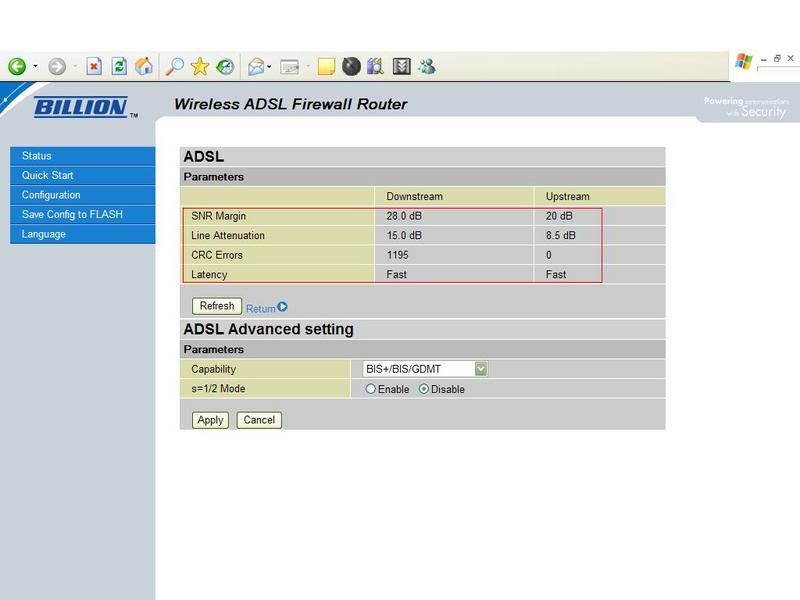
How about your line signal ? please check .
user posted image


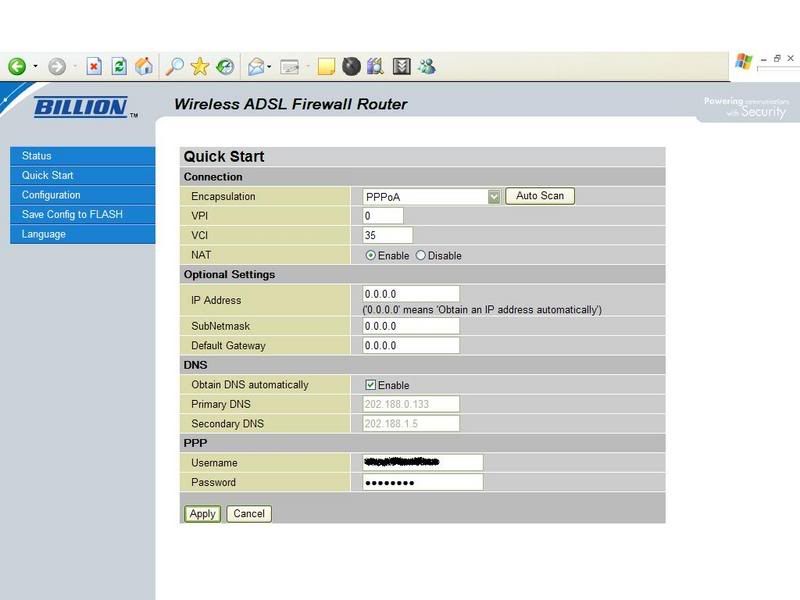
my setting

Connect as PPPOA
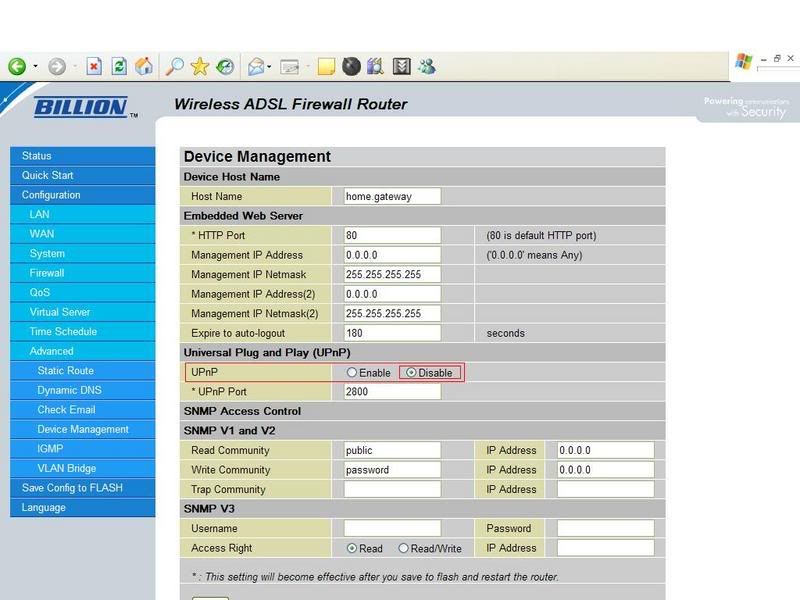
user posted image

Turn off UPNP
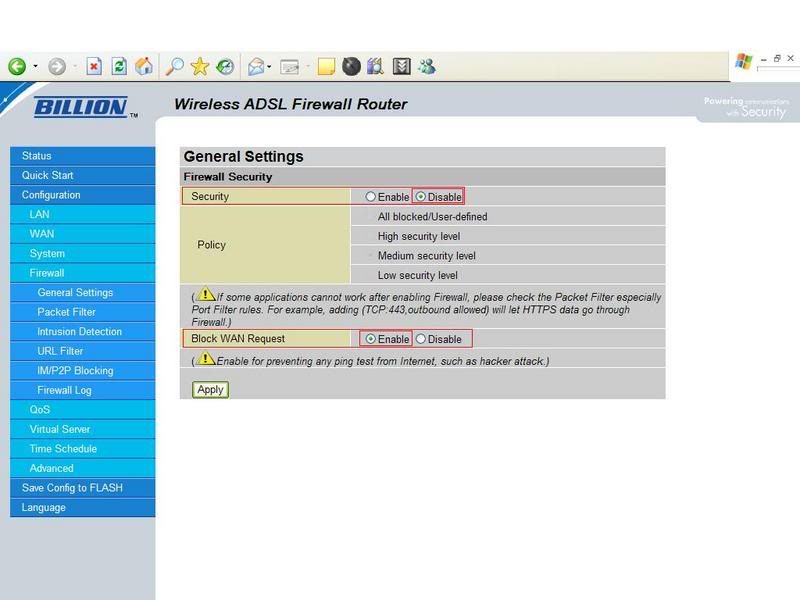
user posted image

Turn off Firewall
user posted image


and don't turn on DMZ as portforwarding.


This post has been edited by yangxi: Oct 9 2006, 01:50 PM
TSyangxi
post Oct 9 2006, 01:51 PM

Violinist ^.^ å›§ å›§
*******
Senior Member
4,189 posts

Joined: Jan 2003
From: Age Quod Agis


QUOTE(AtMostFear @ Oct 9 2006, 01:03 AM)
everytime I try to update my firmware to 5.07 it says,

what is wrong? help..
*
whats model Prolink ? 9300g or 9300gv (vpn) ??

find correct firmware
9300G = Billion 7402G "L"

before flashing , turn off firewall software .
try reset to factory default .
AtMostFear
post Oct 9 2006, 03:43 PM

Enthusiast
*****
Senior Member
810 posts

Joined: Mar 2006
From: Ann Arbor


QUOTE(yangxi @ Oct 9 2006, 01:51 PM)
whats model Prolink ? 9300g or 9300gv (vpn) ??

find correct firmware
9300G = Billion 7402G "L"

before flashing , turn off firewall software .
try reset to factory default .
*
I believe it is 9300G. what does the "L' stands for?

I downloaded the firmware from http://www.billion.com/support/download/fd/fd2.htm, BiPAC 7402G, Annex A.
I even tried restoring to default factory settings before.

anything else could be the cause? :-S

This post has been edited by AtMostFear: Oct 9 2006, 04:05 PM
TSyangxi
post Oct 9 2006, 04:05 PM

Violinist ^.^ å›§ å›§
*******
Senior Member
4,189 posts

Joined: Jan 2003
From: Age Quod Agis


L means non VPN = Prolink 9300G (most ppl buy @RM265)


AtMostFear
post Oct 9 2006, 04:24 PM

Enthusiast
*****
Senior Member
810 posts

Joined: Mar 2006
From: Ann Arbor


successfully upgraded my firmware to 5.07 using the link in your 1st post. it seems that the file from http://www.billion.com/support/download/fd/fd2.htm is different from it. no idea why. anyway cheers. biggrin.gif
c0c0nut
post Oct 9 2006, 04:33 PM

CrAzY aBt aRoWaNa'S !
******
Senior Member
1,970 posts

Joined: Jan 2003
From: Malacca


YNAGXI


we are not using PPPoE ? tonight try update firmware and let you know....THANKS for the help !!!

why is my Latency - Interleave ..........not like yours Fast ? line prob ?

This post has been edited by c0c0nut: Oct 10 2006, 08:33 AM
TSyangxi
post Oct 10 2006, 06:04 PM

Violinist ^.^ å›§ å›§
*******
Senior Member
4,189 posts

Joined: Jan 2003
From: Age Quod Agis


QUOTE(c0c0nut @ Oct 9 2006, 04:33 PM)
YNAGXI
we are not using PPPoE ? tonight try update firmware and let you know....THANKS for the help !!!

why is my Latency - Interleave ..........not like yours Fast ? line prob ?
*
Maybe different Dslam.

My line very near to telekom exchange, <1km .
c0c0nut
post Oct 10 2006, 08:40 PM

CrAzY aBt aRoWaNa'S !
******
Senior Member
1,970 posts

Joined: Jan 2003
From: Malacca


called TM today....seems that they also suspect here line quality is abit low...so in 2 days time they say they gonna fix it...

i hope they do !
eric84cool
post Oct 24 2006, 12:02 PM

I'm BACK!!!
*******
Senior Member
4,540 posts

Joined: Jan 2003
From: Sing-a-poor / Kayell / Jay-Bee


yangxi ...I just upgrade my firmware to billion and I do know what is s=1/2 mode for?!what should I set for the capability and the mode??
TSyangxi
post Oct 24 2006, 12:46 PM

Violinist ^.^ å›§ å›§
*******
Senior Member
4,189 posts

Joined: Jan 2003
From: Age Quod Agis


QUOTE(eric84cool @ Oct 24 2006, 12:02 PM)
yangxi ...I just upgrade my firmware to billion and I do know what is s=1/2 mode for?!what should I set for the capability and the mode??
*
S=1/2 mode is a protocol that increases ADSL max speed to 10mbs, but is not used in Malaysia as providers here have opted for ADSL2+ instead.


disable it , leave it default.

*after flashing.. please reset your setting to "factory default"
eric84cool
post Oct 25 2006, 11:39 AM

I'm BACK!!!
*******
Senior Member
4,540 posts

Joined: Jan 2003
From: Sing-a-poor / Kayell / Jay-Bee


OMG....after I have upgrade my firmware to billion lastest version....I can use ADSL 2+ fallback instead of ADSL...well, I didn't try out whether the speed is fast or not...since my connection always drop in every mode of ADSL...perhaps it must be due to my cable connection loosen with the connection at the telephone port behind my house......

anyways, iszit true that now streamyx upgrade 88 package?! I get 1.5mbps downstream for it....how about the rest?
c0c0nut
post Oct 25 2006, 04:58 PM

CrAzY aBt aRoWaNa'S !
******
Senior Member
1,970 posts

Joined: Jan 2003
From: Malacca


all thanks to yangxi !!! i have a better setup now...
TSyangxi
post Oct 25 2006, 10:12 PM

Violinist ^.^ å›§ å›§
*******
Senior Member
4,189 posts

Joined: Jan 2003
From: Age Quod Agis


update !!

*BETA FIRMWARE*

Version: Beta v5.08a.dg8 ( October 17 , 2006)

http://www.billion.com.au/forums/index.php...pe=post&id=1031

Recently seems many users complain about the ADSL line dropout issue, so Billion released a new version called 5.08a.dg4 with DSP code E67.5.42. It's for Annex A only.
eric84cool
post Oct 25 2006, 10:58 PM

I'm BACK!!!
*******
Senior Member
4,540 posts

Joined: Jan 2003
From: Sing-a-poor / Kayell / Jay-Bee


QUOTE(yangxi @ Oct 25 2006, 10:12 PM)
update !!

*BETA FIRMWARE*

Version: Beta v5.08a.dg8 ( October 17 , 2006)

http://www.billion.com.au/forums/index.php...pe=post&id=1031

Recently seems many users complain about the ADSL line dropout issue, so Billion released a new version called 5.08a.dg4 with DSP code E67.5.42. It's for Annex A only.
*
so have u tried it out?!?
TSyangxi
post Oct 25 2006, 11:02 PM

Violinist ^.^ å›§ å›§
*******
Senior Member
4,189 posts

Joined: Jan 2003
From: Age Quod Agis


not yet. because i don't have disconnect problem.
eric84cool
post Oct 25 2006, 11:05 PM

I'm BACK!!!
*******
Senior Member
4,540 posts

Joined: Jan 2003
From: Sing-a-poor / Kayell / Jay-Bee


god bless me.....I'm going to install this.....hopefully it's work.....or else my adsl modem kantoi..hohoho

ok...I just install..rite now waiting for the signal...

This post has been edited by eric84cool: Oct 25 2006, 11:16 PM
eric84cool
post Oct 25 2006, 11:17 PM

I'm BACK!!!
*******
Senior Member
4,540 posts

Joined: Jan 2003
From: Sing-a-poor / Kayell / Jay-Bee


Yes...it's work!!!but I don't know how long can it last..i mean the connection......good job yangxi!!!thank!!

latest update :still the same problem occurs...it might be due to upgrade done by tmnet recently cause my connection becomes worse...

anyway...what's the ideal result for SNR and authe ??

This post has been edited by eric84cool: Oct 26 2006, 03:52 PM
eric84cool
post Oct 26 2006, 11:21 PM

I'm BACK!!!
*******
Senior Member
4,540 posts

Joined: Jan 2003
From: Sing-a-poor / Kayell / Jay-Bee


yangxi.....how come I couldn't surf the net while I still can download stuff via BT?!? even if I didn't use BT also, I still can't surf the net...what's wrong with my setting?!

or I need to add port for my firefox or what?!?or windows firewall block it?!impossible also...bcoz I didn't touch the setting...
Ree73
post Oct 28 2006, 11:07 AM

Enthusiast
*****
Senior Member
761 posts

Joined: Jan 2003
i think your upload too high on BT... Try cap the upload...

This will improve on http surfing...

I am new user here smile.gif
I think my 9300G got the VPN type... There is a VPN setup section in the control panel.

I have some prob with this modem at 1st, now this is the 2nd unit, 1 to 1 exchange from the shop. It is working perfect now...

My 1st modem kong just after i use for 2 hours, while transfering files from other PC to my PC... The modem hang and all LEDs light blink non stop!!! This including the Power Led... Tried to hardware reset the modem but failed... That is my 1st brand new modem...

This post has been edited by Ree73: Oct 28 2006, 11:07 AM
TSyangxi
post Oct 28 2006, 11:15 PM

Violinist ^.^ å›§ å›§
*******
Senior Member
4,189 posts

Joined: Jan 2003
From: Age Quod Agis


QUOTE(eric84cool @ Oct 26 2006, 11:21 PM)
yangxi.....how come I couldn't surf the net while I still can download stuff via BT?!? even if I didn't use BT also, I still can't surf the net...what's wrong with my setting?!

or I need to add port for my firefox or what?!?or windows firewall block it?!impossible also...bcoz I didn't touch the setting...
*
try do auto scan first , after that set your connection to PPPOA
Attached Image


*can't surf the net ? Yes, TMNUT problem. even I download BT ~10kb/s , also can't surf net . vmad.gif

suggest , BT running job 1 by 1 (max 3)
eric84cool
post Oct 30 2006, 08:47 AM

I'm BACK!!!
*******
Senior Member
4,540 posts

Joined: Jan 2003
From: Sing-a-poor / Kayell / Jay-Bee


QUOTE(Ree73 @ Oct 28 2006, 11:07 AM)
i think your upload too high on BT... Try cap the upload...

This will improve on http surfing...

I am new user here smile.gif
I think my 9300G got the VPN type... There is a VPN setup section in the control panel.

I have some prob with this modem at 1st, now this is the 2nd unit, 1 to 1 exchange from the shop. It is working perfect now...

My 1st modem kong just after i use for 2 hours, while transfering files from other PC to my PC... The modem hang and all LEDs light blink non stop!!! This including the Power Led... Tried to hardware reset the modem but failed...  That is my 1st brand new modem...
*
Nop....it's not bcoz of BT...I have limit my upload bandwidth.....VPN?!??emmm....what's that actually?

QUOTE(yangxi @ Oct 28 2006, 11:15 PM)
try do auto scan first , after that set your connection to PPPOA
Attached Image
*can't surf the net ?  Yes, TMNUT problem. even I download BT ~10kb/s , also can't surf net . vmad.gif 

suggest , BT running job 1 by 1 (max 3)
*
I can't use PPPoA connection....about the BT or surf thing..it's clearly TMnut Problem...sometimes I can get a very good download rate and can surf as well...damn TMNUT!!!kanasai....damn tulan about it laio.....I just went to TMpoint to downgrade my package... laugh.gif ...from 88 to 66...save 22 buck and manage to save 264 buck per y ear.... rclxm9.gif
peter_ng
post Nov 17 2006, 02:19 PM

New Member
*
Junior Member
16 posts

Joined: Jan 2003
From: Petaling Jaya


there Prolink 9300G Orginal Firmware download link anready broken!

anyone here can upload agian?
BrotherLuc
post Nov 30 2006, 01:35 PM

New Member
*
Junior Member
7 posts

Joined: Apr 2005
From: Kuching


Guys, i'm really new here. What is the difference between the Prolink firmware and the one from Billion? Is the one from Billion a lot more better?
TSyangxi
post Jan 10 2007, 11:02 AM

Violinist ^.^ å›§ å›§
*******
Senior Member
4,189 posts

Joined: Jan 2003
From: Age Quod Agis


Official PROLINK firmware:

PROLINK 9300G (no GV)
http://www.prolink2u.com/downloads/drivers...07_firmware.rar
mie99
post Jan 10 2007, 05:40 PM

New Member
*
Junior Member
11 posts

Joined: Jan 2003


Could someone here please confirm whether the 9300G (non VPN model) supports VPN pass-through? I was told that it does, but I want to be sure. I don't want to pay more for the VPN model since I just need the pass-through.
So if you've been happily using VPN through that model, please let me know here.

By the way, I need to get a new one now because my 9000G suddenly lost its DSL modem function because "the main IC died so cannot be fixed" (according to Fida service center).
Could it still be useful just as WiFi AP? It didn't show any other error, just couldn't detect Streamyx's DSL at all.
Or perhaps I should ask: Anyone here wanna buy a 9000G without DSL? brows.gif
scorps
post Jan 10 2007, 05:44 PM

Something you call love, but I call sex
*******
Senior Member
9,572 posts

Joined: Jun 2005
From: Terengganu Darul Iman


QUOTE(mie99 @ Jan 10 2007, 06:40 PM)

Or perhaps I should ask: Anyone here wanna buy a 9000G without DSL?  brows.gif
*
how much you want to offer ??
heheheehhee tongue.gif
mie99
post Jan 10 2007, 06:13 PM

New Member
*
Junior Member
11 posts

Joined: Jan 2003


QUOTE(scorps @ Jan 10 2007, 05:44 PM)
how much you want to offer ??
heheheehhee tongue.gif
*
how much do *you* offer? rolleyes.gif
TSyangxi
post Jan 10 2007, 07:31 PM

Violinist ^.^ å›§ å›§
*******
Senior Member
4,189 posts

Joined: Jan 2003
From: Age Quod Agis


QUOTE(mie99 @ Jan 10 2007, 05:40 PM)
Could someone here please confirm whether the 9300G (non VPN model) supports VPN pass-through?  I was told that it does, but I want to be sure.  I don't want to pay more for the VPN model since I just need the pass-through.
So if you've been happily using VPN through that model, please let me know here.

By the way, I need to get a new one now because my 9000G suddenly lost its DSL modem function because "the main IC died so cannot be fixed" (according to Fida service center).
Could it still be useful just as WiFi AP?  It didn't show any other error, just couldn't detect Streamyx's DSL at all.
Or perhaps I should ask: Anyone here wanna buy a 9000G without DSL?  brows.gif
*
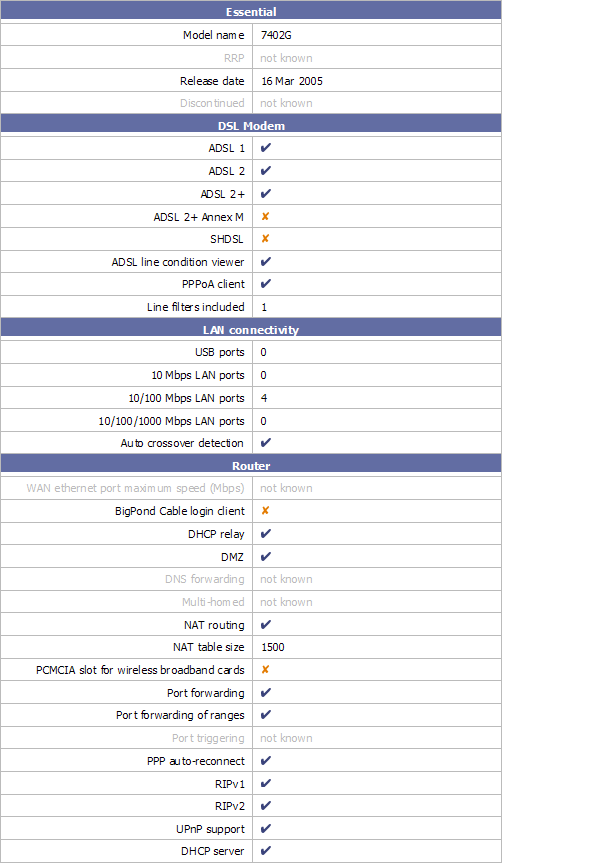
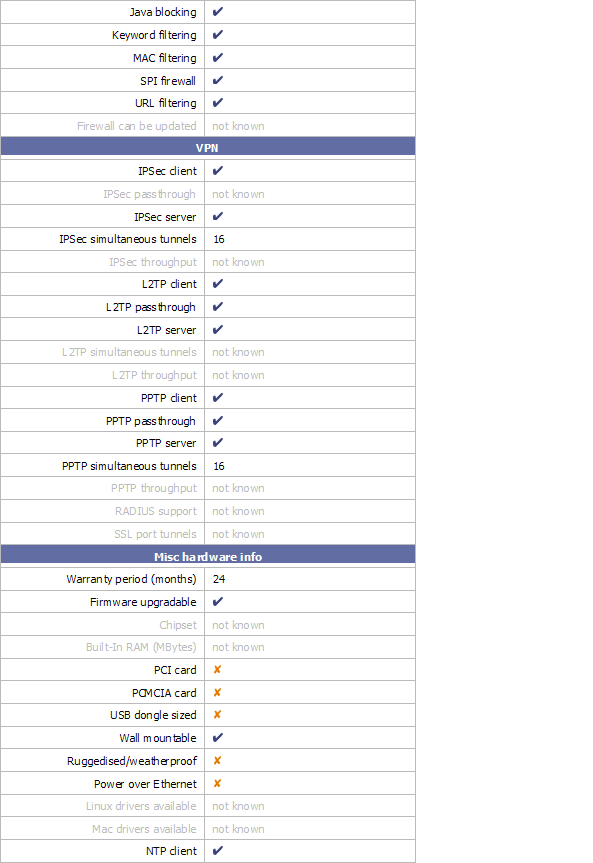
support VPN pass-through.

» Click to show Spoiler - click again to hide... «

mie99
post Jan 10 2007, 08:49 PM

New Member
*
Junior Member
11 posts

Joined: Jan 2003


QUOTE(yangxi @ Jan 10 2007, 07:31 PM)
support VPN pass-through.
*
Thanks yangxi. But are we supposed to see that in the image you attached? 'coz I don't see it in there.
TSyangxi
post Jan 10 2007, 10:06 PM

Violinist ^.^ å›§ å›§
*******
Senior Member
4,189 posts

Joined: Jan 2003
From: Age Quod Agis


streamyx line problem, can't browse photobucket link


Attached Image
Attached Image
Attached Image
Attached Image


This post has been edited by yangxi: Feb 9 2007, 02:31 AM
TSyangxi
post Feb 9 2007, 02:31 AM

Violinist ^.^ å›§ å›§
*******
Senior Member
4,189 posts

Joined: Jan 2003
From: Age Quod Agis


*BILLION FIRMWARE*

~ At own risk ! , might void warranty ~

Version: V5.52d (06th of Feb, 2007)


*Billion 7402GL (Prolink 9300G)
http://billion.com.au/downloads/FOR_PCRange_7402GLAv552d.zip


=====================================================
CHANGELOG:

Version: V5.52d (06th of Feb, 2007)

Improvements:

. Added pre-defined rules for Game Console (Xbox 360, NDS WFC) in Firewall Packet Filter.
. Added VoIP InUse item in QoS time schedule for all VoIP series.
. Updated wireless AP driver version from 1.0.8.0 to 1.0.9.0.


Bugs Fixed:

. Fixed issue where router will crash when "Use default range" option on DHCP Server setting page is checked.
. Fixed the bug where PPP/Mail LED indicates wrong state.
. Fixed bug where sometimes VLAN Bridge can't be edited from web GUI.


Known Issues:

. Conference call will work with G.711a/u law only
. Some issues may occur with T.38 using SIP Proxy servers.
. Flash based upgrade will not allow downgrading to version 5.07 and earlier versions
- Need to use emergency utility for downgrading.


Version: V5.52c (18th of Jan, 2007)

New Features:

- Add ISAP (Internal Service Auto-Pass through) in the firewall module, firewall setting doesn't need to be opened manually when firewall is enabled. SNMP, SNTP, PPTP, L2TP, and DDNS are supported.
- Supports up to 4 WDS, only wireless AP driver version 1.0.8.0 will support this.
- Support G.723 and G.726 codec. (For VoIP series, except 7402 VoIP series.)
- RFC2833 and SIP INFO (For VoIP series, except 7402 VoIP series.)
- 3-way conference call (Only for VoIP calls with G.711 a/u law) (For VoIP series, except 7402 VoIP series.)
- VoIP Call Log
- Anonymous call
- Added one more VoIP region for South Africa
- Supports 4-wire and 2-wire auto fallback. (Only for SHDSL)
- Added the ISDN MSN and sub address function.
- IGMP Snooping supports IGMP v3.


Improvement:
- Changed VOIP series model to use flash based upgrade (except 7404VGO).
- Changed waiting time to 100 seconds for the VoIP series when restarting.
- Changed waiting time to 70 seconds for the non-VoIP series when restarting.
- Change WEP key format without character "-".
- Added a clear message when upgrading a wrong firmware type.
- Added a clear error message when there are over 100 rules in URL Filter.
- Removed CO mode option in BiPAC 8501.
- Updated wireless AP driver version from 1.0.6.0 to 1.0.8.0.
- Avoids sending voice while Codec Type is changing.
- Tolerate Syntax error when SIP Server contains Double Quotations in Authorization field.


Bugs Fixed:

- Fixed WPA/WPA2 where it will not work when only ESSID is changed, but wireless security is enabled already.
- Fixed issue where UPnP port doesn't change immediately when changing on the web page.
- Fixed bug where VoIP calls can't be made with Internode service. (For VoIP series).
- Fixed Fax pass-through issue. (For VoIP series)
- Fixed bug where outbound IP throttling will throttle traffic between LAN and WLAN
- Fixed the bug where router will lose default gateway after PPTP VPN established as default route.
- Fixed the RIP message where it can't exchange successfully with Cisco routers.
- Fixed the issue where TCP session will be disconnected automatically when both NAT and firewall are disabled.
- Fixed issue where ISDN dialling does not work (Only for 7404VGD)
- Fixed SIP ALG for parsing the request from BussTel software phone.
- Fixed system crash issues when changing VPN PPTP password.
- Fixed bug where Distinctive ring is inactivated.
- Fixed bug where IPSec can not re-connect when ADSL line is down or WAN IP changed.
- Fixed issue where PPPoE Pass-through can't work when VoIP is enabled.

lokem
post Apr 9 2007, 06:47 PM

Getting Started
**
Junior Member
76 posts

Joined: Jan 2003
Hi folks,

I'm using the same router as well. Recently upgraded to 5.07 firmware. However, I've a very odd problem with my wireless connection at home which has been bugging me for a couple of weeks.

Everything works fine most of the time. But whenever I notice that there's another wifi signal that my notebook or desktop can pickup, my connection to my router is intermittent. Most of the time unconnectable even.

The strange thing here is that the signal quality is very good (in fact it's 90 when I do a iwlist eth1 scanning on my notebook). However, when I try to connect to the router via DHCP in Ubuntu, it just doesn't get connected. Using WinXP, even though it seems like it's connected, it times out when I do a ping to the router.

I've suspected that it could be wireless interference. I've changed my wifi channel to not clash with the rest, but it's still happening. I made sure the other APs are on different channels.

Anyone has any idea what's going on?

Any help is greatly appreciated.

scorps
post Apr 9 2007, 09:52 PM

Something you call love, but I call sex
*******
Senior Member
9,572 posts

Joined: Jun 2005
From: Terengganu Darul Iman


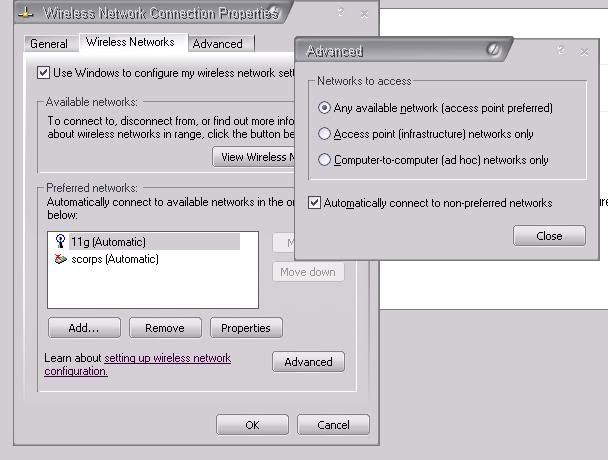
maybe u can set your notebook to just connected to your wifi router,
user posted image
lokem
post Apr 9 2007, 09:57 PM

Getting Started
**
Junior Member
76 posts

Joined: Jan 2003
Tried that, doesn't work smile.gif
BrotherLuc
post Apr 19 2007, 09:53 AM

New Member
*
Junior Member
7 posts

Joined: Apr 2005
From: Kuching


Okay...

Something is wrong with my PC, so after i reformat, plugged in the modem to PC, switched on, and my PC detected LAN... BUT i can't open any webpage at all.

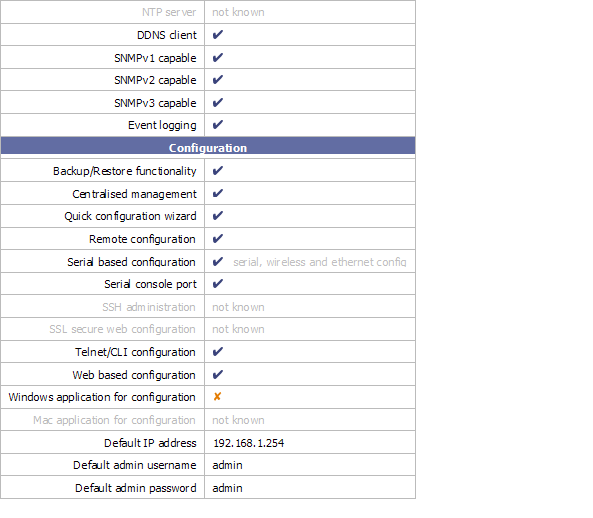
The manual open my browswer and go to 192.168.1.254 but when i tried to key in the address in the URL bar, my browser can't connect to the router.

Am i missing something? Please help as i just reformatted my PC and i believe that there's a workaround here.
scorps
post Apr 19 2007, 10:16 AM

Something you call love, but I call sex
*******
Senior Member
9,572 posts

Joined: Jun 2005
From: Terengganu Darul Iman


QUOTE(BrotherLuc @ Apr 19 2007, 10:53 AM)
Okay...

Something is wrong with my PC, so after i reformat, plugged in the modem to PC, switched on, and my PC detected LAN... BUT i can't open any webpage at all.

The manual open my browswer and go to 192.168.1.254 but when i tried to key in the address in the URL bar, my browser can't connect to the router.

Am i missing something? Please help as i just reformatted my PC and i believe that there's a workaround here.
*
u are using router separate with modem ??
BrotherLuc
post Apr 19 2007, 10:24 AM

New Member
*
Junior Member
7 posts

Joined: Apr 2005
From: Kuching


QUOTE(scorps @ Apr 19 2007, 10:16 AM)
u are using router separate with modem ??
*
Umm... sorry, i mean plugged in my router to my PC.
I can't access the config page as instructed by the manual.

I haven't yet try to reset factory setting. Is there any other way?
I'm not that good in 'networking' stuffs, so please advise.
scorps
post Apr 19 2007, 11:20 AM

Something you call love, but I call sex
*******
Senior Member
9,572 posts

Joined: Jun 2005
From: Terengganu Darul Iman


please check in ipconfig
open command prompt
and type ipconfig
then take the number of gateway shown by ipconfig,
and try that number
BrotherLuc
post Apr 19 2007, 11:29 AM

New Member
*
Junior Member
7 posts

Joined: Apr 2005
From: Kuching


QUOTE(scorps @ Apr 19 2007, 11:20 AM)
please check in ipconfig
open command prompt
and type ipconfig
then take the number of gateway shown by ipconfig,
and try that number
*
Uh... can't really understand what you instructed, but i'll try it tonight as i'm in office now and i'll get back as soon as possible. Thanks!


Added on April 20, 2007, 11:25 am
QUOTE(scorps @ Apr 19 2007, 11:20 AM)
please check in ipconfig
open command prompt
and type ipconfig
then take the number of gateway shown by ipconfig,
and try that number
*
I can finally connect!
Seems like i can't follow what the instruction in the manual said.
It said set 'Obtain IP Automatically'. The fact is, i have to set the IP to my router's IP range, subnet mask as usual 255.255.255.0 and have to put the router's exact adress in the 'default gateway'.

Learnt it from my IT manager. Heh... I'm happy just like when i first got my router as all the settings and configurations are still intact in the router.

Sorry for the trouble. rclxub.gif

This post has been edited by BrotherLuc: Apr 20 2007, 11:25 AM
Espionage
post May 23 2007, 08:10 AM

On my way
****
Senior Member
539 posts

Joined: Jan 2003
From: South Port


Why need to update firmware if it serve well now with old version?
scorps
post May 23 2007, 08:16 AM

Something you call love, but I call sex
*******
Senior Member
9,572 posts

Joined: Jun 2005
From: Terengganu Darul Iman


QUOTE(Espionage @ May 23 2007, 09:10 AM)
Why need to update firmware if it serve well now with old version?
*
maybe for some new features or additional function,
Espionage
post May 23 2007, 09:15 AM

On my way
****
Senior Member
539 posts

Joined: Jan 2003
From: South Port


what is the additional function in billion firmware compared to prolink?
alfie
post May 23 2007, 09:26 AM

Getting Started
**
Junior Member
177 posts

Joined: Nov 2005
From: KL


QUOTE(Espionage @ May 23 2007, 09:15 AM)
what is the additional function in billion firmware compared to prolink?
*
well, one extra feature on the Billion firmware is that u can adjust the strenght of the wireless signal from the user interface. for more features, read the release notes in earlier posts
Espionage
post May 23 2007, 09:44 AM

On my way
****
Senior Member
539 posts

Joined: Jan 2003
From: South Port


ok thanks..........
soon..prolink will release another version same like what you guys r using it...

alfie
post May 23 2007, 09:49 AM

Getting Started
**
Junior Member
177 posts

Joined: Nov 2005
From: KL


QUOTE(Espionage @ May 23 2007, 09:44 AM)
ok thanks..........
soon..prolink will release another version same like what you guys r using it...
*
really? cool! for those who's router still under warranty and want to maintain the warranty, this is good news! rclxms.gif

for those like me who have switched to billion firmware (warranty expired or void by billion firmware), maybe thr's no point in changing if thr's no improvements
Moogle Stiltzkin
post May 23 2007, 01:33 PM

Look at all my stars!!
*******
Senior Member
4,475 posts

Joined: Jan 2003
bruce.gif

This post has been edited by Moogle Stiltzkin: Jul 14 2017, 02:41 PM
rootlinux
post May 24 2007, 01:22 AM

Enthusiast
*****
Senior Member
898 posts

Joined: Jan 2003
From: ph/sbj/slgr
how much is this Prolink 9300G in the market?
scorps
post May 25 2007, 07:38 AM

Something you call love, but I call sex
*******
Senior Member
9,572 posts

Joined: Jun 2005
From: Terengganu Darul Iman


mugenz
post May 27 2007, 07:12 PM

hmmmm..
******
Senior Member
1,300 posts

Joined: Oct 2006
From: Pee Jay


hmmm.. i tried reseting the settings via the config page.. after that i cant seem to login back to the page.. supposing to be id:admin pass:admin rite..?
but cant connect in.. any idea???
TSyangxi
post May 28 2007, 10:16 PM

Violinist ^.^ å›§ å›§
*******
Senior Member
4,189 posts

Joined: Jan 2003
From: Age Quod Agis


recheck your ip address, make sure your gateway address is 192.168.1.254.

Espionage
post Jun 7 2007, 09:43 AM

On my way
****
Senior Member
539 posts

Joined: Jan 2003
From: South Port


I got the latest version

Prolink_H9300G_552f.afw

pls pm me with ur email for this version
wcgan
post Jun 14 2007, 08:46 AM

New Member
*
Junior Member
11 posts

Joined: Oct 2006
sorry...
i download the latest firmware 5.07
but how to flash my device Prolink 9300G ?
can anyone teach me?
thx a lot.
TSyangxi
post Jul 12 2007, 06:33 PM

Violinist ^.^ å›§ å›§
*******
Senior Member
4,189 posts

Joined: Jan 2003
From: Age Quod Agis


new firmware up!

Version: V5.52G (12th of July, 2007)

Prolink 9300G (Billion 7402GL)
http://www.billion.com.au/downloads/FOR_PC...402GLAv552g.zip

New Features:

Improvement:

. Improved logout with web page in order to close the window automatically.
. Added flash checksum for firmware upgrade protection.
. Support SNMP function over loopback interface.


Bug Fixed:

. Fixed the memory leak issue that was caused by DDNS function.
. Fixed the memory leak issue when WAN interface is activated as DHCP client.
. Fixed the memory leak issue when Telnetting to device many times.
. Fixed the memory leak issue when device gets DHCP client request and it will lose 16 bytes per each request.
. Fixed the bug whereby system will be locked when enabling multiple IPSec policies.
. Fixed IPSec IKE bug: Getting wrong policy when 2 or more Road Warrior policies are created.
. Fixed the bug that CPU load will be increased up to 100% when doing remote Telnet/HTTP access.
. Fixed the bug that wireless channel scan can not work on IE 7.
. Fixed slow DNS resolution issue on Linux system.
. Fixed the bug that QoS doesn't work correctly for wireless network.
. Fixed bug that system will crash when disable firewall function from web GUI.
. Fixed bug that FXS port 2 doesn't work if both FXS ports are use the same account.
. Fixed bug that DHCP server will cause memory lost.
. Fixed bug that wireless WPA security can not set correctly by using Mac Safari browser.
. Fixed bug that diagnostic function is not stable.
. Fixed bug that system will jam if get DNS reply with TCP packet.
. Fixed bug that response time of DNS relay function is too slow.
. Fixed bug that traffic can not pass-through if the first packet is from CO to CPE on BiPAC 8501.
. Added watchdog command back.


Known Issues:

-Flash based upgrade will not allow downgrading to version 5.07 and earlier versions, emergency utility is required for downgrading
-Resetting to factory & manually re-entering settings after upgrading is a must for this version.


This post has been edited by yangxi: Jul 12 2007, 06:33 PM
xyngfei
post Oct 9 2007, 08:56 AM

Casual
***
Junior Member
366 posts

Joined: Jan 2003
From: JB

What is the different between 9300G and 6300g?

how about the downloading performance?
does anyone do the compare b4?
Ree73
post Oct 17 2007, 02:30 PM

Enthusiast
*****
Senior Member
761 posts

Joined: Jan 2003
New official firmware release...

Please refer to prolink website for latest firmware...

This post has been edited by Ree73: Nov 9 2007, 01:57 PM
sposh
post Nov 14 2007, 05:08 PM

Getting Started
**
Junior Member
67 posts

Joined: Jan 2007
hi.. i m using Prolink 9300G for quite some time d.. but nowadays whenever i use Bitcomet programme.. my connection like died..
cannot surf.. but bitcomet is still running..

izzit firmware problem? which version u all recommend ? where can i get it
TSyangxi
post Nov 14 2007, 08:32 PM

Violinist ^.^ å›§ å›§
*******
Senior Member
4,189 posts

Joined: Jan 2003
From: Age Quod Agis


Try this setting
Attached Image


*I change new LINKSYS WAG200G. (Texas Inst. AR7 @ 210MHz , 16MB ram) biggrin.gif

Previously, Bitcomet flood prolink router NAT Sessions (max 1500) , once nat connect max 1500 session, cannot browsing anymore. sweat.gif

This post has been edited by yangxi: Nov 15 2007, 12:08 AM
sposh
post Nov 14 2007, 11:17 PM

Getting Started
**
Junior Member
67 posts

Joined: Jan 2007
hhhmmm thanks alot.. but after i update my firmware is much better.
TSyangxi
post Feb 12 2008, 02:54 AM

Violinist ^.^ å›§ å›§
*******
Senior Member
4,189 posts

Joined: Jan 2003
From: Age Quod Agis


New firmware up!~

Version: V5.53 (29th of January, 2008)


http://www.billion.com.au/downloads/FOR_PC...7402GLv5.53.zip


New Features:
- Added DNS Suffix support, it can be found at DHCP Server setting page

Improvements:
- User can check PSTN voltage without Internet connection established.
- Update wireless AP driver version to 1.1.2.0.
- Corrected some ADSL information on web page.
- Corrected Network Busy/Congestion Tones for Spain.
- Modified DHCP server's reply packets for HOSTNAME option (option 12) behaviour.
- Added the capability to display local SNR Margin and Line Attenuation for 85xx.

Bugs Fixed:
- Fixed the bug whereby wireless WPA/WPA2 connection is not stable with Intel 4965AGN.
- Fixed the bug whereby IPSec won't reconnect with RFC1483 routed mode.
- Fixed the bug when doing diagnostic test, ping to www.google.com will fail sometimes.
- Fixed the bug whereby user will get error message "webserver:error: vim namespace from error: invalid operation" when changing wireless security setting.
- Fixed the bug whereby IPSec Preshared key is deleted when Road Warrior connection is terminated
Page 3 / 16
- Fixed IPSec bug: Not include HASH in 2'nd message of Aggressive mode, if DPD is enabled.
- Fixed the bug whereby DHCP Client cannot get IP address from specify DHCP Server.
- Fixed the bug whereby access from remote site can pass the firewall if no NAT session table or Virtual Server rule matched.

c0c0nut
post Feb 17 2008, 11:04 AM

CrAzY aBt aRoWaNa'S !
******
Senior Member
1,970 posts

Joined: Jan 2003
From: Malacca


bro how to remove the yellow light from my bitcomet on the bottom right ?
TSyangxi
post Feb 17 2008, 06:06 PM

Violinist ^.^ å›§ å›§
*******
Senior Member
4,189 posts

Joined: Jan 2003
From: Age Quod Agis


have u done port forward ?

suggest turn off upnp.


When first open bitcomet , router NAT table always load full 1500max. Need wait ~2min to release nat table.

delon85
post Feb 18 2008, 12:23 PM

Ad Astra
******
Senior Member
1,061 posts

Joined: Jan 2003


My Prolink 9300G keeps rebooting while I'm surfing internet. Sometimes it reboots 15 mins into startup or 40 mins into startup, then it just keeps rebooting itself again and again. What do you think is happening?

I flashed to the latest Prolink firmware. I did give the Billion firmware a try but the result is the same.
TSyangxi
post Feb 18 2008, 02:36 PM

Violinist ^.^ å›§ å›§
*******
Senior Member
4,189 posts

Joined: Jan 2003
From: Age Quod Agis


what is your snr margin ? you adsl might not stable .

-try set back Connect Mode to "ADSL"
-Encapsulation mode set to "PPOA"

-after flashing , please set Factory Default Settings

This post has been edited by yangxi: Feb 18 2008, 02:37 PM
delon85
post Feb 18 2008, 04:50 PM

Ad Astra
******
Senior Member
1,061 posts

Joined: Jan 2003


QUOTE(yangxi @ Feb 18 2008, 02:36 PM)
what is your snr margin ? you adsl might not stable .

-try set back Connect Mode to "ADSL"
-Encapsulation mode set to "PPOA"

-after flashing , please set Factory Default Settings
*
SNR Margin Downstream: 30.0 dB
SNR Margin Downstream: 23 dB

Changed Connect Mode to "ADSL"
Changed Encapsulation Mode to "PPoA"

Connection still wouldnt last more than 5 mins. Router keep rebooting itself. It's quite hot tho.

This post has been edited by delon85: Feb 18 2008, 05:11 PM
TSyangxi
post Feb 18 2008, 08:03 PM

Violinist ^.^ å›§ å›§
*******
Senior Member
4,189 posts

Joined: Jan 2003
From: Age Quod Agis


try disable wireless .
-are you connect BT client ? bitcomet / xunlei

Maybe something wrong circuit board , send RMA .

This post has been edited by yangxi: Feb 18 2008, 08:04 PM
delon85
post Feb 26 2008, 12:50 PM

Ad Astra
******
Senior Member
1,061 posts

Joined: Jan 2003


Is there anyway to actually set connection limit and TCP connection timeouts?
p0intblanc
post Mar 7 2008, 02:21 PM

New Member
*
Junior Member
34 posts

Joined: Nov 2005
Hi,
Was hoping to confirm if any shops are still selling this modem.

According to some ppl, this modem has been discontinued. Any reason why?

Really wanna buy this modem.
Thanks

ben3003
post Mar 10 2008, 09:41 AM

10k Club
********
All Stars
10,859 posts

Joined: Jan 2003
From: Sarawak


is this modem better than buffalo one? The firmware better than ddwrt in terms of QoS? Can limit download or upload speed on certain IP?
TSyangxi
post Mar 10 2008, 09:52 AM

Violinist ^.^ å›§ å›§
*******
Senior Member
4,189 posts

Joined: Jan 2003
From: Age Quod Agis


QUOTE(p0intblanc @ Mar 7 2008, 02:21 PM)
Hi,
Was hoping to confirm if any shops are still selling this modem.

According to some ppl, this modem has been discontinued. Any reason why?

Really wanna buy this modem.
Thanks
*
Prolink 9300g already discontinued ,because oem price quite high from BILLION.

and their new prolink 6300g use TI chipset and less function. Not worth~.

*Prolink 6300g = BiPAC 5102G/5200G (also discontinued long time ago ~ sweat.gif )


RECOMMEND:

-LINKSYS WAG200G
-TPLINK W8920G

notinthisworld
post Mar 29 2008, 05:08 PM

New Member
*
Junior Member
26 posts

Joined: Jul 2005
hi. will there be problems when i use the billion firmware on the prolink 9300g?

like led lights going haywire or something similar? thanks.
TSyangxi
post Mar 30 2008, 07:25 PM

Violinist ^.^ å›§ å›§
*******
Senior Member
4,189 posts

Joined: Jan 2003
From: Age Quod Agis


Don't have any problem so far.. wink.gif

This post has been edited by yangxi: Mar 31 2008, 12:29 AM
notinthisworld
post Mar 30 2008, 08:43 PM

New Member
*
Junior Member
26 posts

Joined: Jul 2005
i have not yet tried flashing my prolink with the billion firmware. i am just asking the possible output of doing it. thanks


Added on May 15, 2008, 6:52 amany other comments or opinions regarding this new firmware? any great enhancements? thanks

This post has been edited by notinthisworld: May 15 2008, 06:52 AM
IamNOT
post Aug 30 2008, 09:37 AM

Getting Started
**
Junior Member
283 posts

Joined: Aug 2008
From: Malacca


QUOTE(yangxi @ Aug 4 2006, 11:00 PM)
PROLINK 9000G

connect 16days without disconnect. tongue.gif

user posted image
*
Can anybody post a share link for this firmware for 9000G?
Appreciated. Cause the Billion site need product registration.

k10n9
post Feb 23 2009, 12:46 AM

New Member
*
Junior Member
32 posts

Joined: Mar 2005


QUOTE(IamNOT @ Aug 30 2008, 09:37 AM)
Can anybody post a share link for this firmware for 9000G?
Appreciated. Cause the Billion site need product registration.
*
Have you tried this link?
CODE
http://au.billion.com/downloads/FOR_PCRange_7402GLv5.53.zip

swee sin
post Jul 1 2009, 09:58 PM

New Member
*
Junior Member
28 posts

Joined: Jun 2006


QUOTE(delon85 @ Feb 26 2008, 12:50 PM)
Is there anyway to actually set connection limit and TCP connection timeouts?
*
yeah ... is there anyway??
coz bt always flood the router... causing IE slow ...
if can set timeout to less... then can get new connection faster ...
alfie
post Oct 30 2009, 11:06 PM

Getting Started
**
Junior Member
177 posts

Joined: Nov 2005
From: KL


Updated firmware to v5.73 (from Billion) 4 days ago. All running very well. Streamyx connection hasn't dropped once in these 4 days. Much better than v5.53 that used to disconnect/reconnect about once a day.

** v5.73 recommended!!**

will post again here if i run into any problems in the near future

Attached Image
ultimate
post Nov 1 2009, 11:47 AM

New Member
*
Junior Member
5 posts

Joined: Jan 2003
i'm facing prb to get my ps3 connect to H9300G, any1 had the same experience before? encountered connection failed issue.
notinthisworld
post Jun 30 2010, 10:07 PM

New Member
*
Junior Member
26 posts

Joined: Jul 2005
hi, slightly OT

does anyone know the chipset of the prolink h6300g/6300g? or maybe some internal screenshots? fcc?

thanks in advance


Change to:
| Lo-Fi Version
0.0666sec    0.62    6 queries    GZIP Disabled
Time is now: 20th December 2025 - 12:35 PM