Welcome Guest ( Log In | Register )

Bump Topic Topic Closed RSS Feed

Outline · [ Standard ] · Linear+

 Samsung Galaxy Note 3 - Official v9, WARNING - DO NOT UPDATE BMJ3

views
     
CTRANX
post Oct 25 2013, 03:27 PM

Getting Started
**
Junior Member
50 posts

Joined: Sep 2013


Hi, anyone notice that there is hiccups when connecting Note 3 using USB 3.0 mode to laptop (running Win 8)?
When I connected mine to laptop, the windows explorer is refreshing the phone folder (DCIM) in a very slow pace..
What's worse is when I try to create a new folder in the phone DCIM folder using my laptop, my laptop freezes.
another scenario is when I highlighted several pictures in the phone DCIM folder and wanted to copy them to a folder on my desktop, copy is not successful. Nothing actually was coppied to my new folder on desktop.

Hope anyone here can help me in this issue. smile.gif

This post has been edited by CTRANX: Oct 25 2013, 03:29 PM
CTRANX
post Oct 25 2013, 03:51 PM

Getting Started
**
Junior Member
50 posts

Joined: Sep 2013


QUOTE(vostro78 @ Oct 25 2013, 03:33 PM)
mine home pc also win8. yesterday i still manage to create a movie folder and copy some hi def movie files to the note3 sd card with no problem... using usb 3.0 also.
*
QUOTE(benny888 @ Oct 25 2013, 03:38 PM)
No such issues on mine. Files copy in between phone n notebook is fine n smooth. I am using a Vaio Pro on Win 8.1. Try using another USB port ?
*
QUOTE(chtan @ Oct 25 2013, 03:41 PM)
Fine with mine as well running on Win8 pro. Copied almost 2GB of song over to Note 3 external 32GB SDcard@class 10, super fast.
*
After several tries, copying stuffs from phone to laptop is possible.. but not everytime success..
I have tried using different ports on my laptop also.. problem still there..
I just tried creating folder in my phone DCIM folder.. it is alright... but when i rename the folder, laptop hang again.. wondering why..?? rclxub.gif

UPDATE: this problem doesn't occur everytime I create a new folder... it is a random error... After the slight hang when I created a folder in the DCIM phone folder... now creating another folder in DCIM is possible with no hang.. I think I should disconnect the phone and reconnect to try any if error persist.

This post has been edited by CTRANX: Oct 25 2013, 03:55 PM

CTRANX
post Oct 26 2013, 06:45 PM

Getting Started
**
Junior Member
50 posts

Joined: Sep 2013


QUOTE(mervin8706 @ Oct 25 2013, 06:39 PM)
I have such issue too.. yesterday i try to create one folder in sd card using usb mode.. my laptop hang for sometime.. after that when i rename.. whole window become not responding.. using window 8.1 too.. any solution for it?? I using sandisk ultra class 10
*
Yes, I am experiencing the exact same issue... Perhaps you explain it better.. Anyway this situation happens when in my Phone (Mass Memory) since I have no money to buy 64GB SD at the moment. biggrin.gif
When computer is not responding during the creation of folder... I actually waited for few minutes, then the folder is created. Since then, every new folder can be created with no issues.
But after disconnect and reconnect phone to computer.. the same issue reappears..

Anyway I notice there is no 'safely remove device' option available when I want to unhook device from my laptop...Is is okay I just cabut the cable from phone directly without safely remove?


CTRANX
post Oct 27 2013, 10:05 AM

Getting Started
**
Junior Member
50 posts

Joined: Sep 2013


QUOTE(mervin8706 @ Oct 27 2013, 12:48 AM)
oh.. mine is in external memory card.. for phone itself i have not encounter such problem..  err for another question i guess u have to ask those sifu at here  biggrin.gif  but for me i just pull out the cable only
*
Anyway I just tried connecting my phone to my friend's window 7 laptop... no such issue... So this is not the error of phone it self...
And sifu here using window 8 dont encounter the same problem as mine...
so I conclude this is my laptop problem..
hmm.gif
CTRANX
post Oct 27 2013, 10:57 AM

Getting Started
**
Junior Member
50 posts

Joined: Sep 2013


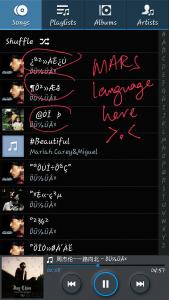
Oh my god, when I transferred my songs to phone..
Here's how it looks in my music player..
The Chinese words for some songs is not shown properly...
can any sifu help me on this matter? smile.gif


Attached thumbnail(s)
Attached Image
CTRANX
post Oct 27 2013, 11:24 AM

Getting Started
**
Junior Member
50 posts

Joined: Sep 2013


Thanks for the reply smile.gif , but I don't quite understand worr..
CTRANX
post Oct 27 2013, 11:30 AM

Getting Started
**
Junior Member
50 posts

Joined: Sep 2013


QUOTE(mervin8706 @ Oct 27 2013, 12:48 AM)
oh.. mine is in external memory card.. for phone itself i have not encounter such problem..  err for another question i guess u have to ask those sifu at here  biggrin.gif  but for me i just pull out the cable only
*
Thanks Mervin for your reply...
So sifu here, before cabut the USB cable from phone, is there a need to 'safely remove device' first?
If yes then how to do it, because I dont see this option available when I plug in my phone to computer.
CTRANX
post Oct 27 2013, 11:39 AM

Getting Started
**
Junior Member
50 posts

Joined: Sep 2013


QUOTE(Noobi3 @ Oct 27 2013, 11:35 AM)
Example . U transfer the songs from your computer . Let's say u forgot to enable NJstar when u transfer , u get all the Inca languages for your chinese songs . In your phone , u get the same thing even your phone can read it since it's not " decoded " . Only way now is 2 rename it manually

There is always an option to safely remove device in your desktop's notification panel . If it's not there , means u didnt enable it .
*
Thanks for your clarification biggrin.gif
Now i should find out how to enable the safely remove device for my phone... But this option always available when I use my thumbdrive and also HDD..
CTRANX
post Oct 27 2013, 03:20 PM

Getting Started
**
Junior Member
50 posts

Joined: Sep 2013


QUOTE(pokemon01234 @ Oct 27 2013, 01:31 PM)
I recommend you this apps thumbup.gif
I always use it to edit my song's name and artist rclxms.gif
https://play.google.com/store/apps/details?...i.infolife.itag
*
Thanks bro.. will try it out.. rclxms.gif
CTRANX
post Oct 27 2013, 03:32 PM

Getting Started
**
Junior Member
50 posts

Joined: Sep 2013


QUOTE(pokemon01234 @ Oct 27 2013, 01:31 PM)
I recommend you this apps thumbup.gif
I always use it to edit my song's name and artist rclxms.gif
https://play.google.com/store/apps/details?...i.infolife.itag
*
Thanks bro.. will try it out.. rclxms.gif

Out of topic: How to edit all songs cover pic once since they will use the same cover pic...

This post has been edited by CTRANX: Oct 27 2013, 03:36 PM

Topic ClosedOptions
 

Change to:
| Lo-Fi Version
0.0506sec    0.51    7 queries    GZIP Disabled
Time is now: 14th December 2025 - 05:10 PM