Welcome Guest ( Log In | Register )

Outline · [ Standard ] · Linear+

Unifi TMnet Streamyx/Unifi & IPv6, Now live!

views
     
klseet
post Feb 10 2014, 07:39 PM

Getting Started
**
Junior Member
130 posts

Joined: Mar 2008
Thanks guys for this IPv6 thread thumbup.gif

I managed to setup my RB750 on IPv6 based on Riz's post here:
https://forum.lowyat.net/index.php?showtopi...&#entry63945436
Thx bro icon_rolleyes.gif

Also tested on ASUS RT-N16 (on Merlin's build), RT-N66U-B1 & RT-AC66U-A1 (both on current latest stock FW3.0.0.4.374.2050)

For RT-AC56U, seem like got IPv6 bug on current FW3.0.0.4.374.39

May refer my test here: http://klseet.com/index.php/5-tm-unifi/uni.../258-unifi-ipv6

For OpenWRT still can't confirm, I'm getting inconsistent result, still figuring/testing it out ...

Does anyone here manage to get OpenWRT trunk works?

klseet
post Feb 11 2014, 02:38 AM

Getting Started
**
Junior Member
130 posts

Joined: Mar 2008
Christopher_LK smile.gif
So is your MikroTik works on v6 now?

QUOTE(alexwsk @ Feb 10 2014, 09:09 PM)
klseet Yes, I'm using stock Dlink DIR-615...
Basically I'm having the same setup like yours ...

QUOTE(rogue @ Feb 10 2014, 11:49 PM)
Hi..you have v6 on both WAN and LAN interface ?
This is where I'm having problem ...
WAN can get both v4 & v6 once connect, but the LAN seem need to wait around 5~20mins (similar to those ASUS routers). If lucky, may be the LAN interface can get v6 after 5~15mins of waiting, then no problem to test/visit on those v6 sites. But later, say 1/2 hour or few hours later wake up next day, my PC can't test/visit v6 sites rclxub.gif
It's like now you have it then you don't sweat.gif

I could be wrong, I do notice if I put all 3 interfaces (LAN/WAN/WAN6) MTU to same value (say 1480 or 1492), then high chance the LAN can get v6

I don't have such irregular/inconsistent issue on my RB750 & ASUS routers ... really not sure what went wrong ...
Might consider to test on AA12.09 later on

QUOTE(warlove3 @ Feb 10 2014, 09:19 PM)
same symptom as your AC56U, whereas N16 works normally
Both your AC68 & my AC56 use FW 3.0.0.374.xxx which has broken IPv6
Whereas the other 3 ASUS routers (N16,N66,AC66) is on FW 3.0.0.374.2xxx which has no problem.

I'll bring this up with ASUS, hopefully will release new fix soon nod.gif
klseet
post Feb 23 2014, 02:23 AM

Getting Started
**
Junior Member
130 posts

Joined: Mar 2008
Both my house (VIP10) & office (Biz10) are in the same area and seem to connect to the same exchange:
Attached Image
But I'm not getting any v6 on office Biz10...

Call TM tech support, they sent 2 guys but can't resolve, they forward the case to network team ....

The thing is, if I use my home a/c (@unifi) login at office then I can get v6
But if I use my office a/c (@unifibiz) login at home, there is no v6 ... rclxub.gif

So it seem to me the v6 feature is somehow "tag" with a/c, regardless of location
I try to explain this to TM, they check & re-check both the a/c, insist there are the same blink.gif

TM's tech explanation is that, it could be "the network path is different for the Biz a/c, also v6 has not fully deployed yet ...." so basically TM can't do anything now, I'll just have to wait ... sad.gif

Kinda of strange & usual to me, I thought it should deploy by area rather than by login a/c

Does anyone here experience the same ?

This post has been edited by klseet: Feb 23 2014, 02:26 AM
klseet
post Feb 23 2014, 10:22 AM

Getting Started
**
Junior Member
130 posts

Joined: Mar 2008
Hi Riz biggrin.gif

My house a/c has been using since day1, the office it's a new area which only started unifibiz service about a year ago
So may be TM is allocating & configuring v6 by a/c, starting from earlier a/cs

Anyway, not really a issue, will swap my a/c to use v6 if needed tongue.gif

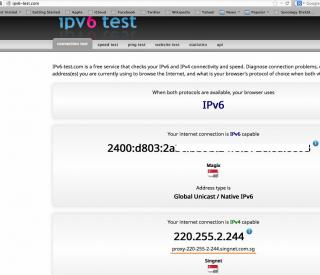
Btw, seem like our neighbour SingTel is deploying 6rd (or 6to4?):
http://info.singtel.com/business/products-...s/internet/ipv6
Some local users discussion:
http://forums.hardwarezone.com.sg/next-gen...-4381081-2.html

I follow the above link and configure my friend's RT-N56U (on Padavan's FW):
Attached Image
Attached Image
Attached Image

Through proxy sweat.gif


Change to:
| Lo-Fi Version
0.0367sec    0.89    7 queries    GZIP Disabled
Time is now: 11th December 2025 - 04:34 PM