Welcome Guest ( Log In | Register )

Outline · [ Standard ] · Linear+

Unifi TMnet Streamyx/Unifi & IPv6, Now live!

views
     
andrew9292
post Nov 5 2013, 06:43 PM

-/Livin' On A Prayer/-
*****
Senior Member
955 posts

Joined: Sep 2008
From: Petaling Jaya


How would the configuration be in OpenWRT? There are so many options & methods, have tried it for a day and still no go. Even broke the DHCP and probably some other stuff, now i'm back with TM's router.

I'm using TM's DIR615 as a VLAN Bridge, stripped the v.500 there.
With a DIR615-C2 on OpenWRT to simply dail PPPoE via the bridge.
That's for IPv4.

So what direction should i be heading? What packages to download and what to input? I'm not a network guy i just follow online instructions really well tongue.gif

If i get it correctly, what i need to do is configure it for Dual-Stack as we're running ipv6 concurrently with v4.
And TM uses SLAAC with DHCPv6 to assign addresses.
The address needs to be routed to clients via something like radvd, something like a DHCP for ipv6?
Anything else needed? 6to4 / 6rd?

At one point i managed to get TM's ipv6 assigned address.
But there was no network connectivity, some routing somewhere didnt work out...
I'm veri confused rclxub.gif
Any detailed guides or ideas? notworthy.gif

This post has been edited by andrew9292: Nov 5 2013, 06:46 PM
andrew9292
post Nov 6 2013, 02:03 PM

-/Livin' On A Prayer/-
*****
Senior Member
955 posts

Joined: Sep 2008
From: Petaling Jaya


QUOTE(ssslayerrr @ Nov 5 2013, 09:25 PM)
I have access to 3 locations with unifi and all 3 have different 'situations'.

No. 1. The first location gets an wan, lan ipv6 address and lan prefix, ipv6 works with tm's dir 615, but now I'm using the asus RT N16 over there. no problems.

No. 2. The second location is able to get a wan ipv6 address, but no lan ipv6 address and no lan prefix, so, while the router itself has ipv6 internet connectivity (can ping ipv6.google.com etc), the lan clients don't.

No. 3. The third location, doesnt even get a wan ipv6 address.

So, it could be very frustrating trying to configure it when it might not be 'fully' available. I suggest you try tm's dir 615 router first and confirm that you are getting complete ipv6 functionality, if you are, then go ahead and try openwrt.

What you describe in your last paragraph sounds like the my situation no. 2, ie, your area is not getting ipv6 prefixes from tmnet yet.
*
Followed your suggestion and enabled ipv6 at TM's 615. It worked!
But I dont want to use their router and i found out it works well on OpenWRT thanks to Asellus!

QUOTE(asellus @ Nov 5 2013, 11:09 PM)
Assuming that you use Barrier Breaker, all you need to do is to run a DHCPv6-PD client on '@wan' interface, assuming of course the PPPoE interface runs on 'wan' interface. No need to get a second /64 prefix, because OpenWRT can actually use the /64 supplied to the 'wan' interface for all supporting devices in your network.

Kinda work the opposite way of routerOS.
*
Nope, I was on Attitude Adjustment before this and you triggered my curiosity on Barrier Breaker.
The problem with Barrier Breaker is that the current version takes up too much space on my DIR615-C2 4MB flash, unable to install the graphic user interface at all... hopefull this changes when the release candidate / final is out.

After doing the basic configs via SSH and just adding [option ipv6 '1'] into /etc/config/network
It works completely without problem! Much simpler than Attitude adjustment notworthy.gif

----

I found that if I dont input Google/ OpenDNS's IPv6 address, test-ipv6.com shows that ISP DNS cannot resolve IPv6.
Turning off IPv4 in Network Preferences without inputing IPv6 DNS results in lost in connectivity
andrew9292
post Nov 6 2013, 11:38 PM

-/Livin' On A Prayer/-
*****
Senior Member
955 posts

Joined: Sep 2008
From: Petaling Jaya


I cant seem to get IPv6 dns advertisments / address resolving properly from OpenWrt BB.

1. If enabling ONLY IPv6 in windows and flush the dns cache, I wont be able to resolve to ipv6 'text' addresses.
Eg... ping ipv6.google.com will fail. But ping 2404:6800:4001:800::1014 will pass.

2. If set custom IPv6 DNS into windows settings with ONLY IPv6 enabled, can resolve ipv6.google.com and it's native address format.

3. If turn on IPv6+IPv4, without inputing a custom ipv6 dns... able to resolve all addresses. So weird...

/etc/config/network
» Click to show Spoiler - click again to hide... «

/etc/config/6relayd
» Click to show Spoiler - click again to hide... «


Yet, resolv.conf.auto will show this, which means it was supposed to resolve! or not?
» Click to show Spoiler - click again to hide... «


For all i know that's all thats needed for ipv6 dns advertisment / resolving.
Do you guys face the same?
Any tips if any? Or is this just the nature of IPv6 at the moment? rclxub.gif

This post has been edited by andrew9292: Nov 7 2013, 12:08 AM
andrew9292
post Nov 7 2013, 12:06 AM

-/Livin' On A Prayer/-
*****
Senior Member
955 posts

Joined: Sep 2008
From: Petaling Jaya


QUOTE(asellus @ Nov 7 2013, 12:01 AM)
This is Windows' problem, not OpenWRT. Do not ever disable TCP/IP IPv4 stack in Windows, because Windows will ignore IPv6 DNS addresses sent by the router. Windows will always use the DNS server(s) provided by the DHCPv4 (not the RA) to get the AAAA records for IPv6-enabled domains. If you disable the IPv4 stack, you will not have any domain-resolving ability at all.

You have to use DHCPv6 server or use manual configuration in Windows (not feasible because TM gives out dynamic prefixes) if you really want to live with IPv6-only stack in Windows.
*
I see, that was my suspect too.
Dont intend to disable ipv4 but just wanted to test 'fully ipv6 only' and found this weird scenario...
I tried in OSX 10.6.8 too and it appeared simillar...
Thanks for the explaination! notworthy.gif
andrew9292
post Nov 8 2013, 08:32 PM

-/Livin' On A Prayer/-
*****
Senior Member
955 posts

Joined: Sep 2008
From: Petaling Jaya


QUOTE(XeactorZ @ Nov 8 2013, 05:05 PM)
just got a called from tm staff
temporary solution for frequent disconnection my computer
my case is firmware version 1.06 TM, router is L7
solution is login router > go wireless setting > manual > untick enable auto channel scan > change wireless channel to ..... CH 13 for windows 7, CH 6 for windows xp, vista forget
*
As far as i know, there is no such thing as 'best channel for this OS'
There are some routers which cannot run well on certain channels due to software or hardware designs. Example, my DIR-615-C2 has slightly weaker transmit power on channel 1 for some reason.

But this is whats real, taken from my previous postings:
Assuming the real cause of your problem is interference and poor config.
Part 1
» Click to show Spoiler - click again to hide... «


Part2
» Click to show Spoiler - click again to hide... «


This post has been edited by andrew9292: Nov 8 2013, 08:57 PM
andrew9292
post Nov 24 2013, 09:17 PM

-/Livin' On A Prayer/-
*****
Senior Member
955 posts

Joined: Sep 2008
From: Petaling Jaya


QUOTE(Anonymous34 @ Nov 24 2013, 04:38 PM)
I thought they said ipv4 is very congested so that's why they invented iPv6 for more space. Btw bro I have just tukar my dir 615 to Asus RT-N10+ C1 with openwrt. Everything works except iptv. Any idea how to set up ipv6?
I'm really noob in networking things.
*
They just ran out of addresses. Just like number plates.

WYZ 1234 = v4
W 1234 A = v6

Route still the same or assigned by isp peering.
It means that even if u hav ipv6 'number plate'. If your isp assigns a 'kampung road' to your address, it wont be any faster. If u get a fast route, faster. Simillar route, same speed.

Old number plate or new number plate, both on the same existing roads.
Ipv4 or ipv6. Same theory.
At the end of the day, just a number plate to identify yourself.lol.

If there's any speed difference, it will be due to specific peering to that ip subnet by isp, which happens to be a faster or slower route.

Correct me if im wrong.
----

For ipv6 on Openwrt i only got it to work on latest beta 'barrier breaker'. It has native ipv6 support
Settings have to be done via ssh as the build is too big to install luci. Follow their wiki, pretty straightforward.
http://wiki.openwrt.org/doc/uci/network6#b...eaker.and.later

This post has been edited by andrew9292: Nov 24 2013, 09:28 PM
andrew9292
post Apr 26 2015, 04:22 PM

-/Livin' On A Prayer/-
*****
Senior Member
955 posts

Joined: Sep 2008
From: Petaling Jaya


user posted image

user posted image

user posted image


Thanks for the good & really useful info in this thread. Got it working stable on a 1043NDv2, Openwrt BB14.07 notworthy.gif

This post has been edited by andrew9292: Apr 26 2015, 04:22 PM
andrew9292
post Nov 29 2015, 12:37 PM

-/Livin' On A Prayer/-
*****
Senior Member
955 posts

Joined: Sep 2008
From: Petaling Jaya


QUOTE(zkteh @ Nov 28 2015, 11:04 AM)
Need assistance on setting new "port 6" thing
» Click to show Spoiler - click again to hide... «

*
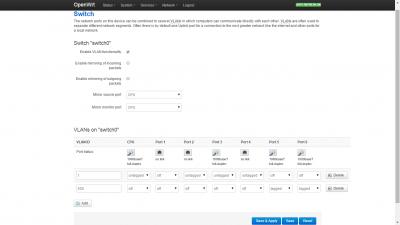
For internet only:
Attached Image


For internet + IPTV, add one more Vlan 600 line:
CODE
VLAN ID----CPU------------------------------------Port6
600--------Off. Untagged. Off. Off. Off. Tagged. Tagged


This post has been edited by andrew9292: Nov 29 2015, 12:47 PM
andrew9292
post Nov 29 2015, 12:45 PM

-/Livin' On A Prayer/-
*****
Senior Member
955 posts

Joined: Sep 2008
From: Petaling Jaya


QUOTE(zkteh @ Nov 27 2015, 07:20 PM)
I am concerned about the default qos engine/settings. Is the ping good when the traffic has p2p/downloading/upload things. Cause the stock firmware doesn't work well with default settings.
*
You need to either install the latest SQM QoS or the standard QoS-app-luci.
SQM gives stable & good latency. But aggressive protocols like torrent can still take up bandwidth.
Traditional QOS not so good on latency. But it can really hammer aggressive protocols down and give maximum bandwidth to others.

SQM - "guarantee" latency. Better gaming?
QOS - "guarantee" bandwidth. Better youtube/streaming?

Can only install and use one at a time. Switch between both to find what you need best. No shortcuts.


Change to:
| Lo-Fi Version
0.0248sec    1.05    7 queries    GZIP Disabled
Time is now: 1st December 2025 - 03:41 PM