QUOTE(asellus @ Oct 2 2013, 06:40 PM)
Man, so lacking in details as usual. Many of their supplied Steamyx modem doesn't even support IPv6.

I understand that's supposed to be an internal announcement. We should be hearing more Soon ™.Unifi TMnet Streamyx/Unifi & IPv6, Now live!
|
|
 Oct 2 2013, 06:45 PM Oct 2 2013, 06:45 PM
|
 
VIP
6,008 posts Joined: Jan 2003 
|
QUOTE(asellus @ Oct 2 2013, 06:40 PM) Man, so lacking in details as usual. Many of their supplied Steamyx modem doesn't even support IPv6. I understand that's supposed to be an internal announcement. We should be hearing more Soon ™. |
|
|
|
|
|
Oct 2 2013, 08:17 PM
|
 
Senior Member
1,725 posts Joined: Jan 2003
|
QUOTE(asellus @ Oct 2 2013, 06:40 PM) Man, so lacking in details as usual. Many of their supplied Steamyx modem doesn't even support IPv6. it is very normal, and this is happen worldwide, wait for their ipv6 router announcement or somebody DIY their own with a ipv6 supported router. |
|
|
Oct 2 2013, 11:33 PM
Show posts by this member only | IPv6 | Post
#43
|
 
Elite
4,603 posts Joined: Jan 2003 From: PJ 
|
WDR4300 IPv6 firmware needs some work. it's half baked.
|
|
|
Oct 2 2013, 11:45 PM
Show posts by this member only | IPv6 | Post
#44
|

Elite
4,541 posts Joined: Jan 2003 From: BSRPPG51 Access Concentrator
|
DHCPv6-PD is supported. wKkaY please fix info in first page.
» Click to show Spoiler - click again to hide... « |
|
|
Oct 3 2013, 12:10 AM
Show posts by this member only | IPv6 | Post
#45
|

Junior Member
30 posts Joined: Oct 2009
|
Yay....it's confirmed.
 My area also covered. Errr, anyone know what is the settings in Cisco IOS?  |
|
|
Oct 3 2013, 12:16 AM
|

Senior Member
1,865 posts Joined: Jan 2003 From: XBOX Live
|
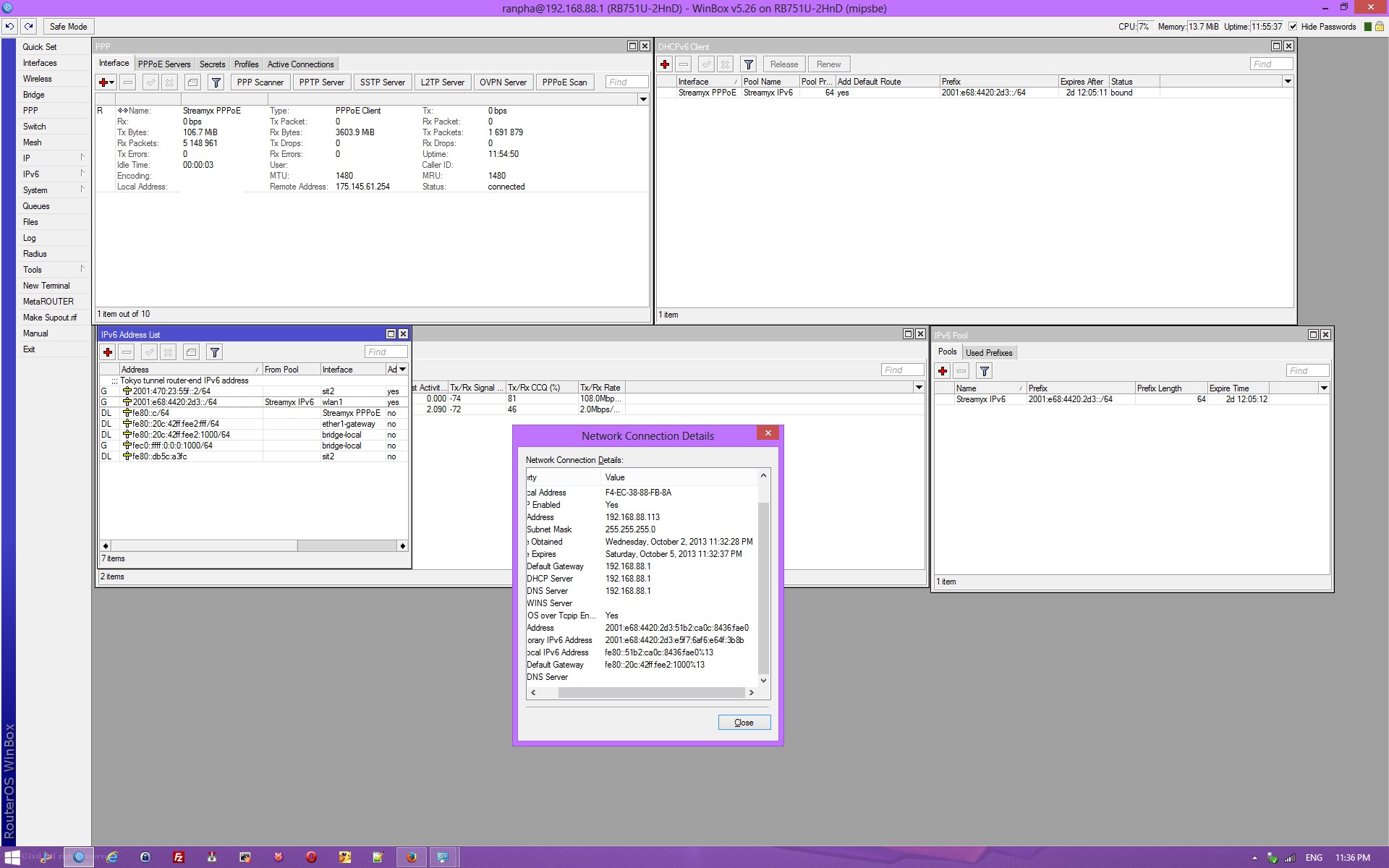
so basically enabling DHCPv6 client on the WAN interface would do ?
 This post has been edited by calvin: Oct 3 2013, 12:18 AM |
|
|
|
|
|
Oct 3 2013, 12:22 AM
|
|
VIP
6,008 posts Joined: Jan 2003
|
QUOTE(asellus @ Oct 2 2013, 11:45 PM) DHCPv6-PD is supported. wKkaY please fix info in first page. Cool!I guess there are implementation differences between Unifi and Streamyx as it stands now. When I try to request for PD, TMnet's DHCP server returns a UnspecFail status code. Looks like you can remove your Hurricane IPv6 tunnel now |
|
|
Oct 3 2013, 12:22 AM
|
|
Elite
4,541 posts Joined: Jan 2003 From: BSRPPG51 Access Concentrator
|
» Click to show Spoiler - click again to hide... « Speed is good too. No problem there. Nice This post has been edited by asellus: Oct 3 2013, 12:23 AM |
|
|
Oct 3 2013, 12:26 AM
|
|
VIP
6,008 posts Joined: Jan 2003
|
asellus can you check whether DHCP assigns you a static or dynamic prefix? Try reconnecting PPPoE and see if you get the same prefix.
|
|
|
Oct 3 2013, 12:31 AM
|
|
Elite
4,541 posts Joined: Jan 2003 From: BSRPPG51 Access Concentrator
|
QUOTE(calvin @ Oct 3 2013, 12:16 AM) so basically enabling DHCPv6 client on the WAN interface would do ? If you run routerOS, just run a DHCPv6-PD client on your Streamyx PPP interface, and it should pull down a random /64 from the access concentrator. Bind + advertise the automatically-created address pool on the bridge interface, and the computer will automatically get two IPv6 addresses in a default Windows install.QUOTE(wKkaY @ Oct 3 2013, 12:26 AM) asellus can you check whether DHCP assigns you a static or dynamic prefix? Try reconnecting PPPoE and see if you get the same prefix. Dynamic prefix. It will change everytime I recycle the PPPoE connection.This post has been edited by asellus: Oct 3 2013, 07:39 AM |
|
|
Oct 3 2013, 12:36 AM
|
|
VIP
6,008 posts Joined: Jan 2003
|
QUOTE(asellus @ Oct 3 2013, 12:31 AM) If you run routerOS, just run a DHCPv6-PD client on your Streamyx PPP interface, and it should pull down a random /64 from the access concentrator. Add the /64 to an address pool, then bind + advertise the address pool on the bridge interface, and the computer will automatically get two IPv6 addresses in a default Windows install. Can you check if you can request for something larger than a /64, for exapmle a /63 ? |
|
|
Oct 3 2013, 12:41 AM
|
|
Elite
4,541 posts Joined: Jan 2003 From: BSRPPG51 Access Concentrator
|
QUOTE(wKkaY @ Oct 3 2013, 12:36 AM) Can you check if you can request for something larger than a /64, for exapmle a /63 ? Already tried requesting a /56, it doesn't seem to be working. routerOS will get a /64, but will only made a random /72 from the supplied /64 available to the IPv6 address pool. |
|
|
Oct 3 2013, 01:26 AM
|

Senior Member
1,473 posts Joined: Oct 2006 From: Jupiter
|
I don't know much about this..
so what do I need to do to get ipv6 enabled? currently still not all areas have ipv6 enable right? im using asus dsl n12u b1 streamyx 4Mbps This post has been edited by squall0833: Oct 3 2013, 01:31 AM |
|
|
|
|
|
Oct 3 2013, 03:17 AM
|

All Stars
31,608 posts Joined: Aug 2010
|
how to set it ??
using Unifi for home set at here ?? if yes I follow 1st page and key in, show no internet access @@ Attached thumbnail(s) 
|
|
|
Oct 3 2013, 08:25 AM
|
|
Junior Member
30 posts Joined: Oct 2009
|
Hi,
You can refer this PDF doc from TM: Guideline to Enable IPv6 This post has been edited by tezro: Oct 3 2013, 08:27 AM |
|
|
Oct 3 2013, 10:17 AM
Show posts by this member only | IPv6 | Post
#56
|

Junior Member
46 posts Joined: May 2008 From: Ipoh, Perak 
|
Hi guys,
just enabled my ipv6 on streamyx using dlink dsl-2730u 
|
|
|
Oct 3 2013, 01:53 PM
|
|
VIP
6,008 posts Joined: Jan 2003
|
QUOTE(tezro @ Oct 3 2013, 08:25 AM) Thanks, I have updated the first post with this info. |
|
|
Oct 3 2013, 02:44 PM
|
|
Junior Member
30 posts Joined: Oct 2009
|
QUOTE(wKkaY @ Oct 3 2013, 01:53 PM) Thanks, I have updated the first post with this info. You're welcome, Mr wKkaY. |
|
|
Oct 3 2013, 05:50 PM
|
|
All Stars
31,608 posts Joined: Aug 2010
|
QUOTE(tezro @ Oct 3 2013, 08:25 AM) thanksI think my model is Model L7 since I have the design however I can't tick dual LAN, any idea ? refer the photo Attached thumbnail(s) 
|
|
|
Oct 3 2013, 06:35 PM
Show posts by this member only | IPv6 | Post
#60
|
|
Junior Member
30 posts Joined: Oct 2009
|
QUOTE(XeactorZ @ Oct 3 2013, 05:50 PM) thanks XeactorZ, maybe you can try tick the "Enable IPv6" setting, save the setting and reboot the router.I think my model is Model L7 since I have the design however I can't tick dual LAN, any idea ? refer the photo Then, check back the setting page to see if you can tick the "Dual LAN".  |
| Change to: |  0.0366sec 0.0366sec
 0.29 0.29
 6 queries 6 queries
 GZIP Disabled GZIP Disabled
Time is now: 7th December 2025 - 03:25 AM |
 Quote
Quote