Welcome Guest ( Log In | Register )

Bump Topic Topic Closed RSS Feed

Outline · [ Standard ] · Linear+

 The Official Nikon Discussion Thread Ver.22, NEW RUMORE Nikon DF!

views
     
gerald7
post Nov 9 2013, 07:17 AM

r a n d o m l y
*******
Senior Member
2,452 posts

Joined: Nov 2007
From: Kuching, Sarawakland


QUOTE(LegendLee @ Nov 9 2013, 12:51 AM)
That's a pretty interesting setup lol.
What's more is that's actually a pretty cheap (and outdated) objective lens... and he's able get pretty nice pictures.
*
yea. cos he is not made of money, so he use what he has and find ways to do it on the cheap... some of his work also been published in scientific magazines.

QUOTE(QiAnG @ Nov 9 2013, 12:56 AM)
NOOOOO, this is too horrifying, will have nightmare looking at it for too long

Although I LOOOVEEE macro, some bugs still scare the hell out of me, shot a normal housefly at 1:1 before and looking at the way its mouth moves scares me few times  cry.gif
*
lol I love to view macro but no patience to do it. love to see my sifu's work. amazed everytime


QUOTE(AuraSapphire @ Nov 9 2013, 01:45 AM)
Im actually quite horrified too. Somethings I dont think its wise to get that up close
Nice shot but its kinda scary for me XD.. He setup is also damn pro la XD. hahahaha.. There are so many levels of macrography eh?
*
heh~ nikon got annual competition for micrography le.... http://www.nikonsmallworld.com/galleries/p...phy-competition
gerald7
post Nov 14 2013, 02:52 PM

r a n d o m l y
*******
Senior Member
2,452 posts

Joined: Nov 2007
From: Kuching, Sarawakland


QUOTE(Everdying @ Nov 14 2013, 12:13 PM)
fake accident?
*
trying to con ppl ... with fake accident ma.. search youtube.. many samples~
gerald7
post Nov 17 2013, 05:58 PM

r a n d o m l y
*******
Senior Member
2,452 posts

Joined: Nov 2007
From: Kuching, Sarawakland


user posted image
doubleexpose by Cybreed, on Flickr

Double trippy expose
gerald7
post Nov 19 2013, 11:35 PM

r a n d o m l y
*******
Senior Member
2,452 posts

Joined: Nov 2007
From: Kuching, Sarawakland


QUOTE(hkenh @ Nov 19 2013, 09:11 PM)
I think those screw in ND1000 are probably better quality
*
I have the B+W ND1000 circular... for other ND filter its fine to use circular.. not ND1000 because its nearly pitch black. Cant focus, you need to prefocus and precompose before screw in the ND filter. Even at noon. Not really suited for zoom lens.
gerald7
post Nov 24 2013, 10:02 PM

r a n d o m l y
*******
Senior Member
2,452 posts

Joined: Nov 2007
From: Kuching, Sarawakland


QUOTE(celciuz @ Nov 24 2013, 09:12 PM)
Probably the car with biggest price tag on the show,

user posted image
Lexus LFA by CY Pixels, on Flickr
*
YUMMMMMYYYYYYYY car!
gerald7
post Nov 25 2013, 01:26 PM

r a n d o m l y
*******
Senior Member
2,452 posts

Joined: Nov 2007
From: Kuching, Sarawakland


Im so jelly... everyone got KLIMS photos.. I only got family photos this whole month .. sad
gerald7
post Nov 25 2013, 06:34 PM

r a n d o m l y
*******
Senior Member
2,452 posts

Joined: Nov 2007
From: Kuching, Sarawakland


user posted image
131015-James-0083 by Cybreed, on Flickr
guys. I did NOT sharpen this pic at all.. but when resize w/ PS and upload to flickr , it looks like over sharpen. Anyone got good setting for resize for web ?
gerald7
post Nov 25 2013, 07:27 PM

r a n d o m l y
*******
Senior Member
2,452 posts

Joined: Nov 2007
From: Kuching, Sarawakland


QUOTE(celciuz @ Nov 25 2013, 07:25 PM)
Flickr sharpens the images which were resized for display on monitor smile.gif
*
but it looks way over on my computer as well.. rclxub.gif
gerald7
post Nov 27 2013, 12:47 PM

r a n d o m l y
*******
Senior Member
2,452 posts

Joined: Nov 2007
From: Kuching, Sarawakland


QUOTE(PF T.J. @ Nov 25 2013, 09:58 PM)
I can't really tell also haha laugh.gif
Great photo, good composition, interesting and cute subject  notworthy.gif  notworthy.gif
*
wink.gif

QUOTE(@meno @ Nov 25 2013, 11:30 PM)
Looks fine to me on my monitor, just nice.
What monitor are you viewing the photo from?
I'll try check this out at work tomorrow with my office monitors and see if it feels different.
*
Im using DELL el cheepo monitor...

QUOTE(alpha001 @ Nov 25 2013, 11:48 PM)
i can see the artifact sweat.gif
Maybe the build in camera preset is too hard + flickr sharpening
IMHO soften the image in camera or post
resolution doesnt matter i guess
long time i dont open lightroom doh.gif
great compo btw thumbup.gif
*
I shooting raw, and didnt apply any sharpening in my processes at all...

QUOTE(mingyuyu @ Nov 26 2013, 12:15 AM)
flickr will sharpen every of your pictures in small size preview as what celciuz said.

can't do anything with it, just remember not to sharpen you picture too much if you going to show them through flickr's preview.

if full resolution, no sharpening will be applied.
*
thing is on my computer already feel over sharp... then to flikr even more absurd .. I wonder if its the resize algorithm on CS6 .. . last time on CS5 didnt 'feel' the sharpness while resize
gerald7
post Nov 27 2013, 01:10 PM

r a n d o m l y
*******
Senior Member
2,452 posts

Joined: Nov 2007
From: Kuching, Sarawakland


QUOTE(mingyuyu @ Nov 27 2013, 01:03 PM)
When you resize in PS, did you straight resize it from high resolution (lets say 20mp?) to low resolution (lets say 3mp)? if you do so, it might introduce artifacts to the image. But if you resize "gently", for example from 20mp to 10mp, then to 5mp, then the image wont really get any artifacts.
*
maybe thats why. went from 6016px to 1200px.. HmmMm Hmmm...
gerald7
post Nov 27 2013, 02:40 PM

r a n d o m l y
*******
Senior Member
2,452 posts

Joined: Nov 2007
From: Kuching, Sarawakland


QUOTE(mingyuyu @ Nov 27 2013, 01:52 PM)
yeap, that's the reason.

i don't really prefer to resize my images in PS as this problem will occur. perhaps you should export using LR in a smaller size to prevent the artifacts?

*
I use LR mainly as a catalog for selecting and basic tuning. Then drop into PS for cleanup. then resize for web.


QUOTE(Agito666 @ Nov 27 2013, 02:36 PM)
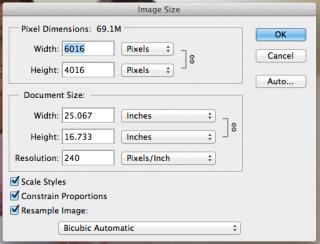
[attachmentid=3742560]

what was the setting in your PS, do you got bother this setting for image resizing?
*
i usually set to AUTO >_<
gerald7
post Nov 27 2013, 02:51 PM

r a n d o m l y
*******
Senior Member
2,452 posts

Joined: Nov 2007
From: Kuching, Sarawakland


QUOTE(Agito666 @ Nov 27 2013, 02:44 PM)
that is no auto la lol, you use CTRL + R when resizing image normally top bar will show which engine to resize one, or if you use image > resize... there got ask you for that, i think maybe you silap change to other option or what...
*
I dont know how you resize but for me its COMMAND+ALT+I and I leave the RESAMPLE IMAGE on AUTOMATIC

Attached Image

smile.gif
gerald7
post Nov 28 2013, 11:43 AM

r a n d o m l y
*******
Senior Member
2,452 posts

Joined: Nov 2007
From: Kuching, Sarawakland


http://nikonrumors.com/2013/11/27/nikon-st...this-year.aspx/ cant say im surprised, *sigh*
gerald7
post Nov 28 2013, 11:59 AM

r a n d o m l y
*******
Senior Member
2,452 posts

Joined: Nov 2007
From: Kuching, Sarawakland


QUOTE(PF T.J. @ Nov 28 2013, 11:51 AM)
Dayum >_<

All thanks to Nikon 1 systems, Nikon is losing a lot of potential customers to other brands, especially Sony  shakehead.gif
*
i would say the result is no D400. and really dodgy d610 (hiding the fact that there was epic problem with d600).. and stronger rivals, SONY got awesome mirrorless, Canon their stuff really good these days, Fujifilm erm.. cant say much about that.. but the biggest problem is d600.. thats what I think

3 Pages < 1 2 3Top
Topic ClosedOptions
 

Change to:
| Lo-Fi Version
0.0638sec    0.41    7 queries    GZIP Disabled
Time is now: 11th December 2025 - 11:53 AM