

Great.. mine also doesn't work... Anyone here can add a reply using direct input?
I can't.nothing pop up after i hover my pen onto the empty space..
Samsung Galaxy Note 3 - Official v6, 3rd gen of the best phablet ever!!
Samsung Galaxy Note 3 - Official v6, 3rd gen of the best phablet ever!!
|
|
 Sep 30 2013, 01:46 PM Sep 30 2013, 01:46 PM
Return to original view | Post
#1
|
 
Senior Member
613 posts Joined: Nov 2009 
|
Great.. mine also doesn't work... Anyone here can add a reply using direct input?
I can't.nothing pop up after i hover my pen onto the empty space.. |
|
|
|
|
|
Sep 30 2013, 02:07 PM
Return to original view | Post
#2
|
|
Senior Member
613 posts Joined: Nov 2009
|
QUOTE(destEX @ Sep 30 2013, 01:48 PM) direct input it working properly is the samsung keyboard that is not working now  QUOTE(Andrewtst @ Sep 30 2013, 01:49 PM) Just try, direct input do work, hold a few second then it work. Owh.. mine direct input doesn't when I reply here... else where like WhatsApp and other apps it works... Why is it like this? |
|
|
Sep 30 2013, 07:06 PM
Return to original view | Post
#3
|
|
Senior Member
613 posts Joined: Nov 2009
|
That keyboard bug isn't a big deal for me. I find that direct input is better...
What is the reading mode for? Anyone actually bought s view cover from superbuy and received it already? I wanted a purple cover but worry about the delivery period... |
|
|
Oct 1 2013, 12:01 PM
Return to original view | Post
#4
|
|
Senior Member
613 posts Joined: Nov 2009
|
I charge my phone til 100% before I sleep. Drain 10% over night.. Wonder what causing the drain..
Attached thumbnail(s) 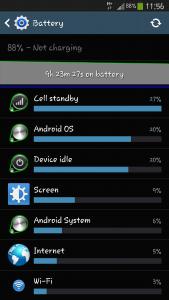

|
|
|
Oct 1 2013, 01:08 PM
Return to original view | Post
#5
|
|
Senior Member
613 posts Joined: Nov 2009
|
QUOTE(destEX @ Oct 1 2013, 12:33 PM) u know the usual procedure, BBS screenshots, what you show here is pretty useless for us to know what's wrong my wifi was off.. dunno y.. Just downloaded bbs.. Will observe it tonight.. post tmr if the draining still occur... Does the cell radio related to gps? My gps was on all the time..btw there's one blue line across the graph, you left wifi on whole night ah? 9.5hrs of wifi will drain of coz |
|
|
Oct 1 2013, 01:34 PM
Return to original view | Post
#6
|
|
Senior Member
613 posts Joined: Nov 2009
|
QUOTE(perror @ Oct 1 2013, 01:25 PM) You could potentially use the detailed battery stats to determine what's really using up your battery. Another possibility are background processes that are running and waking up your phone from time to time. I've turned off most of the Samsung stuff, backup sync, Google stuff etc and my awake time is drastically reduced, most of the time "awake" only registers when the screen is on. On average, my battery drops from 100% to 96% from 12:00am till 9:00am. Oh gosh.. y the heck my mobile network signal was grey all the time... damn maxis..You can go to your applications manager to turn off stuff you don't need, but be careful as to what you switch off as it may affect some functions that you use. I turned off a number of Google services as there was a particular Google process causing my phone to wake up from time to time. Turned it off and it rarely wakes up now. Good luck and hope this helps. Attached thumbnail(s) 
|
|
|
|
|
|
Oct 1 2013, 01:36 PM
Return to original view | Post
#7
|
|
Senior Member
613 posts Joined: Nov 2009
|
QUOTE(mi-g @ Oct 1 2013, 01:29 PM) Setup Dropbox on my wife's Note 3 last night.. successfully get 50GB space lol How you setup? Need to use pc setup right?  |
|
|
Oct 2 2013, 12:39 PM
Return to original view | Post
#8
|
|
Senior Member
613 posts Joined: Nov 2009
|
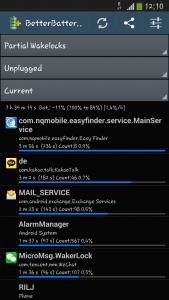
Same result.. drain 10% overnight.. dunno what causing it...
Attached thumbnail(s) 



|
|
|
Oct 2 2013, 01:14 PM
Return to original view | Post
#9
|
|
Senior Member
613 posts Joined: Nov 2009
|
QUOTE(destEX @ Oct 2 2013, 12:58 PM) okay your wakelock is kernel based wakelock That probably because my data was on 24/7... haiz...the highest one http://forum.xda-developers.com/showthread.php?t=1811365 i googled your second highest but can't find the cause others are unavoidable |
|
|
Oct 3 2013, 12:08 PM
Return to original view | Post
#10
|
|
Senior Member
613 posts Joined: Nov 2009
|
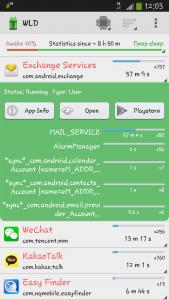
Monitor my wakelocks for last night... It had been better since I installed Green Power... There is one wakelocks with outstanding awake time... Anyone know what that thing do?
Attached thumbnail(s) 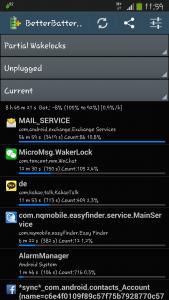
|
|
|
Oct 3 2013, 08:21 PM
Return to original view | Post
#11
|
|
Senior Member
613 posts Joined: Nov 2009
|
Y the appgratis promo code doesn't work on mine? it saidoutdated/invalid code
|
|
|
Oct 4 2013, 08:11 PM
Return to original view | Post
#12
|
|
Senior Member
613 posts Joined: Nov 2009
|
Argh.. The exchange service wakelock draining my battery... Anyone know how to solve it? I checked online, none of them stop the draining... 😭
|
|
|
Oct 4 2013, 09:48 PM
Return to original view | Post
#13
|
|
Senior Member
613 posts Joined: Nov 2009
|
QUOTE(waveweaver @ Oct 4 2013, 08:15 PM) Post lar your BBS screenshots here so others can take a look at it. DestEX or antt00 knows how to translate it for you QUOTE(destEX @ Oct 4 2013, 08:25 PM) he post before days ago, i told him is email Will observe one more night.. If still happen then just clear data.. Thank you My exchange service partial wakelock is 5 mins 36 secs out of 20hr 10 mins you go WLD, tap the exchange services, press app info, then clear data, then you go find email app, email, app info also clear data. Then you set up the email account again. just put in email address and password then settle. if you don't wanna use the email then just disable it lo what email you're using to set it up? i use live/hotmail no problem |
|
Topic ClosedOptions
|
| Change to: |  0.0394sec 0.0394sec
 0.98 0.98
 7 queries 7 queries
 GZIP Disabled GZIP Disabled
Time is now: 3rd December 2025 - 12:48 PM |
 Quote
Quote