Welcome Guest ( Log In | Register )

Bump Topic Topic Closed RSS Feed

Outline · [ Standard ] · Linear+

 Sony XPERIA™ Z1, Official Thread V2, 5"FHD, 20.7MP-GLens (lossless D. Zoom)

views
     
stringfellow
post Sep 29 2013, 06:26 AM

Ultrawide | 4K | VR
********
Senior Member
11,305 posts

Joined: Jan 2003
QUOTE(jloi @ Sep 29 2013, 01:42 AM)
Shashinkin selling QX10 for 1.1k+ D: so expensive

http://shashinki.com/shop/sony-qx10-digita...ck-p-16484.html

and QX100 for 2.1k+

http://shashinki.com/shop/sony-qx100-digit...es-p-16490.html

Damn overprice! Might as well grab Sony NEX-5T
*
So much for folks telling I overpaid for my QX100. tongue.gif
stringfellow
post Sep 29 2013, 06:55 AM

Ultrawide | 4K | VR
********
Senior Member
11,305 posts

Joined: Jan 2003
QUOTE(giovanni @ Sep 28 2013, 09:13 AM)
Went through a few reviews to learn that the screen itself is quite scratch prone. Any early adopter cares to comment on this? I am contemplating of switching from S4 to this sexy beast. I am a little anal on the durability. Cheers mate
*
I'm going naked on mine. Going into a leather pouch lined with soft microfiber lining. Nothing beats naked. I used to swear by SPs, I prefer naked now.

Did a quick and dirty 3DMark benchmark on mine, 16165 points. Better than my Nvidia Shield. And both can play games properly with the Shield has it its controller while the Z1 connects properly with PS3 controller.

Tested and got used to using the Z1 and QX100. The default settings when both are connected for the first time is to have the pictures shared between both the Z1 and QX100, resulting in picture files being taken transferred to both into the memory card inside the QX100 and wirelessly via WiFi to the memory card inside Z1. The end result? The phone has to wait for the photos to be transferred resulting in 1-2s of wait. This may not be ideal to rapid fire shooters and spur-of-the-moment shooting sessions. To remedy this, change the settings to only save the original 18MPx file into the memory card inside the QX100, and choose don't transfer to the Z1. That way, pic snaps are instantaneous, mirroring a regular point-and-shoot. If you choose to, you can transfer wirelessly the pictures residing in the memory card inside the QX100 to the Z1 via the PlayMemories Mobile app.


Image quality-wise from the bare naked eyes, is virtually the same as my Sony RX100 Mark 2.

Three ways to zoom the QX100. One, using the touchscreen slider on Z1 when connected. Two, using the physical slider on the side of the QX100. Three, using the circular control ring around the lens. Touchscreen and slider is kinda juddery, but using the control ring it is smoother.

Took me a while to figure it out the PlayMemories Mobile app. There are no manuals for this app. To change shooting mode, tap on the mode symbol. It is defaulted to Superior Auto. This mode does not allow any manual settings, which at first made me confused on where to access aperture, exposure, white balance settings, etc. switch to Program Auto or Manual, and those settings are now available.

The possibilities are endless with the QX100. I see uses like recording videos or taking pictures remotely as finally being possible. Spy shots as well. Just don't use this to shoot upskirts shots. tongue.gif

This post has been edited by stringfellow: Sep 29 2013, 07:14 AM

stringfellow
post Sep 29 2013, 07:02 AM

Ultrawide | 4K | VR
********
Senior Member
11,305 posts

Joined: Jan 2003
Another added benefit of the QX100 is that it turns shitty cameras on any Android or IOS device obsolete. Hell, even a cameraless first revision of the original Nexus 7 now into a superior camera-wielding tablet, even though it PHYSICALLY does not have a camera on its tablet body at all. And it pairs super easy too since Asus/Google is forward-minded enough to include NFC hardware on that tablet!

This post has been edited by stringfellow: Sep 29 2013, 07:03 AM
stringfellow
post Sep 29 2013, 09:27 PM

Ultrawide | 4K | VR
********
Senior Member
11,305 posts

Joined: Jan 2003
QUOTE(hikashi @ Sep 29 2013, 08:48 PM)
anyone getting .534 update?
*
Got that update while I was in Frankfurt. Updated it there and then. I dont see much difference. The phone is already as snappy as it is. biggrin.gif
stringfellow
post Sep 30 2013, 01:06 AM

Ultrawide | 4K | VR
********
Senior Member
11,305 posts

Joined: Jan 2003
QUOTE(hikashi @ Sep 29 2013, 10:06 AM)
user posted image

Morning everyone!
Just wanna share a cool app for the people with Z1 + docking called DashClock

Our Z1 has a pretty neat feature called DayDream built in. You can set DashClock as default "screensaver" and with that, once the Z1 is docked or charging (depending how you set it), the above screen will show up.

You can download extension for many other feature like battery, facebook notifications, whatsapp message and many more.

Cheers!
*
Good find! I had mine set to BeanFlinger for a while, this app is more informative for the phone while docked.
stringfellow
post Sep 30 2013, 10:49 AM

Ultrawide | 4K | VR
********
Senior Member
11,305 posts

Joined: Jan 2003
QUOTE(jloi @ Sep 30 2013, 10:21 AM)
It's a G lens from Sony. the only advantage I see this has is the 10x zoom. Otherwise the built-in camera on the Z1 can stand toe to toe with it. Between QX10 and QX100, it's much better to get the QX100 to see the tangible jump in quality.
stringfellow
post Oct 1 2013, 01:47 PM

Ultrawide | 4K | VR
********
Senior Member
11,305 posts

Joined: Jan 2003
QUOTE(psyeo @ Oct 1 2013, 11:44 AM)
bought this on ebay
Magnetic Charging Adapter

dont wanna risk loosen those flap
*
I think those microUSB flaps are supposed to be loose, it's firm only when it is in place within its notched slot. But still, it's a good idea to use that magnetic port to charge. Just that I'm skeptical of anything non-reputable from China when it comes to charging my baby.
stringfellow
post Oct 2 2013, 07:28 PM

Ultrawide | 4K | VR
********
Senior Member
11,305 posts

Joined: Jan 2003
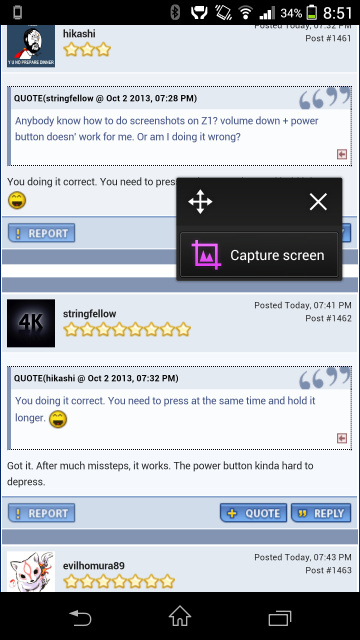
Anybody know how to do screenshots on Z1? volume down + power button doesn' work for me. Or am I doing it wrong?
stringfellow
post Oct 2 2013, 07:41 PM

Ultrawide | 4K | VR
********
Senior Member
11,305 posts

Joined: Jan 2003
QUOTE(hikashi @ Oct 2 2013, 07:32 PM)
You doing it correct. You need to press at the same time and hold it longer. laugh.gif
*
Got it. After much missteps, it works. The power button kinda hard to depress.
stringfellow
post Oct 2 2013, 10:36 PM

Ultrawide | 4K | VR
********
Senior Member
11,305 posts

Joined: Jan 2003
QUOTE(psyeo @ Oct 2 2013, 08:54 PM)
user posted image
Alternatively u can try using that small apps for screen capture
*
shows how much I've explored my Z1. Fantastic tip there, bro! rclxms.gif
stringfellow
post Oct 3 2013, 05:50 PM

Ultrawide | 4K | VR
********
Senior Member
11,305 posts

Joined: Jan 2003
Yup, it doesnt work when transferring using Mac until an NTFS driver install is done. 4GB limit plus incompatibility with MAc OS X when it comes to transferring filesizes more than 4GB. No problems when transferring via Windows 7. Transferred my most fav movie this year, "Pacific Rim" in 1080p into the Z1, looks super gorgeous!

Also, the Z1 fits nicely in the Z Ultra dock. Z Ultra dock comes with two inserts and the inserts meant for the thicker Z Ultra with case fits the Z1.

user posted image

user posted image

This post has been edited by stringfellow: Oct 3 2013, 05:56 PM
stringfellow
post Oct 3 2013, 06:56 PM

Ultrawide | 4K | VR
********
Senior Member
11,305 posts

Joined: Jan 2003
QUOTE(hikashi @ Oct 3 2013, 06:49 PM)
The Z1 dock also comes with 2 inserts/brackets but it look like this:
» Click to show Spoiler - click again to hide... «


The one on the right is the bigger bracket it comes with some kind of notch at the 2 ends, which blocks my phone with extra casing  doh.gif
*
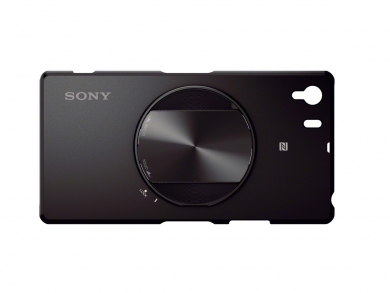
Not using a case with mine so it's fine. Once I get this SPA-ACX2 for my Z1, by then I'm sure the Z1 dock is available locally......that is, IF the Z1 dock can fit with that ACX2 case on.

user posted image

user posted image

Also waiting for this, as a case for my QX100. Currently stuffing my QX100 into a sunglasses pouch only. sad.gif

user posted image

user posted image

This post has been edited by stringfellow: Oct 3 2013, 06:57 PM
stringfellow
post Oct 3 2013, 11:19 PM

Ultrawide | 4K | VR
********
Senior Member
11,305 posts

Joined: Jan 2003
QUOTE(hikashi @ Oct 3 2013, 09:48 PM)
For those who complain the default wallpaper sucked with the bright gradient on the top left.
Here's the fix.  biggrin.gif

» Click to show Spoiler - click again to hide... «

*
I tried. Too much color gradation and banding.
stringfellow
post Oct 3 2013, 11:41 PM

Ultrawide | 4K | VR
********
Senior Member
11,305 posts

Joined: Jan 2003
Looks okay once set. During cropping, color banding looks painfully obvious.

Topic ClosedOptions
 

Change to:
| Lo-Fi Version
0.0377sec    1.00    7 queries    GZIP Disabled
Time is now: 15th December 2025 - 11:12 PM