

QUOTE(zhiyuanchan @ Sep 5 2013, 11:06 PM)
Request network reset on MaxisListens will get faster response?

Fastest would be chatMaxis Maxis Biz68 Mobile Internet V3, Updates on #1
|
|
 Sep 5 2013, 11:48 PM Sep 5 2013, 11:48 PM
|
 
Elite
8,416 posts Joined: Jul 2008  
|
QUOTE(zhiyuanchan @ Sep 5 2013, 11:06 PM) Request network reset on MaxisListens will get faster response? Fastest would be chat |
|
|
|
|
|
Sep 6 2013, 12:34 AM
|
 
Junior Member
182 posts Joined: Jul 2008 
|
Biz68 support multisim ? :-) :-) :-)
|
|
|
Sep 6 2013, 12:41 AM
|

Senior Member
1,240 posts Joined: Aug 2008 From: Other World Computing 
|
QUOTE(MICHAEL NG @ Sep 6 2013, 12:34 AM) Biz68 support multisim ? :-) :-) :-) Yes! but not share DATA  |
|
|
Sep 6 2013, 12:43 AM
|

Junior Member
379 posts Joined: Feb 2013
|
QUOTE(MICHAEL NG @ Sep 6 2013, 12:34 AM) Biz68 support multisim ? :-) :-) :-) First page should be got answer. |
|
|
Sep 6 2013, 01:52 AM
|

Junior Member
223 posts Joined: Nov 2008
|
QUOTE(blacktubi @ Sep 5 2013, 06:50 PM) That is the DNS acquired to the WAN Bro I just found a way to change the DNS on ROOter..... Try doing ipconfig /all on your PC see what is the DHCP acquired DNS address Go to Network > Interface > Wan(wwan0) > Click Edit > Advance Setting > Untick Use DNS Server advertised by peer > Key in your custom DNS. etc. 8.8.8.8 and 8.8.4.4 Restart modem and wait it to reconnect see if it works This is mine 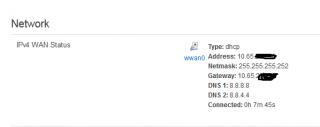
|
|
|
Sep 6 2013, 05:48 AM
|

Newbie
6 posts Joined: May 2010
|
QUOTE(mushashi87 @ Sep 6 2013, 01:52 AM) Bro I just found a way to change the DNS on ROOter..... mine after reboot the tick of " Use DNS Server advertised by peer" always came back, unless changed but not reboot itGo to Network > Interface > Wan(wwan0) > Click Edit > Advance Setting > Untick Use DNS Server advertised by peer > Key in your custom DNS. etc. 8.8.8.8 and 8.8.4.4 Restart modem and wait it to reconnect see if it works This is mine
|
|
|
|
|
|
Sep 6 2013, 07:58 AM
|

Junior Member
178 posts Joined: Oct 2007
|
USIM Nilai
 Currently office network is down. This post has been edited by kaibathelegacy: Sep 6 2013, 08:07 AM |
|
|
Sep 6 2013, 10:40 AM
|
|
Junior Member
223 posts Joined: Nov 2008
|
QUOTE(gonti36 @ Sep 6 2013, 05:48 AM) mine after reboot the tick of " Use DNS Server advertised by peer" always came back, unless changed but not reboot it hmm that was weird mine is save even after reboot. Anyway can set the DNS without rebooting?This post has been edited by mushashi87: Sep 6 2013, 10:41 AM |
|
|
Sep 6 2013, 11:43 AM
|
|
Elite
8,416 posts Joined: Jul 2008
|
QUOTE(mushashi87 @ Sep 6 2013, 01:52 AM) Bro I just found a way to change the DNS on ROOter..... Your way works too, actually just doing it manually what the the script on Modem > Connection is going to doGo to Network > Interface > Wan(wwan0) > Click Edit > Advance Setting > Untick Use DNS Server advertised by peer > Key in your custom DNS. etc. 8.8.8.8 and 8.8.4.4 Restart modem and wait it to reconnect see if it works This is mine
Seem there's some bug here  |
|
|
Sep 6 2013, 01:35 PM
|

Junior Member
92 posts Joined: Apr 2011
|
QUOTE(mushashi87 @ Sep 6 2013, 01:52 AM) Bro I just found a way to change the DNS on ROOter..... It works Go to Network > Interface > Wan(wwan0) > Click Edit > Advance Setting > Untick Use DNS Server advertised by peer > Key in your custom DNS. etc. 8.8.8.8 and 8.8.4.4 Restart modem and wait it to reconnect see if it works This is mine
 Thanks Thanks    |
|
|
Sep 6 2013, 04:26 PM
|
|
Junior Member
223 posts Joined: Nov 2008
|
QUOTE(blacktubi @ Sep 6 2013, 11:43 AM) Your way works too, actually just doing it manually what the the script on Modem > Connection is going to do I think the connection @ modem is similar to the setting where you directly plug the modem to pc. Which cannot set dns.Seem there's some bug here |
|
|
Sep 6 2013, 04:26 PM
|
|
Junior Member
223 posts Joined: Nov 2008
|
QUOTE(Psychosis @ Sep 6 2013, 01:35 PM) It works nice bro Thanks  |
|
|
Sep 6 2013, 06:17 PM
|

Senior Member
556 posts Joined: Jan 2003
|
QUOTE(blacktubi @ Sep 5 2013, 04:25 PM) Adoi, both don't allow you to do so TPLink router can support K5006-Z?Sell both of them and get a Huawei one if you really want to play with frequency |
|
|
|
|
|
Sep 6 2013, 06:19 PM
|
|
Elite
8,416 posts Joined: Jul 2008
|
QUOTE(chding @ Sep 6 2013, 06:17 PM) TPLink router can support K5006-Z? Yes |
|
|
Sep 6 2013, 08:04 PM
|
|
Junior Member
116 posts Joined: Feb 2007
|
hame a100 or hame t1 7800mah can use for e353 or mf680 ?
|
|
|
Sep 6 2013, 08:43 PM
|

Junior Member
415 posts Joined: May 2009 From: Chisel Stone.
|
Edited.
This post has been edited by fuzzly!: Sep 6 2013, 08:47 PM |
|
|
Sep 6 2013, 09:48 PM
|
|
Elite
8,416 posts Joined: Jul 2008
|
QUOTE(jiansiong @ Sep 6 2013, 08:04 PM) hame a100 or hame t1 7800mah can use for e353 or mf680 ? Yes |
|
|
Sep 6 2013, 10:13 PM
|

Senior Member
1,210 posts Joined: Aug 2011
|
 LTE near tesco puchong |
|
|
Sep 6 2013, 10:14 PM
|
|
Elite
8,416 posts Joined: Jul 2008
|
QUOTE(thpace @ Sep 6 2013, 10:13 PM) LTE near tesco puchong Great speed |
|
|
Sep 6 2013, 10:25 PM
|
|
Senior Member
1,210 posts Joined: Aug 2011
|
QUOTE(blacktubi @ Sep 6 2013, 10:14 PM) You bring your modem and laptop everywhere one? No la.. sit down, connect and test. Great speed  last time ppl say lte at puchong cacat, i think they fix it at least at tesco area  now ppl will start moving to puchong since the speed can rival frutie ad  |
|
Topic ClosedOptions
|
| Change to: |  0.0251sec 0.0251sec
 0.71 0.71
 6 queries 6 queries
 GZIP Disabled GZIP Disabled
Time is now: 15th December 2025 - 10:11 AM |
 Quote
Quote