Screen • 4.65" HD (1280 X 720 pixels) Super AMOLED • Contour Display (curved glass) Dimension • Size: 67.94 X 135.5 X 8.94 • Weight: 135g Memory • Storage: 16GB/32GB • Memory:1GB RAM Camera • 5MP continuous auto focus w/ LED Flash • 1.3MP Front • Zero Shutter Lag • Video Recording: 1080p back, 720p front Connectivity • GSM/HSPA+/3G/EDGE/GPRS • WIFI a/b/g/n • Bluetooth 3.0 • Micro USB • NFC Features • Jelly Bean (Android 4.1) • 1.2GHz TI OMAP4460 dual core CPU • Multicolored Notification LED • Buttonless front w/ Hyper Skin back • Accelerometer, Gyro, Compass, Proximity, Barometer
This post has been edited by phantomash: May 10 2013, 10:52 PM
Let's not beat around the bush. The Galaxy Nexus is definitely the best Android phone available today -- it's possibly even the best phone available today, period. Sure, it's not perfect -- we're disappointed that the camera doesn't deliver the same wow factor as the rest of the handset. It's an alright shooter, but it's just no match for the state-of-the-art. There's also room for improvement in terms of build and materials quality. Still, there's no denying the satisfying look and feel, the stunning display, the impressive performance, the excellent battery life -- the whole is far greater than the sum of its parts. Full review here.
The Verge
QUOTE
The Galaxy Nexus is the best Android phone ever made. It's one of the best smartphones ever made, and with a couple of minor tweaks (particularly to the camera), it could be the best smartphone ever produced.
Still, there's really not much to knock here. The hardware is elegant and smartly designed. The software is beautiful and useful. Google has cleaned up a lot of the bad, and replaced it with a serious amount of good. It's faster, smarter, and a lot more friendly than any of its predecessors. Ice Cream Sandwich easily gives iOS and Windows Phone a run for their money, and in many ways, it's a superior operating system than either of them. If there's a bone to pick, perhaps it's with the size, which could be off-putting to some, or the fact that right now the only carrier you can definitely get the phone on in the US will be Verizon. But those are minor blips on the radar, not show stoppers.
Since day one, I've been waiting for an Android device that lived up to the promise of such a powerful OS. I think I can stop waiting now. Full review here.
AnandTech
QUOTE
The Galaxy Nexus is so important again because it's the only time Google gets to dictate everything - the hardware, the software, and update timing. There's also the element of freedom, with unlockable hardware out of the box. I find myself wishing that Google had begun its adventure sticking it to the carriers with pentaband WCDMA support like this phone finally has, as that would've been much more successful than the practice of releasing a few different Nexus variants with different bands.
As far as Ice Cream Sandwich is concerned, it really is Android perfected. Everything is smoother, faster and nearly all of our issues with the OS have been addressed. ICS brings Android into 2012 and gives Google a great platform to begin to introduce new features going forward. Android is now very close to UI performance parity with iOS, which eliminates a major tradeoff you had to make in the past. If you were hoping for ICS to be iOS with a Google logo on it, you'll be sorely disappointed. However if you're a fan of Android and just wished it were smoother and more polished, Ice Cream Sandwich is what you've been waiting for. Full review here.
This post has been edited by phantomash: May 10 2013, 10:47 PM
» Click to show Spoiler - click again to hide... «
Type SMS to Check Warranty Period: PC (space) IMEI NUMBER Send to 33802 (Celcom) or 62002 (DiGi / Maxis)
New Set, Checklist?
» Click to show Spoiler - click again to hide... «
If you're contemplating on buying AP set, jpaq has some advice for you to consider.
QUOTE(jpaq @ Mar 14 2012, 04:38 PM)
It's all a matter of luck, bro. Many people who have bought an AP unit has had no problems whatsoever. However, there are some who have experienced faulty units before as well. To be clear, I myself rather not buy an AP unit.
But do ask the seller about his one-to-one exchange policy. If he says if there is any problem within 7 days, and a one-to-one exchange is allowed within that period, then it is pretty fair for an AP unit. But then, ask him further, if the 2nd unit is also found to be faulty, then what would be his policy. Then consider what he tells you. If you find it acceptable, go ahead and buy it and have fun. Oh, and do get the name of the guy who attends to you, for future reference.
However, do be meticulous with your checking of the unit. When at the shop, check as many things on the phone as you can, at the bare minimum, check for any scratches, dents, cracks and chips. Check for any colour peeling or dis-colouration of every physical part of the phone that you can see, including the logos. Also check the battery cover for any breakage in the clips. Another phone shop seller once told me that he got in a unit from his supplier where one or more of the battery cover clip(s) was/were broken.
Do switch the phone on and inspect with your naked eye for any abnormality in the display. Also see whether the display responds ok with your touches. Then slip in your SIM card and make a few calls. Check for any abnormality in the sound coming out from the earpiece. I have had an earpiece problem before. Not common, but it happened to me. Then ask whomever you are calling whether you sound clear to them or not. Then ask that person to call you back to check again.
After all that, when you get home, do play the heck out of your phone. Go google for apps which let your check for any defects in the display, like dead pixels, etc. Plug in a set of earphones (your fav or the in-box ones) and test. Play some songs through the earphones as well as through the speaker. Listen for any crackling sounds or other abnormality. Make calls, send SMSes, emails, etc. Plug it into your computer to see whether everything is working as it should be. Use the phone fully and even stress the phone if you can (but I don't mean physically!!!).
If everything works out ok, great! If not, go back immediately to the seller. Be firm (but not rude) with the seller when conveying to him your problem(s). If he had promised a one-to-one exchange earlier and you are within the time given, insist on that. I have to add that many sellers would rather not have to do a one-to-one exchange if they can help it. It means that they would have one less phone to sell. But insist on it if he has given you his word. And if he tells you that there is currently no stock to exchange for you at the moment, insist that a new unit should be given to you no longer than in 2 weeks time. Otherwise, ask for your hard earned money back and get the phone from somewhere else.
Honestly, I have not dealt with this directd ever before. From the forums, some say he is ok but could be perceived as a little stuck up. Ignore all this when your are dealing with him. Just be professional and expect professionalism from him as well. Keep it strictly business.
All the best.
SMSC?
» Click to show Spoiler - click again to hide... «
Australia and Malaysia common SMSC. and PDU codewords- three SMSC, optus SMSC, three SMSC, telstra SMSC, vodafone SMSC, maxis SMSC, digi SMSC, celcom SMSC, adam SMSC, mutiara SMSC
Australia
» Click to show Spoiler - click again to hide... «
» Click to show Spoiler - click again to hide... «
maxis +60120000015 07910621000010F5
digi +60162999902 07910661929909F2
digi malaysia +60166782176 07910661762871F6
celcom gsm +60193900000 07910691930000F0
celcom gsm sdn bhd +60193900020 07910691930020F0
Adam +60173600010 07910671630010F0
Mutiara +60162999000 07910661929900F0
Galaxy nexus users open phone and dial *#*#4636#*#* hit phone info, scroll down, enter the PDU code (without the +xxxxxxxxx) hit update close and reboot phone test sms to someone
Updates, Yakju?
» Click to show Spoiler - click again to hide... «
yakju is the stock Google's firmware, so everything is safe here. non-yakju is Samsung's firmware, and will still receive update, but a different batch than yakju ones
For those who want to check Yakju or non-Yakju build on Galaxy Nexus:
1. Download "Android System Info" from market. 2. Launch it 3. Go to System tab 4. Under it, click to expand Buildinfo 5. See Product
However it is possible to flash non-yakju build back to stock Google's firmware, yakju. vernon91 has written a guide on how to flash yakjuxw ICS to Jelly Bean
Google Now?
» Click to show Spoiler - click again to hide... «
Google Now gets you just the right information at just the right time.
It tells you today’s weather before you start your day, how much traffic to expect before you leave for work, when the next train will arrive as you’re standing on the platform, or your favorite team's score while they’re playing. And the best part? All of this happens automatically. Cards appear throughout the day at the moment you need them.
However it seems a fair few people are having issues configuring Google Now to give them the smooth female voice, images in the search content and the ability to send texts, set alarms etc.
Follow this tutorial and you should be sorted in no time.
» Click to show Spoiler - click again to hide... «
The display is HD SAMOLED, which is amazing. Despite having Pentile matrix arrangement, pixels are hard to discern.
QUOTE
The 4.65-inch HD Super AMOLED display (1280 x 720 pixels) is simply beyond par. Gorgeous doesn't even begin to describe this screen -- try amazing, jaw-dropping, mind-boggling. As we mentioned in our first impressions, fonts are crisp, colors are vibrant, blacks are deep and viewing angles are exceptional. By Myriam Joire at Engadget
If you think that your screen might be faulty, due to tinting, dark splotches, or graininess, refer to this guide to see: Galaxy Nexus Screen
» Click to show Spoiler - click again to hide... «
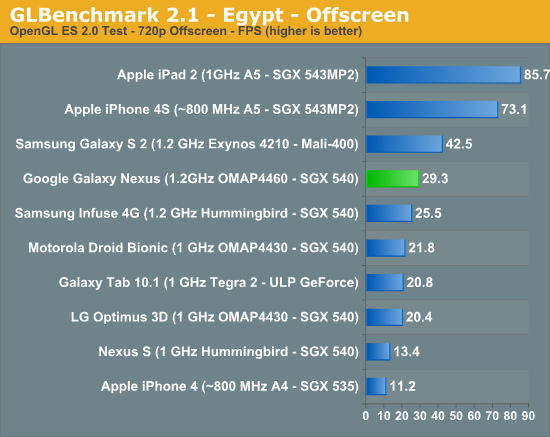
Its a SGX540, the same one in the Nexus S, but significantly higher clocked, running at 384mhz.
QUOTE
Iit's only the GPU that isn't as fast (the CPU is as fast as anything on the market right now, and faster than the iPhone). This will be the third fastest GPU on the market, behind the PowerVR SGX543 of the iPhone, and the Mali-400 of the Samsung Galaxy S2. For most tasks, of course, there will be tons of horsepower available for things like hardware acceleration of the OS, basic processing tasks, etc. These are not generally a challenge to most GPUs. The real question is, how will it handle games or apps like Google Earth or other 3D-intensive apps?
Think about this: when game developers release a game for the PC, do they optimize it so that it will only run on the brand new, top-of-the-line, $600 graphics card? Of course not. They wouldn't sell many copies, would they? Expect the same here. The PowerVR SGX540 of the Nexus is a potent GPU, one of the fastest on the market. Not being the fastest shouldn't be a concern. From Android Forums
Also, if you didn't notice already, games that are actually fun don't rely on polygon counts to sell the game, ie. cut the rope, plant vs zombie, coin drop, etc etc. If the iPhone 4 with SGX535, a lower end GPU than Nexus S, can have great game titles, I don't see how the G Nexus can't.
Food for thought, if the G Nexus can already play 95% of the games in the market (the other 5% being Tegra3 exclusives ), what significance does it make that the GPU scored lower in benchmarks?
Battery?
» Click to show Spoiler - click again to hide... «
If you're concerned about the battery performance, refer to these links for more info:
» Click to show Spoiler - click again to hide... «
If you feel that your phone's speaker volume is too low, try Volume+ to boost the volume.
and install Equalizer to boost volume during videos.
As for quality:
QUOTE
Only had a brief listen on mine using some Yuin PK2s that I have.
I've come from an Xperia Arc, and before that I did have a SGS2 for a while.
I've not had enough time to make a definitive view but at this stage, the Nexus sounds more open than the Arc (which had a warm veil to the sound imo) and seems to be able to drive the Yuin's much better than the SGS2 - my ears will give up before I reach max volume this time around.
To my ears, at this stage, it offers a pretty well balanced sound - plenty of detail resolved without sounding overly harsh on the tracks I have tried. The mids certainly sound better than the previous 2 phones mentioned from my recollection.
Not had a play with any equaliser settings yet as I prefer listening without tweaking these in any way if possible.
Reckon it has potential - and its certainly good enough for the amount of listening I do. From WhiteHartMart @ XDA Developers
QUOTE
I have compared the Nexus to the GS2.
1. Don't worry it blows the GS2 out the water. Highs are high, lows are low. Tested with .flac on same settings via power amp.
2. Its the best sound quality I have ever heard from .flac on a mobile phone. I never owned a Nexus1.
3. Speaker is very low. Not as loud as cm7 on GS2 but hey the quality is OK.
4. Gone are the days of the Bluetooth audio crackle via A2DP. It has very good quality via A2DP even compared to GS2 CM7.
If you are interested I tested the phones with some Astro A40's. Not the best for an audiophile but suitable for the test I guess. From NatTheCat @ XDA Developers
QUOTE
The headphone jack out of the Galaxy Nexus is good. Audio is clear, very little hiss using UE-11s.
I find the volume increments are too large but I listen at low volumes using low impedance IEMs. Others shouldn't find that to be a problem. From doubleperfect @ XDA Developers
Facebook?
» Click to show Spoiler - click again to hide... «
Facebook won't sync with Nexus Devices because Google and Facebook had a little spat back when 2.3 was released. Whereby Facebook refused to use the standard contact sync API and instead used the one that Google had initially concocted from scratch for them. Then, when Google deprecated that API, Facebook didn’t feel like changing their code, so no more sync.
So 3rd party have developed and an app to enable Facebook sync, try HaxSync. Alternatively, you can flash ROMs that has Facebook sync built-in / fixed, if you have root access.
Screenshot?
» Click to show Spoiler - click again to hide... «
Hold down Power button + Volume Down for about 2 seconds to take a screenshot.
Gallery Images?
» Click to show Spoiler - click again to hide... «
Google+ application settings on an Android phone will automatically upload new photos and videos to a Google+ album. There's no need to panic, though, as the photos and the album itself will remain private until you sign into Google+ and specify which images you want to share with select circles
To disable automatic upload from the Google+ Android app, select "Settings" within the "Menu" screen and uncheck "Instant Upload." Now you have control of which mobile photos make it to your private Google+ album.
The Instant Upload settings allows for further customization, including uploading all existing photos on your phone, uploading only when connected to a WiFi network (good for those with capped data plans), and uploading only when the phone is charging.
If you've ever had or used Picasa, there is a chance you've got an album there that Google is picking up and syncing.
Click on the "My Photos" tab, click on the offending album, click on the "actions" tab, and choose "delete album".
To delete the synced photos from Gallery
Go to Settings > Apps > All > Google +
Then press the "Clear data" button.
Now when you go back to the gallery the instant upload and any photos linked in Picasa will be gone.
You should also disable the syncing before doing this if you don't want them to come back again.
Navigation?
» Click to show Spoiler - click again to hide... «
The stock Google Navigation does not work in Malaysia, If you want it, you'll have to install a modded version from here
Multitasking?
» Click to show Spoiler - click again to hide... «
QUOTE(mark @ Mar 14 2012, 08:52 PM)
There seems to be a lot of confusion regarding running apps, multitasking, background tasks and such.
When you launch an Android app, the task is active/running. You use the app, play with the app, etc.
When you exit back to the home screen (or go to a different app), the app is stopped. This means that the app is frozen and will not run/take up battery/etc. It also means the Android OS can freely kill that task if the Android OS needs more memory for other things (i.e. you opened up a really heavy game, you haven't gone back to that app in a while, etc).
So how does multitasking work? How does your app check for email in the background? This is done by something called services. Services run in the background, you don't really see it anywhere on your screen. Even when you quit your app, it still has a service running in the background. It checks your mail even if you're not in the app, it checks for new messages when you're not in the app. If you're busy downloading something using your browser, and you go to a different app, your download still continues, because the browser is running it's own download service in the background.
An example to this would be WhatsApp. If you don't open the app, how does it check for new messages for you? It runs the WhatsApp background service to check for messages for you. You don't have to open the app to keep checking for new messages, it already runs by itself in the background. The Android OS takes care of what services to run, kill, etc automatically for you. That's why if you use a manual task killer (you shouldn't, btw), after a few minutes you'll notice the WhatsApp service running again.
This, of course, does not apply to ALL apps. It depends on whether the app developer has made such a feature available or not. Let's take Draw Something as another example. It doesn't have a background service, therefore it doesn't notify you if you have new drawings to guess.
tl;dr, to answer your question, you don't have to open viber/yahoo/gmail/gtalk to get notifications. The notification part of these apps are running in the background and are checking for new messages for you.
Also, regarding the ICS tasks button, all the tasks listed there are "frozen" apps... the apps themselves aren't running and aren't taking any CPU resources.
For better understanding, you can also read up on the Android Activity Lifecycle, but it's more technical and more for programmers: Android Activity Lifecycle
Wallpaper?
» Click to show Spoiler - click again to hide... «
To set wallpaper, long press at the homescreen - Wallpaper - Gallery to choose the image that you want. Alternatively, go to the Gallery app - select the image you want - Set picture as - Wallpaper
The ideal image resolution for Galaxy Nexus wallpaper is 1440X1280. You can use whatever image that you want, and crop / edit the image down to that resolution. When applying wallpaper, just select the whole image, it will appear as intended, and look crisp and clear.
For quick sources of wallpaper, these links are good starters:
» Click to show Spoiler - click again to hide... «
Don't worry, it is perfectly normal if you feel that your phone is heating up around the camera area, especially when you are using your phone, even if its just minor activities. (you don't know what's going on in the background).
After all, its a 1.2Ghz dual core CPU running underneath, the heat has to dissipates somehow. Just make sure that its not something crazy like above 55C, anything below 50 should be fine. It is advisable to avoid using the phone when charging.
You can install battery monitoring app to monitor the temperature if you are worried about it.
WiFi-direct?
» Click to show Spoiler - click again to hide... «
ok, we all know we have build in Portable Wi-Fi hotspot. as easy as turn on in our setting, then any wifi enable device/system can connect to our phone. and we also Wi-Fi direct, so what is Wi-Fi direct?
as the video show, you got the general idea but how it works? 1 of the easy example: DLNA if you have DLNA device like TV, AVR, etc... you can try download Skifta from market. your photo, video, music from your phone can direct shoot to your DLNA device, very convenient
Wireless ad-hoc network?
» Click to show Spoiler - click again to hide... «
Windows 7 introduces a new feature called Virtual Wifi that can turn your computer into a wireless hotspot. This feature depends on driver support of your wireless adapter.
“All the design projects I’m working on take cues from nature,” says TaeJoong Kim. “Nature is authentic and infinite.” “Before, we tried to take inspiration from polished sports cars and other graceful designs,” adds GiYoung Lee, “but then we realized that nature was the source of all inspiration.”
The magnolia petal’s elegant curve was the perfect fit for the GALAXY Nexus body’s ergonomics By using curved glass, the designers were able to achieve a greater visceral impact.
QUOTE
Rubin is explaining what makes a “Nexus” phone, as opposed to any old Android phone. Basically, Google gets deeply involved in the design, working with the hardware maker and the chipmakers. Rubin notes there are over a million lines of code in Android.
“So much work goes into producing the UI and the changes that you make, and then typically what happens is that the OEM’s put their skins on it and put their own touch. Does it bother you that so much work goes into it and in the end, a lot of consumers don’t interact with the UI as you intended it?”
Well, it would bother me more if we didn’t have programs like the Nexus program. The idea behind the Nexus device is to do exactly that – to give consumers an option to use the baseline work that we do if they choose…the philosophy of Android, the idea that partners can customize Android if they want to, is really important to making Android successful. By Matias Duarte, User Experience Designer of Android
QUOTE
There are Android phones (Nexus). And there are Sense phones (HTC). And there are Philblur Motorola phones. And there are TouchWiz phones. And so on and so forth.
With the Nexus line, Google has its flagships, its models of how its operating system should work. The broader world of Android is more like MS-DOS—the original "weak OS." Every version of the software is retailored and rebranded by its manufacturer. Even some software has to be rewritten to conform to different machines and their varied specs. But what you get is accelerated development of hardware and broad interoperability between machines, which benefits both users and developers.
Why does this distinction matter?
If you're an Android user, you may simply have to accept that you didn't buy an Android device running Google software; you bought a device from Samsung, Motorola or Amazon running Samsung, Motorola or Amazon software. Unless you have a Nexus, Google's more or less invisible on your device. Finally, you're never going to be able to just pull a brand-new software update out of the cloud and stick it on your machine. Not unless you're up for a little hacking. From Arstechnica
QUOTE
There is on one specific reason why I want the Galaxy Nexus so bad. It's everything brought together in a single device, all of the gripes and disappointment in other, non-Nexus handsets that I've had over the past two years and the thought of using Android specifically how Google envisions it. Not everyone will agree, not will everyone understand. But we all have our reasons for the preferences we have, and a run-of-the-mill Android phone just doesn't cut it for me anymore. From PhoneDog
QUOTE
But that is the philosophy of Android, a philosophy that had eluded me until now. To Google, Android is an operating system. To companies like HTC, Samsung, and Motorola, Android is the building-blocks with which they will build their own unique devices.
Google makes Android phones. Apple makes iOS phones. HTC makes Sense phones. Samsung makes TouchWiz phones. Motorola makes MotoBlur phones.
For those of you who don't know, Nexus is essentially Google's iPhone. They have full control over the hardware and software, come out with a new Nexus every year or so, and update all recent-ish Nexus phones with the latest version of Android as soon as possible. By LifeHacker
QUOTE
I've absolutely loved using my pre-release Galaxy Nexus phone running the new version of Android, Ice Cream Sandwich. It is truly beautiful hardware with incredible software. By Larry Page, CEO of Google
QUOTE
2011 Engadget Smartphone of the Year Award The Galaxy Nexus has a gorgeous 4.65-inch HD Super AMOLED display, excellent battery life and it's a top performer through and through. Oh, and it ships with Ice Cream Sandwich. We'll take two.
» Click to show Spoiler - click again to hide... «
QUOTE
In this post, I’ll be talking about the rooting process of an Android device as far as my best knowledge allows me to. Regarding ‘root’ itself, please consult the many definitions around the internet. In short, it is a special permission granted to a user to perform low level operations on a system (like backing up your Angry Birds game data, or changing the boot animation). 'Rooting' is the process of obtaining the means to grant this permission.
Think of it like the Matrix: Jailbreaking is comparable to what Morpheus could do. He could bend the rules of the system to overcome certain restrictions, but was still bound to its rules. Rooting is what Neo could do. Not only could he bend the rules, he could completely break them.
» Click to show Spoiler - click again to hide... «
You download Galaxy Nexus Toolkit over at XDA Developer and use it for EVERYTHING. Including:
QUOTE
Install correct adb/fastboot drivers automatically on Windows xp/vista/7 32bit+64bit Backup/Restore a single package or all apps, user data and Internal Storage Backup your /data/media (virtual SD Card) to your PC for a Full Safe backup of data Perform a FULL NANDROID Backup of your system (Boot, Cache, Data, Recovery and System) via adb and save in Custom Recovery format on your PC which can be Restored via CWM Recovery Pull /data and /system folders, compress to a .tar file and save to your PC Backup/Restore your /efs partition to your PC Dump selected Phone Partitions, compress to a .zip file with md5 and save to your PC Install BusyBox on your phone Extras, Tips and Tricks section available to all ToolKit Donators Mods section to automatically perform certain tasks on your phone 1-Click For All to Unlock, Root, Rename the Restore File and CWM Unlock/Re-Lock your Bootloader Download Google Stock Image files directly via the ToolKit Flash Google Stock Image to phone Root any public build of ICS automatically (ANY Stock build upto and including maguro/toro/toroplus 4.0.4) Root Stock Jelly Bean (4.1) on all models Rename the Recovery Restore File present on some Stock Roms Flash Stock Recovery, CWM Touch Recovery or TWRP Touch Recovery Boot into CWM Touch Recovery or TWRP Touch Recovery without Flashing it Boot or Flash .img Files directly from your PC Install a single apk or multiple apk's to your phone Push Files from your PC to your phone Pull Files from your phone to your PC Dump selected LogCat buffers to your PC Dump BugReport to your PC Set Files Permissions on your phone Pull and Trim your Radio Image from your phone and save to your PC (thanks to josteink for Radio Trimmer) Rip cache.img to zip file in CWM format (by Adam Lange) Open new Command Prompt for manual input Reboot Phone to Fastboot Mode or Android in fastboot mode Reboot Phone to Fastboot Mode, Recovery, Android or Download Mode in adb mode Turn Initial Start Screen On/Off for next use
» Click to show Spoiler - click again to hide... «
changing to yakju and rooting 1- download v7 galaxy tool kit here trollolol 2- Install it 3- go Here and download Factory Images "yakju" for Galaxy Nexus "maguro" (GSM/HSPA+) or just save this yakju 4- navigate to ''C:\Galaxy Nexus toolkit\ put_google_factory_image_here\'' and place the downloaded file 5- go to control panel\hardware and sound\ device manager, look for anything related to samsung galaxy nexus or samsung mobile driver. uninstall it, if not present then continue. 6- boot up ur toolkit, and select 4.0.4, then type the number for the option (install/uninstall galaxy nexus drivers on your PC) installed. reboot computer. while w8ing check ur phone, settings\about phone\android version\ u will see 4.0.2, or some number, remember it. 7- boot up tool kit again, turn off phone. turn on phone again but hold down all buttons u can reach. (vol<> and power) 8a- plug phone in computer, in tool kit, select the number u saw in step 6. 8b- optional select the number for "extract and flash google factory stock rom" then folo screen instructions 9- select the number for ''1-click for all'' and follow on screen instructions. 10- folo all steps, when completed they will greet ur with ''congrats u hacked it'' 11- sit back reboot and read on * remember if u saved anything importand in phone, back them up(files etc) be4 u start, sync with gmail and all.
WARNING Unlocking your bootloader will completely wipe your device's internal "SD card", so backup what you need / want to beforehand.
Also note that the first reboot after you've unlocked your bootloader may take about four or five minutes to complete. So, please be patient and do not pull your battery and let the boot complete.
Nandroid
» Click to show Spoiler - click again to hide... «
What it is, is a full backup of partitions on your device's NAND flash (NAND stands for NOT AND, a type of electronic logic gate -- it's like the hard drive of your Android device) storage. Think of it as a snapshot of the current running system, and it can be used to restore that that point at any time. Both user data and system files are backed up, and it's a far cry from what we think of when talking about a traditional backup from other software.
» Click to show Spoiler - click again to hide... «
Download and flash XXKK6 if you are using 4.0.2 and above
The format is always: XXYZN
XX - > Region / Network / Carrier (XX = Europa) Y - > Release Year (K = 2011) Z - > Release Month (K = November) N - > Version Number
NOTE: The Baseband is defined by 3 sets of codes. The first two are the Country Code, the next 2 denote the Year and Month (KK = 2011 November) and the last number denotes the Revision.
Country Code:
CE---> Belgium, Luxembourg, Netherlands DC---> Thailand DD---> India DX---> Indonesia, Malaysia, Philippines, Singapore, Vietnam DZ---> Malaysia, Singapore JA---> South Africa JC---> Algeria, Morocco, Nigeria, South Africa, Tunisia JP---> Arabic, Algeria, Egypt, Iran, Iraq, Kuwait, Morocco, Nigeria, Oman, Pakistan, Saudi Arabia, Syria JV---> Tunisia, Turkey UG---> North America UH---> Latin America, The Caribbean XE---> Bulgaria, Estonia, Kazakhstan, Latvia, Lithuania, Russia, Ukraine XX---> Austria, Belgium, France, Germany, Hungary, United Kingdom XW---> Austria, Belgium, France, Germany, Hungary, Italy, Nordic, Spain, United Kingdom ZC---> China, Hong Kong ZH---> Hong Kong ZS---> China, Hong Kong ZT---> Taiwan
» Click to show Spoiler - click again to hide... «
flashing AOKP rom 1- navigate to here and choose the latest build, then download ''maguro GSM Galaxy Nexus'' and ''gapps 20120429'' 2- place them in ur phone by plugging in and placing them in a folder(remember where u place it) 3- shut down ur phone, reboot phone with holding all physical buttons. 4- press vol - untill the screen shows recovery, then hit power button. 5- cwm screen shows up. select backup/restore, then backup. thats ur pure yakju to roll back nex time 6- reboot recovery 7- select 'factory wipe reset data' and press power 8- select 'wipe cache' and press power 9- select 'install zip file/ flash zip file' then select 1st option and navigate to the files u placed. 10- install this in order= ROM>GAPPS>KERNAL>BASEBAND>ANY OTHER MODS. (u would be flashing ROM and GAPPS) 11- done flashing, then select back and reboot. 12- u are now a unicorn party!
For a list of ROMs, kernels, MODs, and many more head over to XDA Developer.
No need. Everyone here knows how to do that Don't you think that my guide is like basic knowledge for everyone here?
I wrote this for someone that doesn't bother to study at all. He even asked me the difference between CWM and TWRP. He doesn't mind to spend my time though
Yea... Too quiet... Btw... Haze in KL is very bad today
Basic knowledge but essential knowledge
yea the haze... f***ing hell. Its really really bad. Feel like I'm inhaling smoke all the damn time
just asking is there an app that can turn on bluetooth wifi etc when tap on 1 NFC card and when tap again it will off what it turned on? using 1 card only.
so far all 1 card control 1 command only. calling the malaysian developer @jason something
haha in good lighting only.. next phone probably thinking of getting S4 Google Edition.. good camera and most importantly memory card!!! feels annoying can't install anymore on my current nexus, full
err what's so special about S4's camera? high megapixel?
S4 low light still not bad what. Compared to most of the phones out there. One of the best. That should be enough.
For me, I'll choose to have more mega pixel for moreeeeeee details. Btw... HTC One front camera damn syok. Group selca I think can squeeze 5 ppl (include the one holding the camera) side-by-side all into the frame. Don't even need to fully stretch your arm for that!
Also... When switched to front camera, just tap anywhere on the screen, it'll start timer. The quality of picture taken with the front camera also far superior than many other phone. I shocked a bit when using my friend's One to take group selca
That depends, what are you using the camera for. A4 size print? Otherwise anything that is shared to social network, the megapixel of S4 won't make huge difference. Personally I'd take the low light performance of HTC One, its more practical, especially when most group photos are taken indoors.
Dun put much interest to the new moto X. Since rumours said that it's only dual core and Nexus 4 already quad core and the screen resolution still d same. But might consider battery life, if the battery is amaze me then only will consider bout it.
If that dual core is able to provide a better user experience than most quad core, why does it matter? Don't be too focused on spec, its just a means to an end. The user experience is what matters.


 May 10 2013, 10:27 PM, updated 13y ago


 Quote
Quote










 so many rubbish thread in page 1


 0.0779sec
 0.63
0.63
 7 queries
 GZIP Disabled