Frequently Asked Question
Availability?» Click to show Spoiler - click again to hide... «
SamsungUnivezQUOTE
Galaxy Nexus is target to be release in January 2012. Price is not fixed yet
as for the price,
Malaysian Wirelessis saying RM2099 QUOTE
Further checking reveals that two telcos are geared for the Galaxy Nexus launch in Malaysia within next 2-3 weeks. Last checked, the launch date we got is 13 January 2012. If you’re wondering which Telco, you probably know that one of it is DiGi and the other one is Celcom Axiata. We can’t confirm Maxis yet.
Yakju?» Click to show Spoiler - click again to hide... «
Apparently there
are different firmware flashed into Galaxy Nexus, mainly being yakju and non-yakju (yakjuxw for example).
yakju is the stock Google's firmware, so everything is safe here.
non-yakju is Samsung's own firmware, and
may not receive update straight from Google.
For those who want to check Yakju or non-Yakju build on Galaxy Nexus:
1. Download "Android System Info" from market.
2. Launch it
3. Go to System tab
4. Under it, click to expand Buildinfo
5. See Product
However it is possible to flash non-yakju build back to stock Google's firmware, yakju.
By
restoring your Nexus device's original factory firmware.for Windows user:
download the USB driver and firmware files to Windows (may take multiple tries, keep trying).
run USB driver app in Windows
run firmware app in Windows
put phone in download mode (power off, volume down + power on, plug USB cable in)
in firmware app, click start!
and you're done!
You're now yakju with latest Google ITL41F.
refer to
XDA Developer» Click to show Spoiler - click again to hide... «
QUOTE
I get the feeling I could repeat this a hundred times and people wouldn't listen, but here goes:
The number of megapixels on your camera phone does not matter.
Please, read that again. And again.
The limiting factor in your camera phone is the physical size of the sensor and the lens. You aren't going to resolve much good detail past 5 megapixels, AND you will start contributing heavily to noise by shrinking the photosites.
The new iPhone 4S camera is great, but it is not great because it is 8 megapixels. It is great because it's a high quality sensor and a nice lens. It is great in spite of it being 8 megapixels.
I have printed poster-size with a Nikon D2h. That was a 4 megapixels camera. Those were 4 very high quality megapixels with the right glass on the camera. Having more, lower quality pixels is not the right way to approach cameras.
From binary vision at Android ForumsSample photos
Hemorrdroids: G S2 vs G NexusFrom EngadgetFrom Dan MorrillGalaxy Nexus World Tour» Click to show Spoiler - click again to hide... «
Insufficient storage space?
QUOTE
Try cloud storage:
•
Google Music for all your songs needs, you can upload up to 20,000 songs for free.
•
Plex for all your media files, including videos, photos, audios.
•
Dropbox for everything else.
•
Box is similar to Dropbox
Why does this phone not include a Micro SD slot?
QUOTE
There are many reasons floating around, but the reason I’ve seen by at least a few Googlers is that if an app utilizes an SD card’s storage in some way (say, storing a user’s data) and then the user removes the card, that app has to be programmed to handle the card’s disappearance. It’s easier for developers to code apps that keep everything in the internal storage (e.g. the app’s folder in /data/data) than have to handle the presence/absence of external media.
Check out this
interview with Dan Morrill by Android PoliceWithout an SD card, how can I flash ROMs, back up my data between wipes, etc?
QUOTE
The internal media storage space (for example, the ~13GB left over in the UK model) IS subject to being wiped when user data is wiped (since it is mounted as /data/media). However, custom recoveries have been made for other devices that skip wiping this directory, so once CWM or another recovery for the GN comes out with that feature, you won't need to back-up your media folder before wiping.
What happened to USB mass storage?
QUOTE
Galaxy Nexus doesn't support USB mass storage, instead it supports MTP and PTP which will work without any issue in Windows. However, Mac users will have to use
this application to transfer file.
» Click to show Spoiler - click again to hide... «
The display is HD SAMOLED, with Pentile pixel arrangement. Yes it is Pentile. If you're worried about the Pentile effect, well.. don't. The high resolution of the screen is more than enough to cover up the lack of sub pixels. Everything looks crisp and vivid with the SAMOLED and high resolution combo.
QUOTE
The 4.65-inch HD Super AMOLED display (1280 x 720 pixels) is simply beyond par. Gorgeous doesn't even begin to describe this screen -- try amazing, jaw-dropping, mind-boggling. As we mentioned in our first impressions, fonts are crisp, colors are vibrant, blacks are deep and viewing angles are exceptional.
By
Myriam Joire at Engadget In depth display comparison: G S2 vs G Nexus
» Click to show Spoiler - click again to hide... «
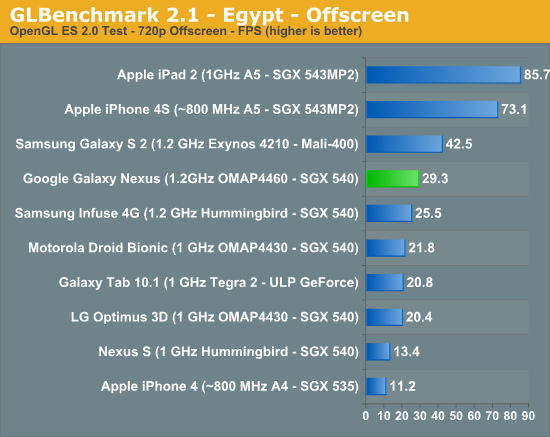
Its a SGX540, the same one in the Nexus S, but significantly higher clocked, running at 384mhz.
QUOTE
Iit's only the GPU that isn't as fast (the CPU is as fast as anything on the market right now, and faster than the iPhone). This will be the third fastest GPU on the market, behind the PowerVR SGX543 of the iPhone, and the Mali-400 of the Samsung Galaxy S2. For most tasks, of course, there will be tons of horsepower available for things like hardware acceleration of the OS, basic processing tasks, etc. These are not generally a challenge to most GPUs. The real question is, how will it handle games or apps like Google Earth or other 3D-intensive apps?
Think about this: when game developers release a game for the PC, do they optimize it so that it will only run on the brand new, top-of-the-line, $600 graphics card? Of course not. They wouldn't sell many copies, would they? Expect the same here. The PowerVR SGX540 of the Nexus is a potent GPU, one of the fastest on the market. Not being the fastest shouldn't be a concern. From
Android ForumsAlso, if you didn't notice already, games that are actually fun don't rely on polygon counts to sell the game, ie. cut the rope, plant vs zombie, coin drop, etc etc. If the iPhone 4 with SGX535, a lower end GPU than Nexus S, can have great game titles, I don't see how the G Nexus can't.
Food for thought, if the G Nexus can already play 95% of the games in the market (the other 5% being Tegra3 exclusives ), what significance does it make that the GPU scored lower in benchmarks?
» Click to show Spoiler - click again to hide... «
QUOTE
Corning has confirmed that the phone does NOT use Gorilla Glass via
Corning's twitter account, contrary to what Samsung indicated at the launch party. Samsung indicates that they use another brand of "fortified glass" so it should still be extremely hard. Some even suspect that it is Corning's "Lotus Glass" but without the brand name. Gorilla Glass is one brand of fortified glass and lack of it does not mean the screen will be prone to scratches. Please watch the Scratch Test at the video section.
» Click to show Spoiler - click again to hide... «
Yes, it is hidden in the middle of the bottom bezel. Watch the Notification LED demo at the video section
If you think its blinking too slow and want to make it faster, or to customize it to blink different color accordingly, try
Light Flow» Click to show Spoiler - click again to hide... «
Yes, ICS supports USB Host Mode. The Galaxy Nexus definitely supports it with its hardware, too, because it was announced that it would support USB game controllers. How it will treat attached flash storage is not known yet but it is almost certain that the functionality will be there. Paul, the founder of Modaco has published a modification of the kernel that provides
compatibility USB Host» Click to show Spoiler - click again to hide... «
If you feel that your phone's volume is too low, try
Volume+ to boost the volume.
As for quality:
QUOTE
Only had a brief listen on mine using some Yuin PK2s that I have.
I've come from an Xperia Arc, and before that I did have a SGS2 for a while.
I've not had enough time to make a definitive view but at this stage, the Nexus sounds more open than the Arc (which had a warm veil to the sound imo) and seems to be able to drive the Yuin's much better than the SGS2 - my ears will give up before I reach max volume this time around.
To my ears, at this stage, it offers a pretty well balanced sound - plenty of detail resolved without sounding overly harsh on the tracks I have tried. The mids certainly sound better than the previous 2 phones mentioned from my recollection.
Not had a play with any equaliser settings yet as I prefer listening without tweaking these in any way if possible.
Reckon it has potential - and its certainly good enough for the amount of listening I do. From
WhiteHartMart @ XDA DevelopersQUOTE
I have compared the Nexus to the GS2.
1. Don't worry it blows the GS2 out the water. Highs are high, lows are low.
Tested with .flac on same settings via power amp.
2. Its the best sound quality I have ever heard from .flac on a mobile phone. I never owned a Nexus1.
3. Speaker is very low. Not as loud as cm7 on GS2 but hey the quality is OK.
4. Gone are the days of the Bluetooth audio crackle via A2DP. It has very good quality via A2DP even compared to GS2 CM7.
If you are interested I tested the phones with some Astro A40's. Not the best for an audiophile but suitable for the test I guess. From
NatTheCat @ XDA DevelopersQUOTE
The headphone jack out of the Galaxy Nexus is good. Audio is clear, very little hiss using UE-11s.
I find the volume increments are too large but I listen at low volumes using low impedance IEMs. Others shouldn't find that to be a problem. From
doubleperfect @ XDA Developers» Click to show Spoiler - click again to hide... «
To enable Facebook sync, try
HaxSync..
» Click to show Spoiler - click again to hide... «
Is the Google search bar at the top of the home screens removable?
QUOTE
No, the search bar at the top of the home screens is not user-removable, movable or resizable.
Where did the Menu button go? How do we access options in apps?
QUOTE
Apps developed for versions of Android previous to ICS (excluding Honeycomb) will have their options menu accessible by a temporary fourth navigational button, which is three vertical dots.
What happens if the on-screen buttons 'freeze up'? Does the phone/device become unusable?
QUOTE
Whether a phone/tablet has physical buttons or on-screen ones, they will behave the same when the device lags or becomes unresponsive. On-screen buttons are different from hardware ones only in whether they are built into the phone or drawn on screen.
Where did the Search button go?
QUOTE
Apps developed for Honeycomb or ICS are supposed to implement in-app search buttons or search bars (typically in the Action Bar, at the top of the screen). Apps developed for earlier versions will need to be updated to at least include a 'Search' option in the options menu if not already provided.
Face Unlock can be fooled by a picture! What's up with that? That's not secure!
QUOTE
Google does not pretend that the Face Unlock feature is SUPPOSED to be a foolproof security measure; just a convenient, fun mechanism. Also, facial recognition software is not foolproof, and in all the “Face Unlock beaten by photo” videos I’ve seen to date, the pictures that ‘fool’ Face Unlock have been shot at practically the same time, and in the same lighting conditions, and resulted in a facsimile of the image captured during setup. Is it really all that surprising that this photo would unlock the phone? It hasn’t been shown whether face unlock will be easily fooled by, say, an older Facebook picture or another image of the user which ISN’T practically the same as when it was set up.
The primary goal of Face Unlock is to provide a measure of security if you accidentally leave your phone on, say, a bus or train. Most likely whoever picks it up won't know what you look like (and so wouldn't be able to get in with your picture), allowing you time to either find it again or remotely wipe it.
From
XDA Developers» Click to show Spoiler - click again to hide... «
QUOTE
Rooting an Android phone opens its core functions that aren’t available when you buy it. One of the major benefits is the ability to install apps to the SD card, which saves space on the device. Rooting also enables you to install apps that required access to system files, example - backup , screenshots . Commonly use of rooting is to allow installation of alternative roms which is faster and better, more features, and reduced bloatware.
Rooting will not remove your 3rd party apps, data/wipe clean your phone. And the chance of bricking the phone during rooting is close to impossible. Just make sure your phone has at least 50% battery charge.
Refer to
this guide on how to root the Galaxy Nexus.
» Click to show Spoiler - click again to hide... «
Galaxy Nexus official website
QUOTE
Rubin is explaining what makes a “Nexus” phone, as opposed to any old Android phone. Basically, Google gets deeply involved in the design, working with the hardware maker and the chipmakers.
Rubin notes there are over a million lines of code in Android.
“You don’t want to build it generically and then throw it over the fence.”
“I look it as a reference design,” Rubin said of the lead device. By
Andy Rubin, Creator of Android interview at AsiaDQUOTE
“So much work goes into producing the UI and the changes that you make, and then typically what happens is that the OEM’s put their skins on it and put their own touch. Does it bother you that so much work goes into it and in the end, a lot of consumers don’t interact with the UI as you intended it?”
Well, it would bother me more if we didn’t have programs like the Nexus program. The idea behind the Nexus device is to do exactly that – to give consumers an option to use the baseline work that we do if they choose…the philosophy of Android, the idea that partners can customize Android if they want to, is really important to making Android successful.
By
Matias Duarte, User Experience Designer of AndroidQUOTE
There are Android phones (Nexus). And there are Sense phones (HTC). And there are Philblur Motorola phones. And there are TouchWiz phones. And so on and so forth.
They may all use Android, but only one of those group should be considered as being Android. By
Phil Nickinson, Editor of Android CentralQUOTE
With the Nexus line, Google has its flagships, its models of how its operating system should work. The broader world of Android is more like MS-DOS—the original "weak OS." Every version of the software is retailored and rebranded by its manufacturer. Even some software has to be rewritten to conform to different machines and their varied specs. But what you get is accelerated development of hardware and broad interoperability between machines, which benefits both users and developers.
Why does this distinction matter?
If you're an Android user, you may simply have to accept that you didn't buy an Android device running Google software; you bought a device from Samsung, Motorola or Amazon running Samsung, Motorola or Amazon software. Unless you have a Nexus, Google's more or less invisible on your device. Finally, you're never going to be able to just pull a brand-new software update out of the cloud and stick it on your machine. Not unless you're up for a little hacking. From
ArstechnicaQUOTE
So when someone asks me why I prefer a Nexus over any other Android handset, why I'm making such a big deal over waiting it out for the Galaxy Nexus or why I don't just cave and buy something else with better specs, the answer is not because of the hardware itself or even the software. The answer is because the hardware and software mix together so well and Nexus phones have a history of consistency and great performance that nothing else really piques my interests. In addition, I'm an Android purist and while I understand the need for custom interfaces, I prefer my Android in the purest of forms. Having a phone that is shipped with the purest of stock Android and promised first dibs on any firmware updates from Google is enough to win me over.
There is on one specific reason why I want the Galaxy Nexus so bad. It's everything brought together in a single device, all of the gripes and disappointment in other, non-Nexus handsets that I've had over the past two years and the thought of using Android specifically how Google envisions it. Not everyone will agree, not will everyone understand. But we all have our reasons for the preferences we have, and a run-of-the-mill Android phone just doesn't cut it for me anymore. From
PhoneDogQUOTE
But that is the philosophy of Android, a philosophy that had eluded me until now. To Google, Android is an operating system. To companies like HTC, Samsung, and Motorola, Android is the building-blocks with which they will build their own unique devices.
Google makes Android phones. Apple makes iOS phones. HTC makes Sense phones. Samsung makes TouchWiz phones. Motorola makes MotoBlur phones.
I suddenly get Android. From
TechnoBuffaloQUOTE
I've absolutely loved using my pre-release Galaxy Nexus phone running the new version of Android, Ice Cream Sandwich. It is truly beautiful hardware with incredible software. By
Larry Page, CEO of Google Video
Google and Samsung, a look at what's new from Android » Click to show Spoiler - click again to hide... «
The Verge Review» Click to show Spoiler - click again to hide... «
In depth Unboxing» Click to show Spoiler - click again to hide... «
Notification LED demo» Click to show Spoiler - click again to hide... «
Scratch Test » Click to show Spoiler - click again to hide... «
Drop Test» Click to show Spoiler - click again to hide... «
ICS Easter Egg» Click to show Spoiler - click again to hide... «
1080p Video Sample» Click to show Spoiler - click again to hide... «
Mic Test» Click to show Spoiler - click again to hide... «
Android Beam» Click to show Spoiler - click again to hide... «
Face Unlock» Click to show Spoiler - click again to hide... «
MHL Cable demo» Click to show Spoiler - click again to hide... «


 Nov 26 2011, 12:17 AM, updated 14y ago


 Quote
Quote





 o a happy goat dancing:::





 0.1345sec
 0.53
0.53
 6 queries
 GZIP Disabled