

looking for Msata SSD halfslim 64GB to install OS, any recommendation?
Is Vostro 5460 support msata3 or only msata2?
Dell Vostro 5460, Ultrabook
Dell Vostro 5460, Ultrabook
|
|
 Jun 2 2013, 11:33 PM Jun 2 2013, 11:33 PM
Return to original view | Post
#1
|
 
Junior Member
33 posts Joined: Aug 2010 
|
looking for Msata SSD halfslim 64GB to install OS, any recommendation?
Is Vostro 5460 support msata3 or only msata2? |
|
|
|
|
|
Jun 3 2013, 11:29 PM
Return to original view | Post
#2
|
|
Junior Member
33 posts Joined: Aug 2010
|
QUOTE(aristotletan @ Jun 2 2013, 11:50 PM) SATA3.0, but backward compatible with SATA2.0 i hv ubuntu version vostro 5460 already, which done install win7 x64 inside, but tend to add in a Msata SSD to increase the performance.PLEXTOR SSD M5M or Crucial M4 Wanna install OS better get freeDOS version, if you haven't buy it. EDIT: Sry if made you confused. Both SATA and mSATA version is 3.0, so no worries.  if i didn't mistake, PLEXTOR SSD M5M & Crucial M4 both not compatible with vostro 5460. 5460 use half slim msata, which half size of normal Msata ssd card. |
|
|
Jun 4 2013, 12:57 AM
Return to original view | Post
#3
|
|
Junior Member
33 posts Joined: Aug 2010
|
looking for SanDisk® U100 SSD (mSATA mini) - SDSA5FK 64GB, dunno where can get it. if anyone know, pls tell me, thanks.
http://www.ssd.gb.com/Products/SanDisk_Ind..._mini/index.php |
|
|
Jun 4 2013, 10:51 PM
Return to original view | Post
#4
|
|
Junior Member
33 posts Joined: Aug 2010
|
QUOTE(suadrif @ Jun 4 2013, 08:00 AM) u assume or u really know? i'm confirmed normal size Msata ssd can't be use, coz i tear up my vostro 5460 already.anyone can confirm this? 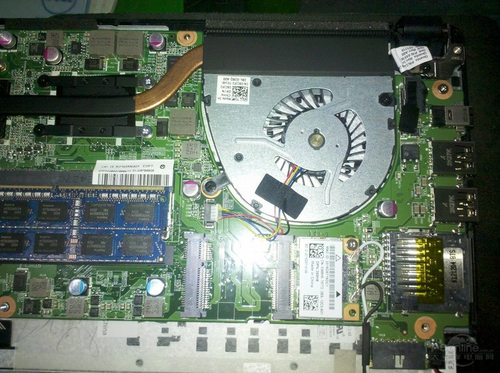 SanDisk U100 SSD mSATA mini half slim 64GB  plextor normal size  looking for http://www.ssd.gb.com/Products/SanDisk_Ind..._mini/index.php, amzon sell this card in$85, dunno malaysia gt sell or not....... |
|
|
Jun 5 2013, 11:09 AM
Return to original view | Post
#5
|
|
Junior Member
33 posts Joined: Aug 2010
|
QUOTE(scarxxx @ Jun 5 2013, 08:14 AM) » Click to show Spoiler - click again to hide... « I tried to look at the user manual but nothing stated about the size of the mSata.  Since kam_4160 have shown in his post above, I think I will scrap the idea of installing a mSata and get a SSD instead.  better get Msata 64GB to install OS, and 500HDD for storage...... js the Msata used by dell is kanasai non-famous half-size.......  This post has been edited by kam_4160: Jun 5 2013, 11:10 AM |
|
|
Jun 5 2013, 07:53 PM
Return to original view | Post
#6
|
|
Junior Member
33 posts Joined: Aug 2010
|
QUOTE(scarxxx @ Jun 5 2013, 07:26 PM) I have been thinking about this option for a very long time but now I know that the mSata size for this laptop is kinda odd. looking on taobao and amazon, js thinking better buy in malaysia if available.kam_4160, do you have any idea where can by that mSata? |
|
|
|
|
|
Jun 5 2013, 08:03 PM
Return to original view | Post
#7
|
|
Junior Member
33 posts Joined: Aug 2010
|
QUOTE(scarxxx @ Jun 5 2013, 07:58 PM) I wonder is the brand of the mSata which Dell use for the highest spec for this Vostro.. do call to ask dell CS, they don't sell msata separately no much option for this size of msata, 64gb one gt sandisk and few china brand only in taobao. which sandisk is sata3, and china brand gt sata2 only. just wonder whether ori or not if order from taobao china http://item.taobao.com/item.htm?spm=a230r....&_u=5iiak007d4d This post has been edited by kam_4160: Jun 5 2013, 08:06 PM |
|
|
Jun 5 2013, 08:19 PM
Return to original view | Post
#8
|
|
Junior Member
33 posts Joined: Aug 2010
|
QUOTE(devour @ Jun 5 2013, 08:14 PM) half size around how many mm ? 27mmx30mm |
|
|
Jun 8 2013, 05:30 PM
Return to original view | Post
#9
|
|
Junior Member
33 posts Joined: Aug 2010
|
QUOTE(guitar8888 @ Jun 8 2013, 04:55 PM) Well bummer I bought the vostro 5460 the RM2199 specs. 3cell but 51.2 wh , 11.4 v. Means 4491mAh .By the way how is the battery performance. I just realised it's only 3 cell. |
|
|
Jun 10 2013, 01:12 AM
Return to original view | Post
#10
|
|
Junior Member
33 posts Joined: Aug 2010
|
QUOTE(aristotletan @ Jun 8 2013, 02:45 AM) Dear Vostro 5460 user: vostro 5460 should support msata boot OS, as what i saw in dell forum as below link.DON't BUY half-sized mSATA SSD. This is because its BIOS itself doesn't support using MSATA SSD as boot-up, only can be used as cache. If you really want a cache mSATA, u should buy ultrabook version. http://en.community.dell.com/support-forum...8/20358010.aspx You may install the operating system on mSATA drive instead of HDD. However, then mSATA drive will work only as SSD and you won’t be able to use it as a cache drive. |
|
|
Jun 17 2013, 08:33 PM
Return to original view | Post
#11
|
|
Junior Member
33 posts Joined: Aug 2010
|
QUOTE(scarxxx @ Jun 17 2013, 07:25 AM) The highest spec in Malaysia come with mSata but the mSata only act as cache. Unable to install any OS on the mSata which rule me out from getting a mSata to slot into my machine. Can install os in msata. Did survey in china forum n asked someone who bought this msata in china.I got ordered 64g msata from china, will receive on next week. Later show your guy hw its perform ^.^  |
|
|
Jun 18 2013, 02:26 PM
Return to original view | Post
#12
|
|
Junior Member
33 posts Joined: Aug 2010
|
QUOTE(Alexdino @ Jun 18 2013, 11:19 AM) 64g for how much? erm.. for cache i think 32g would be enough, anyidea how much for 32g? thanks it cost me around RM250 for 64gb, sandisk msata mini, sata3.i tend to install OS with it but not cache loh. for cache, 20gb would be enough, 32gb around RM120, depend on brand and transport fee. u can hv a look on taobao.com |
|
|
Jun 22 2013, 11:16 AM
Return to original view | Post
#13
|
|
Junior Member
33 posts Joined: Aug 2010
|
Just got my new half size Msata SSD,
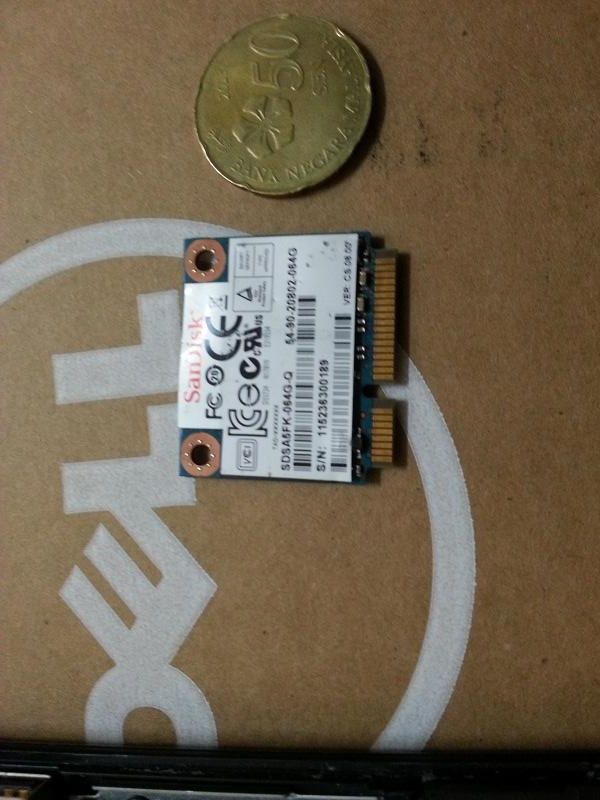 tear up the panel with a guitar clip after unscrew 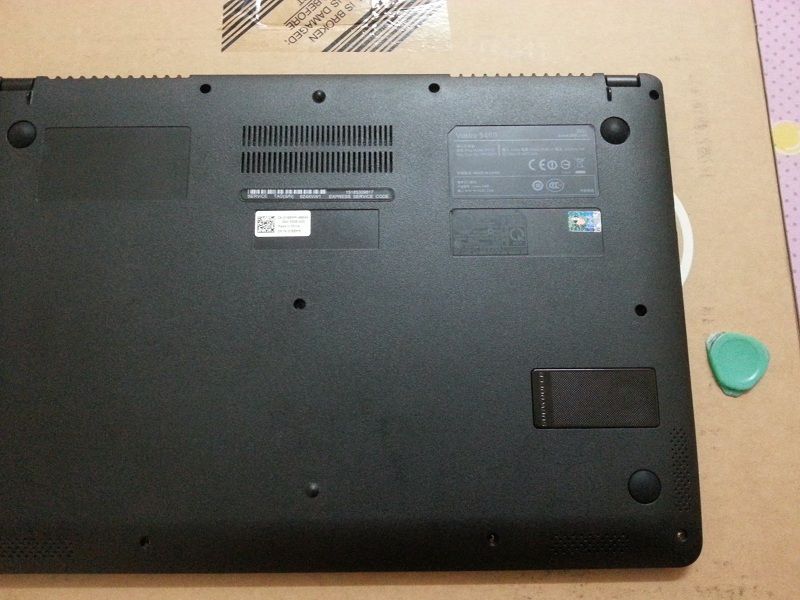 here the slot for msata  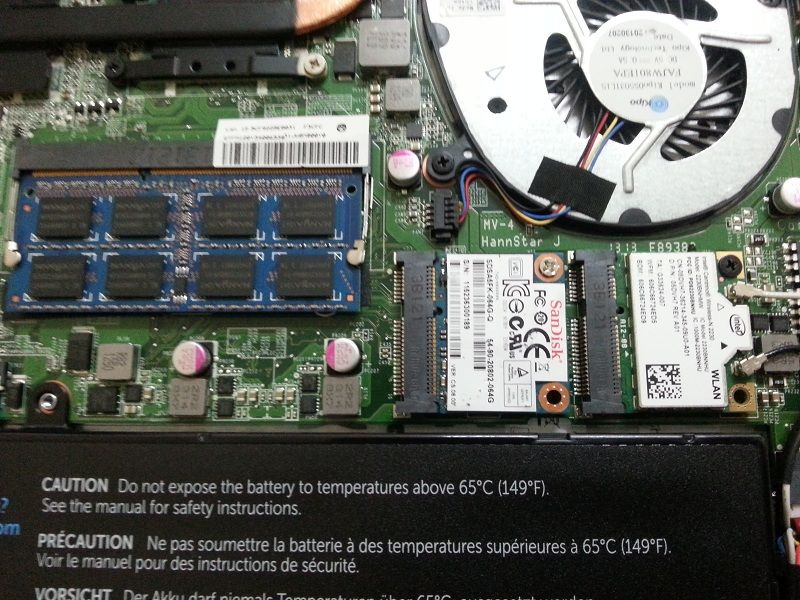 pls take note that, vostro 5460 bios don't support boot from msata thus, in order to boot OS from Msata, create boot partition on HDD were needed. 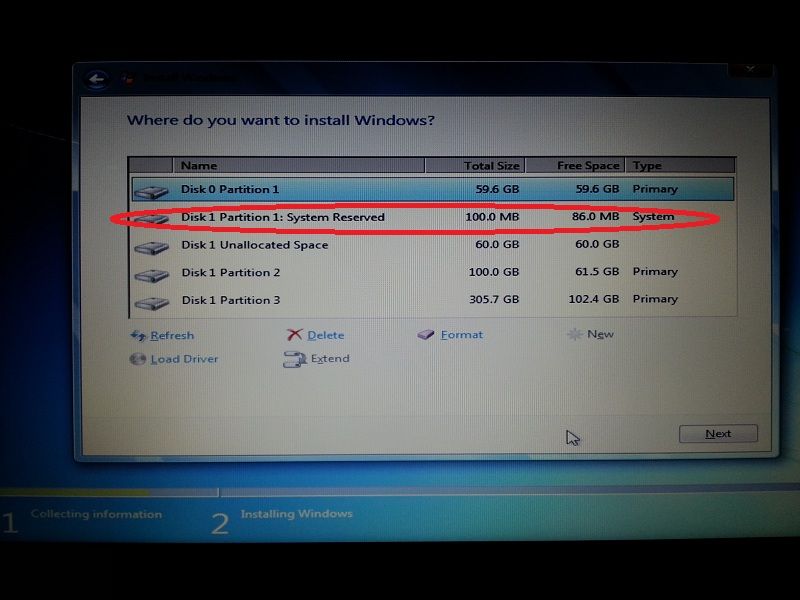 Done OS installation 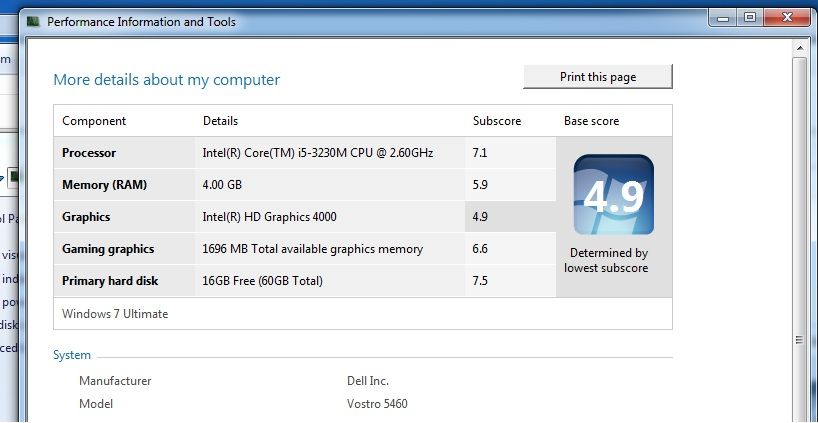 Speed test 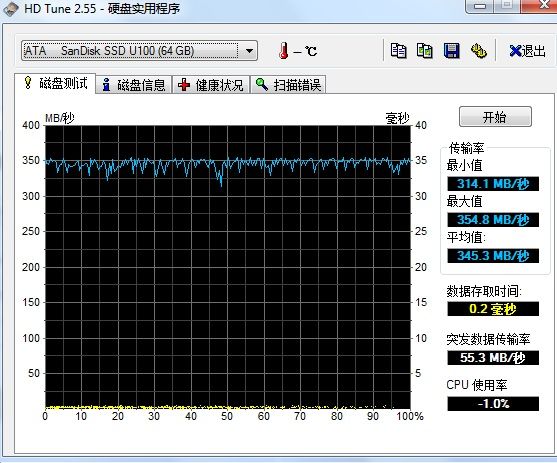 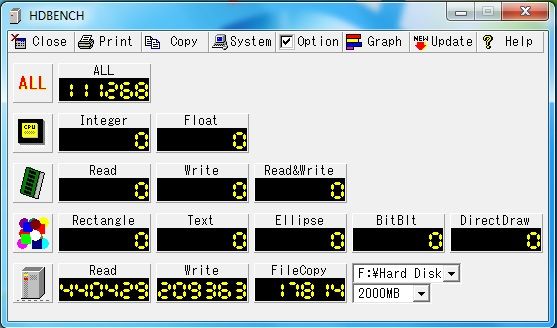 This post has been edited by kam_4160: Jun 22 2013, 11:56 AM |
|
|
|
|
|
Jun 22 2013, 03:12 PM
Return to original view | Post
#14
|
|
Junior Member
33 posts Joined: Aug 2010
|
QUOTE(Cold|Drawn @ Jun 22 2013, 01:50 PM) » Click to show Spoiler - click again to hide... « So initially the laptop doesn't come with the mSATA SSD? How much did you buy from TaoBao? Lol, how do you like the speed of the new SSD? Fast boot n response time. 15second boot win7 x64 Cost around rm250 including postage. |
|
|
Jun 22 2013, 10:14 PM
Return to original view | Post
#15
|
|
Junior Member
33 posts Joined: Aug 2010
|
QUOTE(Alexdino @ Jun 22 2013, 09:12 PM) ur disk 0 is msata and disk 1 is ur hdd? correct, a system reserve partition need to be created when install win7, its contain boot files inside. since bios din't support boot from msata, that partition need to be created from disk 1 (HDD).u meant need to have boot partition in ur hdd (disk1) and windows on ur msata (disk0), since bios boot option can only select disk 1 (hdd). do u reinstall ur windows? what if i plan to clone my current windows, any idea how should i do it. can i just shrink and clone my current c into msata, and leave current boot partition at hdd (disk 1) then edit the bootloader of msata(disk 0) to read disk 1? any idea about running as cache? if i plan to get 32gb instead of 64gb i'm prefer to reformat the OS, coz it's easier and clean. whole installation take 5-8 mins only. There are a lot of utilities for clone os, like ghost, xxclone, Partition Assistant, etc Boot Configuration Data Editor (BCDEdit) and EasyBCD is the utility to use when editing boot loader information in Windows 7 (and in Vista too). you can choose either run msata as normal ssd or cache, once u choose to run it as cache, u can't see it in my computer and save anything inside. cache will help on certain situation only, won't be much different with only HDD. But run as OS partition will increase a lot on boot time and software response time. 32gb also manage to install win7 which take around 15gb only, but few space will left after install software. This post has been edited by kam_4160: Jun 22 2013, 10:22 PM |
|
|
Jun 22 2013, 11:59 PM
Return to original view | Post
#16
|
|
Junior Member
33 posts Joined: Aug 2010
|
QUOTE(Alexdino @ Jun 22 2013, 10:34 PM) thanks for the info. btw, i bought the wrong harddisk size today  , might as well go back change to ssd tomorrow, luckily i didn't open the package yet, dont know they allow me to change or not , might as well go back change to ssd tomorrow, luckily i didn't open the package yet, dont know they allow me to change or not i never know this model run on 7mm hdd  bought a 9mm standard 2.5" bought a 9mm standard 2.5"  . anyone know will it fit? . anyone know will it fit?ps: i have previously tried to upgrade ram 4g and msata, but all bought it wrongly didnt know it only has 1 ram slot, and 1/2 cut msata, instead upgrade all to my asus g55 now.. my hdd gt bad sectors, gotta claim warranty with dell next week my hdd gt bad sectors, gotta claim warranty with dell next week  Damn poor building materials n part |
|
|
Jun 24 2013, 08:26 PM
Return to original view | Post
#17
|
|
Junior Member
33 posts Joined: Aug 2010
|
QUOTE(scarxxx @ Jun 24 2013, 07:40 AM) So you able to install OS on it? Seems like my hope has revived! bro, not sure for linux   coz i boot from HDD but track to win7 on Msata  |
|
|
Jun 24 2013, 09:15 PM
Return to original view | Post
#18
|
|
Junior Member
33 posts Joined: Aug 2010
|
QUOTE(scarxxx @ Jun 24 2013, 08:30 PM) are you able to boot the mSata from Bios?? No this option  |
|
|
Jun 26 2013, 01:45 AM
Return to original view | Post
#19
|
|
Junior Member
33 posts Joined: Aug 2010
|
QUOTE(herojack41 @ Jun 24 2013, 11:28 PM) i damn hate the speaker its should be same, since both i5 & i3 same using hm77 chipsetany1 have done some fine tuning on the speaker? btw.... kam_4160 i bought the i3 free dos version......is it all dell vostro are same motherboard? |
|
|
Jun 26 2013, 01:55 AM
Return to original view | Post
#20
|
|
Junior Member
33 posts Joined: Aug 2010
|
QUOTE(Cold|Drawn @ Jun 25 2013, 12:14 AM) bro, got any guide on how you created the boot partition in hdd 1, but boot os from msata? even chinese forum is ok for me i'm use the simple way only. delete all the partition, a system reserved partition will be created when create new partition on HDD. create new partition on msata, and direct install the win7 into msata partition, done. because bootmgr in new system reserved partition will be generate during window installation and track to path that new win7 been installed. if u meant clone OS and edit bootmgr path, try google it  |
| Change to: |  0.0683sec 0.0683sec
 0.33 0.33
 7 queries 7 queries
 GZIP Disabled GZIP Disabled
Time is now: 3rd December 2025 - 10:25 PM |
 Quote
Quote