Welcome Guest ( Log In | Register )

4 Pages < 1 2 3 4 >Bottom

Outline · [ Standard ] · Linear+

 Lenovo IdeaPad Y Series Thread v3, y510p, where are you?

views
     
sss2sssss
post Jul 1 2013, 07:33 AM

I'm Abra
******
Senior Member
1,329 posts

Joined: May 2008
QUOTE(mrl @ Jul 1 2013, 12:31 AM)
kinda confuse with your explanation...  sweat.gif

but mine will light up if muted, and doesn't light up if it isn't mute... win7 and win8 both behave the same...
*
Well for Y480, only when mute the mute/unmute button light up.....
sss2sssss
post Jul 3 2013, 08:08 PM

I'm Abra
******
Senior Member
1,329 posts

Joined: May 2008
BTW, I dun have the problem u face in this moment...
Maybe I using FreeDOS and buy the Win 8 Pro key myself (Although I also get from my uni).....
And also I'm using the .209 Atheros wifi driver, never dc lol.....
sss2sssss
post Jul 6 2013, 12:03 AM

I'm Abra
******
Senior Member
1,329 posts

Joined: May 2008
QUOTE(Xu3r @ Jul 5 2013, 11:28 PM)
but why the grey or imported sets have problems
*
if u have the official receipt (like US, they mostly sell online so the receipt they give is the lenovo official receipt) then u can claim the warranty....
sss2sssss
post Jul 6 2013, 11:09 AM

I'm Abra
******
Senior Member
1,329 posts

Joined: May 2008
QUOTE(awyongcarl @ Jul 6 2013, 10:28 AM)
Uhh guys, I really need your help now.
My sister bought a Y400 last week, it was suppose to come with Windows 8 but my sister asked the salesman if they can install Windows 7 on this machine.

Why? Because apparently some of her friends told her that the programs and software they used for their University work do not work on Windows 8 (AutoCad, StudioMax 3D, Rhino etc). Which is a load of bull because I've successfully installed every single one of them on my Desktop that runs Windows 8.

So long story short, the technician installed a pirated copy of Window 7 over the 8.

Now I'm trying to get the machine recovered back to it's Factory state. I tried the Lenovo One button, chose "System Recovery" on the menu but it don't work. It just boots into the Windows 7. Right anyway I did a quick googling and..The result is bleak to say the least. I suspect that retarded technician erased the hidden recovery partition and there is no recovery disc available. To be fair to my sister, she did asked whether it comes with a recovery disc and the technician told her yes, but what she didn't know is this is just the driver disc...

So now, what can I do next to get the machine back to its factory state?
*
I think they probably repartition the whole HDD before install Win 7...
Just go Lenovo Service center

PS:
AutoCAD 2012 work in Win 8 (just AutoCAD 2013 can't install without modified some file inside the installer)
And also tons of engineering software which I currently use also work in Win 8
sss2sssss
post Jul 6 2013, 11:09 AM

I'm Abra
******
Senior Member
1,329 posts

Joined: May 2008
QUOTE(awyongcarl @ Jul 6 2013, 11:08 AM)
Really? I thought there is no way to restore the HDD?
*
They of course got the OEM iso.... lol
sss2sssss
post Jul 6 2013, 11:58 AM

I'm Abra
******
Senior Member
1,329 posts

Joined: May 2008
QUOTE(storm88 @ Jul 6 2013, 11:55 AM)
Try switch the Legacy mode back to UEFI in the bios and to see if that allows you boot into recovery partition
*
I think u tag wrong ppl.... wink.gif
sss2sssss
post Jul 12 2013, 10:58 AM

I'm Abra
******
Senior Member
1,329 posts

Joined: May 2008
QUOTE(chugeliang @ Jul 12 2013, 10:27 AM)
what is this ? some sort of small heatsink
*
just go jln pasar found if u really want small heatsink, u can found plenty of them.....
sss2sssss
post Jul 14 2013, 05:28 PM

I'm Abra
******
Senior Member
1,329 posts

Joined: May 2008
QUOTE(genecor @ Jul 14 2013, 05:19 PM)
This is a concern that stops me from asking my relative from buying it and bringing back when they're coming here for their Holiday.
So if you have the original receipt from US, Local Lenovo will cover warranty, no questions and hassle if its a legit claim and not User major f-up?
Are his set covered by Local Lenovo warranty? Does he give original warranty? His pricing looks quite good. These should be BNIB or refurbs?
*
ya....
sss2sssss
post Aug 8 2013, 08:56 AM

I'm Abra
******
Senior Member
1,329 posts

Joined: May 2008
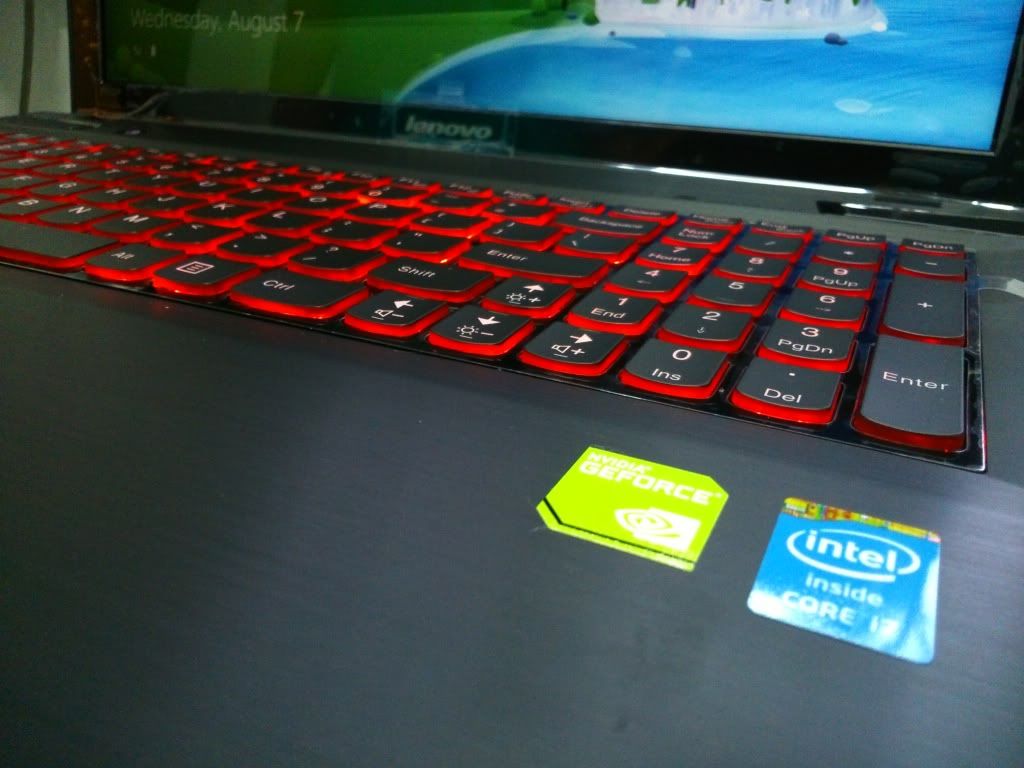
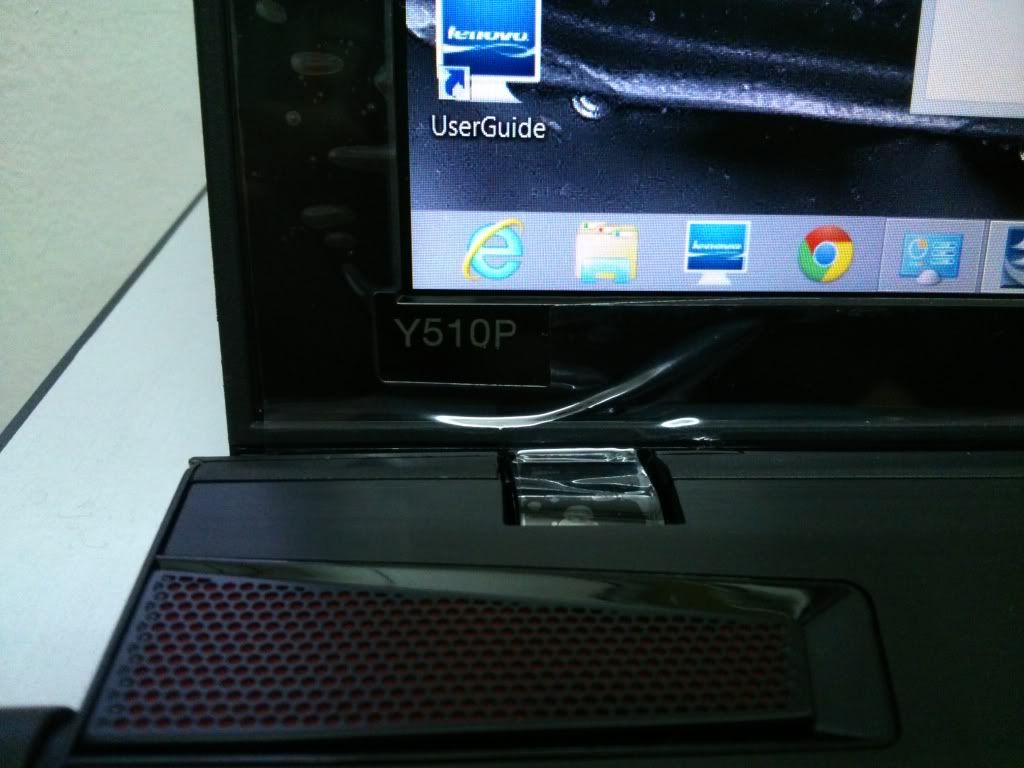
So, my friend got I think is first Local Set Y510P....lol
user posted image
user posted image
sss2sssss
post Aug 9 2013, 01:32 PM

I'm Abra
******
Senior Member
1,329 posts

Joined: May 2008
QUOTE(ruztynail @ Aug 9 2013, 01:16 PM)
Buy from ?
*
He go to lowyat plaza there buy one , his friend work at one of the computer shop (forgot to ask the name )

Edit :
Third floor Lenovo shop there

This post has been edited by sss2sssss: Aug 9 2013, 02:15 PM
sss2sssss
post Sep 7 2013, 03:41 PM

I'm Abra
******
Senior Member
1,329 posts

Joined: May 2008
QUOTE(Y.O.N @ Sep 7 2013, 03:19 PM)
Thats why.. So sad about it...
Seller fron Q & H Technology ask me to buy new webcam...
*
I think now they try to isolating ur case ady...
Since now they ask u to buy webcam....
sss2sssss
post Sep 18 2013, 09:00 AM

I'm Abra
******
Senior Member
1,329 posts

Joined: May 2008
QUOTE(R3b0rn @ Sep 17 2013, 11:07 AM)
RealTemp, HWMonitor, CoreTemp.

After repaste, then run some prime95 to check stability, Throttlestop to set the profiles. biggrin.gif
Run Unigine, check GPU Temp.

The lenovo's uses a "grey" paste and a sticky like "thermal pads" i can said the thermal pads they use is a joke. :/

of coz they applied the paste is too much. Plus, they not even remove the plastic :/

I advice for ArtiClean set if you plan to repaste (remove the paste) and air can to  blow out dust.

Do this setting, so you will know hows the temperature after repaste. (In Games) http://forum.notebookreview.com/alienware/...en-display.html
*
So if I want to repaste I need to find someone , I dun have skill to open
sss2sssss
post Sep 28 2013, 04:12 PM

I'm Abra
******
Senior Member
1,329 posts

Joined: May 2008
QUOTE(deeepahhh @ Sep 28 2013, 02:08 PM)
hey guys, kinda excited to get my hands on my Y510P later on. Managed to get it for RM2999 lol.
*
Where is the place u buy?
Local set or grey set?
sss2sssss
post Oct 13 2013, 10:20 AM

I'm Abra
******
Senior Member
1,329 posts

Joined: May 2008
QUOTE(wanttobuylaptop @ Oct 10 2013, 12:37 PM)
anyway, i7-4500U isnt a quad-core. is a dual core.
guys, can i RMA my y580 because the temp is too hot during gaming?
record 93c under lenovo dynamic graphic in skyrim.
*
wow so hot...@@
My Y480 still can maintain at 7Xc when playing NFS Hot Pursuit 2012.....
sss2sssss
post Oct 18 2013, 04:07 PM

I'm Abra
******
Senior Member
1,329 posts

Joined: May 2008
BTW to any one update their Windows 8 Pro to Windows 8.1 Pro and get this error:
SecureBoot isn't configured properly
I got a solution can solve (only for Y480/Y580)
First u may download 5DCN87WW BIOS (mine one is from 5DCN40WW [Win 7 BIOS] previously) and flash this BIOS
(I'm not 100% sure that every machine will be flash successfully, mine is success, please do on ur risk)
http://www.mediafire.com/?r1h3prqy6d97g93
after that ur laptop will be restarted, notice the message still there, it's normal since it still no complete yet.
now restart ur laptop and once it appear "Lenovo" logo press F2 continuously.
It will go inside the BIOS menu.
Inside BIOS, go "Security" -> "Restore Factory Keys", then "Exit"-> "Exit and Save Change"
if still din disappear, go back to BIOS and "Security" tab, but click "Reset to Setup Mode"-> then "Restore Factory Keys", then "Exit"-> "Exit and Save Change"

This should fix that problem, just update the new SecureBoot key for Win 8/8.1 in UEFI mode

If for Y400/Y500/Y410p/Y510p, since the BIOS preload and the updates is for Windows 8 already, so I think the BIOS got that kind of function too

This post has been edited by sss2sssss: Oct 18 2013, 10:11 PM

sss2sssss
post Oct 19 2013, 01:14 PM

I'm Abra
******
Senior Member
1,329 posts

Joined: May 2008
QUOTE(Tuyin @ Oct 19 2013, 01:04 PM)
Anyone facing incorrect resolution in game after updating to 8.1
*
For me it's no la, tried in NFS HT 2012
sss2sssss
post Oct 25 2013, 11:49 PM

I'm Abra
******
Senior Member
1,329 posts

Joined: May 2008
QUOTE(mrquidz @ Oct 25 2013, 11:24 PM)
Anybody can help me here? I'm having a weak signal with my laptop.

user posted image

As you can see from the image above, both laptop are located side by side. And my wife's lapotp is having better signal than my Y480!

My spec is :

Windows 8
Qualcom Atheros AR9285
Driver Date : 3/7/2012
Driver Version : 3.0.0.130
And from website http://support.lenovo.com/en_MY/downloads/...selector=expand

1. Intel WiMax Driver (Intel 6150NX) for Microsoft Windows 8 (32-bit, 64-bit)
2. Intel Wireless LAN Driver for Microsoft Windows 8 (32-bit, 64-bit)
3. Wireless LAN Driver (CyberTan/Broadcom, Liteon/Atheros) for Microsoft Windows 8 (32-bit, 64-bit)

There's 3 files. And which one should i choose if i want to update the driver? Kinda confuse abit..
Help me! Thanks.  notworthy.gif
*
Wireless LAN Driver (CyberTan/Broadcom, Liteon/Atheros) for Microsoft Windows 8 (32-bit, 64-bit)
this, BTW I hope we can change to Intel Wi-Fi card...lol
the poor signal is due to the antenna I think, we got only two if compare to other laptop which got three
and also atheros wi-fi card is not so good la....
sss2sssss
post Oct 27 2013, 01:25 AM

I'm Abra
******
Senior Member
1,329 posts

Joined: May 2008
QUOTE(king99 @ Oct 27 2013, 12:36 AM)
got reach until 97+c ? lol...1st time buy gaming laptop....these temp scares me..

The only way to play BF3 @ 1080p is to underclock the CPU to 2.0 Ghz from 2.4Ghz...or else it will throttle and causes the screen to flicker....

After underclock also hover around 95c
*
Mine always maintain at 7X-8X....
sss2sssss
post Nov 16 2013, 02:19 AM

I'm Abra
******
Senior Member
1,329 posts

Joined: May 2008
QUOTE(shadowzephyr @ Nov 16 2013, 02:03 AM)
Sorry for double post.

I tried call the service center yesterday evening, and they said need to take at least 7 days just for simple task which is to reapply the thermal paste (and I'm sure the person I called didn't even know what I'm talking about).

So I got fed-up, and decided to do this myself.

And after the first time disassemble this machine, I'm now happy with my current temp, maximum is 72C. That's 21C lower than before! biggrin.gif

I replace the previous thermal paste with XIGMATEK Freezing Point G4718 (this is the only paste I can get yesterday evening near Bangi area  sweat.gif ), but quite impressed with the performance.

Here's a few photos of my self-repair:

» Click to show Spoiler - click again to hide... «


And here's the result, before and after (Furmark screenshot):
» Click to show Spoiler - click again to hide... «


I'd say, the result is quite impressive.  wink.gif
*
Can help me to disassemble as well? lol
I feel like I'll break all the pin inside this laptop so I no dare to disassemble...
sss2sssss
post Jan 25 2014, 11:17 PM

I'm Abra
******
Senior Member
1,329 posts

Joined: May 2008
QUOTE(mrl @ Jan 25 2014, 10:58 PM)
RAM is not soldered, SODIMM is used... I've never saw any laptop with soldered RAM actually... is there any?
I heard that the latest driver gave problem... last R331 version should be ok to use.
*
MacBook Air is an example of the soldered RAM laptop/ultrabook
And also the MacBook Pro 2013

This post has been edited by sss2sssss: Jan 25 2014, 11:21 PM

4 Pages < 1 2 3 4 >Top
 

Change to:
| Lo-Fi Version
0.0278sec    0.34    7 queries    GZIP Disabled
Time is now: 8th December 2025 - 12:11 PM