Welcome Guest ( Log In | Register )

Bump Topic Topic Closed RSS Feed

Outline · [ Standard ] · Linear+

Hardware Official Microsoft Surface Thread V1

views
     
atih007
post Aug 2 2013, 10:18 AM

Regular
******
Senior Member
1,612 posts

Joined: Mar 2005


finally the pro is in my hand. thumbup.gif


» Click to show Spoiler - click again to hide... «
I would like to know from others that using this kind of case. would it annoyed when we slide our finger to the edge of surface?

» Click to show Spoiler - click again to hide... «
wah, this is a life saver. will look for it.

Btw, anyone care to bring car adapter/charger for surface pro? coz I would love to join the bulk. icon_rolleyes.gif
http://mikegyver.com/Surface-Battery-Car/

This post has been edited by atih007: Aug 2 2013, 10:20 AM
atih007
post Aug 2 2013, 11:42 AM

Regular
******
Senior Member
1,612 posts

Joined: Mar 2005


QUOTE(Silverfire @ Aug 2 2013, 10:50 AM)
I tried searching in eBay, there are some quite simply chargers going for RM30+ http://www.ebay.com.my/sch/i.html?_trksid=...cat=0&_from=R40

But I think its gonna charge kinda slow.
*
that one is for RT. which I think most probably no need for car charger coz the battery lasting very long..

but different case for pro which I think will need car charger. pro consume lots of power, it won't last long.
atih007
post Aug 2 2013, 04:26 PM

Regular
******
Senior Member
1,612 posts

Joined: Mar 2005


QUOTE(Silverfire @ Aug 2 2013, 11:57 AM)
RT charger works on Pro too, just that its half as fast. But for a charger which the power input, I think its gonna be slow for either Pro or RT.
*
slow charging is better than no battery..

QUOTE(pristine @ Aug 2 2013, 12:11 PM)
I'm waiting to get my surface rt and currently looking for an sdxc card. Anyone know what the max speeds the rt can handle? Was thinking of getting the new extreme micro sdxc.
*
im using sandisk extreme 64gb. it's up to 80MB/s. that's the fastest and largest size I can find..

» Click to show Spoiler - click again to hide... «

kewl.. thumbup.gif rclxms.gif
atih007
post Aug 2 2013, 08:44 PM

Regular
******
Senior Member
1,612 posts

Joined: Mar 2005


QUOTE(pristine @ Aug 2 2013, 04:47 PM)
Thanks for the reply.  thumbup.gif

The extreme, the new gold colour one right? "Fastest in the world"? Lol

Any difference with ultra? Or you have no idea?  laugh.gif
*
Dem rite.. I got no idea compare to ultra.. sweat.gif

my intention just to get the largest size and the fastest so can 'match up' the ssd speed.
atih007
post Aug 3 2013, 07:39 AM

Regular
******
Senior Member
1,612 posts

Joined: Mar 2005


I bought mine at normal price, rm299..

Here got forummer selling a bit cheaper for Sandisk Extreme SDXC 64GB, RM280..
https://forum.lowyat.net/topic/2316895

» Click to show Spoiler - click again to hide... «

atih007
post Aug 3 2013, 07:55 AM

Regular
******
Senior Member
1,612 posts

Joined: Mar 2005


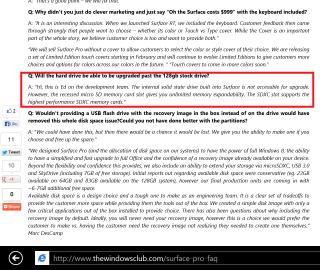
Interesting fact about expandable memory for surface..

Attached Image

Source: http://www.thewindowsclub.com/surface-pro-faq
atih007
post Aug 3 2013, 10:37 AM

Regular
******
Senior Member
1,612 posts

Joined: Mar 2005


QUOTE(Silverfire @ Aug 3 2013, 09:12 AM)
A lot less games but for Microsoft Office work, movie+messaging multitasking. Its excellent biggrin.gif Not to mention portability with micro hdmi output.

A short video I recorded:

*
i wouldn't agree less games for surface pro. it's purely windows 8 and capable of directx games. just limited to storage and graphics..

btw, I can't see the video.
atih007
post Aug 3 2013, 12:24 PM

Regular
******
Senior Member
1,612 posts

Joined: Mar 2005


QUOTE(forumnet @ Aug 3 2013, 11:44 AM)
tht casing wont annoyed you when we slide your finger to the edge of surface, it will just fit nicely your pro station into it,

my comments is base on i did use something similar like the casing photo you post up, everything is great, the only diffenrence i think is the one i used can support"multi-angle", and the one you post up can support "only one angle" (pls pardon me yo if i am wrong)  blush.gif

https://forum.lowyat.net/index.php?showtopic=2906790&hl=
*
the photo is just an example that I quoted from previous post. it would great if it's multi-angle.

my concern is sliding our finger to the edge. because somehow I think it will annoyed when we want to 'minimize' apps/window from top to the left. or 'maximize' from left to right. or 'close' apps/window down to the bottom. I think I have to try the case first..
atih007
post Aug 3 2013, 01:13 PM

Regular
******
Senior Member
1,612 posts

Joined: Mar 2005


QUOTE(forumnet @ Aug 3 2013, 12:44 PM)
it wont annoyed when even you sliding your finger to the edge, when you do "minimize or window frm top to left functions etc etc,

you can have a look at the 1st picture i post up on my thread (i want to highlight here, i am not using this disccussion thread to promote or sell my extra stuff (i m not a trader)), just lazy to again find the pictures to upload again frm my hp,

the surface pro will just fit really nicely "nyam nyam" into the casing, and wont disturb any finger functions on the four corners when we touch it, bcoz i very frequent swap my window to the left or minimize my screen when i do multi task with the OneNote, ms PPT, google & youtube etc etc like what the youtube video show (anyway i also learn this function only when i watch this youtube video, d only difference is the youtube video user is using a surface RT & i m using a surface pro wink.gif)

http://www.youtube.com/watch?v=TlllQi085-0

https://forum.lowyat.net/index.php?showtopic=2883316&hl=
*
I see. Thanks for your sharing. biggrin.gif


QUOTE(pristine @ Aug 3 2013, 12:47 PM)
Well, apparently the surface is even compatible with a 10 port hub and there's a video of it connected to 8 devices.

I massaged kaiwen, David and solar wing. All no stock yet for the micro sdxc extreme. sad.gif
*
no luck eh.. maybe u shud come to lowyat instead..
atih007
post Aug 3 2013, 01:21 PM

Regular
******
Senior Member
1,612 posts

Joined: Mar 2005


Seems like the expandable memory works very well!

I installed some games into sdxc.
Attached Image

Then run it, it goes smoothly. This is the benchmark's screenshot, graphics are set to the highest setting.
Attached Image
atih007
post Aug 4 2013, 06:22 AM

Regular
******
Senior Member
1,612 posts

Joined: Mar 2005


QUOTE(Mr.Docter @ Aug 4 2013, 01:02 AM)
Too bad, RT can't enjoy such luxury (read:games) sad.gif
*
But RT can enjoy longer time usage and lighter weight.. the pro I think took a long time to fully charge while using it.

QUOTE(Silverfire @ Aug 4 2013, 01:08 AM)
Apparently Sandisk made a new 80mb/s version. Saw it today at Lowyat. Currently the Sandisk mobile ultra 32gb goes for RM89. Unfortunately I only the SD 32gb 80mb/s being RM159.
*
At lowyat U can find SanDisk extreme 64GB at viewnet and Sri computer. Rm299..

QUOTE(noorimanyosh @ Aug 4 2013, 05:03 AM)
pfft...if the 64gb microsd cost rm2++...better buy 1TB hard disk straight away=.=
*
Yes, that is true. But U have to connect it each time to use it. As for me, I use sdxc to install pc games. laugh.gif
atih007
post Aug 4 2013, 06:40 PM

Regular
******
Senior Member
1,612 posts

Joined: Mar 2005


QUOTE(richard912 @ Aug 4 2013, 02:51 PM)
I recently ran excel and powerpoint over almost 5 hours. No signs of lag even when I snapped between them and the start screen, check mail and responding to them (wifi on through out of course). Only bit of slowness was from skimming through huge pdf files loaded up via a thumbdrive through the sole USB port. the pages took a bit of delay to load up (100+ pages per file!!) Ended the session with batt level still above 50% thumbup.gif
*
Nice..

Anyone knows how to screen capture to the specific window? I know windows button + volume down button, but that is for the whole screen. Normally I press alt + screen capture buttons..
atih007
post Aug 5 2013, 12:05 PM

Regular
******
Senior Member
1,612 posts

Joined: Mar 2005


QUOTE(Silverfire @ Aug 4 2013, 11:39 PM)

  1. Has 3rd party Google Driver viewer, Dropbox is available from official dev.
  2. Have not tried.
  3. Yes, Home & Stud 2013.

*
dropbox app cannot sync for local files.. just like viewing/downloading from the web..

» Click to show Spoiler - click again to hide... «

this is great. I also dunno..

QUOTE(noorimanyosh @ Aug 5 2013, 02:22 AM)
hand already itchy waiting for my RT biggrin.gif
*
congrates!

QUOTE(bluebeary @ Aug 5 2013, 06:12 AM)
Wow, that's a good news. Can you sync the google drive and have the files downloaded to surface RT?
*
I think google drive in google search just for online. got another app called Gdrive Pro.. it say can sync local files..
atih007
post Aug 6 2013, 03:17 PM

Regular
******
Senior Member
1,612 posts

Joined: Mar 2005


the person most directly responsible for Surface..

user posted image
Panos Panay, Microsoft corporate vice president


atih007
post Aug 6 2013, 03:22 PM

Regular
******
Senior Member
1,612 posts

Joined: Mar 2005


shoot.. the desktop scaling issue is real. sad.gif

I hope windows 8.1 will solve it. huhuhu
atih007
post Aug 6 2013, 03:47 PM

Regular
******
Senior Member
1,612 posts

Joined: Mar 2005


wat a monster.. usb 3 dock. connect to the only one surface usb port, then able to connect with everything.

http://plugable.com/products/UD-3000
user posted image

real situation: http://winsupersite.com/windows-8/going-pr...placing-desktop
user posted image user posted image
atih007
post Aug 7 2013, 09:03 AM

Regular
******
Senior Member
1,612 posts

Joined: Mar 2005


i will wait the official win8.1 released rather try the preview one.. tongue.gif

QUOTE
QUOTE(pristine @ Aug 6 2013, 07:27 PM)

Anyone running windows 8.1 preview on their tablet?
*
QUOTE(hmwgbworld @ Aug 6 2013, 08:47 PM)
Yea, but it will a bit hassle to backup the OS first for a lazy ppl like me  tongue.gif .
*


atih007
post Aug 7 2013, 10:33 AM

Regular
******
Senior Member
1,612 posts

Joined: Mar 2005


QUOTE(marauderz @ Aug 6 2013, 04:47 PM)
What desktop scaling issue?
*
for pro users, the windows desktop is freaking too small to see. it's because the screen size is small but the resolution is high. to solve this, desktop size is scaled to 125% or 150%. but when attached to secondary display, the display when off because of the scaling..

QUOTE(LiMi @ Aug 6 2013, 05:29 PM)
it sucks doesnt it? i having a 11 inch ultrabook with full HD also living the same pain
*
yeaasss...... really sux. doh.gif

QUOTE(nexus2238 @ Aug 6 2013, 06:36 PM)
yup, W8.1 solve the support of different resolution on multiple displays.
*
win7 and win8 also support different resolution on multiple displays. the resolution got nothing to do, but the scaling itself. for example, the screen is scaled to 150%, but the resolution still remain 1920x1080.

from what i understand, windows 8.1 will have something like auto-scale. it will detect the display size and put the right size for each display attached.

atih007
post Aug 14 2013, 10:06 PM

Regular
******
Senior Member
1,612 posts

Joined: Mar 2005


Here's what I found the faq.
Attached Image

QUOTE(mR.hyDE @ Aug 14 2013, 06:34 PM)
Just chat with David, customer service of Microsoft Store and he said any enquires pls email to SurfaceEDU@Microsoft.com, which is a department to handle this offer and i found that the promotion is now extended to 30 September :
[attachmentid=3581841]
from this website
http://www.microsoft.com/student/en-au/Off...bid=KE7J9dZklRC
and the pdf is here
Brochure:
[attachmentid=3581846]
FAQ:
[attachmentid=3581847]
*
atih007
post Aug 18 2013, 10:33 AM

Regular
******
Senior Member
1,612 posts

Joined: Mar 2005


QUOTE(pristine @ Aug 17 2013, 01:12 AM)
Haha. First I need to learn how to use this, still not used to the interface or Win8. Been on 7 for too long. tongue.gif

Any Micro SD can fit, up to Micro SDXC. Max capacity is 64 GB. As for the read/write speed of the device, I'm not too sure yet. Will find out a way to test it with my card and update. That is, if I can get the test done. tongue.gif
*
It should max capacity available now is 64GB. SDXC provides unlimited memory but the largest available micro SDXC in the market is 64GB.
http://www.thewindowsclub.com/surface-pro-faq


QUOTE(underworld @ Aug 17 2013, 10:01 AM)
registered
http://www.microsoft.com/surface/en-my/support/register

get 2 years warranty

windows activated too
*
I registered but get 1 year warranty. hmm.gif

2 Pages  1 2 >Top
Topic ClosedOptions
 

Change to:
| Lo-Fi Version
0.0383sec    0.56    7 queries    GZIP Disabled
Time is now: 4th December 2025 - 07:39 AM