Outline ·
[ Standard ] ·
Linear+
IPhone 5 IOS 6.1.2 Slow WIFI
|
TSxingxing123
|
 Mar 5 2013, 02:14 PM, updated 13y ago Mar 5 2013, 02:14 PM, updated 13y ago
|
New Member


|
Anyone encounter slow wifi on IPhone 5 IOS 6.1.2? Stream Youtube not as smooth as in Notebook IPAD. Download App very slow. WIFI signal not stable? You all may try to download an App called iDownloader and goto the following URL to test the download speed.. http://www.thinkbroadband.com/download.htmlDownload speed (kbps) is not stable as compared to IPAD or Notebook... Is it hardware/OS issue? This post has been edited by xingxing123: Mar 5 2013, 02:20 PM |
|
|
|
|
|
cstkl1
|
Mar 5 2013, 02:31 PM
|
Look at all my stars!!

|
QUOTE(xingxing123 @ Mar 5 2013, 02:14 PM) Anyone encounter slow wifi on IPhone 5 IOS 6.1.2? Stream Youtube not as smooth as in Notebook IPAD. Download App very slow. WIFI signal not stable? You all may try to download an App called iDownloader and goto the following URL to test the download speed.. http://www.thinkbroadband.com/download.htmlDownload speed (kbps) is not stable as compared to IPAD or Notebook... again what router ure using n what casing Here iphone 5 using "free video" app downloading from youtube on iPhone 5 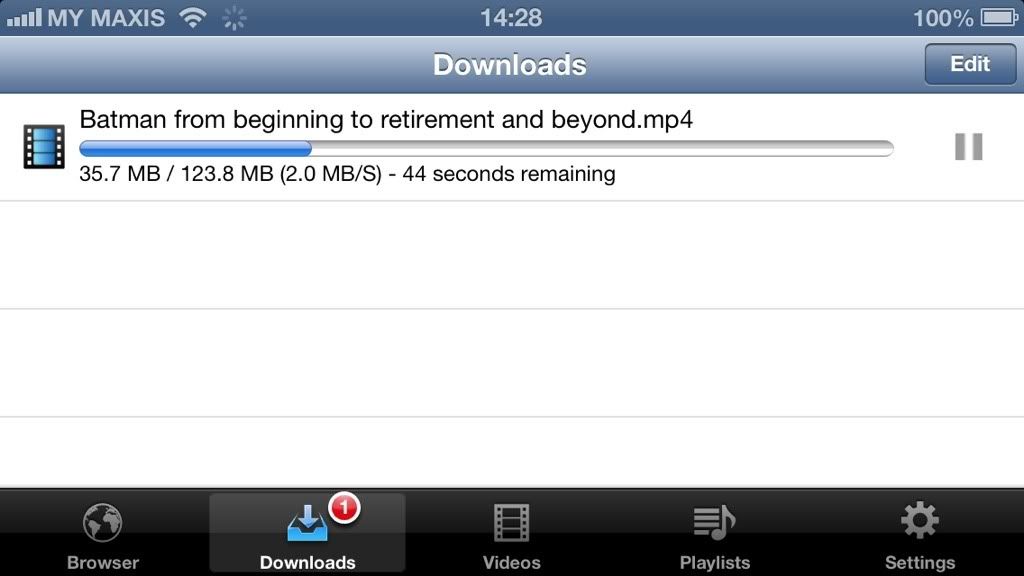 max i ever hit is 2.4Mb/s 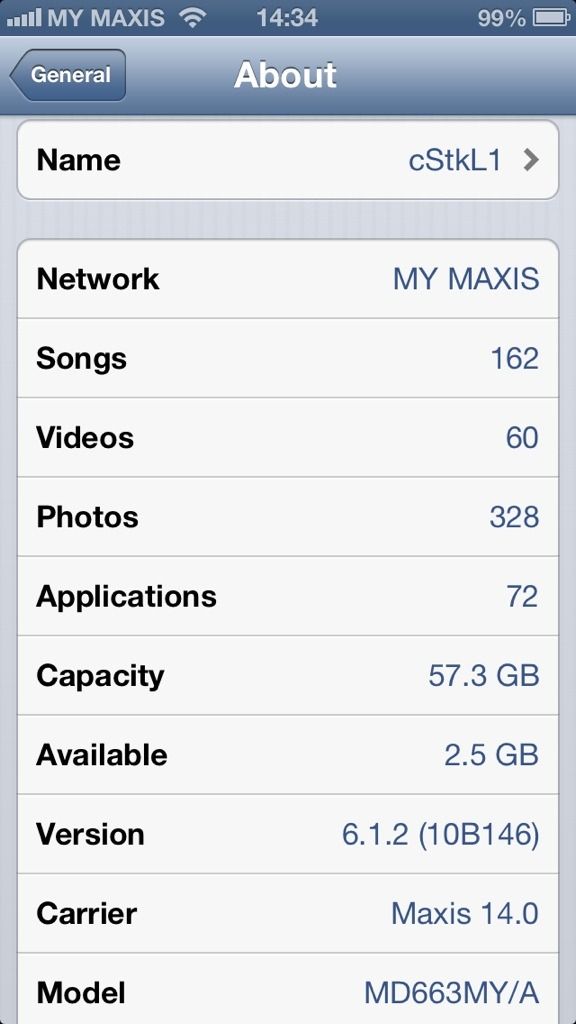 This post has been edited by cstkl1: Mar 5 2013, 02:45 PM This post has been edited by cstkl1: Mar 5 2013, 02:45 PM |
|
|
|
|
|
TSxingxing123
|
Mar 5 2013, 02:48 PM
|
New Member
|
using both SMC and linksys... change it to pure B instead of mixed B+G double the download speed... but again, it is not stable... meaning you can't always get full speed download, e.g max = 110kbps, it will slow until 10kbps but max again... and sometime it will just stop downloading at 0kbps, until you redownload again..
|
|
|
|
|
|
cstkl1
|
Mar 5 2013, 02:51 PM
|
Look at all my stars!!
|
QUOTE(xingxing123 @ Mar 5 2013, 02:48 PM) using both SMC and linksys... change it to pure B instead of mixed B+G double the download speed... but again, it is not stable... meaning you can't always get full speed download, e.g max = 110kbps, it will slow until 10kbps but max again... and sometime it will just stop downloading at 0kbps, until you redownload again.. try n. it doesnt matter mix. Try using G or N. B.. wtf.. that was like when i was using jaring 14 years ago. |
|
|
|
|
|
TSxingxing123
|
Mar 5 2013, 02:53 PM
|
New Member
|
Is it IPhone 5 with IOS 6.1.2 issue? 6.0.2 has no such issue? https://discussions.apple.com/thread/432271...t=3825&tstart=0QUOTE I first noticed the wifi problem when I updated to 6.1, or rather, I was notified by AT&T that I was about to exceed my data limit 3 days into the new billing period. My iPhone 5 kept dropping wifi and forgetting passwords both at home and at work. My iPad Mini, with 6.1, never had a problem. I kept both of them side-by-side during this who debacle.
After working the Apple support trying everything, I finally had my phone replaced. I restored from a backup. Same problem (only with iPhone 5, not iPad). I wiped the phone and installed everything from scratch. Same problem.
I replaced the phone again (my third iPhone 5) and kept iOS to 6.02. Problem solved.
The problem is between the iPhone 5 and 6.1. Unfortunatlely Apple won't let you downgrade. So the only solution is to turn in your phone for a new one with an older iOS and wait for an upgrade that finally addresses the issue. This post has been edited by xingxing123: Mar 5 2013, 02:54 PM |
|
|
|
|
|
tarvalslain87
|
Mar 5 2013, 02:54 PM
|
(•_•) / ( •_•)>⌐■-■ / (⌐■_■)

|
Never notice any slowdown for my iPhone 4 IOS6.1.2. Been the same before and after upgrade
|
|
|
|
|
|
TSxingxing123
|
Mar 5 2013, 02:57 PM
|
New Member
|
QUOTE(cstkl1 @ Mar 5 2013, 02:51 PM) try n. it doesnt matter mix. Try using G or N. B.. wtf.. that was like when i was using jaring 14 years ago. My router support B and G. Only pure B can get full speed, but not stable... Mixed B+G, or pure G can't get full speed... max half of the speed only.. |
|
|
|
|
|
cstkl1
|
Mar 5 2013, 02:59 PM
|
Look at all my stars!!
|
QUOTE(xingxing123 @ Mar 5 2013, 02:57 PM) My router support B and G. Only pure B can get full speed, but not stable... Mixed B+G, or pure G can't get full speed... max half of the speed only.. » Click to show Spoiler - click again to hide... « QUOTE 802.11b
IEEE expanded on the original 802.11 standard in July 1999, creating the 802.11b specification. 802.11b supports bandwidth up to 11 Mbps, comparable to traditional Ethernet.
802.11b uses the same unregulated radio signaling frequency (2.4 GHz) as the original 802.11 standard. Vendors often prefer using these frequencies to lower their production costs. Being unregulated, 802.11b gear can incur interference from microwave ovens, cordless phones, and other appliances using the same 2.4 GHz range. However, by installing 802.11b gear a reasonable distance from other appliances, interference can easily be avoided.
Pros of 802.11b - lowest cost; signal range is good and not easily obstructed
Cons of 802.11b - slowest maximum speed; home appliances may interfere on the unregulated frequency band
802.11a
While 802.11b was in development, IEEE created a second extension to the original 802.11 standard called 802.11a. Because 802.11b gained in popularity much faster than did 802.11a, some folks believe that 802.11a was created after 802.11b. In fact, 802.11a was created at the same time. Due to its higher cost, 802.11a is usually found on business networks whereas 802.11b better serves the home market.
802.11a supports bandwidth up to 54 Mbps and signals in a regulated frequency spectrum around 5 GHz. This higher frequency compared to 802.11b shortens the range of 802.11a networks. The higher frequency also means 802.11a signals have more difficulty penetrating walls and other obstructions.
Because 802.11a and 802.11b utilize different frequencies, the two technologies are incompatible with each other. Some vendors offer hybrid 802.11a/b network gear, but these products merely implement the two standards side by side (each connected devices must use one or the other).
Pros of 802.11a - fast maximum speed; regulated frequencies prevent signal interference from other devices
Cons of 802.11a - highest cost; shorter range signal that is more easily obstructed
802.11g
In 2002 and 2003, WLAN products supporting a newer standard called 802.11g emerged on the market. 802.11g attempts to combine the best of both 802.11a and 802.11b. 802.11g supports bandwidth up to 54 Mbps, and it uses the 2.4 Ghz frequency for greater range. 802.11g is backwards compatible with 802.11b, meaning that 802.11g access points will work with 802.11b wireless network adapters and vice versa.
Pros of 802.11g - fast maximum speed; signal range is good and not easily obstructed
Cons of 802.11g - costs more than 802.11b; appliances may interfere on the unregulated signal frequency
802.11n
The newest IEEE standard in the Wi-Fi category is 802.11n. It was designed to improve on 802.11g in the amount of bandwidth supported by utilizing multiple wireless signals and antennas (called MIMO technology) instead of one.
When this standard is finalized, 802.11n connections should support data rates of over 100 Mbps. 802.11n also offers somewhat better range over earlier Wi-Fi standards due to its increased signal intensity. 802.11n equipment will be backward compatible with 802.11g gear.
Pros of 802.11n - fastest maximum speed and best signal range; more resistant to signal interference from outside sources
Cons of 802.11n - standard is not yet finalized; costs more than 802.11g; the use of multiple signals may greatly interfere with nearby 802.11b/g based networks.
|
|
|
|
|
|
TSxingxing123
|
Mar 5 2013, 03:02 PM
|
New Member
|
QUOTE(cstkl1 @ Mar 5 2013, 02:59 PM) But the problem is, I've no such problem with my IPAD 3 IOS 6.1... all my notebooks have no such problem also.. only IPhone 5 has such issue... Just wondering whether it is hardware issue or IOS issue? Anyone encounter the same problem? This post has been edited by xingxing123: Mar 5 2013, 03:05 PM |
|
|
|
|
|
x132755
|
Mar 5 2013, 03:19 PM
|
|
|
Restore ur ip5 n c..
|
|
|
|
|
|
cstkl1
|
Mar 5 2013, 03:23 PM
|
Look at all my stars!!
|
QUOTE(xingxing123 @ Mar 5 2013, 03:02 PM) But the problem is, I've no such problem with my IPAD 3 IOS 6.1... all my notebooks have no such problem also.. only IPhone 5 has such issue... Just wondering whether it is hardware issue or IOS issue? Anyone encounter the same problem? iphone 5 what casing ure using. QUOTE(x132755 @ Mar 5 2013, 03:19 PM) btw before i report. ure sig is more than 15 lines. This post has been edited by cstkl1: Mar 5 2013, 03:25 PM |
|
|
|
|
|
TSxingxing123
|
Mar 5 2013, 03:30 PM
|
New Member
|
QUOTE(cstkl1 @ Mar 5 2013, 03:23 PM) iphone 5 what casing ure using. btw before i report. ure sig is more than 15 lines. soft rubber casing.. remove the casing still the same... |
|
|
|
|
|
cstkl1
|
Mar 5 2013, 03:36 PM
|
Look at all my stars!!
|
QUOTE(xingxing123 @ Mar 5 2013, 03:30 PM) soft rubber casing.. remove the casing still the same... so comes back to router. whats the router and how many devices are connected to it and at what channel at which wireless 802.11 standard and how many wifi networks nearby. have u reserved each every ip addressed to each devices. these are the devices throughout my house on wifi ipad,ipad2, 2xipad 4, iphone 4, 2 x iphone 4s, iphone 3gs, 2 x iphone 5, note, note 2, S3, Asus G laptop, Dell Xps laptop, 2xiMac 27, Mac Book air 13, Samsung SCX wifi printer and has no issue unless my LG tv inbuilt wifi connects to my router.. then theres some issues. ( so i disable it) Also the Dell Intel Wifi sharing hotspot thingy also interferes. Disable that also. All on channel 6. This is on a tplink 1043nd inside a cupboard lol. This post has been edited by cstkl1: Mar 5 2013, 03:40 PM |
|
|
|
|
|
TSxingxing123
|
Mar 5 2013, 04:22 PM
|
New Member
|
QUOTE(cstkl1 @ Mar 5 2013, 03:36 PM) so comes back to router. whats the router and how many devices are connected to it and at what channel at which wireless 802.11 standard and how many wifi networks nearby. have u reserved each every ip addressed to each devices. these are the devices throughout my house on wifi ipad,ipad2, 2xipad 4, iphone 4, 2 x iphone 4s, iphone 3gs, 2 x iphone 5, note, note 2, S3, Asus G laptop, Dell Xps laptop, 2xiMac 27, Mac Book air 13, Samsung SCX wifi printer and has no issue unless my LG tv inbuilt wifi connects to my router.. then theres some issues. ( so i disable it) Also the Dell Intel Wifi sharing hotspot thingy also interferes. Disable that also. All on channel 6. This is on a tplink 1043nd inside a cupboard lol. i don't think it is the router problem.. as i got 2 routers, SMC and linksys, both are B & G wireless, all my devices has no such problem, and the problem happen at my IPhone 5 only.. and it is not the distance issue, as i move the iphone 5 close to the router, the same sympton occur... |
|
|
|
|
|
cstkl1
|
Mar 5 2013, 06:22 PM
|
Look at all my stars!!
|
QUOTE(xingxing123 @ Mar 5 2013, 04:22 PM) i don't think it is the router problem.. as i got 2 routers, SMC and linksys, both are B & G wireless, all my devices has no such problem, and the problem happen at my IPhone 5 only.. and it is not the distance issue, as i move the iphone 5 close to the router, the same sympton occur... u dont think it but since its happening it is such. my triton has no problem with going up the hill behind my hse. Does that mean my bmw also no issue?? lol. u want everything to work then change ure router. or sell ure phone to get another phone to work with ure router. Most of my stuff are mac and all have no issues. Will be changing everything to dual band end of the month so before then checking the specs etc out. tplink 1043nd is working superbly so far. But the dual band speeds will help with homesharing . |
|
|
|
|
|
TSxingxing123
|
Mar 5 2013, 07:36 PM
|
New Member
|
QUOTE(cstkl1 @ Mar 5 2013, 06:22 PM) u dont think it but since its happening it is such. my triton has no problem with going up the hill behind my hse. Does that mean my bmw also no issue?? lol. u want everything to work then change ure router. or sell ure phone to get another phone to work with ure router. Most of my stuff are mac and all have no issues. Will be changing everything to dual band end of the month so before then checking the specs etc out. tplink 1043nd is working superbly so far. But the dual band speeds will help with homesharing . thanks for the suggestion. will try to upgrade my router to see whether it helps or not |
|
|
|
|
|
acwatzzup
|
Mar 6 2013, 06:00 AM
|
New Member
|
QUOTE(xingxing123 @ Mar 5 2013, 02:14 PM) Anyone encounter slow wifi on IPhone 5 IOS 6.1.2? Stream Youtube not as smooth as in Notebook IPAD. Download App very slow. WIFI signal not stable? You all may try to download an App called iDownloader and goto the following URL to test the download speed.. http://www.thinkbroadband.com/download.htmlDownload speed (kbps) is not stable as compared to IPAD or Notebook... Is it hardware/OS issue? if you wanna make sure is it ur router or ur phone prob.. why not you go to ur friends house and try with their router? did you try to reset all network settings before? |
|
|
|
|
|
TSxingxing123
|
Mar 6 2013, 08:15 AM
|
New Member
|
QUOTE(acwatzzup @ Mar 6 2013, 06:00 AM) if you wanna make sure is it ur router or ur phone prob.. why not you go to ur friends house and try with their router? did you try to reset all network settings before? I can confirmed my IPhone 5 IOS 6.1.2 has untable and sensitive WIFI issue.. been tested with other high speed router.. the results are the same.. especially those public router with mixed of B+G+N, you cant get full speed download... the speedtest.net will show you full speed, but when you try the software and the url that i posted to download(the actual download speed), you wont get the full speed, max 30kbps only.. once i can my router to purely B only, i can get full speed at 110kbps, but still unstable... in summay, my iphone 5 wifi is slow and unstable especially using it at public wifi... have to always depend on 3G  Just wondering whether all IPHone 5 with IOS 6.1.2 has that problem or only mine... before send to Apple service center for repair.. Thanks This post has been edited by xingxing123: Mar 6 2013, 08:17 AM |
|
|
|
|
|
acwatzzup
|
Mar 6 2013, 07:44 PM
|
New Member
|
that's weird.. by right B is the slowest then follow by G and then the fastest is N...
my house is using G + N with i5 6.1.2, speedtest full speed, download app from itunes store no problem, stream 720p youtube without buffering.
For me I will try all the steps below first :
1. Reset All Network Settings in i5.
2. Restore to the latest 6.1.2 firmware again.
3. Reset modem to factory default.
4. Test with friend's wifi router. ( not public wifi )
if non of the above works and result is same, I will just sent to claim warranty.
|
|
|
|
|



 Quote
Quote





 0.0168sec
 0.57
0.57
 5 queries
 GZIP Disabled