Welcome Guest ( Log In | Register )

Outline · [ Standard ] · Linear+

 IPhone 5 IOS 6.1.2 Slow WIFI

views
     
TSxingxing123
post Mar 7 2013, 09:47 AM

New Member
*
Junior Member
23 posts

Joined: Mar 2013
QUOTE(acwatzzup @ Mar 6 2013, 07:44 PM)
that's weird.. by right B is the slowest then follow by G and then the fastest is N...
my house is using G + N with i5 6.1.2, speedtest full speed, download app from itunes store no problem, stream 720p youtube without buffering.

For me I will try all the steps below first :
1. Reset All Network Settings in i5.
2. Restore to the latest 6.1.2 firmware again.
3. Reset modem to factory default.
4. Test with friend's wifi router. ( not public wifi )

if non of the above works and result is same, I will just sent to claim warranty.
*
Thanks for the advice... I've been trying all the above steps... I think probably it is my i5 problem.. will send to the service center .... will keep you all update.

thanks.
kaizer3000
post Mar 7 2013, 10:07 AM

Casual
***
Junior Member
451 posts

Joined: Aug 2009


ai....why iphone5 got so many problems.....mine is 3g...TS is wifi pulak....

im beginning to think iphone 5 is a very fragile hp dy....so easy rosak..?
CapKapak
post Mar 7 2013, 02:00 PM

Getting Started
**
Junior Member
240 posts

Joined: Oct 2005
From: Around the World


Its a known hardware issue with the iPhone 5, exchange it for a new phone.
penguin113
post Mar 7 2013, 04:51 PM

Getting Started
**
Junior Member
59 posts

Joined: Apr 2009
After updating iphone 5 to ios 6.1.2, notice that the WIFI connectivity was not stable. It can only discover strong WIFI signal, maybe within 10ft from router.

Any solution around? or should wait for another ios update?
cstkl1
post Mar 8 2013, 08:42 AM

Look at all my stars!!
Group Icon
Elite
6,799 posts

Joined: Jan 2003

QUOTE(ChangiBear @ Mar 7 2013, 09:54 PM)
I'm using it with Dlink modem and the connection is stable but very slow access. takes quite some time to open apps store or when downloading games.
*
Change ure dns back to telekom. Stop using google etc
lockheed90
post Mar 8 2013, 09:27 AM

Getting Started
**
Junior Member
272 posts

Joined: Oct 2008


Turn off genius..really helps
cstkl1
post Mar 9 2013, 10:20 AM

Look at all my stars!!
Group Icon
Elite
6,799 posts

Joined: Jan 2003

yup change to tplink 4300 dual band. Working great. Although the 5ghz band range is shorter its still good stuff.

btw ppl try using WPA AES

rather than WPA2, WEP.

WEP has higher overhead. WPA2 needs more hardware decryption. WPA has less load on the router.

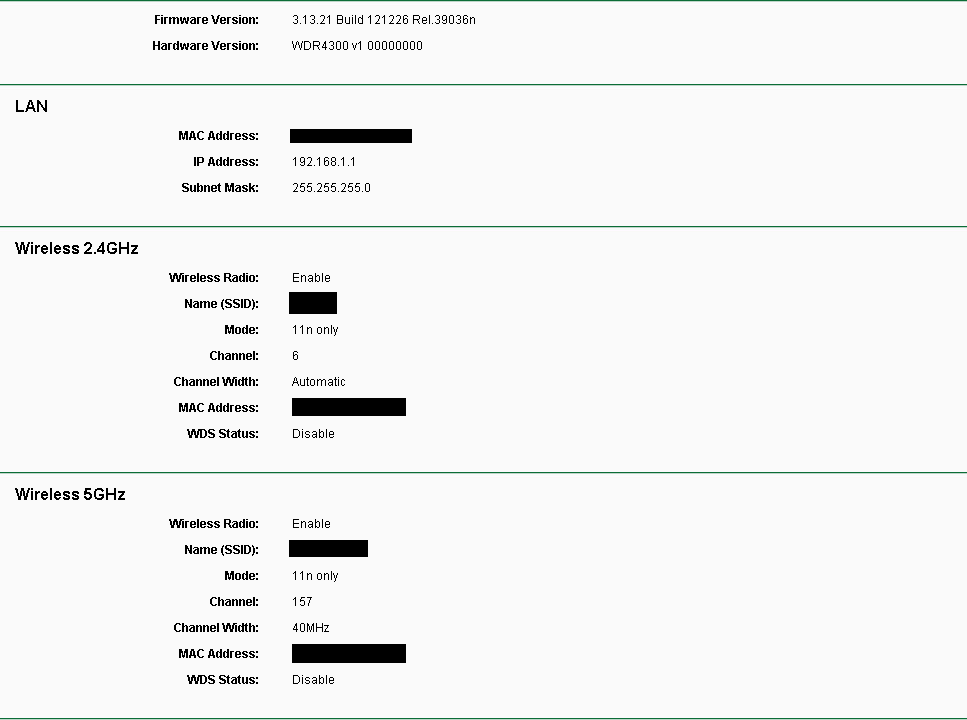
2.4ghz channel width Auto aka 20/40. If u set it to 20 only u will lose 300mbps Wifi N and will be limited to 150n. Up to ya. Channel Selection is important. I use 6. y. Although its the common use but since i am running a few repeaters with 5dbi antennas in the house.. basically i am the one causing all the distruption for other ppl around my hseing area.
5ghz channel width set to 40. The upper band uses more power so not sure on how that will affect on heavy use of a 24/7 multi devices network. Will the modem last?? not sure.

This post has been edited by cstkl1: Mar 9 2013, 10:42 AM
adiyon84
post Mar 9 2013, 11:02 AM

Casual
***
Junior Member
448 posts

Joined: Nov 2010


Same issues happen to me. I tried speedtest my iPhone 5 & iPad Mini, both seems unstable. When tested it shows 8Mbps down/up.. re-test again, it shows 20Mbps down/up. Then down a bit like 13Mbps. So unstable. But my mac shows stable connection somewhere 20-22Mbps all the time.

p/s: I subscribed to VIP 20 and using Modem their provide.
cstkl1
post Mar 9 2013, 11:18 AM

Look at all my stars!!
Group Icon
Elite
6,799 posts

Joined: Jan 2003

read on anandtech iphone 5 wifi

http://www.anandtech.com/show/6330/the-iphone-5-review/20

its best to make sure ure on a fix channel 2.4ghz 20mhz short guard interval. ( only i5 supports SI)

since Short guard interval on most modem is enabled only at 40mhz. Its better to set auto. with channel [3,4,5,6,7,8,9]. [6] is the best in this case.
Y channel 6 cause of the 40mhz width for SI.

and on 5ghz set to 40mhz disable SI. Here choose the upper band which i recommend 157

as per the article. i5 network recommendation etc setting etc is to make sure there no conflict with the bluetooth etc and to make sure

Do u know until now androids has issues with network more than i5. especially on dual band.

u do realize ure comparing ure MAC network card which has the size of half the iphone itself??

here is the prob. Most 300mpbs line require 40mhz width. idevices and most mobile require 20mhz on 2.4ghz to get the 60mbps. 72mpbs only on i5 with SI. SI issue is most modem only enable SI on Auto/40mhz. So no point using 20mhz. And since ure on auto so better dont use channel 1,11.

another note i find sometimes on 1-2 bar changing area my i5 prefers to revert back to 3g. Its the same with homesharing. Last time homesharing works on 1 bar but not really usable.
Apple now makes only 2bars strong min to work now.

btw afaik unifi standard is in WEP. totally not recommended and work with 802.11n WPA/WPA2 TKIP is what u need. WEP also has more overhead and stresses ure hardware more. WPA is what i recommend. Espcially on older devices who doesnt have WPA 2 and whe ure using a 802.11 a/b/g/n.

This is mine on 4300

Note SI disable on 5ghz
user posted image

This post has been edited by cstkl1: Mar 9 2013, 12:04 PM
ck_boon
post Mar 9 2013, 11:35 AM

Regular
******
Senior Member
1,894 posts

Joined: Nov 2009


QUOTE(xingxing123 @ Mar 5 2013, 03:57 PM)
My router support B and G. Only pure B can get full speed, but not stable... Mixed B+G, or pure G can't get full speed... max half of the speed only..
*
try use only g. g can suppport older device which cant support on n if not mistaken
cstkl1
post Mar 9 2013, 12:11 PM

Look at all my stars!!
Group Icon
Elite
6,799 posts

Joined: Jan 2003

btw if u really wanna make sure ure iphone is set properly. use Homesharing as a test.

If u get it working right everything perfect.
SUScarbike
post Mar 10 2013, 05:53 PM

Casual
***
Junior Member
330 posts

Joined: May 2011


I also face the same issue with my ip5. The fix is to use tm dns server instead of google's (8.8.8.8).
geek8585
post Mar 11 2013, 08:58 AM

Enthusiast
*****
Senior Member
923 posts

Joined: Nov 2011
i suspect there is a firmware issue... when im on ios6.0.1 or ios6.1 with my iphone 5, wifi is no issue at all... after upgraded to ios6.1.1 and 6.1.2, here the problems come... the new firmware tend to weaken the receiving of wifi signal...

why i said so?

my router is placed at ground floor while my room at 2nd floor (an ordinary double storey house). my deskstop (2nd floor) got full wifi signal most of the times and smtimes drop to 4bar... but my iphone5 got a very weak signal... smtimes can't even connect to whatsapp. it is not a ISP problem as my pc surfing and running normally while the phone hv problem to connect...

the remedy for me is turn off the wifi and turn it on again... smtimes when i wake the phone up from sleep, it can't even hook to the wifi signal...

yesterday, i discovered smthing... when i get my phone stay closely with the router, the appstore and whatsapp connection speed is tremendous fast... i place my phone beside my router for 30min at sleep mode... when i wake it up it hook to the wifi within 2sec...

i move around 10 foot steps to my living room... the living room is separated with the router with a merely wood cabinet, the wifi signal drop to the lowest and the speed become extremely slow... (same situation as i am at the 2nd floor) hey, i am at the same floor with the wifi router (within 100m distance) !

and it didn't happen to my ipad 2, ipod touch 4th gen and iphone 4 all with ios6.1.X (they all behave normally either in 1st or 2nd floor)... only iphone 5 with ios 6.1.X with this issue, apple pls release an update...


**i tried on "RESET ALL NETWORK SETTING", guess what? after phone restart im still able to connect to the wifi without enter WEP code... i assumed it didn't help me to reset anyway sad.gif

This post has been edited by geek8585: Mar 11 2013, 09:02 AM
cstkl1
post Mar 11 2013, 11:56 AM

Look at all my stars!!
Group Icon
Elite
6,799 posts

Joined: Jan 2003

QUOTE(geek8585 @ Mar 11 2013, 08:58 AM)
i suspect there is a firmware issue... when im on ios6.0.1 or ios6.1 with my iphone 5, wifi is no issue at all... after upgraded to ios6.1.1 and 6.1.2, here the problems come... the new firmware tend to weaken the receiving of wifi signal...

why i said so?

my router is placed at ground floor while my room at 2nd floor (an ordinary double storey house). my deskstop (2nd floor) got full wifi signal most of the times and smtimes drop to 4bar... but my iphone5 got a very weak signal... smtimes can't even connect to whatsapp. it is not a ISP problem as my pc surfing and running normally while the phone hv problem to connect...

the remedy for me is turn off the wifi and turn it on again... smtimes when i wake the phone up from sleep, it can't even hook to the wifi signal...

yesterday, i discovered smthing... when i get my phone stay closely with the router, the appstore and whatsapp connection speed is tremendous fast... i place my phone beside my router for 30min at sleep mode... when i wake it up it hook to the wifi within 2sec...

i move around 10 foot steps to my living room... the living room is separated with the router with a merely wood cabinet, the wifi signal drop to the lowest and the speed become extremely slow... (same situation as i am at the 2nd floor) hey, i am at the same floor with the wifi router (within 100m distance) !

and it didn't happen to my ipad 2, ipod touch 4th gen and iphone 4 all with ios6.1.X (they all behave normally either in 1st or 2nd floor)... only iphone 5 with ios 6.1.X with this issue, apple pls release an update...
**i tried on "RESET ALL NETWORK SETTING", guess what? after phone restart im still able to connect to the wifi without enter WEP code... i assumed it didn't help me to reset anyway  sad.gif
*
again y u expect ure computer network card with the size of an phone to be equal?.

iphone 5 is thinner n lighter than i4. no difference on my i5 vs ipad 4, i4s n i4

btw dude get a n router. stop using wep. it has higher load n is slower.
geek8585
post Mar 11 2013, 12:01 PM

Enthusiast
*****
Senior Member
923 posts

Joined: Nov 2011
QUOTE(cstkl1 @ Mar 11 2013, 11:56 AM)
again y u expect ure computer network card with the size of an phone to be equal?.

iphone 5 is thinner n lighter than i4. no difference on my i5 vs ipad 4, i4s n i4

btw dude get a n router. stop using wep. it has higher load n is slower.
*
sorry, i was plan to include that statement but forgotten...
i'm not expected the wifi performance of i5 same as my deskstop as the pc one will be much more powerful in terms of receiving the signal...

anyway, anything i can choose beside of the WEP? might give a try...

and what router do u suggest that can work with my unifi and hypptv? prefer to have a brand with specific model... signal must be good as well la...

thanks for yr feedback in adv smile.gif
cstkl1
post Mar 11 2013, 12:28 PM

Look at all my stars!!
Group Icon
Elite
6,799 posts

Joined: Jan 2003

QUOTE(geek8585 @ Mar 11 2013, 12:01 PM)
sorry, i was plan to include that statement but forgotten...
i'm not expected the wifi performance of i5 same as my deskstop as the pc one will be much more powerful in terms of receiving the signal...

anyway, anything i can choose beside of the WEP? might give a try...

and what router do u suggest that can work with my unifi and hypptv? prefer to have a brand with specific model... signal must be good as well la...

thanks for yr feedback in advĀ  smile.gif
*
tplink 1043nd its awesome.
the 4300 is good but seems to have a upload flaw on longer range. meaning the download is good but upload gets worse. dont have this issue with 1043nd.

for 802.11n u MUST use WPA/WPA2.. AES. advice using WPA . AES. less load and better performance.

asus not worth it at all.

This post has been edited by cstkl1: Mar 11 2013, 12:29 PM
Blackened
post Mar 11 2013, 07:25 PM

Regular
******
Senior Member
1,068 posts

Joined: Dec 2004
From: Madrid
QUOTE(geek8585 @ Mar 11 2013, 08:58 AM)
i suspect there is a firmware issue... when im on ios6.0.1 or ios6.1 with my iphone 5, wifi is no issue at all... after upgraded to ios6.1.1 and 6.1.2, here the problems come... the new firmware tend to weaken the receiving of wifi signal...

why i said so?

my router is placed at ground floor while my room at 2nd floor (an ordinary double storey house). my deskstop (2nd floor) got full wifi signal most of the times and smtimes drop to 4bar... but my iphone5 got a very weak signal... smtimes can't even connect to whatsapp. it is not a ISP problem as my pc surfing and running normally while the phone hv problem to connect...

the remedy for me is turn off the wifi and turn it on again... smtimes when i wake the phone up from sleep, it can't even hook to the wifi signal...

yesterday, i discovered smthing... when i get my phone stay closely with the router, the appstore and whatsapp connection speed is tremendous fast... i place my phone beside my router for 30min at sleep mode... when i wake it up it hook to the wifi within 2sec...

i move around 10 foot steps to my living room... the living room is separated with the router with a merely wood cabinet, the wifi signal drop to the lowest and the speed become extremely slow... (same situation as i am at the 2nd floor) hey, i am at the same floor with the wifi router (within 100m distance) !

and it didn't happen to my ipad 2, ipod touch 4th gen and iphone 4 all with ios6.1.X (they all behave normally either in 1st or 2nd floor)... only iphone 5 with ios 6.1.X with this issue, apple pls release an update...
**i tried on "RESET ALL NETWORK SETTING", guess what? after phone restart im still able to connect to the wifi without enter WEP code... i assumed it didn't help me to reset anyway  sad.gif
*
i have the same problem as you. go upstairs, no more wifi signal. thinking of changing a new set sad.gif
geek8585
post Mar 11 2013, 11:06 PM

Enthusiast
*****
Senior Member
923 posts

Joined: Nov 2011
QUOTE(Blackened @ Mar 11 2013, 07:25 PM)
i have the same problem as you. go upstairs, no more wifi signal. thinking of changing a new set sad.gif
*
it is not the phone problem.. it is the firmware problem...
tom_tombak
post Apr 14 2013, 12:02 PM

Getting Started
**
Junior Member
88 posts

Joined: Mar 2011
Im also have a same issue on my iphone 5.its superslow la im using p1 and lunatik taktik case for my iphone


Change to:
| Lo-Fi Version
0.0186sec    0.36    5 queries    GZIP Disabled
Time is now: 22nd December 2025 - 08:37 PM