Welcome Guest ( Log In | Register )

Outline · [ Standard ] · Linear+

Unifi Sabah-Sarawak UNIFI Thread, Free until Dec 24month contract promo

views
     
shahie
post Sep 12 2018, 11:36 AM

On my way
****
Junior Member
506 posts

Joined: Feb 2005
seem to be we have to spend more $$ for the good wifi router to get guaranteed 300, 500, 800mbps delivered to the wifi device (phone/tablet). i'm think to get 100mbps for rm129 now, instead of waiting to be turbo upgraded, maybe end of this year (tm notify me phase 1 Aug - Dec). just enough 100mbps for me & my wife (uncle & auntie style surfing). lol

This post has been edited by shahie: Sep 12 2018, 11:37 AM
shahie
post Sep 12 2018, 05:39 PM

On my way
****
Junior Member
506 posts

Joined: Feb 2005
QUOTE(YoungMan @ Sep 12 2018, 02:15 PM)
It's not only about the router, but whether your devices can support such high speed or not. If only the 2 of you, 100mbps is more than enough, can already stream 2 4K video simultaneously, and I assume you do not do torrenting/heavy download/upload.
*
correct. already 'uncle' and 'untie' life style and surfing. lol
shahie
post Sep 14 2018, 07:31 AM

On my way
****
Junior Member
506 posts

Joined: Feb 2005
QUOTE(singung @ Sep 14 2018, 12:15 AM)
Sibu here, got it few days ago, 500M, wireless won't get that speed, unless buy expensive wifi router.
*
those struggling to optimise their wifi speed on their device (h/p, tablet or laptop), just use wifi analyzer apps to see your actual wifi speed come to your device first and unifi speed coming to your device is always 50-60% from that wifi speed value. i tested mine, example i seat next to my dlink dir-842 and get 200mbps (2.4 band) on the wifi analyser, do speed test with singtel server or tm server, always get 100-104mbps (package 100mbps). than i move around at my living room, getting only 160mbps wifi speed (2.4 band), do speed test again with tm server, only get 80-90mbps. so, those with higher unifi package (300-800mbps), wifi router efficiency and signal strength coming to your device is always pain you. hope this info help.
shahie
post Sep 14 2018, 08:46 PM

On my way
****
Junior Member
506 posts

Joined: Feb 2005
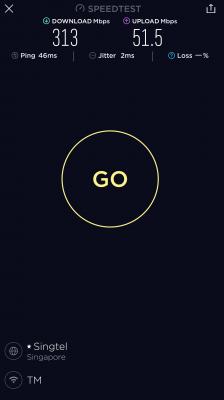
i'm turbo ed...... miri sarawak...


Attached thumbnail(s)
Attached Image
shahie
post Sep 14 2018, 10:15 PM

On my way
****
Junior Member
506 posts

Joined: Feb 2005
QUOTE(squall0833 @ Sep 14 2018, 10:03 PM)
did u get email notification before upgrade?

and what plan were u using? RM179 30Mbps?
*
email received 21 july 2018 saying will be turbo-ed aug - dec 2018. plan Rm139 for 30mbps before but yesterday went to TM to change the plan to 100mbps for Rm129. seem to be they did not process my request, luckly.

This post has been edited by shahie: Sep 14 2018, 10:18 PM
shahie
post Sep 16 2018, 11:08 PM

On my way
****
Junior Member
506 posts

Joined: Feb 2005
QUOTE(squall0833 @ Sep 16 2018, 09:53 PM)
how do u know u are slotted for next year?
*
my colleague received the email mentioned jan - june 2019 slot
shahie
post Sep 17 2018, 02:16 PM

On my way
****
Junior Member
506 posts

Joined: Feb 2005
QUOTE(JohnLai @ Sep 14 2018, 10:23 PM)
They gonna process your 100Mbps request soon....so...enjoy 300Mbps while it last?  sweat.gif
*
finally they maintain my rm139 for 300mbps...lol


Attached thumbnail(s)
Attached Image
shahie
post Sep 17 2018, 05:04 PM

On my way
****
Junior Member
506 posts

Joined: Feb 2005
QUOTE(squall0833 @ Sep 17 2018, 02:32 PM)
When did u subscribe this RM139?

I subscribed this year Feb but not turboed yet sad.gif

Before web site shows im on jan 2019 onwards

But never received email about it

cry.gif
*
with unifi since VIP5 on early 2013, and at last change to Rm139 30mbps Nov 2017

This post has been edited by shahie: Sep 17 2018, 05:05 PM
shahie
post Sep 19 2018, 01:02 PM

On my way
****
Junior Member
506 posts

Joined: Feb 2005
QUOTE(squall0833 @ Sep 19 2018, 10:13 AM)
It's time to change to a new gigabit router
*
just check your WAN speed on your router also coz most default at 100mbps only.

This post has been edited by shahie: Sep 19 2018, 01:02 PM
shahie
post Sep 19 2018, 01:45 PM

On my way
****
Junior Member
506 posts

Joined: Feb 2005
QUOTE(raemon @ Sep 19 2018, 01:32 PM)
How to check and change?
*
just google base on your router model.
shahie
post Sep 21 2018, 11:23 PM

On my way
****
Junior Member
506 posts

Joined: Feb 2005
just an update, my brother house at jalan bunga tongkeng, kpg pinang jawa, petrajaya, kuching recently got turbo-ed 500mbps.
shahie
post Sep 22 2018, 10:36 AM

On my way
****
Junior Member
506 posts

Joined: Feb 2005
QUOTE(syaigon @ Sep 22 2018, 10:22 AM)
Morning guys, I got turboed yesterday, BTW in miri but the download speed not that good try speedtest just a small increase upload got massive increase
*
make sure:
1. BTU configured at the 1gbps
2. using cat 5e or cat 6 to do the speed test on PC and also PC network card support 1gbps
3. on wifi, make sure use 5ghz band. use wifi speed apps on your device to see what is the wifi speed rate coming from your nearby router.
5. me also from miri, attached my speedtest on my note 8. currently turbo-ed to 300mbps.

my setup (purely on 5ghz only) :
BTU : Alcatel-Lucent I-240G-P (cat 6 LAN to router 1)
Router 1 : DLink Dir-882 (room at ground floor), cat 5e to router 2. and TP-Link RE450
Router 2 : DLink Dir-842 (Room 1st floor)
TP-Link RE450 (master bedroom 1st floor)

This post has been edited by shahie: Sep 22 2018, 10:38 AM


Attached thumbnail(s)
Attached Image
shahie
post Sep 22 2018, 01:24 PM

On my way
****
Junior Member
506 posts

Joined: Feb 2005
QUOTE(syaigon @ Sep 22 2018, 11:42 AM)
Thanks for the info BTW how to configure the btu?
*
using cat5e or cat 6 cable, plug in to your BTU LAN port 1 and the other side plug in to your PC. make sure your pc have a network card 1gbps. just check the connection from Pc lan network. if you have 1gbps connection than you are ready for the turbo speed

This post has been edited by shahie: Sep 22 2018, 01:25 PM
shahie
post Sep 27 2018, 01:16 PM

On my way
****
Junior Member
506 posts

Joined: Feb 2005
QUOTE(junclj @ Sep 27 2018, 12:26 PM)
Sabah Unifi turbo users could you please tell me your experience of your speedtest results. Recently I am complaining about my Unifi turbo 500mbps can't reach full speed. Current tested speed is 300mbps out of 500mbps. Just 60% capacity of my subscribed speed.

Do you having the same problem like me too? Please share your experience.

[attachmentid=10040883]
*
300mbps over 500mbps on LAN consider ok since TM is still on the trial pilot project for the Turbo upgrade. be patient, soon will improve better.
shahie
post Sep 27 2018, 01:29 PM

On my way
****
Junior Member
506 posts

Joined: Feb 2005
QUOTE(stephantsen @ Sep 27 2018, 01:17 PM)
looks like the pikot project had failed according to unifi thread.
*
seem to be. but like myself feel very lucky and thanks to TM since i can get average 200-300mbps most of the time, for the Rm139 as compare 30mbps last time.

This post has been edited by shahie: Sep 27 2018, 01:30 PM
shahie
post Sep 27 2018, 03:15 PM

On my way
****
Junior Member
506 posts

Joined: Feb 2005
QUOTE(soulfly @ Sep 27 2018, 02:38 PM)
My unifi already turboed to 500mbps.

Based on TM Speed Test from my pc via wifi connection ... i am only getting around 75/65 DL/UL. My wifi adapter is capable of 300mbps.

Any idea what is wrong? My wifi is running on 2.4GHz channel. Router is DIR-850L. Channels are set to AUTO, but currently is connected to channel 10+6. I'm not hoping to hit full speed because I know there is hardware limitations on my side, but not even reaching 100mbps is kinda slow. On my crappy Lenovo I can only managed to get an average of 30mbps-ish download eventhough before turbo upgrade I can get near 50mbps almost every time.

On my mom's Samsung hp, connected via 5ghz AC managed to get around 100mbps download only.

Before upgrade, my unifi package is 50mbps and hitting max speed is not a problem. Should I ask TM?
*
1. ensure you have cat 5e atleast LAN cable from BTU to Router.
2. use LAN cat 5e or cat 6 from router to pc/laptop and ensure your network card on pc/laptop support 1gbps LAN and not 100mbps.
3. as wifi, as long as your unifi speed 100mbps and above, the best deal is using 5ghz band. use your wifi apps on your android to see first what is the wifi speed from your router coming to your device. you can’t espect 300mbps unifi speed coming to your device if the wifi data link apprears on your device is only 100mbps due to the distance you are standing from your router. like myself, i have to pull cat 6 lan cable to my a few wireless AP, everywhere inside my house i measure and ensure i get 400-600mbps wifi speed just to ensure i enjoy my 300mbps package to my gadgets. hope this help.

This post has been edited by shahie: Sep 27 2018, 03:19 PM
shahie
post Oct 5 2018, 12:05 PM

On my way
****
Junior Member
506 posts

Joined: Feb 2005
QUOTE(empigid @ Oct 5 2018, 12:02 PM)
i've been turbo-ed to 300Mbps for a month now and still the best speed i can get is roughly 60Mbps.. what a bullock
*
don't worry, try to read and understand this link, especially those text in green color

https://forum.lowyat.net/topic/4658474
shahie
post Oct 5 2018, 01:34 PM

On my way
****
Junior Member
506 posts

Joined: Feb 2005
QUOTE(empigid @ Oct 5 2018, 12:26 PM)
i'm from that forum and then only i'm here. my speed reading is from LAN cable cat 7. I've asked them to reset my port, restart my router multiple times yet still the same. i dont expect to receive full 300Mbps coz i know they're still in pilot phase.. but at least give me 50% of speed that they promise
*
seem to be your BTU still in 100mbps, you can google on how to check this. or ask TM center to configure to 1gbps remotly for you than.
shahie
post Oct 13 2018, 10:57 AM

On my way
****
Junior Member
506 posts

Joined: Feb 2005
QUOTE(junclj @ Oct 13 2018, 10:49 AM)
The simplest way is buy a best value 50 meters cat 6 cable from lazada or shopee, then pull by yourself through behind the shelves to hide the cable, then put the cable at the side corner of stairs until upstairs then hide with floor mat.

The costly way, you need to consume a lot of money to hire people who are doing renovation. You need to drill hole tunnel on your wall to hide the LAN cable up to ceiling then pull it up until the wall of upstairs then make a CAT 6 LAN Socket on the wall.
*
like my case, i take the opportunity to lay more conduit during the installation of my cctv many years back. save me a lot. now my cat 5e is on that conduit. lol
shahie
post Nov 20 2018, 06:01 AM

On my way
****
Junior Member
506 posts

Joined: Feb 2005
QUOTE(johnny_kiu2003 @ Nov 19 2018, 09:47 PM)
Go complain at SKMM
*
for that speed, the most important is the performance of the router itself. please get the dual core processor MU-MIMO router such as Dlink Dir-882 or higher spec, or any brand similar.

2 Pages  1 2 >Top
 

Change to:
| Lo-Fi Version
0.0781sec    0.32    7 queries    GZIP Disabled
Time is now: 7th December 2025 - 03:27 AM