

QUOTE(fruitie @ Mar 1 2013, 02:59 PM)
I don't think it will wake up the screen but just the phone I think...

oh, in my case... the screen lights up (at night). that's why i'm a bit puzzled...Samsung Galaxy Note II LYN's Official Thread V18, FEB OTA 4.1.2 XXDMB4 - NO CHANGELOGS
|
|
 Mar 1 2013, 03:27 PM Mar 1 2013, 03:27 PM
Return to original view | Post
#41
|
 
Senior Member
7,044 posts Joined: Nov 2007  
|
QUOTE(fruitie @ Mar 1 2013, 02:59 PM) I don't think it will wake up the screen but just the phone I think... oh, in my case... the screen lights up (at night). that's why i'm a bit puzzled... |
|
|
|
|
|
Mar 5 2013, 11:08 AM
Return to original view | Post
#42
|
|
Senior Member
7,044 posts Joined: Nov 2007
|
QUOTE(aspire2oo6 @ Mar 5 2013, 10:43 AM) Looks disappointing. Only way s4 might amaze me is if keyboard accuracy like iphone, retina display, aluminum or titanium body, battery life similar to note 2 or better, resistive buttons like back and options, fm transmitter, camera performance at least a nokia n8 quality and spen technology without spen i guess it really boils down to individuals...If not I wont even consider it for me... i'm used to SWIPE. no swype, its not really a touchscreen keyboard la... coz we have so many swipe and gestures but keyboard still need to tap like the old physical keyboard?!? accuracy-wise, swipe is accurate. retina display... how to define it? based on PPI? if so... S4 will have about 441 pixels per inch, assuming rumours of fullHD on 4.99" screen is true. i never liked titanium or any 'metal' body. drop it a bit and you get a permanent dent. ouch... camera... ok la... but you've shown ma... Note 2 also can take nice photos.  so, i'd think the same with S4. so, i'd think the same with S4.spen tech without spen is not possible coz spen uses WACOM tech which employs some sort of magnetic thingy. so unless you have new accessories like maybe wear a finger glove... else i doubt out finger will have magnetic power strong enuff to do the air view thingy... well, unless you're Magneto... heh heh... i actually wish Samsung would just remove those physical buttons... but what to do... still need that since its the one thing iPhone users are so familiar with -- yes, i believe samsung is targetting iPhone users. |
|
|
Mar 6 2013, 04:02 PM
Return to original view | Post
#43
|
|
Senior Member
7,044 posts Joined: Nov 2007
|
QUOTE(aspire2oo6 @ Mar 6 2013, 03:38 PM) I found a cool feature on tbe note 2 browser. Like the side navigation thing i shared this as well... 1-2 v back... was doing the comparison and complaining about the browser not displaying properly, etc... vs chrome... only to find out some settings went haywire on my browser. did a reset on my browser as advised back then... all ok.so ya... i'm using the stock browser 95% of the time now. pop-up browser when set to full screen goes to default browser. default browser can also sync with google bookmarks. then got some of these nice development features... it is nice. |
|
|
Mar 6 2013, 04:02 PM
Return to original view | Post
#44
|
|
Senior Member
7,044 posts Joined: Nov 2007
|
btw, i just noticed on Samsung Apps store... Need For Speed: Most Wanted is free.
|
|
|
Mar 6 2013, 04:09 PM
Return to original view | Post
#45
|
|
Senior Member
7,044 posts Joined: Nov 2007
|
QUOTE(mydragoon @ Mar 6 2013, 04:02 PM) btw, i just noticed on Samsung Apps store... Need For Speed: Most Wanted is free. oh ya... even got free voucher if you setup the Learning Hub. i guess can use the 'cash' to buy some books...update1: voucher value is rm30. can buy rm30 worth of books. i was checking it out... seems like they have some extensive collect of kids' books. This post has been edited by mydragoon: Mar 6 2013, 04:17 PM |
|
|
Mar 6 2013, 04:12 PM
Return to original view | Post
#46
|
|
Senior Member
7,044 posts Joined: Nov 2007
|
QUOTE(aspire2oo6 @ Mar 6 2013, 04:02 PM) Yea but need get used to it. I prefer that because I can hide thetop bar ya, i'm still trying to get a hang on it...so just to share some tips regarding the stock browser with this feature turned on: * sometimes if wanna browse/ select other tabs, can just pinch to zoom out... then you can select the tabs * tap on the menu button to bring up the URL bar -- useful when u wanna press refresh or enter URL. sometimes i still find this easier that swiping from the sides. |
|
|
|
|
|
Mar 6 2013, 04:33 PM
Return to original view | Post
#47
|
|
Senior Member
7,044 posts Joined: Nov 2007
|
hmmm... 'discovered' today...
* Need For Speed: Most Wanted free on Samsung Apps * rm30 voucher when you register/ launch Samsung Learning Hub * lots of nice educational kids' books in Learning Hub... Well, yet to confirm if they are good. plan to use my vouchers later -- the rm30 voucher expires in Aug 2013 * the Reader Hub really improved quite a bit. used to have some apps inside. now, it looks like its an apps on its own. can just put my ePub file into the folder and it's added. but find it weird that it won't launch a book when USB connection is detected -- something about Digitial Rights or something... * reader hub got lots of mills & boon books... ouch... i dun really like those. lolz 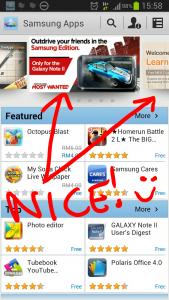
This post has been edited by mydragoon: Mar 6 2013, 04:48 PM |
|
|
Mar 7 2013, 09:34 AM
Return to original view | Post
#48
|
|
Senior Member
7,044 posts Joined: Nov 2007
|
just saw 1Gadget post on FB...
so sharing here again, in case anyone curious to know 'latest' note2 price: Samsung Galaxy Note II - N7100 16GB RM1835 (White) , RM1899 (Grey) - 2 years AP warranty REady stocks! Samsung Galaxy Note II - N7100 16GB RM1999 (Grey) , RM2049 (White) - 1 year SME warranty |
|
|
Mar 7 2013, 09:52 AM
Return to original view | Post
#49
|
|
Senior Member
7,044 posts Joined: Nov 2007
|
QUOTE(fruitie @ Mar 7 2013, 09:36 AM) Glad to know after 5 months of usage I'm only losing RM 100. ya, i'm kinda surprised Samsung is keeping tight control on pricing, just like iphone... i think i paid rm2199 for my 32GB. i'm still very happy. |
|
|
Mar 7 2013, 11:49 AM
Return to original view | Post
#50
|
|
Senior Member
7,044 posts Joined: Nov 2007
|
QUOTE(fruitie @ Mar 7 2013, 11:31 AM) Somehow I don't like that, I'm more comfortable in seeing web address. Me traditional type. for me... this is nice. full screen view.  when i need the address bar, just tap on the menu 'button'. |
|
Topic ClosedOptions
|
| Change to: |  0.0579sec 0.0579sec
 0.23 0.23
 7 queries 7 queries
 GZIP Disabled GZIP Disabled
Time is now: 6th December 2025 - 06:33 PM |
 Quote
Quote